


- Posts: 730
- Thank you received: 26
3 Post Moderation Rule for New Boarders (25 Jan 2021)
New boarders will have their posts moderated - Don't worry if you cannot see your post immediately.
Changing limiter settings on multiple clips?
- DmitriZigany
-
 Topic Author
- Offline
- Platinum Member
-

Less
More
07 May 2016 14:17 - 07 May 2016 14:53 #76469
by DmitriZigany
Changing limiter settings on multiple clips? was created by DmitriZigany
Hey!
Struggling with workflows for audio... Lets say I have a multicam clip. I've done my edits etc... Now audio is handled seperately for each little clip. If I wanna change the gain on all instances of the limiter on all clips for example, it doesn't work if I select all clips, then it only changes the first clip. So I have to manually go in on each clip and change it...
How are you guys dealing with this?
EDIT: Ah! If you use the slider it seems to be working, but not if you open the settings window and apply changes there which is what I tend to do so you can see the meter...
Struggling with workflows for audio... Lets say I have a multicam clip. I've done my edits etc... Now audio is handled seperately for each little clip. If I wanna change the gain on all instances of the limiter on all clips for example, it doesn't work if I select all clips, then it only changes the first clip. So I have to manually go in on each clip and change it...
How are you guys dealing with this?
EDIT: Ah! If you use the slider it seems to be working, but not if you open the settings window and apply changes there which is what I tend to do so you can see the meter...
Last edit: 07 May 2016 14:53 by DmitriZigany.
Please Log in to join the conversation.
- DmitriZigany
-
Topic Author
- Offline
- Platinum Member
-
Less
More
- Posts: 730
- Thank you received: 26
07 May 2016 15:08 - 07 May 2016 15:09 #76471
by DmitriZigany
Replied by DmitriZigany on topic Changing limiter settings on multiple clips?
Ok, new question:
I can't find a limiter with a threshold? What if I want a signal to never go above -6dB, for example? Do I have to push the limiter so it's doing some limiting and then lower the volume of the clip? How is this handled in FCPX?
I can't find a limiter with a threshold? What if I want a signal to never go above -6dB, for example? Do I have to push the limiter so it's doing some limiting and then lower the volume of the clip? How is this handled in FCPX?
Last edit: 07 May 2016 15:09 by DmitriZigany.
Please Log in to join the conversation.
08 May 2016 03:19 #76482
by BenB
Replied by BenB on topic Changing limiter settings on multiple clips?
You need to understand how a Limiter filter works. All clips should have a limiter of the same setting. I'd actually detect all audio, put it in a Compound, put the Limiter on that. But you probably want to use a Compressor first. Because you're living the whole Timeline evenly, so ONE compressor/limiter setting should work.
help.apple.com/logicpro-effects/mac/10.2.1/
help.apple.com/logicpro-effects/mac/10.2.1/
Please Log in to join the conversation.
- Karsten Schlüter
-

- Offline
- Moderator
-

Less
More
- Posts: 3790
- Thank you received: 718
08 May 2016 08:26 - 08 May 2016 11:35 #76485
by Karsten Schlüter
Replied by Karsten Schlüter on topic Changing limiter settings on multiple clips?
as additional info:
cmd-shift-v copies the audio settings from one clip to many
or…
[strike]Adjustment Layers also work for audio - handy to apply one setting to a bunch/all clips of a project.
[/strike]complete nonsense - sorry!
cmd-shift-v copies the audio settings from one clip to many
or…
[strike]Adjustment Layers also work for audio - handy to apply one setting to a bunch/all clips of a project.
[/strike]complete nonsense - sorry!
Last edit: 08 May 2016 11:35 by Karsten Schlüter.
Please Log in to join the conversation.


08 May 2016 11:22 #76488
by rjvddoes
Replied by rjvddoes on topic Changing limiter settings on multiple clips?
Hi Karsten,
are you sure that audio effects also work on adjustment layers?
As far as I know they don't since it is an empty title layer which doesn't accept audio filters, or did I miss something?
are you sure that audio effects also work on adjustment layers?
As far as I know they don't since it is an empty title layer which doesn't accept audio filters, or did I miss something?
Please Log in to join the conversation.
- Karsten Schlüter
-
- Offline
- Moderator
-
Less
More
- Posts: 3790
- Thank you received: 718
08 May 2016 11:36 - 08 May 2016 11:37 #76489
by Karsten Schlüter
no, me wrong, AL do not work with audio ....
you're right - only excuse: low caffein level while posting!! :silly:
Replied by Karsten Schlüter on topic Changing limiter settings on multiple clips?
rjvddoes wrote: Hi Karsten
are you sure that audio effects also work on adjustment layers?…
no, me wrong, AL do not work with audio ....
you're right - only excuse: low caffein level while posting!! :silly:
Last edit: 08 May 2016 11:37 by Karsten Schlüter.
Please Log in to join the conversation.
08 May 2016 13:14 #76492
by rjvddoes
Replied by rjvddoes on topic Changing limiter settings on multiple clips?
So you need an adjusment latte.
cheers!
cheers!
Please Log in to join the conversation.
08 May 2016 15:26 #76494
by BenB
Replied by BenB on topic Changing limiter settings on multiple clips?
For audio, that concept translates as a Compound Clip. Put multiple audio files into a CC, and apply audio filters to the CC, to effect all clips equally.
Please Log in to join the conversation.
- Unfenswinger
-
- Offline
- Banned
-

Less
More
- Posts: 58
- Thank you received: 5
08 May 2016 15:53 #76495
by Unfenswinger
Replied by Unfenswinger on topic Changing limiter settings on multiple clips?
When I read the Adjustment Layers tip I thought how the heck did I miss that!
I think we need to send that in as a feature request for an Audio Adjustment Layer. Shame it doesn't work but great thinking nevertheless.
I think we need to send that in as a feature request for an Audio Adjustment Layer. Shame it doesn't work but great thinking nevertheless.
Please Log in to join the conversation.
- DmitriZigany
-
Topic Author
- Offline
- Platinum Member
-
Less
More
- Posts: 730
- Thank you received: 26
10 May 2016 18:31 #76539
by DmitriZigany
Replied by DmitriZigany on topic Changing limiter settings on multiple clips?
Yes, I use same settings on all clips. That's why if I change it on one I need to adjust all the others. By using the slider of the limiter it's possible, but wasn't if you adjust the parameters within the limiter window... I had a music studio for over 10 years so I'm very well aware of how limiters and compressors work... I am not used to use them to make spoken words the same level across several different FCPX projects, however! (was recording music)
Regarding adjustment layers... They are really just a hack on titles... There should be Effects Layers and Titles as two seperate things... Now so much effects are living in the Titles tab so when you're trying to actually find a title it takes forever
Regarding adjustment layers... They are really just a hack on titles... There should be Effects Layers and Titles as two seperate things... Now so much effects are living in the Titles tab so when you're trying to actually find a title it takes forever
Please Log in to join the conversation.

10 May 2016 19:45 #76543
by dgwvideo
Creating history....one edit at a time !
Replied by dgwvideo on topic Changing limiter settings on multiple clips?
Sounds like you could benefit from a little organization of your browser windows. You should consider creating a few folders within the sub folders of your motion templates folder. For titles, create a folder within named "Special" and move titles that you rarely use including a lot of free ones found on this forum into that folder. Do the same for critical titles used often. Put them in a folder called something relevant. You can move most effects, titles, generators and transitions this way with the exception of those using a custom installer that places them in specific plugin directories. Take the lot of "will never use" titles or effects and either delete them or place them in another folder within the titles folder. You'll have an easily managed browser view if you apply a little routine cleanup. I'm sure you know that you can always search titles, effects, generators, etc. by name at the bottom of the respective browser pane but placing them in well described sub folders works best for me and reduces the number of items visible in the browsers.DmitriZigany wrote: Now so much effects are living in the Titles tab so when you're trying to actually find a title it takes forever
Creating history....one edit at a time !
Please Log in to join the conversation.
11 May 2016 13:39 #76580
by BenB
Replied by BenB on topic Changing limiter settings on multiple clips?
OK, I just applied the LPX Limiter to 4 clips. Select all 4, change the gain, it is changed in all 4 at once. You can also save Limiter presets, which I've done and have several for different re-occuring VO projects that come my way.
Please Log in to join the conversation.
11 May 2016 13:55 #76582
by lichinho
An AL affects the video *below* it.
I could be wrong but I think that this could not work for audio, at least in part because audio clips are treated differently: they are not stacked in a top down order; audio is not obscured (or should I say silenced) by clips above.
Replied by lichinho on topic Changing limiter settings on multiple clips?
Unfenswinger wrote: When I read the Adjustment Layers tip I thought how the heck did I miss that!
I think we need to send that in as a feature request for an Audio Adjustment Layer. Shame it doesn't work but great thinking nevertheless.
An AL affects the video *below* it.
I could be wrong but I think that this could not work for audio, at least in part because audio clips are treated differently: they are not stacked in a top down order; audio is not obscured (or should I say silenced) by clips above.
Please Log in to join the conversation.
- Karsten Schlüter
-
- Offline
- Moderator
-
Less
More
- Posts: 3790
- Thank you received: 718
11 May 2016 15:06 #76586
by Karsten Schlüter
who was it who came up here at fcp.co with the idea of a 'Roles Mixer'?
select the audio clips (as in the Timeline index), then affect all together ... that would be nice ....
Replied by Karsten Schlüter on topic Changing limiter settings on multiple clips?
lichinho wrote: …I could be wrong but I think that this could not work for audio, at least in part because audio clips are treated differently: they are not stacked in a top down order; audio is not obscured (or should I say silenced) by clips above.
who was it who came up here at fcp.co with the idea of a 'Roles Mixer'?
select the audio clips (as in the Timeline index), then affect all together ... that would be nice ....
Please Log in to join the conversation.
11 May 2016 21:30 #76606
by BenB
Replied by BenB on topic Changing limiter settings on multiple clips?
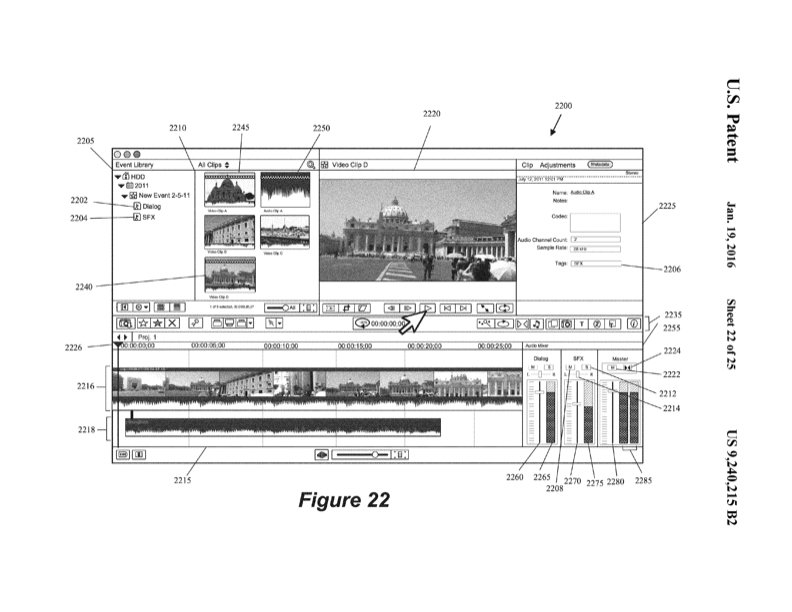
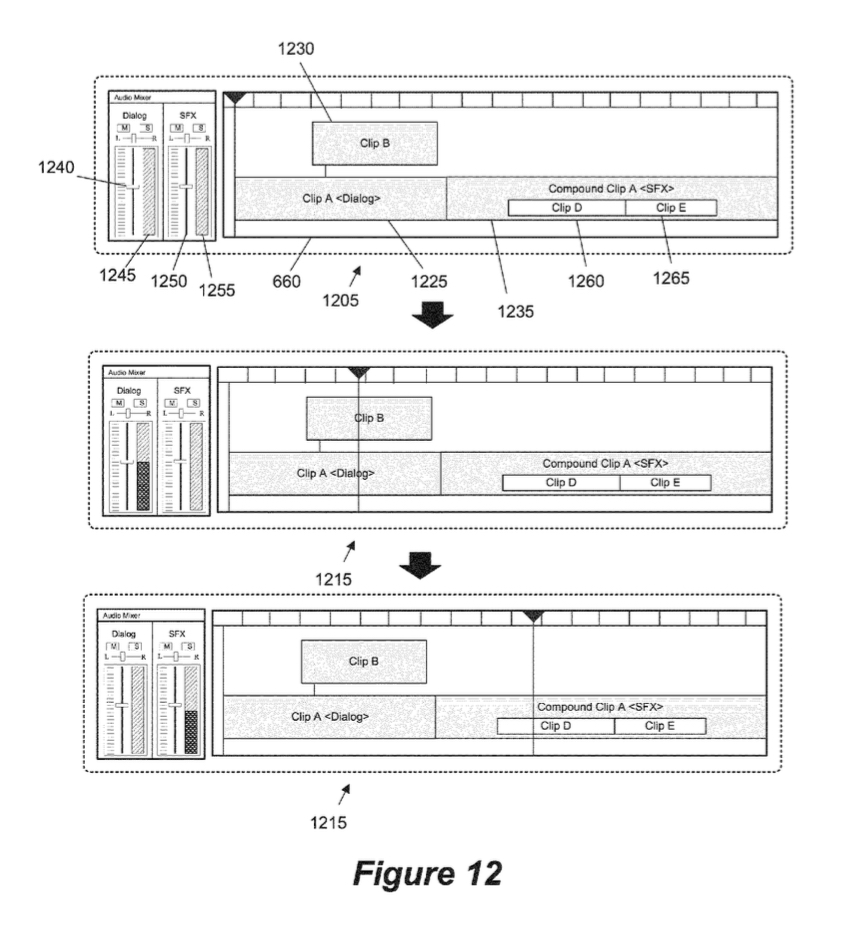
Actually, Apple had a patent filed for a Roles base mixer and meters when FCPX first came out. We still haven't seen it. And LOTS of folks have asked for it. One could only hope.
Please Log in to join the conversation.
