


- Posts: 16
- Thank you received: 0
3 Post Moderation Rule for New Boarders (25 Jan 2021)
New boarders will have their posts moderated - Don't worry if you cannot see your post immediately.
How can I make a photo pop up?
06 May 2016 11:28 #76438
by Tufty
How can I make a photo pop up? was created by Tufty
Hello all,
Firstly, apologies if this is in the wrong place...I tried looking for an answer, but couldn't find anything. What I'm trying to figure out is how to have a photo flip up, or pop up mid' video...I'm not even sure that I'm offering a decent explanation of what I'd like to achieve. Essentially, I can recall seeing a couple of daft videos where suddenly, a photo of someone/something sprang up as though propelled by a Jack-in-the-box. I'd love to know how this can be done. Also, if someone could show me where to find the related idea of having a photo flip 90 degrees from flat to face the screen, that'd be magic, too.
As always, thanks, in advance for any help that anyone can provide.
Tufty.
Firstly, apologies if this is in the wrong place...I tried looking for an answer, but couldn't find anything. What I'm trying to figure out is how to have a photo flip up, or pop up mid' video...I'm not even sure that I'm offering a decent explanation of what I'd like to achieve. Essentially, I can recall seeing a couple of daft videos where suddenly, a photo of someone/something sprang up as though propelled by a Jack-in-the-box. I'd love to know how this can be done. Also, if someone could show me where to find the related idea of having a photo flip 90 degrees from flat to face the screen, that'd be magic, too.
As always, thanks, in advance for any help that anyone can provide.
Tufty.
Please Log in to join the conversation.

06 May 2016 12:20 - 06 May 2016 12:22 #76439
by BenB
Replied by BenB on topic How can I make a photo pop up?
In Motion you would simply keyframe the Rotation Z parameter. But for some wacko reason FCPX doesn't allow that natively. I've no clue why FCPX still, after 5 years, has no X, Y, Z parameters for both Rotation. Just baffling. Anyway...
Go to the Effects browser, to the Custom category, and use the Flipped effect. Keyframe the start at 50, keyframe the end of the effect at 0. Or keyframe at 100 if you want the image reversed.
For bouncing, you may want to look at either the "springIt" or "bounceIt" plugins here.
www.reelpath.com/home/index.html
Go to the Effects browser, to the Custom category, and use the Flipped effect. Keyframe the start at 50, keyframe the end of the effect at 0. Or keyframe at 100 if you want the image reversed.
For bouncing, you may want to look at either the "springIt" or "bounceIt" plugins here.
www.reelpath.com/home/index.html
Last edit: 06 May 2016 12:22 by BenB.
Please Log in to join the conversation.
- Karsten Schlüter
-

- Offline
- Moderator
-

Less
More
- Posts: 3790
- Thank you received: 718
06 May 2016 16:39 #76453
by Karsten Schlüter
Replied by Karsten Schlüter on topic How can I make a photo pop up?
tufty, I made you a plugin... quick'n dirty...:
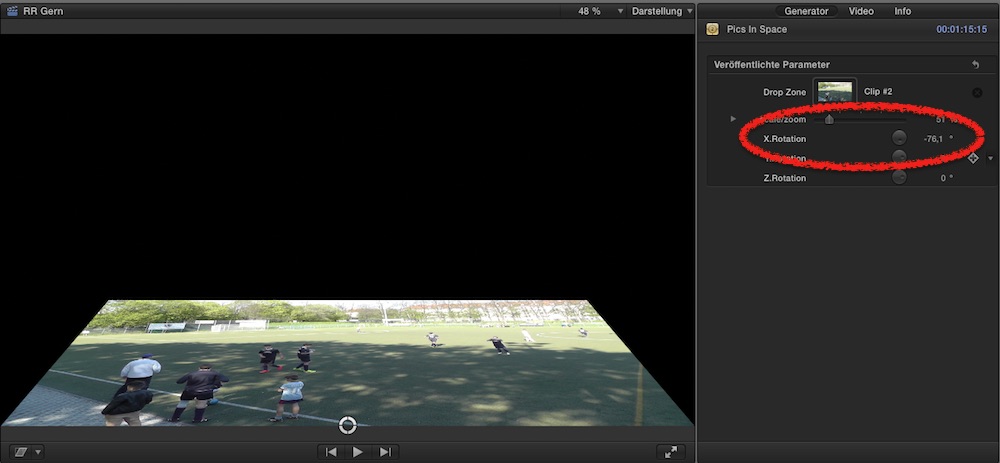
www.fcp.co/fcp-forum/generators/25370-pi...icture-rotator#76452
hope it helps ...
www.fcp.co/fcp-forum/generators/25370-pi...icture-rotator#76452
hope it helps ...
Please Log in to join the conversation.
