


- Posts: 10
- Thank you received: 0
3 Post Moderation Rule for New Boarders (25 Jan 2021)
New boarders will have their posts moderated - Don't worry if you cannot see your post immediately.
Slow Motion Help
- shaundowey
-
 Topic Author
- Offline
- New Member
-

Less
More
05 May 2016 08:59 #76411
by shaundowey
Slow Motion Help was created by shaundowey
Hi
Just looking for a bit of guidance on filming & editing slow motion. I'm putting together a video of people dancing and thought it'd be good to have some of the footage in slow motion.
I filmed it using a Canon 700d and I changed the frame rate to 50fps (the 700d can't do 60fps) as I'd read that this was the best way to film for slow motion clips.
I've now imported the footage into Final Cut but it just seems to look exactly the same as my 24fps footage.
Is it something different I need to do at the import stage? Any help and guidance would be greatly appreciated.
Many thanks in advance
Shaun
Just looking for a bit of guidance on filming & editing slow motion. I'm putting together a video of people dancing and thought it'd be good to have some of the footage in slow motion.
I filmed it using a Canon 700d and I changed the frame rate to 50fps (the 700d can't do 60fps) as I'd read that this was the best way to film for slow motion clips.
I've now imported the footage into Final Cut but it just seems to look exactly the same as my 24fps footage.
Is it something different I need to do at the import stage? Any help and guidance would be greatly appreciated.
Many thanks in advance
Shaun
Please Log in to join the conversation.
- Tom Wolsky
-

- Offline
- Moderator
-

05 May 2016 11:38 #76416
by Tom Wolsky
Replied by Tom Wolsky on topic Slow Motion Help
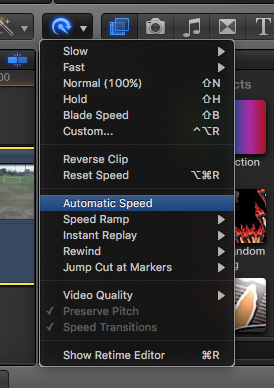
Put it in your project and in the retime menu use Automatic Speed.
Please Log in to join the conversation.

05 May 2016 11:47 - 05 May 2016 11:48 #76419
by BenB
Replied by BenB on topic Slow Motion Help
Create a 24fps Project, when you drop your 50fps clip into it, go to the Retiming Shortcut Menu, and use the "Automatic Speed" function. That gives you "in-camera" slow motion, using all of the original frames. You can slow it down more than that a little and still look good, too.
Last edit: 05 May 2016 11:48 by BenB.
Please Log in to join the conversation.
- shaundowey
-
Topic Author
- Offline
- New Member
-
Less
More
- Posts: 10
- Thank you received: 0
05 May 2016 12:19 #76423
by shaundowey
Replied by shaundowey on topic Slow Motion Help
That's great, thanks very much
Please Log in to join the conversation.
