


- Posts: 20
- Thank you received: 0
3 Post Moderation Rule for New Boarders (25 Jan 2021)
New boarders will have their posts moderated - Don't worry if you cannot see your post immediately.
Moving up from MMS i7/16Gb/SSD
- mylescdavis
-
 Topic Author
- Offline
- Junior Member
-

Less
More
28 Apr 2016 09:13 #76160
by mylescdavis
Moving up from MMS i7/16Gb/SSD was created by mylescdavis
First, thanks to everyone who has helped me out with my very basic questions as I've begun to learn FCPX over the past year.
I'm posting this here because the hardware forum doesn't seem to get much traffic.
I'm a musician making videos for the music I write and record. I shoot in 1080p, most viewing is on Youtube, so I'm not exactly at the bleeding edge.
I've been using 2012 i7 Mac Mini Servers for several years now for Pro Tools. A really big audio session with lots of plug-ins will push one of these, but it works. However, as I've learned, editing video is a whole new ball game. Waiting for renders of effects plugins isn't helping my workflow, as I need to try things out and most, if not all, of my video will have one or two plugs. I don't use any third party plugins, and total length of the videos I make is around five minutes, but with lots of edits, clips, crossfades and plugs.
So, I'd like to upgrade, and while the older 2012 towers look appealing from a price standpoint, the 6,1 seems like it's a better long-term solution. I'm used to having a bunch of drives hanging off my MMS, so that's not a problem.
I'm trying to figure out the best bang-for-buck point that will get me the biggest performance jump from my current setup. Buying used seems like the way to go. I'm American but live in the UK, and will probably buy this fall when I'm in the US visiting my parents. This should give me enough time to get funds together to buy something good.
So, the main problem is plug-in rendering time. Output renders can run overnight, if there's a way to go that favors one over the other.
I appreciate any thoughts you all might have.
Thanks,
Myles
I'm posting this here because the hardware forum doesn't seem to get much traffic.
I'm a musician making videos for the music I write and record. I shoot in 1080p, most viewing is on Youtube, so I'm not exactly at the bleeding edge.
I've been using 2012 i7 Mac Mini Servers for several years now for Pro Tools. A really big audio session with lots of plug-ins will push one of these, but it works. However, as I've learned, editing video is a whole new ball game. Waiting for renders of effects plugins isn't helping my workflow, as I need to try things out and most, if not all, of my video will have one or two plugs. I don't use any third party plugins, and total length of the videos I make is around five minutes, but with lots of edits, clips, crossfades and plugs.
So, I'd like to upgrade, and while the older 2012 towers look appealing from a price standpoint, the 6,1 seems like it's a better long-term solution. I'm used to having a bunch of drives hanging off my MMS, so that's not a problem.
I'm trying to figure out the best bang-for-buck point that will get me the biggest performance jump from my current setup. Buying used seems like the way to go. I'm American but live in the UK, and will probably buy this fall when I'm in the US visiting my parents. This should give me enough time to get funds together to buy something good.
So, the main problem is plug-in rendering time. Output renders can run overnight, if there's a way to go that favors one over the other.
I appreciate any thoughts you all might have.
Thanks,
Myles
Please Log in to join the conversation.
- Karsten Schlüter
-

- Offline
- Moderator
-

Less
More
- Posts: 3790
- Thank you received: 718
28 Apr 2016 09:18 #76161
by Karsten Schlüter
Which plugin has 'render times'??
(aside Neat Noise Reduction) ....
Replied by Karsten Schlüter on topic Moving up from MMS i7/16Gb/SSD
mylescdavis wrote: … Waiting for renders of effects plugins isn't helping my workflow…
Which plugin has 'render times'??
(aside Neat Noise Reduction) ....
Please Log in to join the conversation.
- mylescdavis
-
Topic Author
- Offline
- Junior Member
-
Less
More
- Posts: 20
- Thank you received: 0
28 Apr 2016 09:49 - 28 Apr 2016 09:50 #76164
by mylescdavis
Replied by mylescdavis on topic Moving up from MMS i7/16Gb/SSD
Sorry, double post.
Last edit: 28 Apr 2016 09:50 by mylescdavis. Reason: Double post
Please Log in to join the conversation.
- mylescdavis
-
Topic Author
- Offline
- Junior Member
-
Less
More
- Posts: 20
- Thank you received: 0
28 Apr 2016 09:49 #76165
by mylescdavis
Pretty much everything. The ones I've used a lot most recently - Bleach Bypass, Visual Echo, Film Grain. I use a lot of speed changes, both on whole clips and in parts of clips. I also alter clips with the color board pretty consistently. If I don't use a specific effect on a clip, I'll usually have some adjustment in video properties - transparency, scale, etc.
So, if I have a bunch of clips that have been speed adjusted, color adjusted, and have, say Bleach Bypass and Visual Echo... I get long (anywhere from 30 seconds to a couple of minutes) render times. Part of this is due to bad workflow - I know I should wait and do all the adjustments after the edit is finished, but I'm using FCPX without storyboarding, sort of making stuff up as I go along, and it's easier to get an idea of how things look if I can... see how they look!
Thanks,
Myles
Replied by mylescdavis on topic Moving up from MMS i7/16Gb/SSD
Karsten Schlüter wrote:
mylescdavis wrote: … Waiting for renders of effects plugins isn't helping my workflow…
Which plugin has 'render times'??
(aside Neat Noise Reduction) ....
Pretty much everything. The ones I've used a lot most recently - Bleach Bypass, Visual Echo, Film Grain. I use a lot of speed changes, both on whole clips and in parts of clips. I also alter clips with the color board pretty consistently. If I don't use a specific effect on a clip, I'll usually have some adjustment in video properties - transparency, scale, etc.
So, if I have a bunch of clips that have been speed adjusted, color adjusted, and have, say Bleach Bypass and Visual Echo... I get long (anywhere from 30 seconds to a couple of minutes) render times. Part of this is due to bad workflow - I know I should wait and do all the adjustments after the edit is finished, but I'm using FCPX without storyboarding, sort of making stuff up as I go along, and it's easier to get an idea of how things look if I can... see how they look!
Thanks,
Myles
Please Log in to join the conversation.
- Unfenswinger
-
- Offline
- Banned
-

Less
More
- Posts: 58
- Thank you received: 5
28 Apr 2016 12:14 #76169
by Unfenswinger
Replied by Unfenswinger on topic Moving up from MMS i7/16Gb/SSD
Myles
The best Macs to choose are those with discrete GPUs, so look at the top Macbook Pro or the top iMac and if you have deep pockets the Mac Pro.
I recently bought the 5K iMac which for my money is one of the best value computers in computing let alone just on the Mac side. I have always used Mac Pros but when I had a chance to compare the performance of the new Mac Pro against the iMac I found the iMac ticked every check box for a lot less money and it came with an excellent display which compares very favourably with my Dreamcolors. I haven't found the iMac wanting for anything I do from realtime work in Isadora or VDMX, to 3D work in C4D or editing 4K video from the FS7 in FCPX, it eats it up like DV footage.
I'd take a long look at the latest 27" iMac.
The best Macs to choose are those with discrete GPUs, so look at the top Macbook Pro or the top iMac and if you have deep pockets the Mac Pro.
I recently bought the 5K iMac which for my money is one of the best value computers in computing let alone just on the Mac side. I have always used Mac Pros but when I had a chance to compare the performance of the new Mac Pro against the iMac I found the iMac ticked every check box for a lot less money and it came with an excellent display which compares very favourably with my Dreamcolors. I haven't found the iMac wanting for anything I do from realtime work in Isadora or VDMX, to 3D work in C4D or editing 4K video from the FS7 in FCPX, it eats it up like DV footage.
I'd take a long look at the latest 27" iMac.
Please Log in to join the conversation.
- Karsten Schlüter
-
- Offline
- Moderator
-
Less
More
- Posts: 3790
- Thank you received: 718
28 Apr 2016 12:31 #76170
by Karsten Schlüter
those are all 'out of the box'-effect/no 3rd party effects,
just tested on my 4y old i5 MacMini (!) :
stacked Bleach Bypass, Visual Echo, Film grain on a 25% retimed 4k, not optimized material = realtime playback.
... no 'render' at all. For sure, on export. But while editing? Nope. As in the ads: all realtime effects.
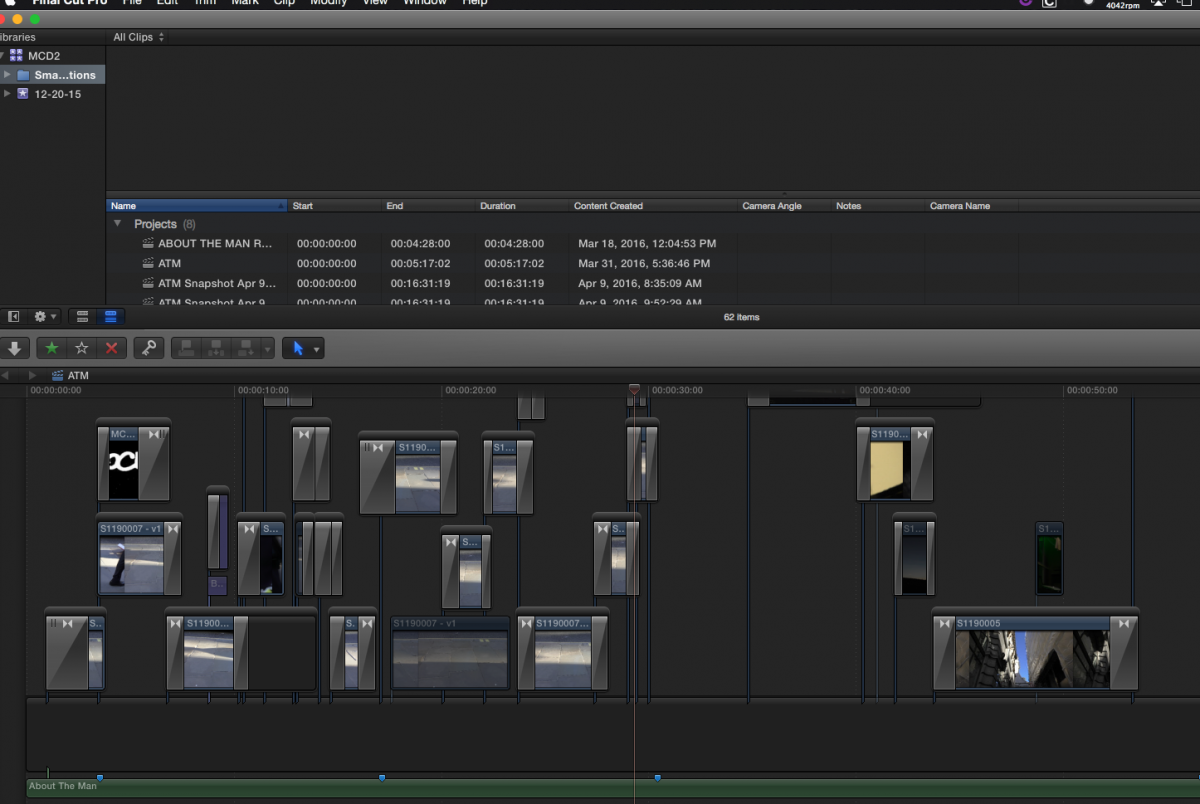
Can you post a screenshot of your timeline? I have an asssumption ...
A new Mac doesn't solve that....
Replied by Karsten Schlüter on topic Moving up from MMS i7/16Gb/SSD
mylescdavis wrote: ... Bleach Bypass, Visual Echo, Film Grain. I use a lot of speed changes, both on whole clips and in parts of clips. I also alter clips with the color board pretty consistently. If I don't use a specific effect on a clip, I'll usually have some adjustment in video properties - transparency, scale, etc.
So, if I have a bunch of clips that have been speed adjusted, color adjusted, and have, say Bleach Bypass and Visual Echo... I get long (anywhere from 30 seconds to a couple of minutes) render times. ...
those are all 'out of the box'-effect/no 3rd party effects,
just tested on my 4y old i5 MacMini (!) :
stacked Bleach Bypass, Visual Echo, Film grain on a 25% retimed 4k, not optimized material = realtime playback.
... no 'render' at all. For sure, on export. But while editing? Nope. As in the ads: all realtime effects.
Can you post a screenshot of your timeline? I have an asssumption ...
A new Mac doesn't solve that....
Please Log in to join the conversation.
- mylescdavis
-
Topic Author
- Offline
- Junior Member
-
Less
More
- Posts: 20
- Thank you received: 0
28 Apr 2016 12:57 #76171
by mylescdavis
Well, nothing like learning in public...
Thanks, Karsten!
Myles
Replied by mylescdavis on topic Moving up from MMS i7/16Gb/SSD
Karsten Schlüter wrote:
mylescdavis wrote: ... Bleach Bypass, Visual Echo, Film Grain. I use a lot of speed changes, both on whole clips and in parts of clips. I also alter clips with the color board pretty consistently. If I don't use a specific effect on a clip, I'll usually have some adjustment in video properties - transparency, scale, etc.
So, if I have a bunch of clips that have been speed adjusted, color adjusted, and have, say Bleach Bypass and Visual Echo... I get long (anywhere from 30 seconds to a couple of minutes) render times. ...
those are all 'out of the box'-effect/no 3rd party effects,
just tested on my 4y old i5 MacMini (!) :
stacked Bleach Bypass, Visual Echo, Film grain on a 25% retimed 4k, not optimized material = realtime playback.
... no 'render' at all. For sure, on export. But while editing? Nope. As in the ads: all realtime effects.
Can you post a screenshot of your timeline? I have an asssumption ...
A new Mac doesn't solve that....
Well, nothing like learning in public...
Thanks, Karsten!
Myles
Please Log in to join the conversation.
- Karsten Schlüter
-
- Offline
- Moderator
-
Less
More
- Posts: 3790
- Thank you received: 718
28 Apr 2016 13:12 #76172
by Karsten Schlüter
drop your pants, please, relax and bent ov.... LOL!
hmm, you try to simulate tracks - no such thing in FCPX, and not needed.
2nd Q:
you don't use an ext HDD for storage, right?
3rd Q:
you like to edit a music-video, correct?
Replied by Karsten Schlüter on topic Moving up from MMS i7/16Gb/SSD
mylescdavis wrote: ..Well, nothing like learning in public...
...
drop your pants, please, relax and bent ov.... LOL!
hmm, you try to simulate tracks - no such thing in FCPX, and not needed.
2nd Q:
you don't use an ext HDD for storage, right?
3rd Q:
you like to edit a music-video, correct?
Please Log in to join the conversation.
- mylescdavis
-
Topic Author
- Offline
- Junior Member
-
Less
More
- Posts: 20
- Thank you received: 0
28 Apr 2016 13:20 #76173
by mylescdavis
Ha!
The only reason I pull clips out of the timeline is so I can have different timings on crossfades - in other words, to have the fadeout on be a different length than the fade in on the second clip. If you can show me how to do that in the timeline, I would forever in your debt.
I use an external USB3 SSD for storage.
Yes, it's a music video, for the music I make.
Thanks!
Replied by mylescdavis on topic Moving up from MMS i7/16Gb/SSD
Karsten Schlüter wrote:
mylescdavis wrote: ..Well, nothing like learning in public...
...
drop your pants, please, relax and bent ov.... LOL!
hmm, you try to simulate tracks - no such thing in FCPX, and not needed.
2nd Q:
you don't use an ext HDD for storage, right?
3rd Q:
you like to edit a music-video, correct?
Ha!
The only reason I pull clips out of the timeline is so I can have different timings on crossfades - in other words, to have the fadeout on be a different length than the fade in on the second clip. If you can show me how to do that in the timeline, I would forever in your debt.
I use an external USB3 SSD for storage.
Yes, it's a music video, for the music I make.
Thanks!
Please Log in to join the conversation.

28 Apr 2016 13:36 #76174
by thinkfilm
Replied by thinkfilm on topic Moving up from MMS i7/16Gb/SSD
I hesitate to add anything to this thread as you are in good hands with Karsten. But…
If you need a nudge to get back into working in the main timeline and you want to control the timings on crossfades - and you seem to like plugins as much as we all do - you might try the new Hawaiki Super Dissolve plugin (get it from fxfactory). It does dissolve/cross fade control like no other.
We now return to your regularly scheduled Karsten.
If you need a nudge to get back into working in the main timeline and you want to control the timings on crossfades - and you seem to like plugins as much as we all do - you might try the new Hawaiki Super Dissolve plugin (get it from fxfactory). It does dissolve/cross fade control like no other.
We now return to your regularly scheduled Karsten.
Please Log in to join the conversation.
- Karsten Schlüter
-
- Offline
- Moderator
-
Less
More
- Posts: 3790
- Thank you received: 718
28 Apr 2016 13:45 - 28 Apr 2016 13:46 #76175
by Karsten Schlüter
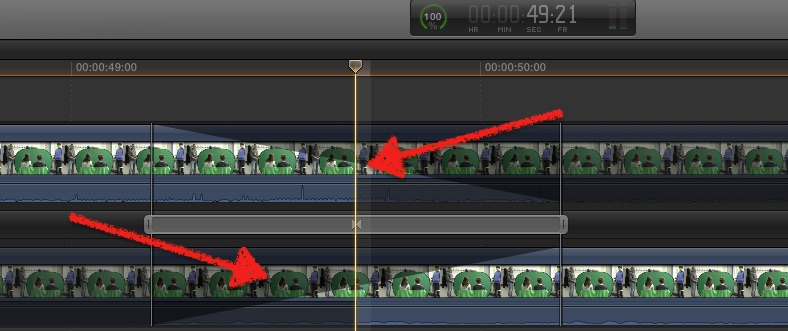
when you disssolve two clips, the moment one fades out.... what 'replaces' clip#1? yep, clip#2.
or, you use a fade-to-black - then, #1 fades to black in say30frames, then #2 from black in5frames....
but meanwhile.... mastermind Simon Ubsdell published his latest masterstroke
Hawaiki Super Dissolve
fxfactory.com/info/hawaikisuperdissolve/ 49$ ...
honestly? asymmetric cross-dissolves are a bit over my mind ... (sorry, Simon!)
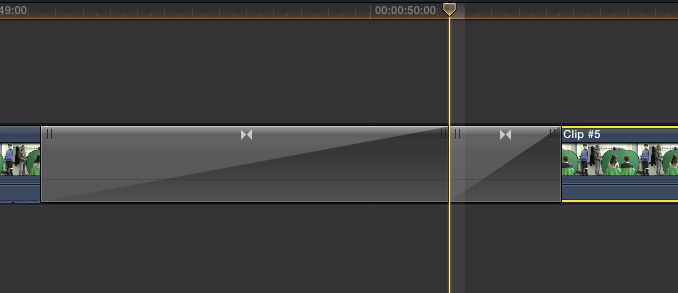
an asymmetric fade-to-black? easy:
put a black slug btw two clips, apply dissolves on both ends, shorten/lengthen each disolve, finally 'push together' ..
Replied by Karsten Schlüter on topic Moving up from MMS i7/16Gb/SSD
hmm, 2 weeks ago I would have told you - not possible, look:in other words, to have the fadeout on be a different length than the fade in on the second clip.
when you disssolve two clips, the moment one fades out.... what 'replaces' clip#1? yep, clip#2.
or, you use a fade-to-black - then, #1 fades to black in say30frames, then #2 from black in5frames....
but meanwhile.... mastermind Simon Ubsdell published his latest masterstroke
Hawaiki Super Dissolve
fxfactory.com/info/hawaikisuperdissolve/ 49$ ...
honestly? asymmetric cross-dissolves are a bit over my mind ... (sorry, Simon!)
an asymmetric fade-to-black? easy:
put a black slug btw two clips, apply dissolves on both ends, shorten/lengthen each disolve, finally 'push together' ..
Last edit: 28 Apr 2016 13:46 by Karsten Schlüter.
Please Log in to join the conversation.
- mylescdavis
-
Topic Author
- Offline
- Junior Member
-
Less
More
- Posts: 20
- Thank you received: 0
28 Apr 2016 13:50 #76176
by mylescdavis
Replied by mylescdavis on topic Moving up from MMS i7/16Gb/SSD
That's great!
So, I should pull everything down into the timeline? Will that help my problem?
I also just checked and my storage drive isn't an SSD, it's a 7200rpm bus-powered 2.5" drive. Is that a problem? As the MMS doesn't have USB3, I run it off a thunderbolt hub.
So, I should pull everything down into the timeline? Will that help my problem?
I also just checked and my storage drive isn't an SSD, it's a 7200rpm bus-powered 2.5" drive. Is that a problem? As the MMS doesn't have USB3, I run it off a thunderbolt hub.
Please Log in to join the conversation.
- Karsten Schlüter
-
- Offline
- Moderator
-
Less
More
- Posts: 3790
- Thank you received: 718
28 Apr 2016 14:09 - 28 Apr 2016 14:10 #76177
by Karsten Schlüter
LOL, my schedule is the European.early-bird-shift! late here .....
nono, everything fine .... I'm Mr Cheap here, running on a zil-budget.. 50€-drives is my domain
First of all, make a snapshot of your Project!
help.apple.com/finalcutpro/mac/10.2/?lang=en#/verfd45ffa45
... just in case...
there's a command, opt-cmd-arrowdown to catch free floating clips down where they belong, into the storyline. But I'm shy to recommend that ... your project is a bit .... cluttered, hard to tell how FCPX handles it.
plus, you have dissolves over dissolves ... never tried that ...
test it with a copy of your project first!
worst case: you have strip-off all dissolves and get all clips together down into storyline ...
but then you have to learn about the Trim tool, the Position tool, and that fade2black trick ...
Replied by Karsten Schlüter on topic Moving up from MMS i7/16Gb/SSD
We now return to your regularly scheduled Karsten.
LOL, my schedule is the European.early-bird-shift! late here .....
nono, everything fine .... I'm Mr Cheap here, running on a zil-budget.. 50€-drives is my domain
First of all, make a snapshot of your Project!
help.apple.com/finalcutpro/mac/10.2/?lang=en#/verfd45ffa45
... just in case...
there's a command, opt-cmd-arrowdown to catch free floating clips down where they belong, into the storyline. But I'm shy to recommend that ... your project is a bit .... cluttered, hard to tell how FCPX handles it.
plus, you have dissolves over dissolves ... never tried that ...
test it with a copy of your project first!
worst case: you have strip-off all dissolves and get all clips together down into storyline ...
but then you have to learn about the Trim tool, the Position tool, and that fade2black trick ...
Last edit: 28 Apr 2016 14:10 by Karsten Schlüter.
Please Log in to join the conversation.
28 Apr 2016 15:05 - 28 Apr 2016 15:05 #76183
by BenB
Replied by BenB on topic Moving up from MMS i7/16Gb/SSD
Your music track, that audio clip, should be in the Primary Storyline, when editing a music video. The music is the mainstay of the story, keep it in the Primary Storyline.
Last edit: 28 Apr 2016 15:05 by BenB.
Please Log in to join the conversation.
- mylescdavis
-
Topic Author
- Offline
- Junior Member
-
Less
More
- Posts: 20
- Thank you received: 0
28 Apr 2016 15:14 #76185
by mylescdavis
Replied by mylescdavis on topic Moving up from MMS i7/16Gb/SSD
Thanks! I think the best thing to do would be to finish this video (it's pretty much done and I don't want to mess with the timing on all the transitions) and then start the next one properly.
So, assuming I get the crossfade plugin mentioned above, I make sure I do the following:
Always create a new project (didn't do that when I was first fumbling around) - there's a thread floating around for that.
Keep music in the primary storyline.
Keep all clips in the primary storyline.
Keep everything in the primary storyline.
And then I'll see if I still have this rendering thing. My terminology might be incorrect - I can always play the project, it's just that transitions/crossfades (in particular) look awful unless I let the clock get back to 100%. And, as most clips have processing plus fades, if I move something, at minimum the fades grind away for 10 - 30 seconds.
Obviously, if someone had given this system to me ten years ago I'd be ecstatic, but the bar keeps moving up. I want to be able to do stuff and not have to wait for the clock.
Is there anywhere that lists all the stupid things not to do in FCPX? Most of the stuff I see online takes for granted that the reader is already a video editor, and I started at zero.
Thanks again.
Myles
So, assuming I get the crossfade plugin mentioned above, I make sure I do the following:
Always create a new project (didn't do that when I was first fumbling around) - there's a thread floating around for that.
Keep music in the primary storyline.
Keep all clips in the primary storyline.
Keep everything in the primary storyline.
And then I'll see if I still have this rendering thing. My terminology might be incorrect - I can always play the project, it's just that transitions/crossfades (in particular) look awful unless I let the clock get back to 100%. And, as most clips have processing plus fades, if I move something, at minimum the fades grind away for 10 - 30 seconds.
Obviously, if someone had given this system to me ten years ago I'd be ecstatic, but the bar keeps moving up. I want to be able to do stuff and not have to wait for the clock.
Is there anywhere that lists all the stupid things not to do in FCPX? Most of the stuff I see online takes for granted that the reader is already a video editor, and I started at zero.
Thanks again.
Myles
Please Log in to join the conversation.
28 Apr 2016 15:45 #76186
by BenB
Replied by BenB on topic Moving up from MMS i7/16Gb/SSD
You can't keep everything in the Primary Storyline. You put the spinal cord, the core of your story in it. With a music video, that is the music clip. Everything else attaches to it. May help to see a sample clip from your Project timeline, also.
Please Log in to join the conversation.
- mylescdavis
-
Topic Author
- Offline
- Junior Member
-
Less
More
- Posts: 20
- Thank you received: 0
28 Apr 2016 15:53 #76187
by mylescdavis
Replied by mylescdavis on topic Moving up from MMS i7/16Gb/SSD
There's one attached to my post up above.
I'm not really clear on the function of the timeline, and what should and shouldn't be attached, and why. I'll dig into the couple of books I have, but if anyone has a few minutes...
Oh, and not to go OT, but is there any way to stay logged in here? I'm logged out almost immediately all the time... maybe it's Adblock. :blink:
Thanks,
Myles
I'm not really clear on the function of the timeline, and what should and shouldn't be attached, and why. I'll dig into the couple of books I have, but if anyone has a few minutes...
Oh, and not to go OT, but is there any way to stay logged in here? I'm logged out almost immediately all the time... maybe it's Adblock. :blink:
Thanks,
Myles
Please Log in to join the conversation.

28 Apr 2016 16:09 #76188
by lichinho
Replied by lichinho on topic Moving up from MMS i7/16Gb/SSD
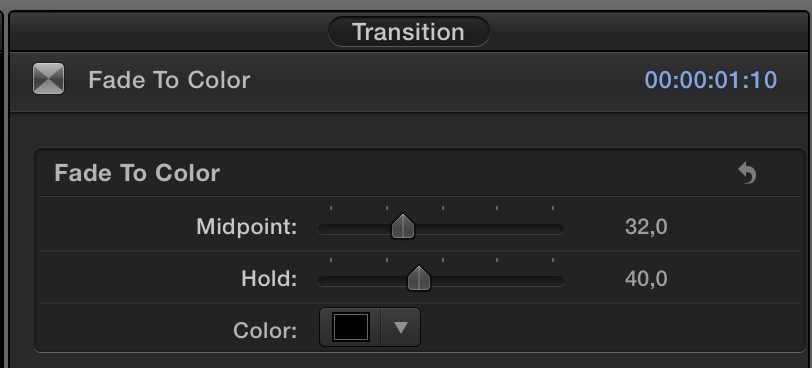
All talk about asymmetric fade led to actually look at the Fade to Color transition. Lo and behold, if you open the Inspector there is a midpoint slider. It appears to me that this be all you need 
Please Log in to join the conversation.
- MarkNelsonMovies
-
- Offline
- Elite Member
-

Less
More
- Posts: 256
- Thank you received: 48
28 Apr 2016 16:35 #76189
by MarkNelsonMovies
Replied by MarkNelsonMovies on topic Moving up from MMS i7/16Gb/SSD
You can just turn background render off, and then only render the parts you need to by selecting them and pressing ctrl>R.
As for a new computer, anything newish with a discrete GPU should do the job as Unfenswinger said.
The 2012 mac mini has a not that spectacular integrated GPU, and any dedicated one should be far better.
Keep in mind that due to their nature, retiming with optical flow and visual echo might always require rendering.
Hope this helps,
-Mark
As for a new computer, anything newish with a discrete GPU should do the job as Unfenswinger said.
The 2012 mac mini has a not that spectacular integrated GPU, and any dedicated one should be far better.
Keep in mind that due to their nature, retiming with optical flow and visual echo might always require rendering.
Hope this helps,
-Mark
Please Log in to join the conversation.
28 Apr 2016 18:30 #76194
by BenB
Replied by BenB on topic Moving up from MMS i7/16Gb/SSD
"There's one attached to my post up above."
Clip, video clip, not a screen capture. I'd like to see the actual video, see what it is you're trying to achieve.
Clip, video clip, not a screen capture. I'd like to see the actual video, see what it is you're trying to achieve.
Please Log in to join the conversation.
