


- Posts: 1
- Thank you received: 0
3 Post Moderation Rule for New Boarders (25 Jan 2021)
New boarders will have their posts moderated - Don't worry if you cannot see your post immediately.
Clipping files in events to save space or before the import
- nick.funnell
-
 Topic Author
- Offline
- New Member
-

Less
More
27 Apr 2016 21:57 #76146
by nick.funnell
I need to clip the files in my events so there is less footage to work with when finding clips for projects. Can this be done? If so, can you then save those clipped files to a HD for backup?
I work on a lot of projects where I leave cameras in place recording to capture multiple angles as I work alone most of the time.
When I import the files there can be up to 20minutes of footage in the event but I only need a couple of 4 second clip from it.
It means I use a massive amount of space backing up my files and the events are ridiculously long and hard to find the footage you need.
Again, can you clip the files in the event and then save them to an HD for backup?
Thanks so much for your help in advance.
I work on a lot of projects where I leave cameras in place recording to capture multiple angles as I work alone most of the time.
When I import the files there can be up to 20minutes of footage in the event but I only need a couple of 4 second clip from it.
It means I use a massive amount of space backing up my files and the events are ridiculously long and hard to find the footage you need.
Again, can you clip the files in the event and then save them to an HD for backup?
Thanks so much for your help in advance.
Please Log in to join the conversation.
- Karsten Schlüter
-

- Offline
- Moderator
-

Less
More
- Posts: 3790
- Thank you received: 718
28 Apr 2016 04:15 #76149
by Karsten Schlüter
Replied by Karsten Schlüter on topic Clipping files in events to save space or before the import
what you call 'clipping' is done in FCPX by tagging/applying Keywords/favorits.
or, on import: select (roughly) the parts you want ....
or, on import: select (roughly) the parts you want ....
Please Log in to join the conversation.
- nils.dettmann
-
- Offline
- Elite Member
-

Less
More
- Posts: 161
- Thank you received: 13
28 Apr 2016 07:28 - 28 Apr 2016 07:28 #76155
by nils.dettmann
Replied by nils.dettmann on topic Clipping files in events to save space or before the import
I think what the OP is looking for is to consolidate only used media ranges.
Natively FCPX doesn´t do that.
There is an extensive thread about it in here, recently updated: Consolidate used media ranges
Do you want to trash the unused source files?
Natively FCPX doesn´t do that.
There is an extensive thread about it in here, recently updated: Consolidate used media ranges
Do you want to trash the unused source files?
Last edit: 28 Apr 2016 07:28 by nils.dettmann.
Please Log in to join the conversation.
- Karsten Schlüter
-
- Offline
- Moderator
-
Less
More
- Posts: 3790
- Thank you received: 718
28 Apr 2016 08:52 #76158
by Karsten Schlüter
hmmmm....
I translate ...
… with:
"would like to use my habitual workflow with clipping and bins and folders, and have no clue about the superiority of flexible range&keyword-media-management".....
(apologizes, nick, sounds harsher than meant!)
Replied by Karsten Schlüter on topic Clipping files in events to save space or before the import
nils.dettmann wrote: I think what the OP is looking for is to consolidate only used media ranges....
hmmmm....
I translate ...
I need to clip the files in my events so there is less footage to work with when finding clips for projects.
… with:
"would like to use my habitual workflow with clipping and bins and folders, and have no clue about the superiority of flexible range&keyword-media-management".....
(apologizes, nick, sounds harsher than meant!)
Please Log in to join the conversation.
- nils.dettmann
-
- Offline
- Elite Member
-
Less
More
- Posts: 161
- Thank you received: 13
28 Apr 2016 09:52 #76166
by nils.dettmann
Replied by nils.dettmann on topic Clipping files in events to save space or before the import
I was referring to the backup part of the question.
It´s true, the original question is mixing the workflow (organizing media) with the file size part or just unclear or I just don´t understand it.
So perhaps the right answer could be.
What you do within FCPX doesn´t change the media files on your harddisk.
You can and should easily the long clips in your events by appyling keywords and rejecting the useless parts of the clips.
But you can´t easily tell FCPX to throw away all the unused media ranges and only copy the used parts to a new folder/library for backup.
nick.funnell wrote: Again, can you clip the files in the event and then save them to an HD for backup?
It´s true, the original question is mixing the workflow (organizing media) with the file size part or just unclear or I just don´t understand it.
So perhaps the right answer could be.
What you do within FCPX doesn´t change the media files on your harddisk.
You can and should easily the long clips in your events by appyling keywords and rejecting the useless parts of the clips.
But you can´t easily tell FCPX to throw away all the unused media ranges and only copy the used parts to a new folder/library for backup.
Please Log in to join the conversation.
28 Apr 2016 14:12 #76178
by lichinho
Unless I am misunderstanding it, I think the answer to that is simple and part of a standard FCP X workflow: mark those portions you don't want as Rejected and switch the viewing of the browser from "All Clips" to "Hide Rejected".
Replied by lichinho on topic Clipping files in events to save space or before the import
Karsten Schlüter wrote:
nils.dettmann wrote: I think what the OP is looking for is to consolidate only used media ranges....
hmmmm....
I translate ...
I need to clip the files in my events so there is less footage to work with when finding clips for projects.
… with:
"would like to use my habitual workflow with clipping and bins and folders, and have no clue about the superiority of flexible range&keyword-media-management".....
(apologizes, nick, sounds harsher than meant!)
Unless I am misunderstanding it, I think the answer to that is simple and part of a standard FCP X workflow: mark those portions you don't want as Rejected and switch the viewing of the browser from "All Clips" to "Hide Rejected".
Please Log in to join the conversation.
- Andreas Kiel
-
- Offline
- Platinum Member
-

Less
More
- Posts: 1077
- Thank you received: 189
28 Apr 2016 19:33 #76198
by Andreas Kiel
Replied by Andreas Kiel on topic Clipping files in events to save space or before the import
Hmm,
I think I don't understand at all.
If you want to save disk space and don't want to use the whole clip why import them into an Event.
There is nothing in FCPX like the Media Mangler in FCP.
All the things about "Good" and "Reject" want help at all since the complete clips are referenced anyway.
- Andreas
I think I don't understand at all.
If you want to save disk space and don't want to use the whole clip why import them into an Event.
There is nothing in FCPX like the Media Mangler in FCP.
All the things about "Good" and "Reject" want help at all since the complete clips are referenced anyway.
- Andreas
Please Log in to join the conversation.

28 Apr 2016 23:38 - 28 Apr 2016 23:40 #76202
by joema
The short answer is there's no built-in FCPX feature to save a clip range to another library or event (independent of the original long clip file). However you can manually export the short range selection from your timeline to a high-quality ProRes format, save that and discard the originals (gasp!)
Normally you would never do that because it's considered poor practice and the cost of disk space is cheaper than ever. You absolutely do NOT need that procedure from a workflow standpoint. You can skim through content in FCPX faster than any external tool, mark ranges then easily find them later -- despite your long 20 min clips being imported.
However there are special situations like a camera running for 30 min when pointed at a bird feeder. You absolutely know 95% of the content is junk and you don't want to back it up. There are a couple of options:
(1) Use an external head/tail utility to trim the content before importing. This can be tricky since you never know how the utility will handle the various codecs. The trimmed output could look OK, then after you have discarded the original content, you find it mangled something. I think Quicktime 7 Pro can do this but I've never tried that. I have used some 3rd party Windows utilities for this and it's a tricky area.
(2) Save short clip by importing to FCPX, skimming and making rough selection, export to ProRes, then re-import it.
Replied by joema on topic Clipping files in events to save space or before the import
nick.funnell wrote: I need to clip the files in my events so there is less footage to work with when finding clips for projects. Can this be done? If so, can you then save those clipped files to a HD for backup?...When I import the files there can be up to 20minutes of footage in the event but I only need a couple of 4 second clip from it...It means I use a massive amount of space backing up my files and the events are ridiculously long and hard to find the footage you need...Again, can you clip the files in the event and then save them to an HD for backup?
The short answer is there's no built-in FCPX feature to save a clip range to another library or event (independent of the original long clip file). However you can manually export the short range selection from your timeline to a high-quality ProRes format, save that and discard the originals (gasp!)
Normally you would never do that because it's considered poor practice and the cost of disk space is cheaper than ever. You absolutely do NOT need that procedure from a workflow standpoint. You can skim through content in FCPX faster than any external tool, mark ranges then easily find them later -- despite your long 20 min clips being imported.
However there are special situations like a camera running for 30 min when pointed at a bird feeder. You absolutely know 95% of the content is junk and you don't want to back it up. There are a couple of options:
(1) Use an external head/tail utility to trim the content before importing. This can be tricky since you never know how the utility will handle the various codecs. The trimmed output could look OK, then after you have discarded the original content, you find it mangled something. I think Quicktime 7 Pro can do this but I've never tried that. I have used some 3rd party Windows utilities for this and it's a tricky area.
(2) Save short clip by importing to FCPX, skimming and making rough selection, export to ProRes, then re-import it.
Last edit: 28 Apr 2016 23:40 by joema.
Please Log in to join the conversation.

Less
More
- Posts: 971
- Thank you received: 46
29 Apr 2016 06:48 - 29 Apr 2016 06:54 #76213
by MsJustine
Replied by MsJustine on topic Clipping files in events to save space or before the import
Sadly one feature that was not included in the new FCPX, you had this feature in classic if you used a non tape based recorder, you could select a range and import that range, that was one of the first features I requested back in 10.0.1...to date nada!!
There is no option other than to fully import, create a timeline of the material you need, export that out as prores 422, then delete the original material, re-import the newly minted .mov, a bit of a faff really, and I agree something like import ranges only should be included, as yes there are parts of clips you will not need, for the time being, import all, range the rubbish, mark as rejected, set the browser view to hide rejected, it is hidden from view, and you have new range clips that are suitable.
Send a feedback to Apple, the more it gets votes, the better the chance it may one day be included, a useful feature no doubt!!
There is no option other than to fully import, create a timeline of the material you need, export that out as prores 422, then delete the original material, re-import the newly minted .mov, a bit of a faff really, and I agree something like import ranges only should be included, as yes there are parts of clips you will not need, for the time being, import all, range the rubbish, mark as rejected, set the browser view to hide rejected, it is hidden from view, and you have new range clips that are suitable.
Send a feedback to Apple, the more it gets votes, the better the chance it may one day be included, a useful feature no doubt!!
Last edit: 29 Apr 2016 06:54 by MsJustine.
Please Log in to join the conversation.
- Karsten Schlüter
-
- Offline
- Moderator
-
Less
More
- Posts: 3790
- Thank you received: 718
29 Apr 2016 07:11 #76214
by Karsten Schlüter
sure there is, ask Andreas ...
www.fcp.co/forum/4-final-cut-pro-x-fcpx/18538-virtualcameracard
but I'm with you:
why there's no option to set in/out points on importing files is a mystery…
Replied by Karsten Schlüter on topic Clipping files in events to save space or before the import
MsJustine wrote: …There is no option other than …
sure there is, ask Andreas ...
www.fcp.co/forum/4-final-cut-pro-x-fcpx/18538-virtualcameracard
but I'm with you:
why there's no option to set in/out points on importing files is a mystery…
Please Log in to join the conversation.

29 Apr 2016 13:24 #76231
by dgwvideo
Creating history....one edit at a time !
Replied by dgwvideo on topic Clipping files in events to save space or before the import
My take on this is a bit different. I have no problem with importing all my footage in its entirety. FCPX makes organizing really easy and during the editing phase of a project having access to all the media can be helpful. BUT, I would like the ability when the project is finished to consolidate and archive the library with just the USED media from the project. We always have two complete backups of all the original footage, graphics, images, etc. anyway in external storage drives, but a master library with just what has been used would be nice.
Creating history....one edit at a time !
Please Log in to join the conversation.
Less
More
- Posts: 971
- Thank you received: 46
29 Apr 2016 13:27 - 29 Apr 2016 13:34 #76232
by MsJustine
Replied by MsJustine on topic Clipping files in events to save space or before the import
Having both options opens up possibilities, I would love a log-transfer window,
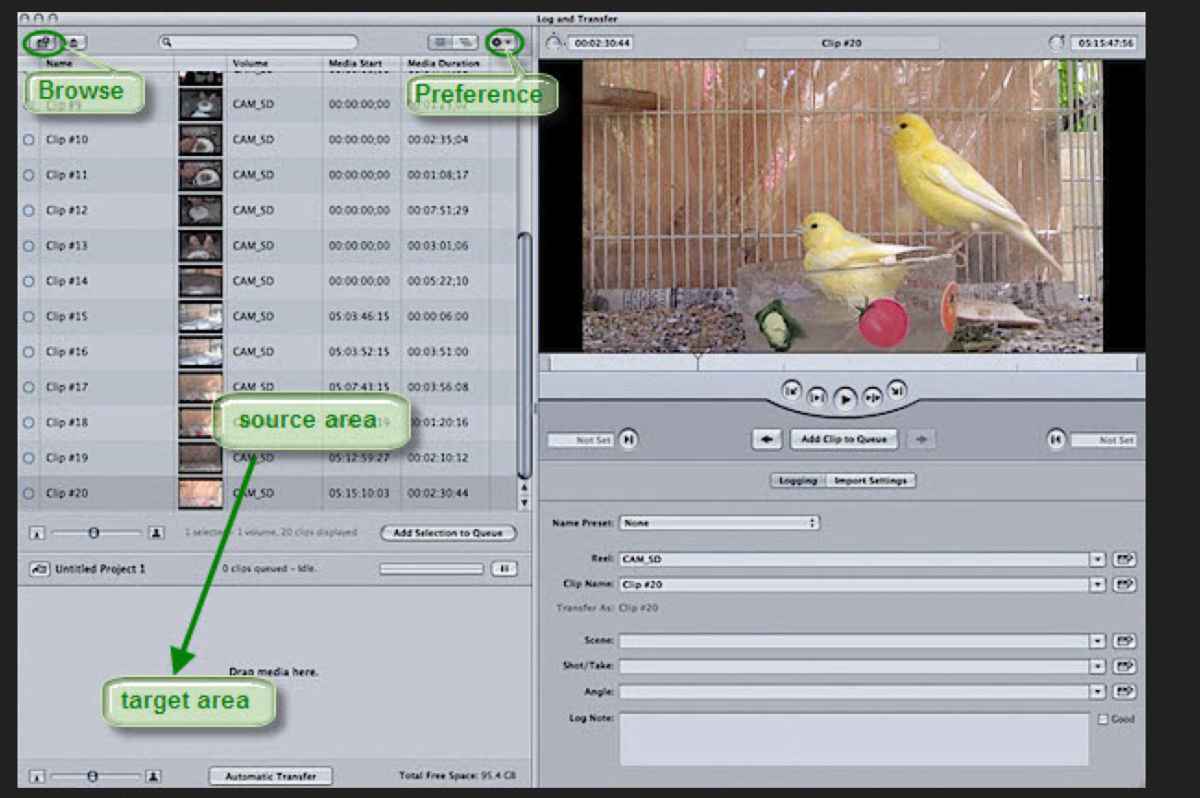
This makes using card based media more efficient, it worked in classic and was a time saver of sorts, you only have the good media on hard drives to edit, and saves having to reject/change browser view later!!
Why are my png files not showing up?? It is on my desktop?? Confused!!!
This makes using card based media more efficient, it worked in classic and was a time saver of sorts, you only have the good media on hard drives to edit, and saves having to reject/change browser view later!!
Why are my png files not showing up?? It is on my desktop?? Confused!!!
Last edit: 29 Apr 2016 13:34 by MsJustine.
Please Log in to join the conversation.
04 May 2016 18:59 - 04 May 2016 19:01 #76387
by dgwvideo
UPDATE. Just realized you are probably talking about a posted image. I was looking at your log and transfer window.
Creating history....one edit at a time !
Replied by dgwvideo on topic Clipping files in events to save space or before the import
They are likely in a different folder or location than your 5D movies.MsJustine wrote:
Why are my png files not showing up?? It is on my desktop?? Confused!!!
UPDATE. Just realized you are probably talking about a posted image. I was looking at your log and transfer window.
Creating history....one edit at a time !
Last edit: 04 May 2016 19:01 by dgwvideo.
Please Log in to join the conversation.
