


- Posts: 971
- Thank you received: 46
3 Post Moderation Rule for New Boarders (25 Jan 2021)
New boarders will have their posts moderated - Don't worry if you cannot see your post immediately.
White lines, what does it mean??
Less
More
25 Apr 2016 09:36 - 25 Apr 2016 09:42 #76007
by MsJustine
White lines, what does it mean?? was created by MsJustine
Hi All
I am busy with the ripple training core training series, and I noticed a strange white line in the audio section when selecting the camera archive, what does this line mean? :blush:
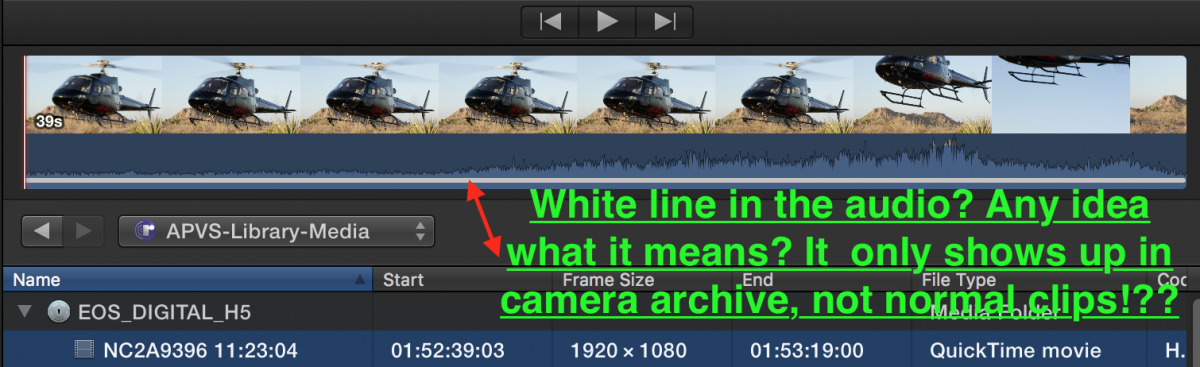
I am confused as to what the solid white line in the audio region is supposed to mean?! :blush: :blush:
I am busy with the ripple training core training series, and I noticed a strange white line in the audio section when selecting the camera archive, what does this line mean? :blush:
I am confused as to what the solid white line in the audio region is supposed to mean?! :blush: :blush:
Last edit: 25 Apr 2016 09:42 by MsJustine.
Please Log in to join the conversation.
25 Apr 2016 11:25 #76010
by BenB
Replied by BenB on topic White lines, what does it mean??
I forget, but it means I think either it has been imported already, or is not fully copied from the camera original. I'll have to check on that.
Please Log in to join the conversation.
- simon_hutchings
-

- Offline
- Junior Member
-

Less
More
- Posts: 34
- Thank you received: 7
25 Apr 2016 11:28 #76012
by simon_hutchings
Replied by simon_hutchings on topic White lines, what does it mean??
It means that you have already imported that clip before. It may have been in another library or the one you are working on, but FCPX remembers that it was imported from a camera source before. You will only get that if you are importing from a camera archive or camera card .
FCPX is so smart, it remembers what you have and have not imported from camera card/archive.
FCPX is so smart, it remembers what you have and have not imported from camera card/archive.
Please Log in to join the conversation.
Less
More
- Posts: 971
- Thank you received: 46
25 Apr 2016 11:35 #76013
by MsJustine
Replied by MsJustine on topic White lines, what does it mean??
FCPX remembering I imported??? How can that be true? I have reformatted this hard drive, my internal mac SSD after doing this course, it only appears on the camera archive clips, not on anything else to be imported.
I have tried to search the manual, nothing mentioned about this, there is no tool tip about this white line and it is very broad covering the audio, it must be important to make it so wide, but FCPX makes no mention of it.
Thanks again, just confusing, as to the white color and the width!!
I have tried to search the manual, nothing mentioned about this, there is no tool tip about this white line and it is very broad covering the audio, it must be important to make it so wide, but FCPX makes no mention of it.
Thanks again, just confusing, as to the white color and the width!!
Please Log in to join the conversation.
- simon_hutchings
-
- Offline
- Junior Member
-
Less
More
- Posts: 34
- Thank you received: 7
25 Apr 2016 11:39 #76014
by simon_hutchings
Replied by simon_hutchings on topic White lines, what does it mean??
yeah... I was confused with it at first too. I edit a fishing show and am always going in and out of camera card/archives so I did some testing to see for my self.
It only appears on Camera Cards and or Archives. I can only assume that it is there as a reminder that you have copied that clip to your computer once before so you don't double up on footage.
It only appears on Camera Cards and or Archives. I can only assume that it is there as a reminder that you have copied that clip to your computer once before so you don't double up on footage.
Please Log in to join the conversation.
Less
More
- Posts: 971
- Thank you received: 46
25 Apr 2016 11:43 - 25 Apr 2016 11:44 #76015
by MsJustine
Replied by MsJustine on topic White lines, what does it mean??
But I have not copied that footage, and it was there before I copied, so copying indicator does not answer that question fully.
I guess that sort of makes sense, not a great indicator to be fair, and why only on camera archive footage? I would have thought, change the color of the text of the clip name to green if copied, orange if part copied, white if nothing copied, or the white line is green/orange if only that section copied.
Just confusing, never seen it before, do not use much of camera archive, and it is not on the Ripple training video, only their source material, must have been something slipped into 10.2.3 when we were not looking!!!
I guess that sort of makes sense, not a great indicator to be fair, and why only on camera archive footage? I would have thought, change the color of the text of the clip name to green if copied, orange if part copied, white if nothing copied, or the white line is green/orange if only that section copied.
Just confusing, never seen it before, do not use much of camera archive, and it is not on the Ripple training video, only their source material, must have been something slipped into 10.2.3 when we were not looking!!!
Last edit: 25 Apr 2016 11:44 by MsJustine.
Please Log in to join the conversation.
- simon_hutchings
-
- Offline
- Junior Member
-
Less
More
- Posts: 34
- Thank you received: 7
25 Apr 2016 11:45 #76016
by simon_hutchings
Replied by simon_hutchings on topic White lines, what does it mean??
It's been there for a while... but you are right that it is confusing at first.
Please Log in to join the conversation.
Less
More
- Posts: 971
- Thank you received: 46
25 Apr 2016 11:49 #76017
by MsJustine
Replied by MsJustine on topic White lines, what does it mean??
The real problem is the author of the 10.2 manual is a terrible manual writer, it is written more like a training manual than a problem solving manual.
In technical manuals, good ones, have the fault codes, fault symbols, graphics at the head of the document, then a page reference to find more info, as well that is what you see on the tool/equipment, a symbol in orange/red so you open the manual, page through the fault indicators, find the right indicator, then page to the right page for solving the problem.
Apple has not included many of these symbols, just uses them as if we are supposed to know what they mean!!! grrrh
In technical manuals, good ones, have the fault codes, fault symbols, graphics at the head of the document, then a page reference to find more info, as well that is what you see on the tool/equipment, a symbol in orange/red so you open the manual, page through the fault indicators, find the right indicator, then page to the right page for solving the problem.
Apple has not included many of these symbols, just uses them as if we are supposed to know what they mean!!! grrrh
Please Log in to join the conversation.

25 Apr 2016 14:21 #76023
by davechap
Replied by davechap on topic White lines, what does it mean??
Here's a little more info:
forums.creativecow.net/thread/344/33135
I'm pretty sure the camera archive you got from Ripple Training had already been imported when they messed with it? So if you haven't imported anything, they probably did. That might be the reason for the line, but it's supposed to mark clips or clip sections that have been copied over.
Not sure how to clear it. And it's not in the manual that I can find.
forums.creativecow.net/thread/344/33135
I'm pretty sure the camera archive you got from Ripple Training had already been imported when they messed with it? So if you haven't imported anything, they probably did. That might be the reason for the line, but it's supposed to mark clips or clip sections that have been copied over.
Not sure how to clear it. And it's not in the manual that I can find.
Please Log in to join the conversation.
Less
More
- Posts: 971
- Thank you received: 46
25 Apr 2016 14:25 #76025
by MsJustine
Replied by MsJustine on topic White lines, what does it mean??
Sort of makes sense I guess, terrible writing in regards the manual, that is one of the worst I ever read, the 3000+ pages of Final Cut Studio, well written, but I guess you get what you pay for.
Question answered, confirmed by 3 sources so to speak!!
Question answered, confirmed by 3 sources so to speak!!
Please Log in to join the conversation.
25 Apr 2016 16:43 #76035
by BenB
Replied by BenB on topic White lines, what does it mean??
You needed an engineering degree to understand most of what was in the multiple volumes of the Final Cut Studio LIBRARY of user manuals.
This was covered in previous versions of the FCPX manual, but as I look, it is missing from this one.
Yes, the line indicates it was imported from the Camera Archive into an Event previously (not to the hard drive).
This was covered in previous versions of the FCPX manual, but as I look, it is missing from this one.
Yes, the line indicates it was imported from the Camera Archive into an Event previously (not to the hard drive).
Please Log in to join the conversation.
Less
More
- Posts: 971
- Thank you received: 46
25 Apr 2016 16:50 #76038
by MsJustine
Replied by MsJustine on topic White lines, what does it mean??
To be fair Final Cut SDtudio was all things to all, it was overkill for most, I am sure I would never in 2000 years be asked to telecine, or use 90% of the power functions built into FCP 6/7, I guess someone decided that all those printed pages was worth the acres of trees felled to print.
Thanks everyone for answering my question...fingers crossed for what we all want...
Thanks everyone for answering my question...fingers crossed for what we all want...
Please Log in to join the conversation.
