


- Posts: 16
- Thank you received: 0
3 Post Moderation Rule for New Boarders (25 Jan 2021)
New boarders will have their posts moderated - Don't worry if you cannot see your post immediately.
Font window too wide...help!
23 Apr 2016 10:05 #75890
by Tufty
Font window too wide...help! was created by Tufty
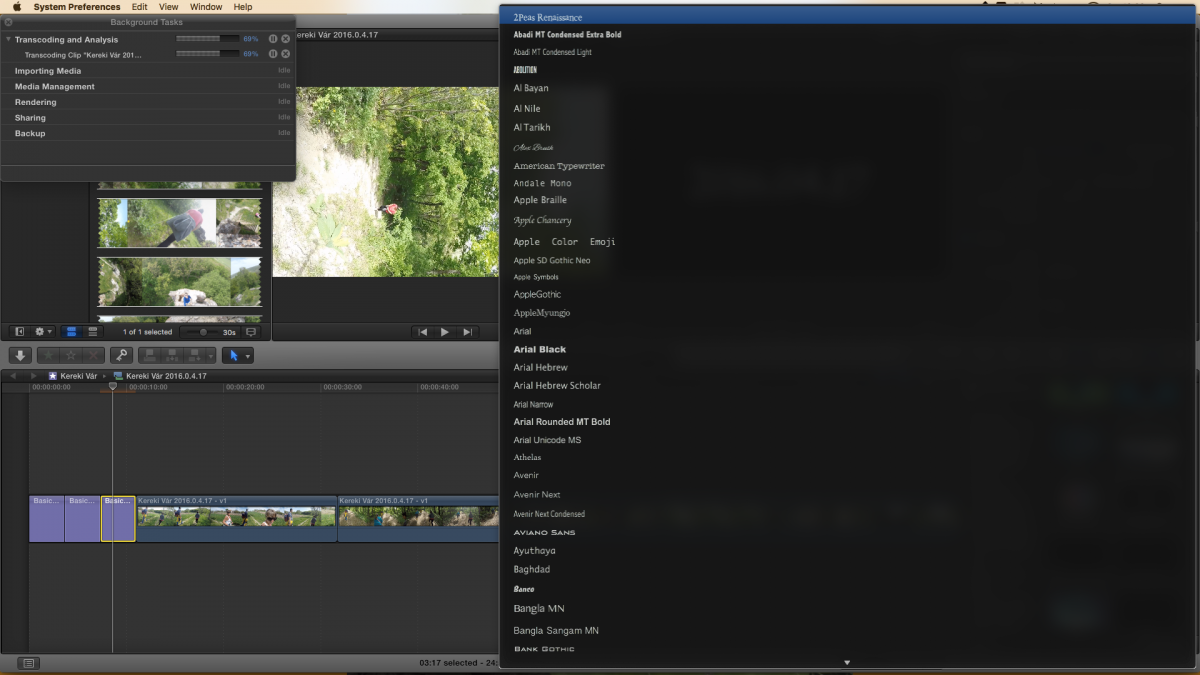
Hello all, I'm struggling with a problem regarding the size of the font window...it's so wide that I can't see the changes effected until I select something, causing the window to close. Any ideas?!
Please Log in to join the conversation.
- Karsten Schlüter
-

- Offline
- Moderator
-

Less
More
- Posts: 3790
- Thank you received: 718
23 Apr 2016 11:36 - 23 Apr 2016 11:37 #75894
by Karsten Schlüter
Replied by Karsten Schlüter on topic Font window too wide...help!
perhaps lost in translation - what do you mean by font window??
feel free to attach a screen shot...
And: Welcome to fcp.co !
feel free to attach a screen shot...
And: Welcome to fcp.co !
Last edit: 23 Apr 2016 11:37 by Karsten Schlüter.
Please Log in to join the conversation.
- Tom Wolsky
-

- Offline
- Moderator
-
23 Apr 2016 11:38 #75895
by Tom Wolsky
Replied by Tom Wolsky on topic Font window too wide...help!
Could you post s screenshot of what you're seeing. Normally the font selection should change whatever selection is made in the viewer, so I'm not sure what's being hidden.
Please Log in to join the conversation.

23 Apr 2016 12:23 #75903
by BenB
Replied by BenB on topic Font window too wide...help!
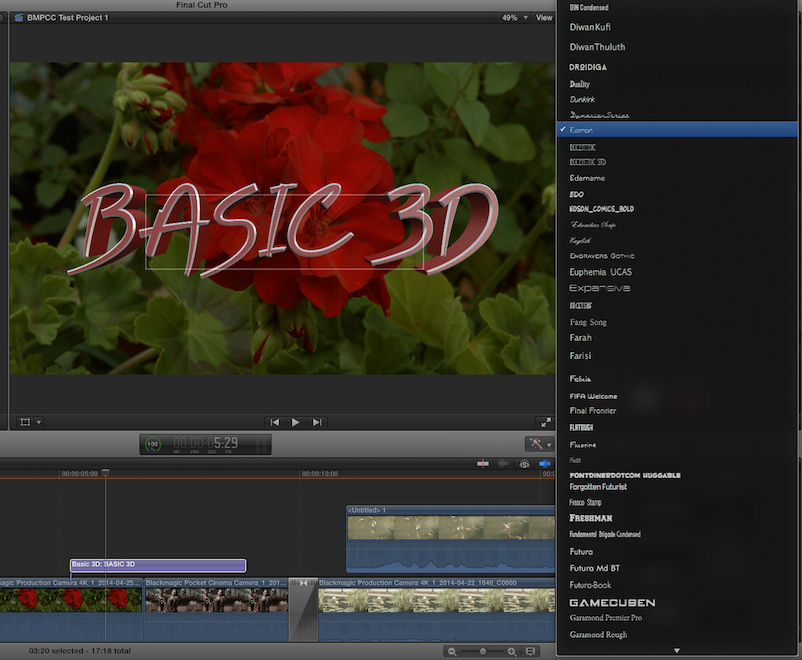
If you don't see this, something is wrong, and my first suspicion is your sizing of FCPX window panes, and/or the size of the FCPX window itself. If so, be sure in System Preferences, you have the Dock set to be hidden. And in FCPX, hold the Option button while clicking the green window button in the top left. You should be able to see the font list in the font menu (Inspector pane), while scrolling through it, watching the font in your Viewer pane change accordingly.
Please Log in to join the conversation.
23 Apr 2016 16:31 #75922
by Tufty
Replied by Tufty on topic Font window too wide...help!
Sorry, all. I did intend to attach a screenshot, but then forgot. Apologies. I did try the "press the option button whilst clicking on the green top left thingy" - sadly, no luck. Anyway, in the hope of making the problem clearer...here's a screenshot depicting what I'm having difficulty with. Thanks, anyway for all the suggestions, and thanks, in advance for anyone who can explain what I'm doing wrong!
Please Log in to join the conversation.
- MarkNelsonMovies
-

- Offline
- Elite Member
-

Less
More
- Posts: 256
- Thank you received: 48
23 Apr 2016 18:59 #75929
by MarkNelsonMovies
Replied by MarkNelsonMovies on topic Font window too wide...help!
do you have a font or two with a really long name? if so you may have to disable them.
Please Log in to join the conversation.
23 Apr 2016 20:23 #75937
by Tufty
Replied by Tufty on topic Font window too wide...help!
OK...I'm game. But...well, thick, it appears - where should I disable the fonts?
Please Log in to join the conversation.
- MarkNelsonMovies
-
- Offline
- Elite Member
-
Less
More
- Posts: 256
- Thank you received: 48
23 Apr 2016 20:53 #75940
by MarkNelsonMovies
Replied by MarkNelsonMovies on topic Font window too wide...help!
Open the Font book application, find the font(s) in with the long name, (if there is one and it's not a preference glitch)
with it/them selected click Edit>Disable Fonts, then restart and see if the problem is solved.
with it/them selected click Edit>Disable Fonts, then restart and see if the problem is solved.
Please Log in to join the conversation.
24 Apr 2016 02:28 #75945
by BenB
Replied by BenB on topic Font window too wide...help!
That is really, really weird...
Please Log in to join the conversation.
24 Apr 2016 09:33 #75958
by Tufty
Replied by Tufty on topic Font window too wide...help!
BenB: Agreed. Not that the acceptance thereof gets me any further down the path!
Please Log in to join the conversation.
24 Apr 2016 09:34 #75959
by Tufty
Replied by Tufty on topic Font window too wide...help!
MarkNelsonMovies...I tried the font trick...to be honest, there weren't many fonts that struck me as having long names, but I stripped a few out...all to no avail.
Please Log in to join the conversation.
24 Apr 2016 11:14 #75963
by BenB
Replied by BenB on topic Font window too wide...help!
Did you try deleting preference files?
Please Log in to join the conversation.
24 Apr 2016 11:34 #75966
by Tufty
Replied by Tufty on topic Font window too wide...help!
Yep, tried that...no dice.
Please Log in to join the conversation.
24 Apr 2016 14:55 #75973
by BenB
Replied by BenB on topic Font window too wide...help!
Check the air pressure in the tires.
No, seriously, that is really odd, I've never seen that issue before. I'm at a loss.
No, seriously, that is really odd, I've never seen that issue before. I'm at a loss.
Please Log in to join the conversation.
24 Apr 2016 15:47 #75976
by Tufty
Replied by Tufty on topic Font window too wide...help!
Ahhh....piss.
Please Log in to join the conversation.
- MarkNelsonMovies
-
- Offline
- Elite Member
-
Less
More
- Posts: 256
- Thank you received: 48
24 Apr 2016 17:09 #75979
by MarkNelsonMovies
Replied by MarkNelsonMovies on topic Font window too wide...help!
Did you try verifying your font's and seeing if any were corrupted?
There have been other bugs with font selection in FCPX, so maybe this is something apple needs to work on.
There have been other bugs with font selection in FCPX, so maybe this is something apple needs to work on.
Please Log in to join the conversation.


25 Apr 2016 03:15 - 25 Apr 2016 03:16 #75987
by dgwvideo
Creating history....one edit at a time !
Replied by dgwvideo on topic Font window too wide...help!
Are you running any other third party font manager on your system? OSX Font Book doesn't always play nicely when there is a competing font manager on your system.
To check any font issues quickly without having to validate them one by one, choose ALL FONTS in font book and then scroll down the list slowly looking for any yellow exclamation alert icons. If you find one, click the font and you'll generally see the suspect info, such as incorrect table structures, etc. It also reports duplicate fonts, but you can easily select from the top menu to check for enabled duplicates (although this wouldn't cause the wide view you are seeing).
This issue does seem to be related to some font though, and if you don't have a lot of custom fonts installed, you might try to restore the system fonts from the drop down menu in Font Book.
One other suggestion would be to delete the FCPX window layouts - go to user/library/application support/final cut pro and delete the layout file, including any modified layouts you have for the windows in fcpx. FCPX will rebuild these files the next time you launch it.
To check any font issues quickly without having to validate them one by one, choose ALL FONTS in font book and then scroll down the list slowly looking for any yellow exclamation alert icons. If you find one, click the font and you'll generally see the suspect info, such as incorrect table structures, etc. It also reports duplicate fonts, but you can easily select from the top menu to check for enabled duplicates (although this wouldn't cause the wide view you are seeing).
This issue does seem to be related to some font though, and if you don't have a lot of custom fonts installed, you might try to restore the system fonts from the drop down menu in Font Book.
One other suggestion would be to delete the FCPX window layouts - go to user/library/application support/final cut pro and delete the layout file, including any modified layouts you have for the windows in fcpx. FCPX will rebuild these files the next time you launch it.
Creating history....one edit at a time !
Last edit: 25 Apr 2016 03:16 by dgwvideo.
Please Log in to join the conversation.
25 Apr 2016 03:17 #75989
by BenB
Replied by BenB on topic Font window too wide...help!
Curious if this happens in Motion 5, also?
Please Log in to join the conversation.
25 Apr 2016 09:45 #76008
by Tufty
Replied by Tufty on topic Font window too wide...help!
As far as I could see, there were no problems with any of the fonts...but, I then decided that I might as well follow dgwvideo's advice and restore the system fonts...just waiting to see what happens now!
Please Log in to join the conversation.
25 Apr 2016 09:56 #76009
by Tufty
Replied by Tufty on topic Font window too wide...help!
Ah! Please allow me to prostrate myself before the assorted genii who orbit this site like satellites of bright, gleaming, polished intelligence! I restored the system fonts and the problem appears to have been solved! Thanks to everyone who used their time and experience to help me get through this hugely irritating problem...I've only just realised that I was actually avoiding creating videos as a direct result (not that anyone's missing out on some undiscovered masterpiece, I accept, but even so!)
Cheers to you all! I salute you!
Tufty
Cheers to you all! I salute you!
Tufty
Please Log in to join the conversation.
