


- Posts: 4
- Thank you received: 0
3 Post Moderation Rule for New Boarders (25 Jan 2021)
New boarders will have their posts moderated - Don't worry if you cannot see your post immediately.
Video Bug on Final Cut Pro X
23 Apr 2016 07:00 #75883
by jonie.wl
Video Bug on Final Cut Pro X was created by jonie.wl
Hello Everyone! I'm seeking help with an issue that I don't know how to resolve. I create videos for youtube. Most of them are 20 minutes or longer so they are take a lot of work to create. I use Final Cut pro X to edit my videos but I always get glitches/bugs on them. I have always blamed that my laptop is oldish (macbook air 2011) and has only 2 GB of ram and FCP always warns me that it need a minimum of 4 GB to work, but I don't have the means to purchase a better computer at the moment.. So I work with what I have. In the image you see the glitch that always shows up in my videos and I'm tired of it.. I work so hard on them to have this kind of glitch ruining them. My question is.. is it really the issue with my ram or am I doing something wrong in the edition?? It frustrates me so much and I can't go back to iMovie because I work with 3D audio and iMovie doesn't do a good job with that. Any help is appreciated. For more explanation on how I edit:
1- Import video files from my desktop
2- Place the video and audio file and sync them manually in the time line
3- Cut off parts of video not needed and add transitions
4- I see the glitches/bugs while I'm editing but the bug always shows in different parts than the ones I first saw them.
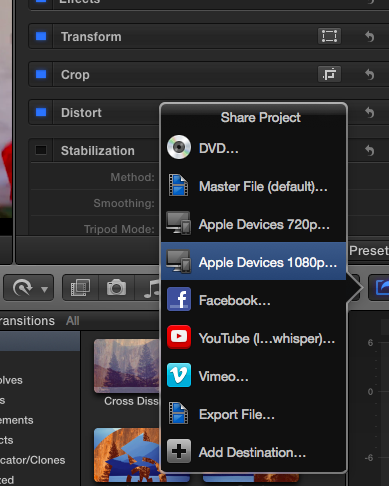
5- Save as Apple Devices since the final video is a good size and format to upload to youtube
1- Import video files from my desktop
2- Place the video and audio file and sync them manually in the time line
3- Cut off parts of video not needed and add transitions
4- I see the glitches/bugs while I'm editing but the bug always shows in different parts than the ones I first saw them.
5- Save as Apple Devices since the final video is a good size and format to upload to youtube


Please Log in to join the conversation.
- Karsten Schlüter
-

- Offline
- Moderator
-

Less
More
- Posts: 3790
- Thank you received: 718
23 Apr 2016 11:44 - 23 Apr 2016 11:45 #75898
by Karsten Schlüter
Replied by Karsten Schlüter on topic Video Bug on Final Cut Pro X
A bug is an undocumented misbehave of an app, everybody can re-enact.
What you're noticing is no bug, but indeed an effect of using FCPX below min. specs...
Q: does your exported/shared video show the same symptoms? or is this just while ediitng?
if a) ugrade you hardware, if b) don't care (or work with proxies) …
And: Welcome to fcp.co !
What you're noticing is no bug, but indeed an effect of using FCPX below min. specs...
Q: does your exported/shared video show the same symptoms? or is this just while ediitng?
if a) ugrade you hardware, if b) don't care (or work with proxies) …
And: Welcome to fcp.co !
Last edit: 23 Apr 2016 11:45 by Karsten Schlüter.
Please Log in to join the conversation.
- Tom Wolsky
-

- Offline
- Moderator
-
23 Apr 2016 11:45 #75899
by Tom Wolsky
Replied by Tom Wolsky on topic Video Bug on Final Cut Pro X
I don't think there's anything you can go about it. It's not only the RAM, but the graphics card is probably limited as well.
Please Log in to join the conversation.
- nils.dettmann
-

- Offline
- Elite Member
-

Less
More
- Posts: 161
- Thank you received: 13
23 Apr 2016 11:59 - 23 Apr 2016 12:00 #75900
by nils.dettmann
Replied by nils.dettmann on topic Video Bug on Final Cut Pro X
What video source/camera are you using?
Do you see the glitches when you directly play the source files?
Did you try to export ProRes first? Then check and encode in another app like "Handbrake" (free).
Do you have the possibility to transcode them to ProRes first. On a friends computer?!
ProRes should have less impact on your Macs performance.
As Karsten and Tom mentioned using an app below specs can lead to unexpected results.
Do you see the glitches when you directly play the source files?
Did you try to export ProRes first? Then check and encode in another app like "Handbrake" (free).
Do you have the possibility to transcode them to ProRes first. On a friends computer?!
ProRes should have less impact on your Macs performance.
As Karsten and Tom mentioned using an app below specs can lead to unexpected results.
Last edit: 23 Apr 2016 12:00 by nils.dettmann. Reason: Forgot one!
Please Log in to join the conversation.

23 Apr 2016 12:29 #75907
by BenB
Replied by BenB on topic Video Bug on Final Cut Pro X
What is "3D audio"?
Please Log in to join the conversation.
23 Apr 2016 16:15 #75921
by jonie.wl
Replied by jonie.wl on topic Video Bug on Final Cut Pro X
Hello, I use a canon t5 and when I see the original video there are no glitches at all. They only show when I'm editing on FCP.
Please Log in to join the conversation.
- MarkNelsonMovies
-
- Offline
- Elite Member
-
Less
More
- Posts: 256
- Thank you received: 48
23 Apr 2016 18:29 - 23 Apr 2016 19:24 #75925
by MarkNelsonMovies
Replied by MarkNelsonMovies on topic Video Bug on Final Cut Pro X
This looks exactly like a glitch I was getting with interlaced 60i .MTS files off a Sony NEX-5.
My guess from your description, is that the issue might no not be with your computer, but with your import method.
Select one or more clips, then click - File>Transcode Media, then check create optimized media and click Ok.
If the problem goes away with those clips, then you may just have to work with optimized media on your computer, but you can try importing directly from the camera/card with FCPX's import function and see if that fixes the problem.
If you are shooting 60i, see if your camera has a 30p setting (.mp4 for sony) as that will be easier on your system.
A screenshot of the glitch as it appears in your timeline (instead of YT) would probably be helpful to the people on this forum.
Hope this helps,
-Mark
My guess from your description, is that the issue might no not be with your computer, but with your import method.
Select one or more clips, then click - File>Transcode Media, then check create optimized media and click Ok.
If the problem goes away with those clips, then you may just have to work with optimized media on your computer, but you can try importing directly from the camera/card with FCPX's import function and see if that fixes the problem.
If you are shooting 60i, see if your camera has a 30p setting (.mp4 for sony) as that will be easier on your system.
A screenshot of the glitch as it appears in your timeline (instead of YT) would probably be helpful to the people on this forum.
Hope this helps,
-Mark
Last edit: 23 Apr 2016 19:24 by MarkNelsonMovies. Reason: add information
Please Log in to join the conversation.


23 Apr 2016 19:03 #75930
by Redifer
Replied by Redifer on topic Video Bug on Final Cut Pro X
First we need to find out WHERE this is happening. Is the glitch only in the Youtube video? Or is it present while you are working in FCPX as well? If it's only in the Youtube video, try exporting a Quicktime ProRes and compress it to MP4 with high settings in Handbrake or MPEG Streamclip. Then upload the resulting MP4 to Youtube. I produce long-form content as well and I never ever publish directly from FCP to Youtube. I need more control over that and FCPX offers virtually none.
Please Log in to join the conversation.
- MarkNelsonMovies
-
- Offline
- Elite Member
-
Less
More
- Posts: 256
- Thank you received: 48
23 Apr 2016 19:17 - 23 Apr 2016 19:19 #75932
by MarkNelsonMovies
Replied by MarkNelsonMovies on topic Video Bug on Final Cut Pro X
Redifer,
in the OP
also,
in the OP
this seem to indicate that FCPX isn't reading the source files properly.4- I see the glitches/bugs while I'm editing but the bug always shows in different parts than the ones I first saw them.
also,
is not uploading directly to YT5- Save as Apple Devices since the final video is a good size and format to upload to youtube
Last edit: 23 Apr 2016 19:19 by MarkNelsonMovies. Reason: add information
Please Log in to join the conversation.
23 Apr 2016 19:55 #75934
by davechap
Replied by davechap on topic Video Bug on Final Cut Pro X
Hey Jonie,
Welcome! So as others have pointed out, FCPX does have a minimum requirement for running—and it is 4GB. Looking at the clips, I think this specific issue may be more with the codec than the GPU or ram. Perhaps your older GPU has some trouble with the media from the camera itself.
1. The T5 can shoot in 1080p and 720p—which one are you shooting in?
2. What is the frame rate? I would definitely stick to 30fps or 24fps.
3. Are you using a CLASS 6 card or higher to shoot on?
The format the camera shoots video in is a MOV with H.264/MPEG-4 encoding. Premiere Pro even has issues with this and people transcode this format into something else. The good thing about FCPX, it can transcode it for you without much effort.
I'm almost certain this is just a codec playback issue in FCPX. Here's what you can try:
1. Import your media. In the checkbox area, check to Create Optimized Media. This will transcode that h.264 media into ProRes and give you a better experience editing and exporting.
2. If you already have media imported and edited, Right Click the Event and select Transcode Media. In the dropdown menu that appears, select Create Optimized Media. You can also create Proxy Media in addition to this if you want. This may improve editing even more on your older computer.
**In order to toggle back and forth between the Optimized Media and Proxy Media, click the View tab in the Viewer and select either Optimized or Proxy. It's pretty easy to toggle back and forth.
Let us know if this solves the issue for you. Good luck!
Welcome! So as others have pointed out, FCPX does have a minimum requirement for running—and it is 4GB. Looking at the clips, I think this specific issue may be more with the codec than the GPU or ram. Perhaps your older GPU has some trouble with the media from the camera itself.
1. The T5 can shoot in 1080p and 720p—which one are you shooting in?
2. What is the frame rate? I would definitely stick to 30fps or 24fps.
3. Are you using a CLASS 6 card or higher to shoot on?
The format the camera shoots video in is a MOV with H.264/MPEG-4 encoding. Premiere Pro even has issues with this and people transcode this format into something else. The good thing about FCPX, it can transcode it for you without much effort.
I'm almost certain this is just a codec playback issue in FCPX. Here's what you can try:
1. Import your media. In the checkbox area, check to Create Optimized Media. This will transcode that h.264 media into ProRes and give you a better experience editing and exporting.
2. If you already have media imported and edited, Right Click the Event and select Transcode Media. In the dropdown menu that appears, select Create Optimized Media. You can also create Proxy Media in addition to this if you want. This may improve editing even more on your older computer.
**In order to toggle back and forth between the Optimized Media and Proxy Media, click the View tab in the Viewer and select either Optimized or Proxy. It's pretty easy to toggle back and forth.
Let us know if this solves the issue for you. Good luck!
Please Log in to join the conversation.
23 Apr 2016 19:59 #75935
by davechap
Replied by davechap on topic Video Bug on Final Cut Pro X
One more thing... When you export to YouTube, don't export with the Apple Devices preset. In the preferences, there should be a Compressor option that lets you select a Sharing Services with YouTube, Vimeo, etc as the descriptor. Export in this format and upload.
If you have Compressor ($50), you can export the native ProRes (after you have transcoded it from h.264 to ProRes) and then use Compressor to make the YouTube specific format. This seems like an additional step, but it gives you a master file (the ProRes render) that you can make other exports from. So you won't have to open up FCPX every time you need to make another version or size.
If you have Compressor ($50), you can export the native ProRes (after you have transcoded it from h.264 to ProRes) and then use Compressor to make the YouTube specific format. This seems like an additional step, but it gives you a master file (the ProRes render) that you can make other exports from. So you won't have to open up FCPX every time you need to make another version or size.
Please Log in to join the conversation.
23 Apr 2016 22:04 #75943
by jonie.wl
Replied by jonie.wl on topic Video Bug on Final Cut Pro X
Thank you for the advice I will try it in my next video. I shoot at 1080p with 24fps my SD card is Sandisk ultra. For some reason every time I try to export it with the youtube option it fails and I have to start over again so the apple devices option has been the best way for me to export it to be able to upload it to youtube. This glitch also happens with video files recorded with my Samsung Galaxy S5.
I don't have a compressor but I have also read about converting the camera .mov file to ProRes hopefully I will be able to purchase it soon, but at the moment all I can do is try your first solution. thank you!
I don't have a compressor but I have also read about converting the camera .mov file to ProRes hopefully I will be able to purchase it soon, but at the moment all I can do is try your first solution. thank you!
Please Log in to join the conversation.
24 Apr 2016 02:33 #75946
by BenB
Replied by BenB on topic Video Bug on Final Cut Pro X
"but the bug always shows in different parts than the ones I first saw them."
That's typical of the computer being underpowered for full playback. To to the menu that's at the top right of the Viewer, titled "View". In it, look at the "Quality" setting. Make sure it is set to "Better Performance."
Then Optimize your imports, as stated before.
And be sure all media and Libraries are on an external USB 3 or Thunderbolt drive.
Aside from adding more RAM to your system, that's about all your options.
That's typical of the computer being underpowered for full playback. To to the menu that's at the top right of the Viewer, titled "View". In it, look at the "Quality" setting. Make sure it is set to "Better Performance."
Then Optimize your imports, as stated before.
And be sure all media and Libraries are on an external USB 3 or Thunderbolt drive.
Aside from adding more RAM to your system, that's about all your options.
Please Log in to join the conversation.
- Russ Haskell
-
- Offline
- Elite Member
-
Less
More
- Posts: 176
- Thank you received: 24
24 Apr 2016 13:16 #75971
by Russ Haskell
Replied by Russ Haskell on topic Video Bug on Final Cut Pro X
You've had so much good feedback that you probably don't need this…but just a couple of additional comments, FWIW.
The artifacts you see while editing your projects are something that you're probably just have to live with – because of the hardware limitations (especially the GPU). Nevertheless, if you are able to complete your edits and export the project, I would expect that you cam still get a satisfactory output file for uploading. The higher the quality the file that you upload, the better will be the result after You Tube recompresses it. So if you have enough time (and patience) consider exporting a Pro Res LT master file and uploading that via the You Tube uploader.
Best of luck.
Russ
The artifacts you see while editing your projects are something that you're probably just have to live with – because of the hardware limitations (especially the GPU). Nevertheless, if you are able to complete your edits and export the project, I would expect that you cam still get a satisfactory output file for uploading. The higher the quality the file that you upload, the better will be the result after You Tube recompresses it. So if you have enough time (and patience) consider exporting a Pro Res LT master file and uploading that via the You Tube uploader.
Best of luck.
Russ
Please Log in to join the conversation.
26 Apr 2016 05:13 #76049
by jonie.wl
Replied by jonie.wl on topic Video Bug on Final Cut Pro X
Thank you everyone!
I will invest in a compressor and try to convert the original files to prores will take a lot of time in my slow laptop but guess it will make my videos looks better and hopefully without this issue that is bothering me so much.
I don't now if this can be closed or marked as solved. I appreciate all of your help. Thanks again!
I will invest in a compressor and try to convert the original files to prores will take a lot of time in my slow laptop but guess it will make my videos looks better and hopefully without this issue that is bothering me so much.
I don't now if this can be closed or marked as solved. I appreciate all of your help. Thanks again!
Please Log in to join the conversation.
- nils.dettmann
-
- Offline
- Elite Member
-
Less
More
- Posts: 161
- Thank you received: 13
26 Apr 2016 07:27 #76052
by nils.dettmann
Replied by nils.dettmann on topic Video Bug on Final Cut Pro X
Be aware that Compressor could have the same problems as FCPX.
It has the same specs and FCPX uses compressor internally for some transcoding processes.
Did you try generating optimized media in FCPX on import?
I don´t know if it´s the same in your country. In Germany you can buy apps in the App Store and "Return" them if they don´t work as expected. At least that´s possible for most apps.
In that case you could try Compressor...
It has the same specs and FCPX uses compressor internally for some transcoding processes.
Did you try generating optimized media in FCPX on import?
I don´t know if it´s the same in your country. In Germany you can buy apps in the App Store and "Return" them if they don´t work as expected. At least that´s possible for most apps.
In that case you could try Compressor...
Please Log in to join the conversation.
