


- Posts: 4
- Thank you received: 0
3 Post Moderation Rule for New Boarders (25 Jan 2021)
New boarders will have their posts moderated - Don't worry if you cannot see your post immediately.
Timeline to Keyword/Smart Collection?
21 Apr 2016 23:23 #75804
by jrobinson
Timeline to Keyword/Smart Collection? was created by jrobinson
Is there a way to take all or a selection of media in a timeline and create a Keyword or Smart collection of that media?
Please Log in to join the conversation.

22 Apr 2016 16:12 #75853
by VidGreg
Replied by VidGreg on topic Timeline to Keyword/Smart Collection?
Hi J, Welcome to the forums!
Guess I would have to ask why you would need a "keyword" collection of a whole project???
As far as a "selection" i.e. a "Range" you could create a compound clip of a Range and keyword that.
Keywords are mostly used as a way to organize clips in the Browser to aid in creating a Timeline/Project.
You can always select a clip and Find in Browser and apply keywords. This is sort of working backwards.
AFAIK keywords are created either in the Finder prior to import or in the Browser. Don't think you can do it in the Timeline, unless you could use the Timeline Index???? Don't have FCPX open to try, don't think so.
Sorry don't really understand what you want to accomplish fully.
Hope this helps, Greg
Guess I would have to ask why you would need a "keyword" collection of a whole project???
As far as a "selection" i.e. a "Range" you could create a compound clip of a Range and keyword that.
Keywords are mostly used as a way to organize clips in the Browser to aid in creating a Timeline/Project.
You can always select a clip and Find in Browser and apply keywords. This is sort of working backwards.
AFAIK keywords are created either in the Finder prior to import or in the Browser. Don't think you can do it in the Timeline, unless you could use the Timeline Index???? Don't have FCPX open to try, don't think so.
Sorry don't really understand what you want to accomplish fully.
Hope this helps, Greg
Please Log in to join the conversation.

22 Apr 2016 17:32 - 22 Apr 2016 19:58 #75865
by BenB
Replied by BenB on topic Timeline to Keyword/Smart Collection?
The answer is YES, and I discussed this with both a PPro and Avid MC editor during NAB this week. FCPX does it way faster and easier than the other two. Yes, it is a useful technique for some editors in a few situations, but not something most editors do daily.
Here's what you're looking for:
finalcutprox.guru/support/supportblog/fi...3ae4a58082e2-11.html
Now, if you want a sub-group of what has been used in the Timeline, make a Smart Collection for Used Media as in the blog post above. Then keyword that select sub-group of clips/ranges. Poof, done, keyword group.
Here's what you're looking for:
finalcutprox.guru/support/supportblog/fi...3ae4a58082e2-11.html
Now, if you want a sub-group of what has been used in the Timeline, make a Smart Collection for Used Media as in the blog post above. Then keyword that select sub-group of clips/ranges. Poof, done, keyword group.
Last edit: 22 Apr 2016 19:58 by BenB.
Please Log in to join the conversation.
22 Apr 2016 19:53 #75874
by VidGreg
Replied by VidGreg on topic Timeline to Keyword/Smart Collection?
Ben's link are all excellent suggestions/solutions, but all involve the Browser, not really creating keywords directly in the Timeline, which is what I was struggling with.
Most of your organizing is done via the Browser and to a limited degree in the Finder. The Timeline is more a receiver of the organizing efforts.
Being able to track Used Media is important and easy via smart collections, but you would still need to select clips or ranges of clips inside the Browser to make meaningful keywords for each clip, IMHO. Shift+F is your friend here.
It does point to the power of FCPX in creating and utilizing Metadata. Metadata is one of the keys to how FCPX can be very fast for creative editing. Every editor can create systems that work for them.
Using Metadata also means we do not have to duplicate media files for various projects within a Library.
Thanks Ben
Hope this helps, Greg
Most of your organizing is done via the Browser and to a limited degree in the Finder. The Timeline is more a receiver of the organizing efforts.
Being able to track Used Media is important and easy via smart collections, but you would still need to select clips or ranges of clips inside the Browser to make meaningful keywords for each clip, IMHO. Shift+F is your friend here.
It does point to the power of FCPX in creating and utilizing Metadata. Metadata is one of the keys to how FCPX can be very fast for creative editing. Every editor can create systems that work for them.
Using Metadata also means we do not have to duplicate media files for various projects within a Library.
Thanks Ben
Hope this helps, Greg
Please Log in to join the conversation.
23 Apr 2016 03:31 #75881
by jrobinson
Replied by jrobinson on topic Timeline to Keyword/Smart Collection?
Thanks Ben. Your Blog post is very clear, exactly what I was looking for, especially creating a Smart Collection of the Used Media in a particular timeline. However, I must be doing something wrong. I have open the timeline that I want, but the Smart Collection I created only contains a small handful of the clips that are in the timeline. I have the browser set to All Clips. I cannot figure out what's wrong. Any suggestions?
Thank you.
Jonathan
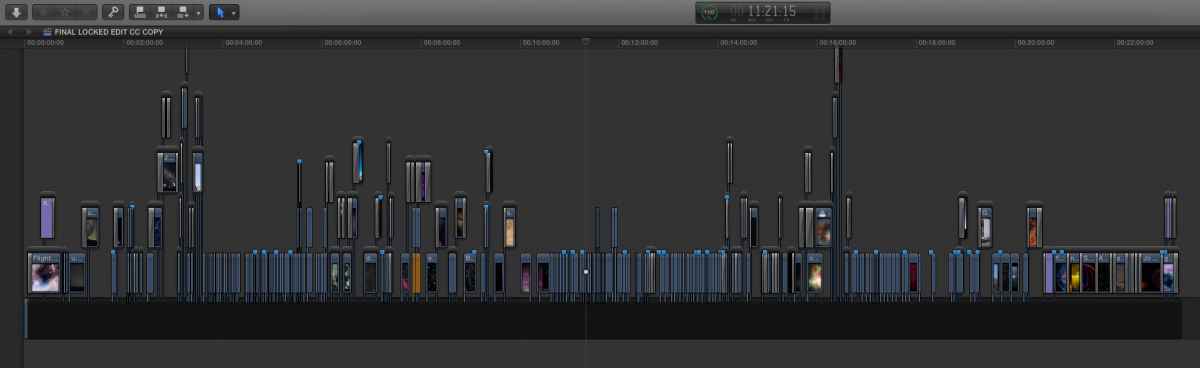
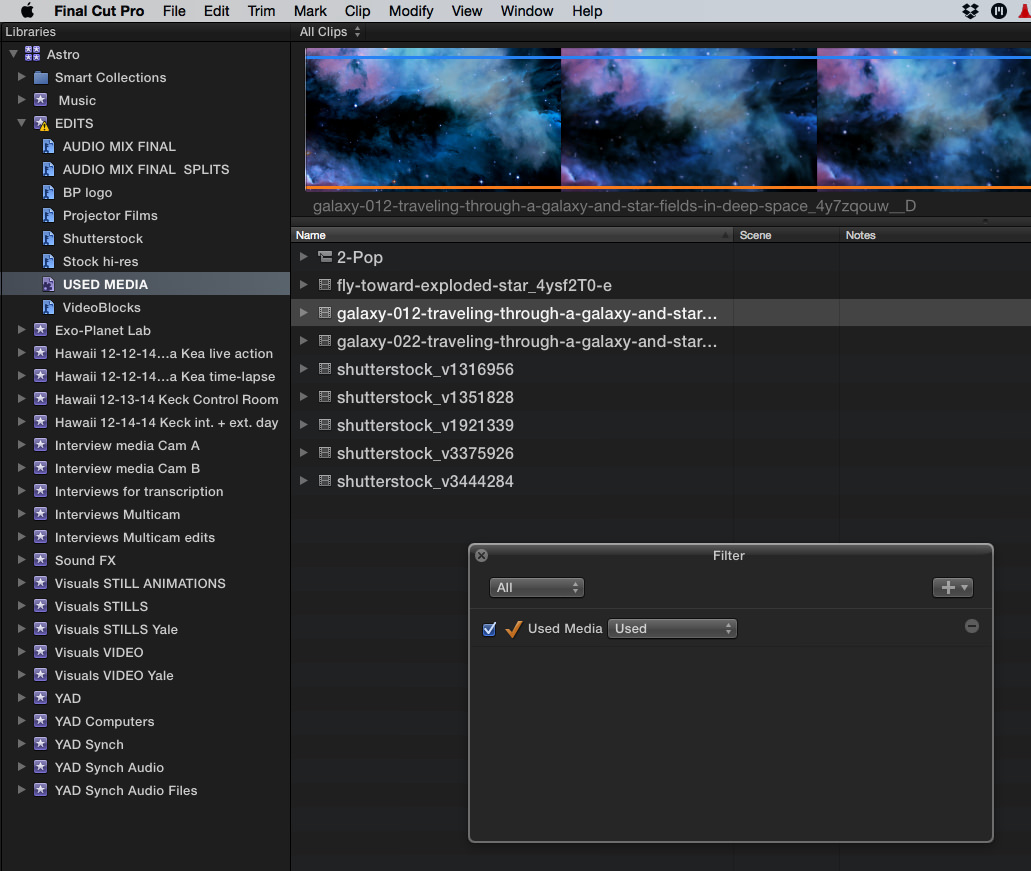
Thank you.
Jonathan
Please Log in to join the conversation.
- nils.dettmann
-

- Offline
- Elite Member
-

Less
More
- Posts: 161
- Thank you received: 13
23 Apr 2016 08:56 #75888
by nils.dettmann
Replied by nils.dettmann on topic Timeline to Keyword/Smart Collection?
I like the trick with the smart collection only showing the clips used in the active project - very useful.
The OP was also asking for keywording a range within the project.
I can imagine quite some instances where this would be useful eg. working with stock footage, music rights, tracking which clips are used within one scene, ...
The fastest way I can imagine is copying the range of clips to a temp project and then going the smart folder route.
Within a project you can use the "Notes" field in the inspector to tag certain parts of the timeline.
They are searchable in the timeline index. But of course these notes won´t reflect on the Clips in the Event browser.
The OP was also asking for keywording a range within the project.
I can imagine quite some instances where this would be useful eg. working with stock footage, music rights, tracking which clips are used within one scene, ...
The fastest way I can imagine is copying the range of clips to a temp project and then going the smart folder route.
Within a project you can use the "Notes" field in the inspector to tag certain parts of the timeline.
They are searchable in the timeline index. But of course these notes won´t reflect on the Clips in the Event browser.
Please Log in to join the conversation.
23 Apr 2016 10:58 #75892
by BenB
Replied by BenB on topic Timeline to Keyword/Smart Collection?
Select a range in the Project timeline, make it a Compound Clip, immediately Break Apart that CC in the Timeline. The parent CC now resides in the Browser. Done.
Alternative; Select the range in the Timeline Index, add a common Note or Role.
Alternative; Select the range in the Timeline Index, add a common Note or Role.
Please Log in to join the conversation.
24 Apr 2016 23:49 #75983
by jrobinson
Replied by jrobinson on topic Timeline to Keyword/Smart Collection?
Ben, I'm still not sure why all the clips do not show up in the Smart Collection. Any thoughts?
Thanks for the Compound Clip idea. That's excellent, too!
Thanks for the Compound Clip idea. That's excellent, too!
Please Log in to join the conversation.
25 Apr 2016 00:53 #75984
by davechap
Replied by davechap on topic Timeline to Keyword/Smart Collection?
Hey JRobinson,
Im catching up on the original question. But for the "Used Media" smart collection, it only shows the media that's inside that single Event. Looking at your screen shots, you have many events. You can create a Smart Collection in the library itself that should show all media in all events. Its called a Library Smart Collection. Hope that helps.
Im catching up on the original question. But for the "Used Media" smart collection, it only shows the media that's inside that single Event. Looking at your screen shots, you have many events. You can create a Smart Collection in the library itself that should show all media in all events. Its called a Library Smart Collection. Hope that helps.
Please Log in to join the conversation.
25 Apr 2016 03:15 #75988
by BenB
Replied by BenB on topic Timeline to Keyword/Smart Collection?
Good catch, Dave! If the media is taken from several Events in one Timeline, yes, you do have to make the Used Media smart collection on the Library level. Even then, works the same, just at a Library level, not Event. Very good thinking, Dave. I'm going to have to update my blog with that tip! Thanks!
Please Log in to join the conversation.
