


3 Post Moderation Rule for New Boarders (25 Jan 2021)
New boarders will have their posts moderated - Don't worry if you cannot see your post immediately.
Bugs
- Tom Wolsky
-
 Topic Author
- Offline
- Moderator
-

Let's be clear about what I mean by a bug. It's not something that you'd like to see in the application, which you really think is critical. It's not something that you don't like it way it works, and think it would work better in some other way. A bug is something that is supposed to work, but doesn't work as described, as it's intended to work. And a bug has to be reproducible.
I'll name a few I know about: Shape Mask doesn't export correctly after scaling, angle viewer smears if the multicam clip doesn't match the project properties, audio heard in the gap before clips, copying a library to an ExFAT drive will lose both libraries, skimmer disappears in the timeline when working with large format still images.
So I'm curious to see what you've got, and I can make happen.
Thanks.
Please Log in to join the conversation.
- MarkNelsonMovies
-

- Offline
- Elite Member
-

- Posts: 256
- Thank you received: 48
1: thumbnails sometimes don't show up on timeline clips until moused over. - Totally random and difficult to reproduce.
2: I don't know if this is a bug, but stabilization will sometimes start to smooth a motion that doesn't happen until after the out point. - easy to reproduce
3: I haven't been able to duplicate this one, and It's not worth my time to continue trying to do so, but In a project imported from iMovie any changes to the titles (zoom in this case) would revert on closing FCPX, but not re-render, so that the video was the changed version, but the settings were back to their original state.
4: custom Motion templates will sometimes require re-rendering after FCPX has been closed and re-opened.
5: sometimes a DVD share will fail until the computer has been restarted.
6: not sure if this is a bug either, but editing straight Sony .MTS files with 5.1 ac3 sound results in long periods of beach ball when the FCPX is first opened, accompanied by much higher than normal disk activity levels. after that everything is fine.
That's all I can think of, FCPX has overall been great, and quite stable with few bugs. Motion 5 on the other hand....
Please Log in to join the conversation.


2. the Video scopes don't remember that I like waveforms, not Histograms for my luma.
Really all in all, that is a pretty small and unimpressive list.
all software and os is currently up to date.

Please Log in to join the conversation.

- Tom Wolsky
-
Topic Author
- Offline
- Moderator
-
Please Log in to join the conversation.
Basically it never lines up on the tail of audio tracks for me. This has happened over multiple versions for me going back to 10.1.2. 44.1 or 48k wavs or mp3s.
EDIT: not sure how to make file show up...here is dropbox link:
www.dropbox.com/s/t6go8j3dk3ms5hy/FCPX%2...20waveforms.mov?dl=1
Please Log in to join the conversation.
- Posts: 971
- Thank you received: 46
Ben-keep food waste in the freezer until garbage day-my mom taught me that one-solution flies have nothing to smell!!
When I create a smart collection, there are blue lines in the + button graphic.
Most annoying bug- FCPX always after a laptop shutdown then restart open fcpx always 100% loads the video scopes window!! Annoying!!!
Please Log in to join the conversation.
- Tom Wolsky
-
Topic Author
- Offline
- Moderator
-
Never seen that one.
Please Log in to join the conversation.

Seems like something gets gummed up somewhere internally and just makes it very laggy or disappear entirely...
Please Log in to join the conversation.
- Posts: 971
- Thank you received: 46
- Posts: 971
- Thank you received: 46
If I have to control G then ripple delete a range, then why not just automatically have the app apply control G to all clips in the timeline???
Please Log in to join the conversation.
Control-G by default is not set to anything. Check your Commands, this should be an unnecessary step.
Please Log in to join the conversation.
- Posts: 971
- Thank you received: 46
A DAMN RIPPLE DELETE....only in storylines, now sorry folks that is a small issue with me, blame my autistic faulty brain, I do, daily..But if I drag a range, I want to delete it with or without ripple, with ripple, something like I guess delete, no ripple something like shift+delete.
Frustrating that ripple delete is functional only on storylines, and storylines are not created equal...
My bad, it is meant to be command G
Please Log in to join the conversation.
- Posts: 971
- Thank you received: 46
If you drag a range in a connected clip, then delete, you create 2 clips both of which are attached to the primary storyline, and maybe that is a good thing, I am just saying that is not always a good thing, it is a bad thing at times.
Ok moving on...
BUG BUG BUG..
Show hide clip connections to primary storyline, I have de-selected show storylines in the zoom box window bottom right, so why are clip connections still showing when I move a clip?
Forgive me, but my autistic affected moronic brain thinks when you say do not show, you mean do not show until I click show clip connections!! It is either on or off, or is FCPX now quantum physics in action? It seems show clip connections is both off and on at the same time!!!
Please Log in to join the conversation.
- nils.dettmann
-
- Offline
- Elite Member
-
- Posts: 161
- Thank you received: 13
MsJustine wrote: It is either on or off, or is FCPX now quantum physics in action? It seems show clip connections is both off and on at the same time!!!
I think it will show the clip connection for the selected clip, wether it is moved or not. Though one might find that annoying I think it´s ment to be like hat.
Some bugs for me:
- When you open a synchronized clip in the timeline and change things in the audio lanes or storylines you can end up loosing the audio when editing with the clips.
eg.- Synch a video clip to a compound clip with several audio lanes.
- Open the resulting synchronized clip in the timeline and shift-command-g (split) the compound clip.
- Now go back to the event browser and select the synchronized clip. Only one audio channel will be left.
If you open the clip in the timeline it´s still there and you can play the whole timeline.
So you end up with a clip where the clips timeline don´t match the representation in the event browser. - Trying this again just to make sure it wasn´t a user error, I realized that synchronizing seems to have unexpected results in several cases. The most simple test: Synch three mono audio clips toghether -> the synchronized clip will only have two audio channels in the inspector while in the clip timeline has three perfectly aligned clips. I have to test this further...
Am I missing something here? - Half a bug: When you synchronize two clips with the keyboard command, after the synching is finished most of the times the two input clips keep being selected. But sometimes (+-1/8 for me) the resulting clip will be selected after the process of synching.
This is not too bad but especially in an editing application I rely on the outcome of an operation within the UI quite often.
Please Log in to join the conversation.

If you want to have full access to audio channels, use a multicam clip, not a synchronized clip.
Unless I am seriously misunderstanding what you say, what you see is NOT a bug.
Please Log in to join the conversation.
- nils.dettmann
-
- Offline
- Elite Member
-
- Posts: 161
- Thank you received: 13
Unless I am seriously misunderstanding what you say, what you see is NOT a bug.
I may not understand the deeper meaning of the clip synchronization in FCPX and/or have difficulties making myself clear but I don´t think I´m confusing the terms.
Lanes is what you see within a timeline.
Stereo can be A: what you record, B: what you tell FCPX in the channel configuration how to interpret the channels.
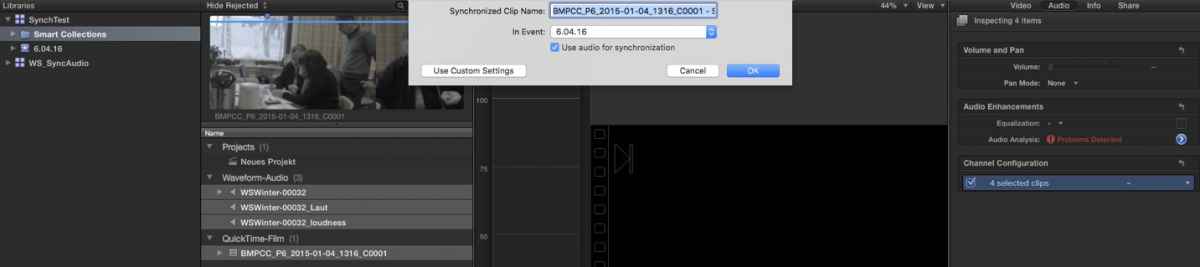
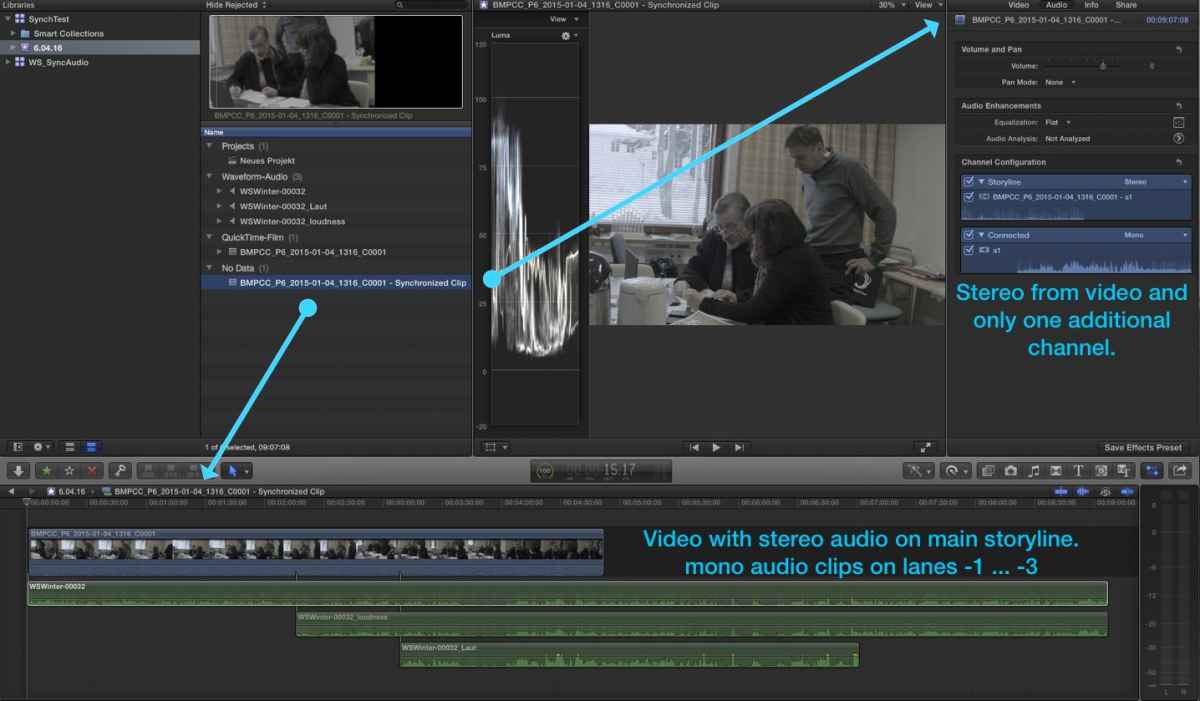
When I sync one video clip with stereo audio and three single channel audio clips I would expect a synchronized clip with 4 audio channels in the inspector.
But perhaps that´s a wrong assumption.
Actually FCPX is mixing the three mono channels in my example into one output channel (Connected - a1). So perhaps you are right. In my opinion an extremely strange behaviour but possibly not a bug.
Please Log in to join the conversation.
- Karsten Schlüter
-

- Offline
- Moderator
-
- Posts: 3790
- Thank you received: 718
nils.dettmann wrote: … When I sync one video clip with stereo audio and three single channel audio clips I would expect a synchronized clip with 4 audio channels in the inspector.
But perhaps that´s a wrong assumption...
because I'm a complete ignorant when it comes to audio, I would say, your assumption is wrong...

the Info about a clip NEVER displays the situation in the timeline... when I stack 15 lanes/tracks of audio to some clip, the Inspector still tells me stereo... or surround.
by synching you don't compound the audio tracks ... afaik.
poor FCPX tries best to spray all audio across the 2 (or 5) tracks the clip offers ...
so, 2 chanels stereo (source) and 4 chanels mono ... and you tell to synch the whole stuff, so basically, I would expect TWO 'lanes': the source stereo signal l/r, and snyched and mixed the 4 centered... (same l/r). due to 'non distructiveness' th source' native stereo signal is listed seperated from the snyched mix.
... in my humble stupidity... :blink:
Please Log in to join the conversation.
- Posts: 971
- Thank you received: 46
It is just a powerful compound clip if you like, and has the ability to switch to other angles is a by product of the nesting within the multi-cam, which I love, you can add or remove sources as you please, you can change the order of the angles, re-name the angles, I am sure that is what you need, up to 16 angles, if you need more, create a 2nd multi-cam, add angles, frustrating it does not drag and drop, if you do it overwrites the angle just above it, press the tiny arrow in the mulit-cam once you open it, press add angle, then add the new clip, which is called an angle, job done!
Just cvonfirmed you can set each audio to whatever you need, mono, stereo, left right, center, etc, it is a tiny project on it's own really, just use the , or . to move each clip into the right place frame by frame, then close the multi-cam.
Please Log in to join the conversation.
