


3 Post Moderation Rule for New Boarders (25 Jan 2021)
New boarders will have their posts moderated - Don't worry if you cannot see your post immediately.
How Is He Text Searching for Keywords?


20 Apr 2016 21:05 - 20 Apr 2016 23:19 #75764
by davechap
How Is He Text Searching for Keywords? was created by davechap
Thomas Grove Carter demoing some FCPX clip features. This is a great video, but some steps are skipped. I wish he toggled to list view to see what's in the notes field.
BUT: How is he searching for a keyword with text input? I'm thinking he typed the keywords into the notes field as well. He doesn't cover it and it makes you believe that keywords are searchable. Hmm... I'm dying to know how he searched for "wide" and "wheel" when they are shown as keyword collections but keyword collections can't be search that way.
BUT: How is he searching for a keyword with text input? I'm thinking he typed the keywords into the notes field as well. He doesn't cover it and it makes you believe that keywords are searchable. Hmm... I'm dying to know how he searched for "wide" and "wheel" when they are shown as keyword collections but keyword collections can't be search that way.
Last edit: 20 Apr 2016 23:19 by davechap.
Please Log in to join the conversation.
- Karsten Schlüter
-

- Offline
- Moderator
-

Less
More
- Posts: 3790
- Thank you received: 718
21 Apr 2016 04:50 #75769
by Karsten Schlüter
Replied by Karsten Schlüter on topic How Is He Text Searching for Keywords?
Thomas honors our lil' community with his membership, have you tried sending him a PM? 
www.fcp.co/community/thomasgcarter/profile
www.fcp.co/community/thomasgcarter/profile
Please Log in to join the conversation.
21 Apr 2016 05:02 #75770
by davechap
Replied by davechap on topic How Is He Text Searching for Keywords?
Thanks, Karsten. I thought about the direct message after I tweeted him. Didn't want to be the guy that hit him up everywhere. Haha
Please Log in to join the conversation.

21 Apr 2016 14:00 #75781
by jcmcnamee
Replied by jcmcnamee on topic How Is He Text Searching for Keywords?
Please report back with the answer, though!
Please Log in to join the conversation.
21 Apr 2016 14:26 - 21 Apr 2016 14:26 #75783
by davechap
Replied by davechap on topic How Is He Text Searching for Keywords?
Figured it out! Got some good info from him and he sent me a longer video. Watch it! Tons of great stuff:
vimeo.com/158641571
So here's the workflow...
Keyword Collections are used as an organizational tool at a high level as opposed to bins (something we all do really). But, keywords aren't searchable by text. So after the clips are grouped into Keyword Collections, you can select all the clips in a collection and modify the scene name to be the same name as the Keyword. So in the video where he has all of the wheel clips in the keyword Wheel, he also has the scene name as Wheel.
Sounds a little redundant until you do it. It's quite fast. Keep in mind, these aren't keyword ranges or meticulously keywords segments, these are just some high level grouping keywords. So it's very easy to add a scene, take, note on all clips at once.
So beyond that, he uses notes to tag items with fps or director/client notes.
This is actually how I've been working for a while. I was so excited to see someone else do things like this.
vimeo.com/158641571
So here's the workflow...
Keyword Collections are used as an organizational tool at a high level as opposed to bins (something we all do really). But, keywords aren't searchable by text. So after the clips are grouped into Keyword Collections, you can select all the clips in a collection and modify the scene name to be the same name as the Keyword. So in the video where he has all of the wheel clips in the keyword Wheel, he also has the scene name as Wheel.
Sounds a little redundant until you do it. It's quite fast. Keep in mind, these aren't keyword ranges or meticulously keywords segments, these are just some high level grouping keywords. So it's very easy to add a scene, take, note on all clips at once.
So beyond that, he uses notes to tag items with fps or director/client notes.
This is actually how I've been working for a while. I was so excited to see someone else do things like this.
Last edit: 21 Apr 2016 14:26 by davechap.
Please Log in to join the conversation.

21 Apr 2016 16:24 #75788
by VidGreg
Replied by VidGreg on topic How Is He Text Searching for Keywords?
Hey Dave
Thanks for posting the Vimeo link. Enjoyed seeing his workflow. Nice to see how others work.
Never thought about moving the connecting link for an exact point in audio (crescendo) and video. Always just used markers, connection point is so much easier/faster.
When he was making keywords, once you create one, no need to retype the keyword again, just use the number key or drag and drop. At least for me, I'd end up mistyping something and have an extra keyword collection.
All good stuff.
I'm sending the link to my daughter's boyfriend who is an Avid editor. Much better example of how fast/efficient FCPX can be, than what I could demonstrate.
Thanks for the follow up
Happy editing, Greg
Thanks for posting the Vimeo link. Enjoyed seeing his workflow. Nice to see how others work.
Never thought about moving the connecting link for an exact point in audio (crescendo) and video. Always just used markers, connection point is so much easier/faster.
When he was making keywords, once you create one, no need to retype the keyword again, just use the number key or drag and drop. At least for me, I'd end up mistyping something and have an extra keyword collection.
All good stuff.
I'm sending the link to my daughter's boyfriend who is an Avid editor. Much better example of how fast/efficient FCPX can be, than what I could demonstrate.
Thanks for the follow up
Happy editing, Greg
Please Log in to join the conversation.

- Karsten Schlüter
-
- Offline
- Moderator
-
Less
More
- Posts: 3790
- Thank you received: 718
22 Apr 2016 05:30 #75818
by Karsten Schlüter
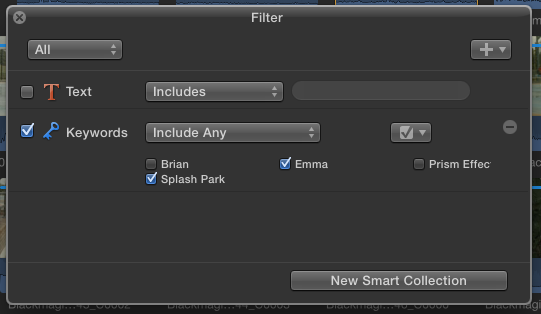
creating a smartlist is quite (very) different to that what Thomas demoes …
Replied by Karsten Schlüter on topic How Is He Text Searching for Keywords?
BenB wrote: Here's how I search for keywords....
creating a smartlist is quite (very) different to that what Thomas demoes …
Please Log in to join the conversation.
