


- Posts: 15
- Thank you received: 0
3 Post Moderation Rule for New Boarders (25 Jan 2021)
New boarders will have their posts moderated - Don't worry if you cannot see your post immediately.
sound problems when FCPX edit broadcast on TV
- sossy.deux@gmail.com
-
 Topic Author
- Offline
- New Member
-

Less
More
29 Apr 2016 20:38 #76244
by sossy.deux@gmail.com
Replied by sossy.deux@gmail.com on topic sound problems when FCPX edit broadcast on TV
Thanks for your input. Now they want me to redo the first 6 episodes on another app. I want to make sure it's really my fault before I do that...
Please Log in to join the conversation.


30 Apr 2016 01:33 - 30 Apr 2016 01:38 #76248
by Francois
Replied by Francois on topic sound problems when FCPX edit broadcast on TV
I know many specialist here are looking to trouble shoot the problem , but in the mean time I would try to deliver a Final Master to the spec of the broadcaster....
The tools:
1- compressor -> MXF 29.97 Xdcam HD 422
2- Telestream SWITCH plus (apple store) to insert and check subtitles ,
You can also playback the final Delivery MASTER displaying subtitles and check audio levels
"SRT converter" (apple store) can do subtitles conversion if needed but I did not test it on long productions.
Sometimes we are better served by ourself
The tools:
1- compressor -> MXF 29.97 Xdcam HD 422
2- Telestream SWITCH plus (apple store) to insert and check subtitles ,
You can also playback the final Delivery MASTER displaying subtitles and check audio levels
"SRT converter" (apple store) can do subtitles conversion if needed but I did not test it on long productions.
Sometimes we are better served by ourself
Last edit: 30 Apr 2016 01:38 by Francois.
Please Log in to join the conversation.

30 Apr 2016 03:34 #76249
by BenB
Replied by BenB on topic sound problems when FCPX edit broadcast on TV
Ronny and Sam Mestman need to just call these wads and set them straight.
Please Log in to join the conversation.


30 Apr 2016 03:40 #76251
by Redifer
Replied by Redifer on topic sound problems when FCPX edit broadcast on TV
This thread just got really good! I can't wait to see the outcome. I'm sure FCPX is not causing any of the issues. I don't even see how it possibly could.
Please Log in to join the conversation.
- sossy.deux@gmail.com
-
Topic Author
- Offline
- New Member
-
Less
More
- Posts: 15
- Thank you received: 0
04 May 2016 22:22 #76396
by sossy.deux@gmail.com
Replied by sossy.deux@gmail.com on topic sound problems when FCPX edit broadcast on TV
I sent you a sample of a master early this morning through WeTransfer. Hope you received it.
Please Log in to join the conversation.
- ronny courtens
-

- Offline
- Moderator
-

Less
More
- Posts: 4455
- Thank you received: 962
05 May 2016 05:58 #76405
by ronny courtens
Replied by ronny courtens on topic sound problems when FCPX edit broadcast on TV
Yes, I have received it. I'm in Spain for a few days now, we will test the file early next week.
- Ronny
- Ronny
Please Log in to join the conversation.
- sossy.deux@gmail.com
-
Topic Author
- Offline
- New Member
-
Less
More
- Posts: 15
- Thank you received: 0
05 May 2016 06:22 #76406
by sossy.deux@gmail.com
Replied by sossy.deux@gmail.com on topic sound problems when FCPX edit broadcast on TV
Awesome ! Hope you enjoy Spain .
Please Log in to join the conversation.
12 May 2016 22:34 #76663
by Redifer
Replied by Redifer on topic sound problems when FCPX edit broadcast on TV
Back yet, Ronny?
Please Log in to join the conversation.
- ronny courtens
-
- Offline
- Moderator
-
Less
More
- Posts: 4455
- Thank you received: 962
16 May 2016 09:04 #76755
by ronny courtens
Replied by ronny courtens on topic sound problems when FCPX edit broadcast on TV
Hey Marc,
Thank you for sending me the file. I have passed it through VidCheck QC hardware, and I don't see any issues with your master. Your overall levels are nicely within broadcast specs, and both the visual and the analytic QC passed without any problems.
Although this is totally unrelated to wether your file passes QC or not, I would like to give you a few little tips to enhance your mastering.
- Your video levels seem to clip at 100% NTSC values in the Red values. This is especially noticeable in the 3-shot plans:
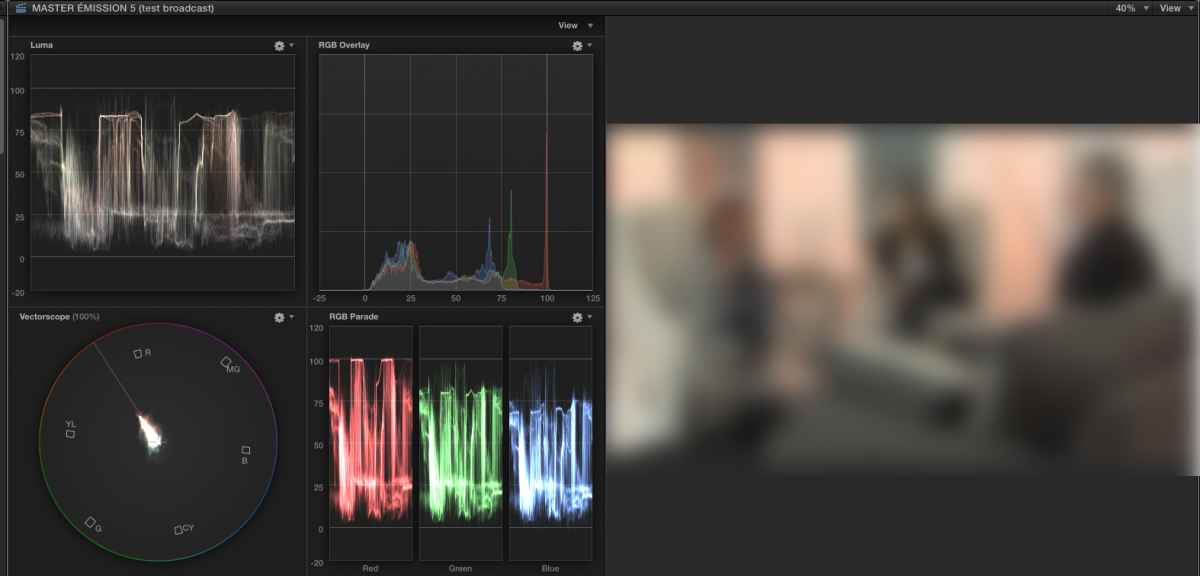
I would go somewhat easier on the video levels by dragging down the Exposure > Highlights puck in FCP X by 2%. This won't have any influence on the overall visual appearance, but it will prevent Red spill passing slightly over 100 in certain shots.
- I would also go a little easier on audio limiting and/or compression. Although you have correctly set your master max levels at -12dB, the audio sometimes peaks up to -11dB:
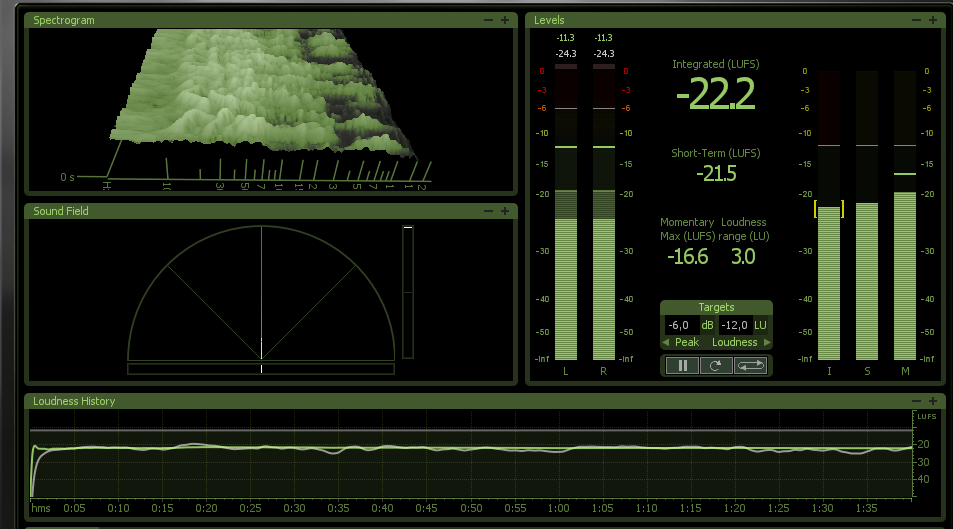
This can be solved by lowering the output gain on your limiter/compressor by 1 dB.
Again, this has nothing to do with your master not passing QC. It's just to make occasional spill and peaks completely fit within specs. Overall, there is no reason whatsoever why someone would have any trouble with this file.
That's why I think that, if there are indeed any issues with your final program, these issues have nothing to do with your master file but should be found further down the delivery line. However, if your broadcaster still remains adamant about FCP X being at the cause of any of this, their QC engineer is free to contact me so we can have a little personal chat about broadcast specifications and QC
- Ronny
Thank you for sending me the file. I have passed it through VidCheck QC hardware, and I don't see any issues with your master. Your overall levels are nicely within broadcast specs, and both the visual and the analytic QC passed without any problems.
Although this is totally unrelated to wether your file passes QC or not, I would like to give you a few little tips to enhance your mastering.
- Your video levels seem to clip at 100% NTSC values in the Red values. This is especially noticeable in the 3-shot plans:
I would go somewhat easier on the video levels by dragging down the Exposure > Highlights puck in FCP X by 2%. This won't have any influence on the overall visual appearance, but it will prevent Red spill passing slightly over 100 in certain shots.
- I would also go a little easier on audio limiting and/or compression. Although you have correctly set your master max levels at -12dB, the audio sometimes peaks up to -11dB:
This can be solved by lowering the output gain on your limiter/compressor by 1 dB.
Again, this has nothing to do with your master not passing QC. It's just to make occasional spill and peaks completely fit within specs. Overall, there is no reason whatsoever why someone would have any trouble with this file.
That's why I think that, if there are indeed any issues with your final program, these issues have nothing to do with your master file but should be found further down the delivery line. However, if your broadcaster still remains adamant about FCP X being at the cause of any of this, their QC engineer is free to contact me so we can have a little personal chat about broadcast specifications and QC
- Ronny
Please Log in to join the conversation.
- sossy.deux@gmail.com
-
Topic Author
- Offline
- New Member
-
Less
More
- Posts: 15
- Thank you received: 0
17 May 2016 05:15 #76818
by sossy.deux@gmail.com
Replied by sossy.deux@gmail.com on topic sound problems when FCPX edit broadcast on TV
Hi Ronney,
thanks for checking my file and for giving me good advice also. I will relay your review of the file to the station for which I edit this show. It's looking more and more like the problem occurs when the broadcaster mixes the master with the SCC (closed caption) file.
When I started editing a few years ago, I had no idea how multifaceted and complex editing was. I love it still and I'm very happy there is a community like this one that can help me and others learn and grow.
Thanks again.
thanks for checking my file and for giving me good advice also. I will relay your review of the file to the station for which I edit this show. It's looking more and more like the problem occurs when the broadcaster mixes the master with the SCC (closed caption) file.
When I started editing a few years ago, I had no idea how multifaceted and complex editing was. I love it still and I'm very happy there is a community like this one that can help me and others learn and grow.
Thanks again.
Please Log in to join the conversation.
