


- Posts: 46
- Thank you received: 0
3 Post Moderation Rule for New Boarders (25 Jan 2021)
New boarders will have their posts moderated - Don't worry if you cannot see your post immediately.
Another Re-Linking Thread...But a Little Different
18 Apr 2016 14:04 #75538
by talonhead
Another Re-Linking Thread...But a Little Different was created by talonhead
Hey guys. I really need to cry out for outside help on this one. For good or for bad, let me preface this issue with what caused my problem.
I replaced a HD in my MacPro with a larger one. This holds my media (not all) that FC references. I copied the entire drive of the old one, and threw it onto the new drive...all within the machine. I also re-named the drive differently than what the old one was named.
So, you know what happened next. A ton of files went rogue in a few libraries. No problem! I'll just re-link everything and all will be good with the world...right? Nope.
I try to re-link and get the same dreaded error message "no shared media range". I tried to re-link a single file to find out why my files are no longer "compatible" and it basically tells me that the new file has audio...the old one did not. So thus, it's not going to re-link to this so-called "different" file. WTF?
Sure, I can re-import my media...no problem! But I lose my edits (rather not do that). I've searched and searched on this and didn't really come up with anything applicable to my case. Odd thing also, I've tried FCPXchange and the XML file exported (and then opened in FCPXchange), doesn't even say anything about any missing files at all in the particular project I'm checking out. Hmm.
Incidentally, for a goof, I re-imported those files (to confirm that I would lose my project edits) and they, as they should, showed up in the Event browser. I close FC and re-open, and the files are all gone in the browser. Huh?? This has gotten really crazy.
Hey, I know! Fix the problem and use Time Machine to find some backups? I can't do that because "conveniently" I replaced the backup drive as well...started out with a fresh drive...all backups gone. Why would I need those anymore, right??? Of course, I didn't know there would be problems downstream at the time I replaced the TM backup drive. Ugh...live and learn.
I'm using v10.2.2
Any ideas on what I can do to save hours of work in these projects? All in all, it basically seems that when I copied all of the older Drive A over to the newer Drive B, it "changed" the files enough to alert FC that it's a "different" file? I don't know what's going on.
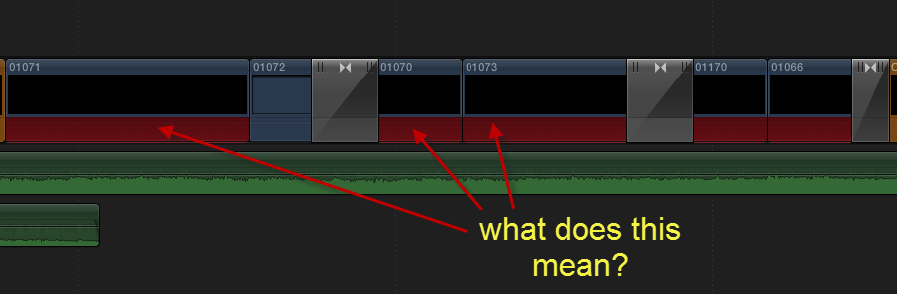
An interesting side note, see attached screenshot. The clips in the Timeline have the red, but not the exclamation point. Not sure what that means?
ANY thoughts will be appreciated guys! I thank you for your time.
I replaced a HD in my MacPro with a larger one. This holds my media (not all) that FC references. I copied the entire drive of the old one, and threw it onto the new drive...all within the machine. I also re-named the drive differently than what the old one was named.
So, you know what happened next. A ton of files went rogue in a few libraries. No problem! I'll just re-link everything and all will be good with the world...right? Nope.
I try to re-link and get the same dreaded error message "no shared media range". I tried to re-link a single file to find out why my files are no longer "compatible" and it basically tells me that the new file has audio...the old one did not. So thus, it's not going to re-link to this so-called "different" file. WTF?
Sure, I can re-import my media...no problem! But I lose my edits (rather not do that). I've searched and searched on this and didn't really come up with anything applicable to my case. Odd thing also, I've tried FCPXchange and the XML file exported (and then opened in FCPXchange), doesn't even say anything about any missing files at all in the particular project I'm checking out. Hmm.
Incidentally, for a goof, I re-imported those files (to confirm that I would lose my project edits) and they, as they should, showed up in the Event browser. I close FC and re-open, and the files are all gone in the browser. Huh?? This has gotten really crazy.
Hey, I know! Fix the problem and use Time Machine to find some backups? I can't do that because "conveniently" I replaced the backup drive as well...started out with a fresh drive...all backups gone. Why would I need those anymore, right??? Of course, I didn't know there would be problems downstream at the time I replaced the TM backup drive. Ugh...live and learn.
I'm using v10.2.2
Any ideas on what I can do to save hours of work in these projects? All in all, it basically seems that when I copied all of the older Drive A over to the newer Drive B, it "changed" the files enough to alert FC that it's a "different" file? I don't know what's going on.
An interesting side note, see attached screenshot. The clips in the Timeline have the red, but not the exclamation point. Not sure what that means?
ANY thoughts will be appreciated guys! I thank you for your time.
Please Log in to join the conversation.

18 Apr 2016 14:36 #75542
by BenB
Replied by BenB on topic Another Re-Linking Thread...But a Little Different
First, to improve system performance, keep all Libraries and media on a secondary drive, not the system drive. I'd have used Carbon Copy Cloner, clone the old drive, rebuild the new one with the same name. Why change the name?
But at this point... geez, I dunno. Romney!!!!!
But at this point... geez, I dunno. Romney!!!!!
Please Log in to join the conversation.
18 Apr 2016 14:43 #75545
by talonhead
Replied by talonhead on topic Another Re-Linking Thread...But a Little Different
I agree. I use two scratch drives for libraries and media. I never did say I replaced a system drive. It was all good. Cloning a drive wasn't really necessary for simple file moving.
Like I had said, for good or for bad, this is what I did. Should've could've would've doesn't really work the problem. Thanks though brother.
Like I had said, for good or for bad, this is what I did. Should've could've would've doesn't really work the problem.
Thanks though brother. Please Log in to join the conversation.
18 Apr 2016 15:20 #75546
by BenB
Replied by BenB on topic Another Re-Linking Thread...But a Little Different
Ah, older MP, that holds 4 drives, ok, got it. I was thinking the new MP with only system drive inside. And yes, there is a larger replacement drive for that.
Show Contents of the Library. There is a database file in there. Not at a workstation now. But I think it's like .flexo...something. Try moving that out of there. Don't delete it, you may need to put it back. But move it out, as I seem to remember doing this some time ago, and FCPX connected to stuff. Give it a try. If not, put it back in place.
Show Contents of the Library. There is a database file in there. Not at a workstation now. But I think it's like .flexo...something. Try moving that out of there. Don't delete it, you may need to put it back. But move it out, as I seem to remember doing this some time ago, and FCPX connected to stuff. Give it a try. If not, put it back in place.
Please Log in to join the conversation.
18 Apr 2016 15:27 #75547
by talonhead
Replied by talonhead on topic Another Re-Linking Thread...But a Little Different
The new MP? No sir. I'm a poor boy. lol Anyway, the closest to what you've described is a file name "CurrentVersion.flexolibrary".
Thoughts?
Thoughts?
Please Log in to join the conversation.


18 Apr 2016 16:28 #75552
by tangierc
Replied by tangierc on topic Another Re-Linking Thread...But a Little Different
So I'll chime in here. FCP X Sym Links are pretty powerful so I can't quite get why that didn't work for you. I would redo the copy of the original content using CCC as stated above or use Decimus Synk which I rely on heavily; particularly with library and library contents to insure that they are in fact identical.
Here's some basics that may:
Make sure the new drive has the same volume name and the permission are the same.
Get the free version of Decimus synk and sync what you've copied over after copying just to make sure.
There should be no structural change in your video files.
If you're having problems still, trash the preferences for FCP X in your user library. I know that seems like a non issue, but sometimes there are prefs that have effects on things your would think they would. Case in point - I just had what I thought was a serious graphics card issue on an iMac 5K Retina. Blocky glitches all over the screen and I couldn't get a project to function. I trashed the FCP X prefs and all was fine.
Here's some basics that may:
Make sure the new drive has the same volume name and the permission are the same.
Get the free version of Decimus synk and sync what you've copied over after copying just to make sure.
There should be no structural change in your video files.
If you're having problems still, trash the preferences for FCP X in your user library. I know that seems like a non issue, but sometimes there are prefs that have effects on things your would think they would. Case in point - I just had what I thought was a serious graphics card issue on an iMac 5K Retina. Blocky glitches all over the screen and I couldn't get a project to function. I trashed the FCP X prefs and all was fine.
Please Log in to join the conversation.
Less
More
- Posts: 971
- Thank you received: 46
18 Apr 2016 16:49 #75554
by MsJustine
Replied by MsJustine on topic Another Re-Linking Thread...But a Little Different
I sent a question about this to Apple Dev team, and does anyone know if there is an official Apple FCPX 10.2.x series pdf online at Apple.com?
The only one I could find was for 10.1.2..
The only one I could find was for 10.1.2..
Please Log in to join the conversation.
18 Apr 2016 18:31 #75564
by BenB
Replied by BenB on topic Another Re-Linking Thread...But a Little Different
Updated user manuals have always been online.
finalcutprox.guru/support/supportlinks/
finalcutprox.guru/support/supportlinks/
Please Log in to join the conversation.
Less
More
- Posts: 971
- Thank you received: 46
18 Apr 2016 18:35 - 18 Apr 2016 18:37 #75565
by MsJustine
Replied by MsJustine on topic Another Re-Linking Thread...But a Little Different
Thanks Ben,
I have the user guide, now do I download and save it locally for when the interwebs goes down, as it does often here?
I mean the 1500 page version, the guide you linked to is 690 pages.
Justine
I have the user guide, now do I download and save it locally for when the interwebs goes down, as it does often here?
I mean the 1500 page version, the guide you linked to is 690 pages.
Justine
Last edit: 18 Apr 2016 18:37 by MsJustine.
Please Log in to join the conversation.
- MarkNelsonMovies
-

- Offline
- Elite Member
-

Less
More
- Posts: 256
- Thank you received: 48
18 Apr 2016 18:41 #75566
by MarkNelsonMovies
Replied by MarkNelsonMovies on topic Another Re-Linking Thread...But a Little Different
I think your only option for the getting newer guides offline is the ebook from the iBooks store, for Mac or iOS.
Please Log in to join the conversation.
- nils.dettmann
-
- Offline
- Elite Member
-
Less
More
- Posts: 161
- Thank you received: 13
18 Apr 2016 19:22 #75573
by nils.dettmann
Replied by nils.dettmann on topic Another Re-Linking Thread...But a Little Different
To the OP:
Does his happen to all of your libraries?
All files that were on the exchanged drive?
Are you owner of all files on the exchanged drive? If not that can also lead to crazy errors.
If you open the clips with the black picture and the red audio in the timeline, does it pretend to be knowing where the video is?
Does his happen to all of your libraries?
All files that were on the exchanged drive?
Are you owner of all files on the exchanged drive? If not that can also lead to crazy errors.
If you open the clips with the black picture and the red audio in the timeline, does it pretend to be knowing where the video is?
Please Log in to join the conversation.
18 Apr 2016 19:24 #75574
by talonhead
Replied by talonhead on topic Another Re-Linking Thread...But a Little Different
What does locating an online manual have to do with this thread? C'mon Justine! You know better'n that.
Please Log in to join the conversation.
Less
More
- Posts: 971
- Thank you received: 46
18 Apr 2016 19:26 #75576
by MsJustine
Replied by MsJustine on topic Another Re-Linking Thread...But a Little Different
I was trying to find the answer to the question posted in the attached graphic..The red areas on the video clips...I wanted to see if there was something in the 1500+page manual about it, the user guide is useless!!
Please Log in to join the conversation.
- MarkNelsonMovies
-
- Offline
- Elite Member
-
Less
More
- Posts: 256
- Thank you received: 48
18 Apr 2016 19:32 #75577
by MarkNelsonMovies
Replied by MarkNelsonMovies on topic Another Re-Linking Thread...But a Little Different
I'm pretty sure the red bars in the screenshot are supposed to mead that the audio file format is not readable by FCPX, I had red bars show up like that when an audio file got corrupted. I ended up fixing it by renaming the source file from the camera, then re-linking to a copy of that, and then consolidating the files.
Please Log in to join the conversation.

18 Apr 2016 19:32 #75578
by VidGreg
Replied by VidGreg on topic Another Re-Linking Thread...But a Little Different
MsJ
Here is the link for Professional Apple User Manuals either Web or iBooks… support.apple.com/manuals/professionalsoftware
Last version for FCPX 10.2 1,992 pages April 9, 2015
Soon to be replaced I hope with 10.3
You can also find all the ProApp manuals and older manuals.
Hope this helps, Greg
Here is the link for Professional Apple User Manuals either Web or iBooks… support.apple.com/manuals/professionalsoftware
Last version for FCPX 10.2 1,992 pages April 9, 2015
Soon to be replaced I hope with 10.3
You can also find all the ProApp manuals and older manuals.
Hope this helps, Greg
Please Log in to join the conversation.
18 Apr 2016 19:36 #75579
by talonhead
Replied by talonhead on topic Another Re-Linking Thread...But a Little Different
No sir. Not all libraries...but many. Wild eh? Hit and miss.
Yes...it pretends to know where the file is. But you did make me have an idea though. The red stripe (meaning no audio) matches to what FC says is the problem with the "new" file...the "new" file has audio, but the original did not...which is completely not true.
Yes...I should be owner of all the files.
Yes...it pretends to know where the file is. But you did make me have an idea though. The red stripe (meaning no audio) matches to what FC says is the problem with the "new" file...the "new" file has audio, but the original did not...which is completely not true.
Yes...I should be owner of all the files.
Please Log in to join the conversation.
Less
More
- Posts: 971
- Thank you received: 46
18 Apr 2016 19:38 #75580
by MsJustine
Replied by MsJustine on topic Another Re-Linking Thread...But a Little Different
It says user guide, but anyway, ibooks for some reason now says there is an update, the last 10 times I went to that very location, no update, I don't know, ibooks is just lame!!
Thank you anyway, I will soon in 50 minutes know if it is the same 600 pages I already have or the 2000 page version I do not have...
Thank you anyway, I will soon in 50 minutes know if it is the same 600 pages I already have or the 2000 page version I do not have...
Please Log in to join the conversation.
18 Apr 2016 19:39 #75581
by talonhead
Replied by talonhead on topic Another Re-Linking Thread...But a Little Different
Ahh...I pretty much figured that it would lead to nowhere...but I appreciate it! Sounds like we found a hole, eh?
Please Log in to join the conversation.
18 Apr 2016 19:45 #75583
by talonhead
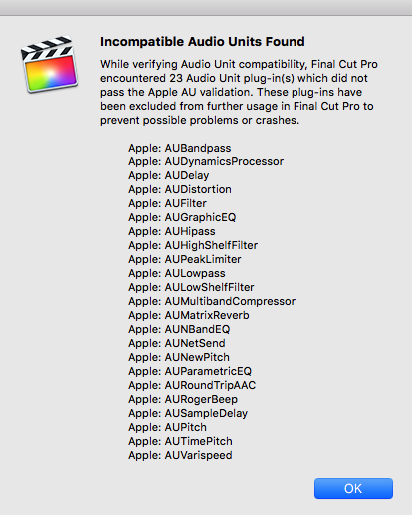
Hmm...that's interesting. Because now that I, for a goof, changed the permissions to "read and write" at all levels (system, admin, and everyone), when opening up FC, I get an Info window popping up. See attached. Clicking "OK" brings me to FC...then it crashes.
So now, I can't even open the program. We must be getting closer. lol
Replied by talonhead on topic Another Re-Linking Thread...But a Little Different
MarkNelsonMovies wrote: I'm pretty sure the red bars in the screenshot are supposed to mead that the audio file format is not readable by FCPX, I had red bars show up like that when an audio file got corrupted. I ended up fixing it by renaming the source file from the camera, then re-linking to a copy of that, and then consolidating the files.
Hmm...that's interesting. Because now that I, for a goof, changed the permissions to "read and write" at all levels (system, admin, and everyone), when opening up FC, I get an Info window popping up. See attached. Clicking "OK" brings me to FC...then it crashes.
So now, I can't even open the program. We must be getting closer. lol
Please Log in to join the conversation.
- MarkNelsonMovies
-
- Offline
- Elite Member
-
Less
More
- Posts: 256
- Thank you received: 48
18 Apr 2016 19:52 #75584
by MarkNelsonMovies
Replied by MarkNelsonMovies on topic Another Re-Linking Thread...But a Little Different
did you try moving the 'CurrentVersion.flexolibrary' file to a temporary holding folder outside the library bundle like Ben suggested?
Please Log in to join the conversation.
