


- Posts: 9
- Thank you received: 1
3 Post Moderation Rule for New Boarders (25 Jan 2021)
New boarders will have their posts moderated - Don't worry if you cannot see your post immediately.
backUp Custom Metadata Views
- craig.russill-roy
-
 Topic Author
- Offline
- New Member
-

Less
More
17 Apr 2016 15:49 #75498
by craig.russill-roy
backUp Custom Metadata Views was created by craig.russill-roy
Hi Guys,
Is there a way to backup and move custom metadata fields between FCPX systems ?
I have a few custom views and I want this to be shared with a co-worker - I have searched everywhere on where this can be saved, any direction would be great !
Is there a way to backup and move custom metadata fields between FCPX systems ?
I have a few custom views and I want this to be shared with a co-worker - I have searched everywhere on where this can be saved, any direction would be great !
Please Log in to join the conversation.
- ronny courtens
-

- Offline
- Moderator
-

Less
More
- Posts: 4455
- Thank you received: 962
17 Apr 2016 18:22 #75509
by ronny courtens
Replied by ronny courtens on topic backUp Custom Metadata Views
Hey Craig,
I have tried everything, from sending XMLs over from one system to the other, to copying an entire Library from one system to another. None of this has resulted in getting the custom view I created on one machine to show up on the other. This makes me suspect custom metadata view information is stored inside the FCP X application bundle. But so far I haven't found it.
I will contact a help-line and get back to you as soon as I have more news.
- Ronny
I have tried everything, from sending XMLs over from one system to the other, to copying an entire Library from one system to another. None of this has resulted in getting the custom view I created on one machine to show up on the other. This makes me suspect custom metadata view information is stored inside the FCP X application bundle. But so far I haven't found it.
I will contact a help-line and get back to you as soon as I have more news.
- Ronny
Please Log in to join the conversation.
- Tom Wolsky
-

- Offline
- Moderator
-
17 Apr 2016 18:26 #75510
by Tom Wolsky
Replied by Tom Wolsky on topic backUp Custom Metadata Views
What's odd is that if you try and save another view with the same name you get a warning asking if you want to replace the existing one. So it's somewhere I suppose. It has to be embedded inside a file somewhere.
Please Log in to join the conversation.
- ronny courtens
-
- Offline
- Moderator
-
Less
More
- Posts: 4455
- Thank you received: 962
17 Apr 2016 18:50 #75511
by ronny courtens
Replied by ronny courtens on topic backUp Custom Metadata Views
That's correct, Tom. It's not stored inside the Library database, because when you create a new Library and you close the Library where you created the custom view, the custom view is also available in the new Library.
It is contained in an exported XML:

But when you import the XML on another FCP X station, the custom view is not available. Will have to look further into this.
- Ronny
It is contained in an exported XML:
But when you import the XML on another FCP X station, the custom view is not available. Will have to look further into this.
- Ronny
Please Log in to join the conversation.

17 Apr 2016 20:12 #75513
by FernKraft
Replied by FernKraft on topic backUp Custom Metadata Views
if it helps, I found reference to metadata views in the "com.apple.finalcut.plist" file that is found in the "User"-Library-Preferences. But otherwise, I know nothing.
(i find it great that I was just looking into this today, the collective FCPX minds must be on similar trains of thought)
(i find it great that I was just looking into this today, the collective FCPX minds must be on similar trains of thought)
Please Log in to join the conversation.
- Tom Wolsky
-
- Offline
- Moderator
-
17 Apr 2016 20:17 #75515
by Tom Wolsky
Replied by Tom Wolsky on topic backUp Custom Metadata Views
Probably risky because there's too much stuff in the plist but you could test by swapping it between machines.
Please Log in to join the conversation.
17 Apr 2016 20:30 #75516
by FernKraft
Replied by FernKraft on topic backUp Custom Metadata Views
it's also worth noting is that a temporary and separate plist file shows up in that folder with every click in FCPX, and the original plist file is made anew with every close and open of FCPX.
I know nothing about coding and operating systems at this level, so at this point it's still magical to me.
I know nothing about coding and operating systems at this level, so at this point it's still magical to me.
Please Log in to join the conversation.
- ronny courtens
-
- Offline
- Moderator
-
Less
More
- Posts: 4455
- Thank you received: 962
17 Apr 2016 21:35 #75518
by ronny courtens
Replied by ronny courtens on topic backUp Custom Metadata Views
Well, gentlemen: that is already one working solution.
I have replaced the com.apple.FinalCut.plist from system 2 with a duplicate of the .plist from system 1 where I had created some custom Metadata Views and low and behold: the custom Metadata Views are now available on both systems.
There is no risk in replacing a .plist because even if you delete the .plist from the User/Library/ it gets rebuilt as soon as you launch FCP X. The only caveat is that you may not want every single preference being transferred from one system onto the other, unless both systems are absolutely identical and both users want to have the same user preferences.
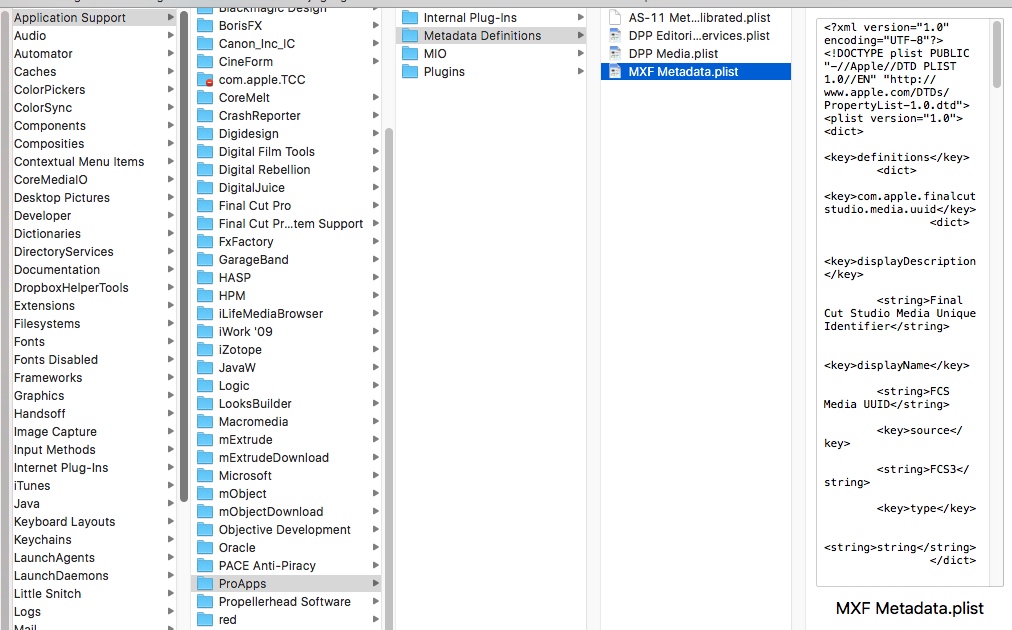
So I have asked Philip Hodgetts to help me out on this. We have already found a place where custom metadata views are stored: Macintosh>Library>Aplication Support>ProApps>Metadata Definitions. But this folder only contains special MXF metadata views that were installed on this system together with the AS-11 DPP MXF plugins from Hamburg Media Pro a few years ago. The custom views I created today are not inside this folder:
We will keep investigating, but already many thanks for suggesting the com.apple.FinalCut.plist. If we don't find any specific location where these views are stored, this may be the fastest way to transfer custom views across different machines.
- Ronny
I have replaced the com.apple.FinalCut.plist from system 2 with a duplicate of the .plist from system 1 where I had created some custom Metadata Views and low and behold: the custom Metadata Views are now available on both systems.
There is no risk in replacing a .plist because even if you delete the .plist from the User/Library/ it gets rebuilt as soon as you launch FCP X. The only caveat is that you may not want every single preference being transferred from one system onto the other, unless both systems are absolutely identical and both users want to have the same user preferences.
So I have asked Philip Hodgetts to help me out on this. We have already found a place where custom metadata views are stored: Macintosh>Library>Aplication Support>ProApps>Metadata Definitions. But this folder only contains special MXF metadata views that were installed on this system together with the AS-11 DPP MXF plugins from Hamburg Media Pro a few years ago. The custom views I created today are not inside this folder:
We will keep investigating, but already many thanks for suggesting the com.apple.FinalCut.plist. If we don't find any specific location where these views are stored, this may be the fastest way to transfer custom views across different machines.
- Ronny
Please Log in to join the conversation.
- Tom Wolsky
-
- Offline
- Moderator
-
17 Apr 2016 21:45 #75519
by Tom Wolsky
Replied by Tom Wolsky on topic backUp Custom Metadata Views
Sometimes when transferring plists between completely different systems the launch process can get hung up. The solution for which of course is to trash your preferences, i.e. the plist.
Please Log in to join the conversation.
- ronny courtens
-
- Offline
- Moderator
-
Less
More
- Posts: 4455
- Thank you received: 962
17 Apr 2016 21:49 #75520
by ronny courtens
Replied by ronny courtens on topic backUp Custom Metadata Views
Correct, that's why I'm still afraid of advising this as a workflow. But if everything else fails, it's something that can be tried. If you first put the existing .plist in a folder on the desktop, you always can put it back if the replacing method does not work.
- Ronny
- Ronny
Please Log in to join the conversation.
- craig.russill-roy
-
Topic Author
- Offline
- New Member
-
Less
More
- Posts: 9
- Thank you received: 1
17 Apr 2016 22:20 #75521
by craig.russill-roy
Replied by craig.russill-roy on topic backUp Custom Metadata Views
thanks guys this is why i love fcp.co and all the clever clogs we have ! thank you guys great starting point - i was offf looking for a ruby db as in fcp server !!!
Please Log in to join the conversation.
- nils.dettmann
-
- Offline
- Elite Member
-

Less
More
- Posts: 161
- Thank you received: 13
18 Apr 2016 08:56 - 18 Apr 2016 13:46 #75527
by nils.dettmann
Replied by nils.dettmann on topic backUp Custom Metadata Views
I looked into the com.apple.FinalCut.plist with XCode.
There is a field called "metadataViews" which changes whenever I change something in the metadata views.
(I think the value is written on closing FCPX)
Unfortunately it is a really long entry not natively readable. I tried to convert it but didn´t succeed. Perhaps someone with a little more insight in programming can look into this and tell us the type of data in this field.
I think without understanding this value there is no exporting of custom metadata views made from within FCPX.
As Ronny pointed out there are external metadata views.
You can write your own metadata view and place it either in
Macintosh>Library>Aplication Support>ProApps>Metadata Definitions
or in
User>Library>Aplication Support>ProApps>Metadata Definitions
So just create a file "My_Custom_MetadataView.plist"
with content:
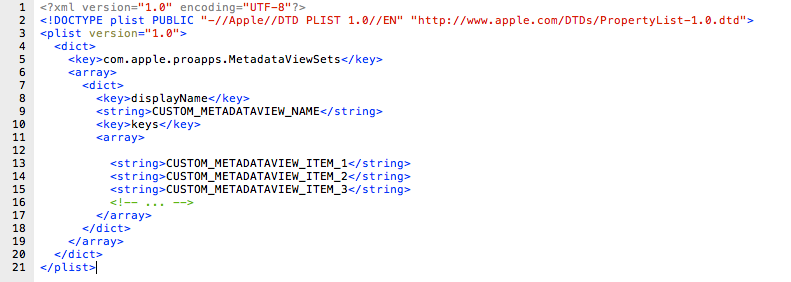
The CUSTOM_METADATAVIEW_ITEMs are in the format:
com.apple.proapps.studio.reel
com.apple.proapps.studio.scene
com.apple.proapps.studio.metadataRoles
...
I tried it and it worked. Unfortunately there is no easy overview of all the metadata types available.
So it´s a little bit of trial and error.
A starting point for metadata items is:
Editable metadata keys
and
Metdata Sources
I tried to trick FCPX to make a list of available metadatakeys myself:
I created a custom metadata view - "My_Custom_MetadataView.plist" in the way above, opened it in the FCPX metadata view editor and checked all the available items.
Unfortunately FCPX doesn´t change the plist I created but instead stores the changes in in the com.apple.FinalCut.plist effectively overwriting the "My_Custom_MetadataView.plist"
There is a field called "metadataViews" which changes whenever I change something in the metadata views.
(I think the value is written on closing FCPX)
Unfortunately it is a really long entry not natively readable. I tried to convert it but didn´t succeed. Perhaps someone with a little more insight in programming can look into this and tell us the type of data in this field.
I think without understanding this value there is no exporting of custom metadata views made from within FCPX.
As Ronny pointed out there are external metadata views.
You can write your own metadata view and place it either in
Macintosh>Library>Aplication Support>ProApps>Metadata Definitions
or in
User>Library>Aplication Support>ProApps>Metadata Definitions
So just create a file "My_Custom_MetadataView.plist"
with content:
The CUSTOM_METADATAVIEW_ITEMs are in the format:
com.apple.proapps.studio.reel
com.apple.proapps.studio.scene
com.apple.proapps.studio.metadataRoles
...
I tried it and it worked. Unfortunately there is no easy overview of all the metadata types available.
So it´s a little bit of trial and error.
A starting point for metadata items is:
Editable metadata keys
and
Metdata Sources
I tried to trick FCPX to make a list of available metadatakeys myself:
I created a custom metadata view - "My_Custom_MetadataView.plist" in the way above, opened it in the FCPX metadata view editor and checked all the available items.
Unfortunately FCPX doesn´t change the plist I created but instead stores the changes in in the com.apple.FinalCut.plist effectively overwriting the "My_Custom_MetadataView.plist"
Last edit: 18 Apr 2016 13:46 by nils.dettmann. Reason: Correcting last phrase
Please Log in to join the conversation.
- craig.russill-roy
-
Topic Author
- Offline
- New Member
-
Less
More
- Posts: 9
- Thank you received: 1
18 Apr 2016 18:59 #75570
by craig.russill-roy
Replied by craig.russill-roy on topic backUp Custom Metadata Views
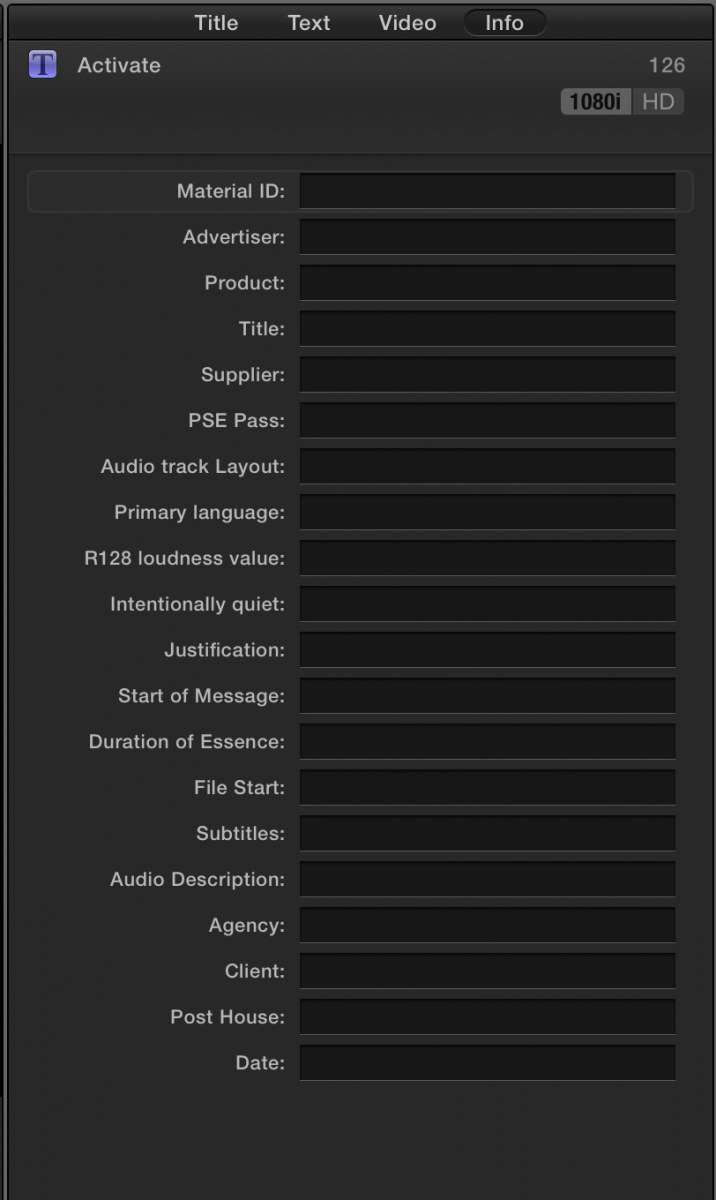
Fantastic, I managed to knock up this plist but it isn't coming up in the Metadata field,
Please Log in to join the conversation.
- nils.dettmann
-
- Offline
- Elite Member
-
Less
More
- Posts: 161
- Thank you received: 13
18 Apr 2016 19:11 - 18 Apr 2016 19:11 #75571
by nils.dettmann
Replied by nils.dettmann on topic backUp Custom Metadata Views
Which metadata field, where?
Last edit: 18 Apr 2016 19:11 by nils.dettmann.
Please Log in to join the conversation.
- craig.russill-roy
-
Topic Author
- Offline
- New Member
-
Less
More
- Posts: 9
- Thank you received: 1
18 Apr 2016 19:44 #75582
by craig.russill-roy
Replied by craig.russill-roy on topic backUp Custom Metadata Views
Hey !
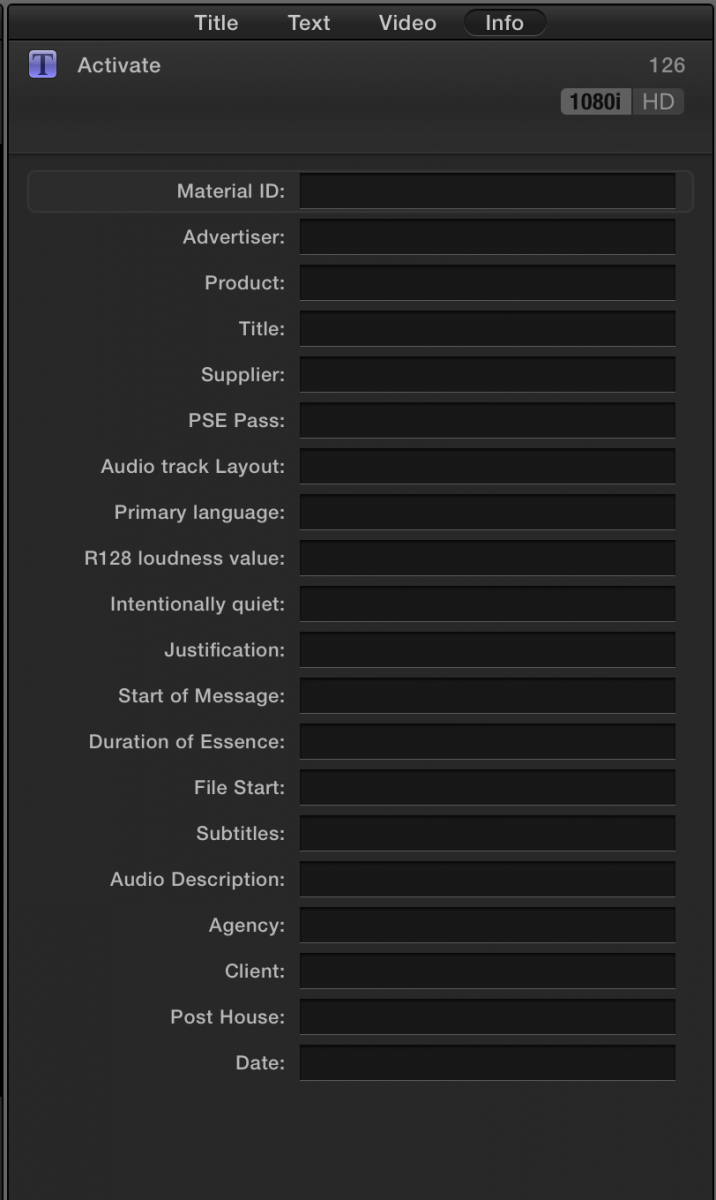
SO i tried your neat plist and this didnt show up in the Metadata fields, I am trying to use your concept and turn it into the manual fields I have done here
So I was hoping that with the script you started i could work out the rest and end up with the attached Screengrab ...
Are you saying if you follow
<?xml version="1.0" encoding="UTF-8"?>
<!DOCTYPE plist PUBLIC "-//Apple//DTD PLIST 1.0//EN" " www.apple.com/DTDs/propertyList-1.0.dtd ">
<plist version="1.0"
<dict>
<key>com.apple.proapps.MetadataViewSets</key>
<array>
<dict>
<key>displayName</key>
<string>CUSTOM_METADATAVIEW_NAME</string>
<key>keys</key>
<array>
<string>CUSTOM_METADATAVIEW_ITEAM_1</string>
<string>CUSTOM_METADATAVIEW_ITEAM_2</string>
<string>CUSTOM_METADATAVIEW_ITEAM_3</string>
<!-- ... -->
</array>
</dict>
</array>
</dict>
</plist>
SO i tried your neat plist and this didnt show up in the Metadata fields, I am trying to use your concept and turn it into the manual fields I have done here
So I was hoping that with the script you started i could work out the rest and end up with the attached Screengrab ...
Are you saying if you follow
<?xml version="1.0" encoding="UTF-8"?>
<!DOCTYPE plist PUBLIC "-//Apple//DTD PLIST 1.0//EN" " www.apple.com/DTDs/propertyList-1.0.dtd ">
<plist version="1.0"
<dict>
<key>com.apple.proapps.MetadataViewSets</key>
<array>
<dict>
<key>displayName</key>
<string>CUSTOM_METADATAVIEW_NAME</string>
<key>keys</key>
<array>
<string>CUSTOM_METADATAVIEW_ITEAM_1</string>
<string>CUSTOM_METADATAVIEW_ITEAM_2</string>
<string>CUSTOM_METADATAVIEW_ITEAM_3</string>
<!-- ... -->
</array>
</dict>
</array>
</dict>
</plist>
Please Log in to join the conversation.
- nils.dettmann
-
- Offline
- Elite Member
-
Less
More
- Posts: 161
- Thank you received: 13
18 Apr 2016 19:54 #75585
by nils.dettmann
Replied by nils.dettmann on topic backUp Custom Metadata Views
You can define custom metadata fields in the external plist.
I don´t know if it is possible to reference custom metadata fields defined from within FCPX in an external plist.
The syntax for defining custom metadata fields in the external plist you can find:
Defining Custom Metadata Fields
I´ll try it myself later...
I don´t know if it is possible to reference custom metadata fields defined from within FCPX in an external plist.
The syntax for defining custom metadata fields in the external plist you can find:
Defining Custom Metadata Fields
I´ll try it myself later...
Please Log in to join the conversation.
- nils.dettmann
-
- Offline
- Elite Member
-
Less
More
- Posts: 161
- Thank you received: 13
18 Apr 2016 20:28 - 18 Apr 2016 20:31 #75590
by nils.dettmann
Replied by nils.dettmann on topic backUp Custom Metadata Views
Okay, it works.
If you structure your plist like that:
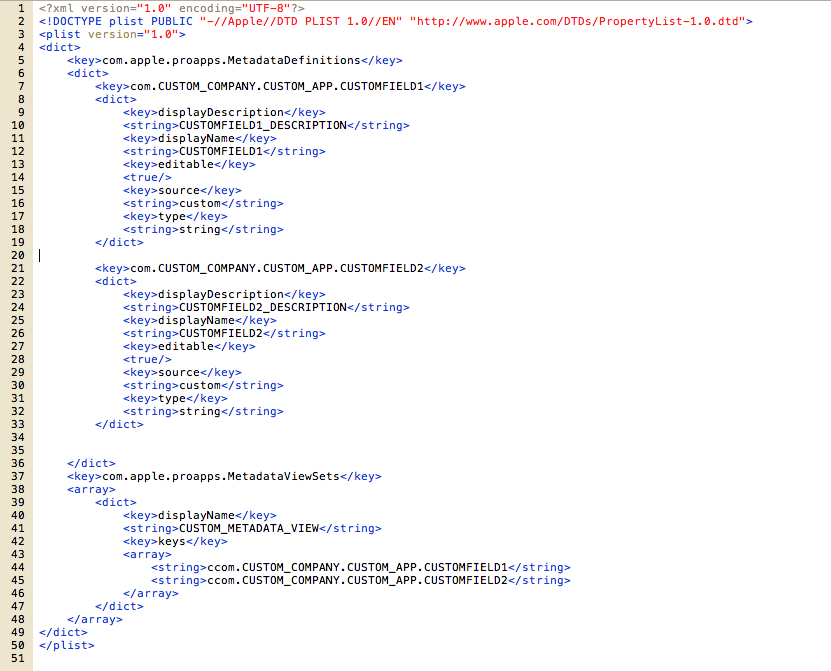
you should be able to set up custom views with custom fields.
In the link I posted before the tag "editable" was missing in the example. Without that the fields are read-only.
If you structure your plist like that:
you should be able to set up custom views with custom fields.
In the link I posted before the tag "editable" was missing in the example. Without that the fields are read-only.
Last edit: 18 Apr 2016 20:31 by nils.dettmann.
Please Log in to join the conversation.
- craig.russill-roy
-
Topic Author
- Offline
- New Member
-
Less
More
- Posts: 9
- Thank you received: 1
18 Apr 2016 20:42 #75593
by craig.russill-roy
Replied by craig.russill-roy on topic backUp Custom Metadata Views
YOU CLEVER BUGGER !!!!
it was the editable that was getting me - that you so much for this - great find and brilliant work, thank you
it was the editable that was getting me - that you so much for this - great find and brilliant work, thank you
Please Log in to join the conversation.
- nils.dettmann
-
- Offline
- Elite Member
-
Less
More
- Posts: 161
- Thank you received: 13
18 Apr 2016 20:58 #75595
by nils.dettmann

Glad to help.
Now we just need to find a comprehensive overview with all available metadata fields...
Replied by nils.dettmann on topic backUp Custom Metadata Views
Glad to help.
Now we just need to find a comprehensive overview with all available metadata fields...
Please Log in to join the conversation.
- ronny courtens
-
- Offline
- Moderator
-
Less
More
- Posts: 4455
- Thank you received: 962
19 Apr 2016 11:28 #75632
by ronny courtens
Replied by ronny courtens on topic backUp Custom Metadata Views
Well, it seems you guys have been having all the fun while I was away Great find, Nils! Much appreciated.
I do wonder if writing a plist saves you much time compared with just re-entering the custom view and fields on the second computer
I have been in touch with Philip and Greg from Intelligent Assistance. Greg will write a little script that will automatically transfer custom metadata views and fields from one system to multiple other systems. But we will have to wait until after NAB for this. Will keep you updated.
In the meantime, great workaround!
- Ronny
Great find, Nils! Much appreciated.I do wonder if writing a plist saves you much time compared with just re-entering the custom view and fields on the second computer
I have been in touch with Philip and Greg from Intelligent Assistance. Greg will write a little script that will automatically transfer custom metadata views and fields from one system to multiple other systems. But we will have to wait until after NAB for this. Will keep you updated.
In the meantime, great workaround!
- Ronny
Please Log in to join the conversation.
