


- Posts: 8
- Thank you received: 0
3 Post Moderation Rule for New Boarders (25 Jan 2021)
New boarders will have their posts moderated - Don't worry if you cannot see your post immediately.
burn audio cd via final cut pro
- cheesus2000
-
 Topic Author
- Offline
- New Member
-

Less
More
16 Apr 2016 21:47 #75462
by cheesus2000
burn audio cd via final cut pro was created by cheesus2000
hi!
i´ve got a mp3 file of a concert which is recorded all in one. i want to have each track seperated on an audio cd.
of course there is the method - putting the whole file in the timeline, cutting out each song and exporting each song and burning an audio cd via i tunes.
but is there a more elegant way to do this? maybe by using chapter markers or any similar tool, where i can burn the whole cd directly from final cut pro x?
thx and greetz from vienna,
paulus
i´ve got a mp3 file of a concert which is recorded all in one. i want to have each track seperated on an audio cd.
of course there is the method - putting the whole file in the timeline, cutting out each song and exporting each song and burning an audio cd via i tunes.
but is there a more elegant way to do this? maybe by using chapter markers or any similar tool, where i can burn the whole cd directly from final cut pro x?
thx and greetz from vienna,
paulus
Please Log in to join the conversation.
- ronny courtens
-

- Offline
- Moderator
-

Less
More
- Posts: 4455
- Thank you received: 962
17 Apr 2016 09:37 #75473
by ronny courtens
Replied by ronny courtens on topic burn audio cd via final cut pro
Hey Paulus,
Although you can use FCP X to do what you want to do, I don't think a video editor is the fastest tool to split MP3s into multiple song tracks.
I would advise you to download a specialized audio application such as Audacity (free): www.audacityteam.org/download/mac/
When the application is installed and launched, choose "File > Open" to open your MP3 file in Audacity:
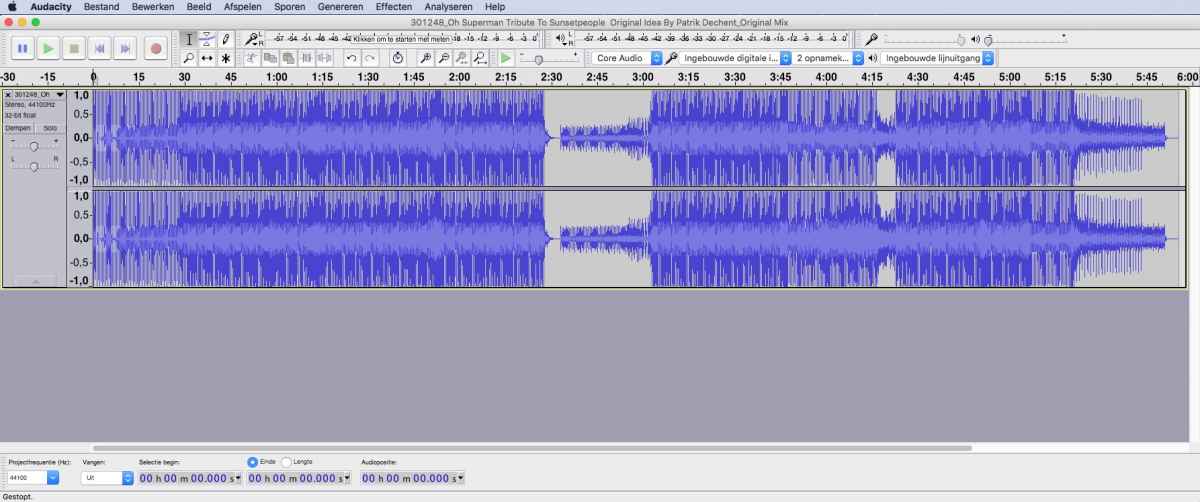
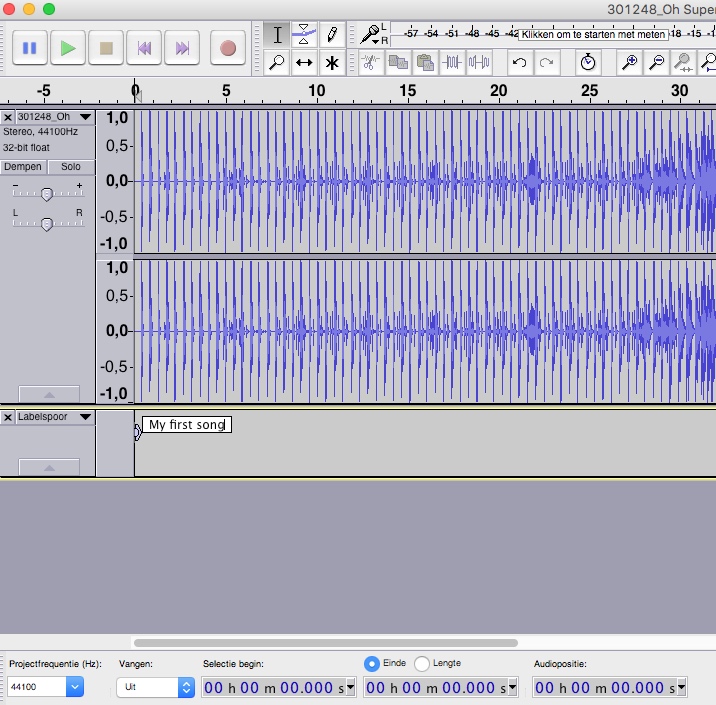
Go to the start of your first song and press CMD+B. A little text box will open where you can enter the title of your first song:
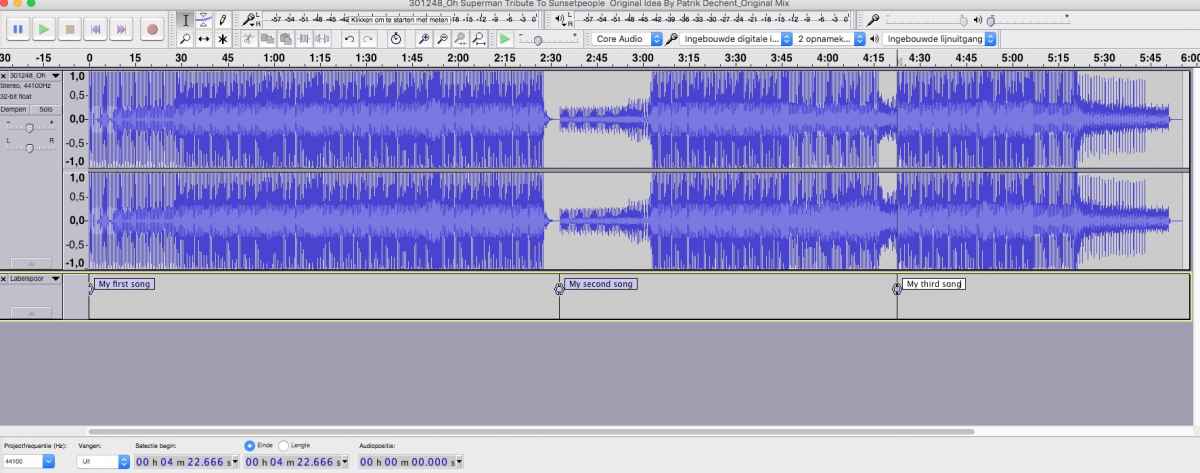
Now go to the start of the second song, press CMD+B and enter the title of the second song in the text box; then go to the start of the third song, etc...:
When all your songs have been identified, choose File > Export Multiple (SHIFT+CMD+L). A window will open where you can set the destination and the audio format for your exported songs:
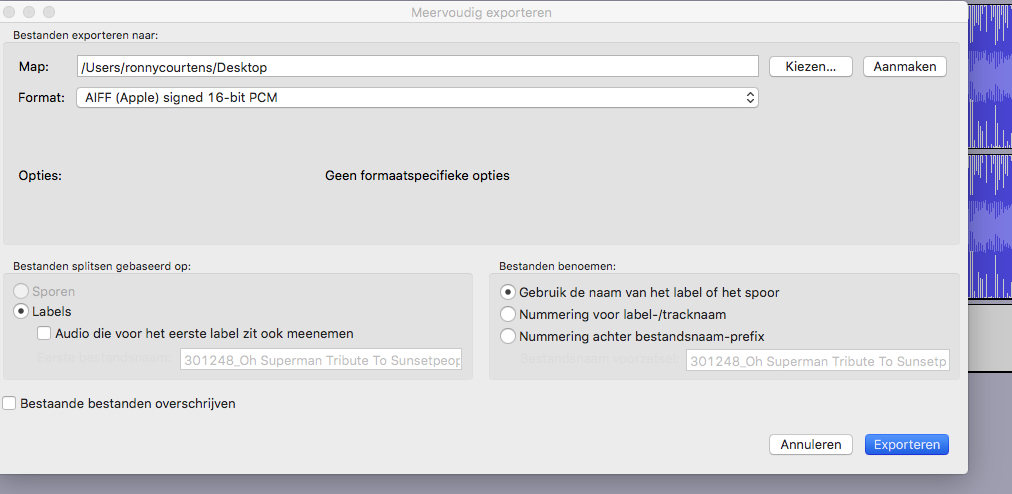
Press the Export button. A new window will open where you can change the metadata for every song. Usually, you will want to preserve all the metadata. So just press OK for every song:
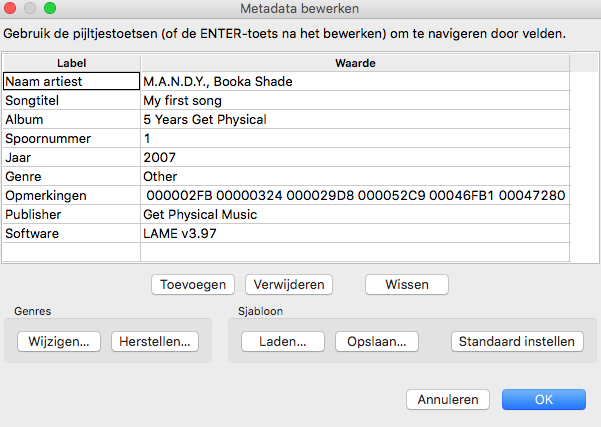
Your songs will be exported all at once as separate audio files. All this takes less than a minute, including the exports.
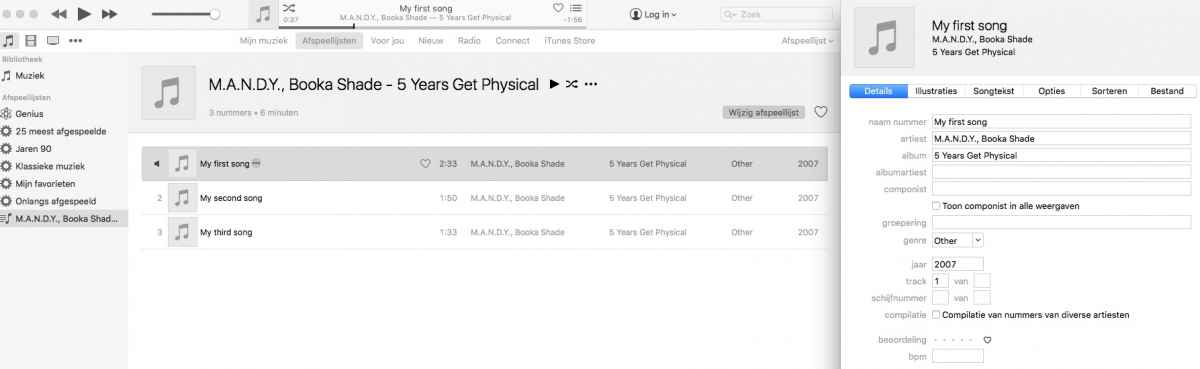
Now all you need to do is to open the songs in iTunes as a playlist and burn the playlist to CD. The beauty of using Audacity is that all the original metadata of your original MP3 (Album, Group, creation date etc...) will be preserved in iTunes when you burn the CD:
For more details, check the Audacity manual:
manual.audacityteam.org/o/man/splitting_...te_tracks.html#label
- Ronny
Although you can use FCP X to do what you want to do, I don't think a video editor is the fastest tool to split MP3s into multiple song tracks.
I would advise you to download a specialized audio application such as Audacity (free): www.audacityteam.org/download/mac/
When the application is installed and launched, choose "File > Open" to open your MP3 file in Audacity:
Go to the start of your first song and press CMD+B. A little text box will open where you can enter the title of your first song:
Now go to the start of the second song, press CMD+B and enter the title of the second song in the text box; then go to the start of the third song, etc...:
When all your songs have been identified, choose File > Export Multiple (SHIFT+CMD+L). A window will open where you can set the destination and the audio format for your exported songs:
Press the Export button. A new window will open where you can change the metadata for every song. Usually, you will want to preserve all the metadata. So just press OK for every song:
Your songs will be exported all at once as separate audio files. All this takes less than a minute, including the exports.
Now all you need to do is to open the songs in iTunes as a playlist and burn the playlist to CD. The beauty of using Audacity is that all the original metadata of your original MP3 (Album, Group, creation date etc...) will be preserved in iTunes when you burn the CD:
For more details, check the Audacity manual:
manual.audacityteam.org/o/man/splitting_...te_tracks.html#label
- Ronny
Please Log in to join the conversation.

17 Apr 2016 13:57 #75477
by VidGreg
Replied by VidGreg on topic burn audio cd via final cut pro
Hi Paulas
I totally agree with Ronny. FCPX is not the best tool.
I often use Audacity. The interface is a little clunky and old school but it is a great free tool. It is possible to do it in other apps, but often requires copy/delete and paste for each song.
The only other things to add is if available, use a higher quality format like WAV or AIFF, and make sure you have permission to use any of the music, especially if you are going to post it publicly.
Once again, Ronny has gone above & beyond simple in providing a step by step help. We are very lucky to have him. Thanks for all the great advice Ronny.
Greg
I totally agree with Ronny. FCPX is not the best tool.
I often use Audacity. The interface is a little clunky and old school but it is a great free tool. It is possible to do it in other apps, but often requires copy/delete and paste for each song.
The only other things to add is if available, use a higher quality format like WAV or AIFF, and make sure you have permission to use any of the music, especially if you are going to post it publicly.
Once again, Ronny has gone above & beyond simple in providing a step by step help. We are very lucky to have him. Thanks for all the great advice Ronny.
Greg
Please Log in to join the conversation.

17 Apr 2016 14:58 #75489
by BenB
Replied by BenB on topic burn audio cd via final cut pro
If you have LPX already, and are fluent, simply making playback ranges, Bounce out, pretty much the same workflow as Audacity.
Please Log in to join the conversation.
- Karsten Schlüter
-

- Offline
- Moderator
-
Less
More
- Posts: 3790
- Thank you received: 718
17 Apr 2016 15:00 #75490
by Karsten Schlüter
to play Good Cop (Ronny), Bad Cop (me):
abusing a video-edit app as audio-cd-burner is not elegant in any ways... :dry:
Why not using the audio-processor your Mac came preinstalled with - Garageband?
@Greg
'clunky' is an euphemism...
tried to help a friend building his own iNet-radio station, .. OMG!! what an interface!! :woohoo:
Replied by Karsten Schlüter on topic burn audio cd via final cut pro
cheesus2000 wrote: … is there a more elegant way to do this? …burn the whole cd directly from final cut pro x?…
to play Good Cop (Ronny), Bad Cop (me):
abusing a video-edit app as audio-cd-burner is not elegant in any ways... :dry:
Why not using the audio-processor your Mac came preinstalled with - Garageband?
@Greg
'clunky' is an euphemism...
tried to help a friend building his own iNet-radio station, .. OMG!! what an interface!! :woohoo:
Please Log in to join the conversation.
- ronny courtens
-
- Offline
- Moderator
-
Less
More
- Posts: 4455
- Thank you received: 962
17 Apr 2016 15:06 #75492
by ronny courtens
Replied by ronny courtens on topic burn audio cd via final cut pro
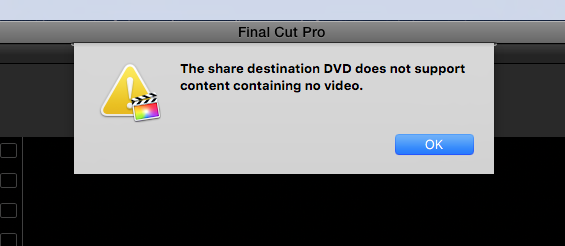
It would be impossible to burn the whole CD directly from FCP X:
- Ronny
- Ronny
Please Log in to join the conversation.
17 Apr 2016 15:16 #75494
by BenB
Replied by BenB on topic burn audio cd via final cut pro
GarageBand, excellent option!
Please Log in to join the conversation.
- MarkNelsonMovies
-
- Offline
- Elite Member
-

Less
More
- Posts: 256
- Thank you received: 48
17 Apr 2016 15:55 #75499
by MarkNelsonMovies
Replied by MarkNelsonMovies on topic burn audio cd via final cut pro
I agree with the rest of the posters here, using FCPX for an audio CD is like delivering newspapers with a tank, sure it works, but.... 
I'd probably use Ronny's audacity method, but if you want to use GarageBand simply drag the file into a project, set the cycle range to the first track, select - Share>Export song to iTunes -, then check the Export cycle area only box, and then share. Move/adjust the cycle range to the next track, and repeat as necessary. When your done, just use iTunes to burn the CD.
I'd probably use Ronny's audacity method, but if you want to use GarageBand simply drag the file into a project, set the cycle range to the first track, select - Share>Export song to iTunes -, then check the Export cycle area only box, and then share. Move/adjust the cycle range to the next track, and repeat as necessary. When your done, just use iTunes to burn the CD.
Please Log in to join the conversation.
17 Apr 2016 16:02 #75500
by VidGreg
Replied by VidGreg on topic burn audio cd via final cut pro
Well I did say you can do it in lots of other apps, Logic, GarageBand, QT, and many others but, it does take more work than in Audacity as Ronny laid out. The advantage of Audacity is the ability to add the multiple markers for each song/tune and batch export with song titles to iTunes in a single playlist. The only other program I have used with this ability is part of Toast Titanium "Spin Doctor" for LP vinyl albums. It really doesn't work very well and so I use Audacity for this as well.
Audacity also gives you lots of extra features.
But the UI, ugh! Ya Karsten, I'm sure FCP.co would ban me for all the descriptive words I could use
For LPX or GB, you can import the whole file and then break apart each song into a new "Track" then you have to mute all but 1 track, export to iTunes, mute that track activate the next, export…rinse and repeat… It becomes more work. Same for "Ranges".
Off topic, but one of the many limitations to GB I have never understood is the 44.1 kHz and no 48K sampling rate for record/export. Given this is a companion to iMovie and even FCPX and given that the capability is already built-in the OS, why doesn't Apple enable this in GB. 48kHz is the video standard.
Hope this helps, Greg
Audacity also gives you lots of extra features.
But the UI, ugh! Ya Karsten, I'm sure FCP.co would ban me for all the descriptive words I could use
For LPX or GB, you can import the whole file and then break apart each song into a new "Track" then you have to mute all but 1 track, export to iTunes, mute that track activate the next, export…rinse and repeat… It becomes more work. Same for "Ranges".
Off topic, but one of the many limitations to GB I have never understood is the 44.1 kHz and no 48K sampling rate for record/export. Given this is a companion to iMovie and even FCPX and given that the capability is already built-in the OS, why doesn't Apple enable this in GB. 48kHz is the video standard.
Hope this helps, Greg
Please Log in to join the conversation.
- ronny courtens
-
- Offline
- Moderator
-
Less
More
- Posts: 4455
- Thank you received: 962
17 Apr 2016 16:07 - 17 Apr 2016 16:12 #75501
by ronny courtens
Replied by ronny courtens on topic burn audio cd via final cut pro
Although I totally agree that you could do this in Garageband, Logic, or even in After Effects, these solutions all require exporting the individual songs one by one. Just like you would do in FCP X.
That's why I find the Audacity solution more elegant: just press CMD+B to split up the MP3 and export all the songs in one action. And above anything else: the exported songs automatically have all existing metadata from your original MP3 included. Big time saver.
- Ronny
That's why I find the Audacity solution more elegant: just press CMD+B to split up the MP3 and export all the songs in one action. And above anything else: the exported songs automatically have all existing metadata from your original MP3 included. Big time saver.
- Ronny
Last edit: 17 Apr 2016 16:12 by ronny courtens.
Please Log in to join the conversation.
17 Apr 2016 16:14 #75502
by VidGreg
Replied by VidGreg on topic burn audio cd via final cut pro
Ronny
While I don't think FCPX has a CD destination, I think you could import the audio into the Timeline and then "Blade" into separate songs, create clips in Browser, move to Desktop and then import into iTunes. Geessh what a miserable way to do it
This is if you wanted an actual CD.
If you just wanted to separate each song into useable separated clips, blading might work fine.
Suppose you could also export using "Roles" as well.
Still like Audacity for iTunes/CD
Hope this helps, Greg
While I don't think FCPX has a CD destination, I think you could import the audio into the Timeline and then "Blade" into separate songs, create clips in Browser, move to Desktop and then import into iTunes. Geessh what a miserable way to do it
This is if you wanted an actual CD.
If you just wanted to separate each song into useable separated clips, blading might work fine.
Suppose you could also export using "Roles" as well.
Still like Audacity for iTunes/CD
Hope this helps, Greg
Please Log in to join the conversation.
- ronny courtens
-
- Offline
- Moderator
-
Less
More
- Posts: 4455
- Thank you received: 962
17 Apr 2016 16:36 #75503
by ronny courtens
Replied by ronny courtens on topic burn audio cd via final cut pro
Hey Greg,
Export individual files at once based on Roles was the first thing that came to my mind. But then I actually did it as a test, and I found it took much more time than doing the whole thing in Audacity. Plus, and this was the main reason why I gave up, the exported songs based on Roles have the Project name and the channel numbers in their file names.
If you put your MP3 in a Project timeline called "Test", you blade the MP3 for each song, you apply Roles (Song 1, Song 2, Song 3 etc...), and you export individual files based on Roles, this is what you get in every file name: Test 1-2 Song 1, Test 3-4 song 2 etc... This means you have to rename every song file before burning it to CD. And you still have to add all the other metadata such as Album name, Performer, etc... In Audacity all this happens automatically.
- Ronny
Export individual files at once based on Roles was the first thing that came to my mind. But then I actually did it as a test, and I found it took much more time than doing the whole thing in Audacity. Plus, and this was the main reason why I gave up, the exported songs based on Roles have the Project name and the channel numbers in their file names.
If you put your MP3 in a Project timeline called "Test", you blade the MP3 for each song, you apply Roles (Song 1, Song 2, Song 3 etc...), and you export individual files based on Roles, this is what you get in every file name: Test 1-2 Song 1, Test 3-4 song 2 etc... This means you have to rename every song file before burning it to CD. And you still have to add all the other metadata such as Album name, Performer, etc... In Audacity all this happens automatically.
- Ronny
Please Log in to join the conversation.
17 Apr 2016 17:03 #75506
by VidGreg
Replied by VidGreg on topic burn audio cd via final cut pro
Ronny
Maybe we should hi-jack this thread and make it into… What is the most convoluted, obtuse, RubeGolberg and expensive method of using MP3s in FCPX with audio CD release? :silly:
Have a great day everyone. Off to the Earth Day Fair in San Diego. Should be around 40-60 thousand folks looking to save the planet from humans.
Goodness Gracious, Great Balls of Fire…
Greg
Maybe we should hi-jack this thread and make it into… What is the most convoluted, obtuse, RubeGolberg and expensive method of using MP3s in FCPX with audio CD release? :silly:
Have a great day everyone. Off to the Earth Day Fair in San Diego. Should be around 40-60 thousand folks looking to save the planet from humans.
Goodness Gracious, Great Balls of Fire…
Greg
Please Log in to join the conversation.
- Karsten Schlüter
-
- Offline
- Moderator
-
Less
More
- Posts: 3790
- Thank you received: 718
18 Apr 2016 06:08 #75524
by Karsten Schlüter
once saw a secretary using Excel to paint a floorplan, "… rectangles done easy!…"
.... so, for your project, you should at last integrate at one step MSWord .... :silly:
Replied by Karsten Schlüter on topic burn audio cd via final cut pro
VidGreg wrote: ...… What is the most convoluted, obtuse, RubeGolberg and expensive method of using MP3s in FCPX with audio CD release? :silly:
..
once saw a secretary using Excel to paint a floorplan, "… rectangles done easy!…"
.... so, for your project, you should at last integrate at one step MSWord .... :silly:
Please Log in to join the conversation.
18 Apr 2016 12:44 - 18 Apr 2016 12:48 #75534
by BenB
Replied by BenB on topic burn audio cd via final cut pro
Audacity is fastest. But just to clarify;
"For LPX or GB, you can import the whole file and then break apart each song into a new 'Track..."
No, you use one track for the original audio file. Then set a playback range (click, drag, done) and export that range.
Audacity needs to be on every editor's Mac.
Personally, I'd export as high quality AIFF. Then in Finder, right click, "Encode Audio File", use "iTunes Plus" setting. Great audio quality. That's how I get my original compositions from LPX to iTunes. Extra work, but worth the quality.
"For LPX or GB, you can import the whole file and then break apart each song into a new 'Track..."
No, you use one track for the original audio file. Then set a playback range (click, drag, done) and export that range.
Audacity needs to be on every editor's Mac.
Personally, I'd export as high quality AIFF. Then in Finder, right click, "Encode Audio File", use "iTunes Plus" setting. Great audio quality. That's how I get my original compositions from LPX to iTunes. Extra work, but worth the quality.
Last edit: 18 Apr 2016 12:48 by BenB.
Please Log in to join the conversation.
- cheesus2000
-
Topic Author
- Offline
- New Member
-
Less
More
- Posts: 8
- Thank you received: 0
21 Apr 2016 19:21 #75791
by cheesus2000
Replied by cheesus2000 on topic burn audio cd via final cut pro
Hey!
Ronny, you guys are great!
thx for the precise tutorial also!
Paulus
Ronny, you guys are great!
thx for the precise tutorial also!
Paulus
Please Log in to join the conversation.
21 Apr 2016 20:22 #75793
by VidGreg
Replied by VidGreg on topic burn audio cd via final cut pro
I assume that Ben is talking about exporting newly recorded music as AIFF for high quality. If the original file is MP3, it is a lossy format and reformatting and exporting as AIFF will not improve the sound. The data was already lost and cannot be retrieved/restored. In fact format transcoding/regeneration can lead to additional quality loss.
The actual quality of an MP3 varies with things like original Sample/bit rate for recording, the sample/bit rate of the MP3 encoder, Constant Bit Rate (CBR) or Variable Bit Rate (VBR) compression and the quality of the encoder/decoder. Ends up being highly variable.
I do my best to not use MP3's if I can avoid it. In your OP you said you had an MP3 as the file, so that is what you have to work with.
If you have the choice, AIFF or WAV are much better formats for recording and editing.
Unless my foggy brain is deceiving me again, I think Legacy FCP didn't even handle MP3s???
Best of Luck, Greg
The actual quality of an MP3 varies with things like original Sample/bit rate for recording, the sample/bit rate of the MP3 encoder, Constant Bit Rate (CBR) or Variable Bit Rate (VBR) compression and the quality of the encoder/decoder. Ends up being highly variable.
I do my best to not use MP3's if I can avoid it. In your OP you said you had an MP3 as the file, so that is what you have to work with.
If you have the choice, AIFF or WAV are much better formats for recording and editing.
Unless my foggy brain is deceiving me again, I think Legacy FCP didn't even handle MP3s???
Best of Luck, Greg
Please Log in to join the conversation.
