


- Posts: 134
- Thank you received: 9
3 Post Moderation Rule for New Boarders (25 Jan 2021)
New boarders will have their posts moderated - Don't worry if you cannot see your post immediately.
External drive recognized as Camera
- Ponponpostprod
-
 Topic Author
- Offline
- Premium Member
-

Less
More
15 Apr 2016 09:29 #75410
by Ponponpostprod
External drive recognized as Camera was created by Ponponpostprod
Hi,
A friend of mine is editing with an external drive on a dock. On this drive he has : the library, the medias imported or linked and even the copies of the Cards of it's camera ! (I've asked him to keep the Camera cards on an other drive but he has a lack of space ...).
Even if the copy of the cards are in a specific folder, each time he try to import medias from the external disk, FCPX recognize the disk as camera and not as device. He must wait that FCPX scan all the medias before importing a single one.
Is there a pref. somewhere to delete ?
A friend of mine is editing with an external drive on a dock. On this drive he has : the library, the medias imported or linked and even the copies of the Cards of it's camera ! (I've asked him to keep the Camera cards on an other drive but he has a lack of space ...).
Even if the copy of the cards are in a specific folder, each time he try to import medias from the external disk, FCPX recognize the disk as camera and not as device. He must wait that FCPX scan all the medias before importing a single one.
Is there a pref. somewhere to delete ?
Please Log in to join the conversation.
- Tom Wolsky
-

- Offline
- Moderator
-

15 Apr 2016 11:25 #75411
by Tom Wolsky
Replied by Tom Wolsky on topic External drive recognized as Camera
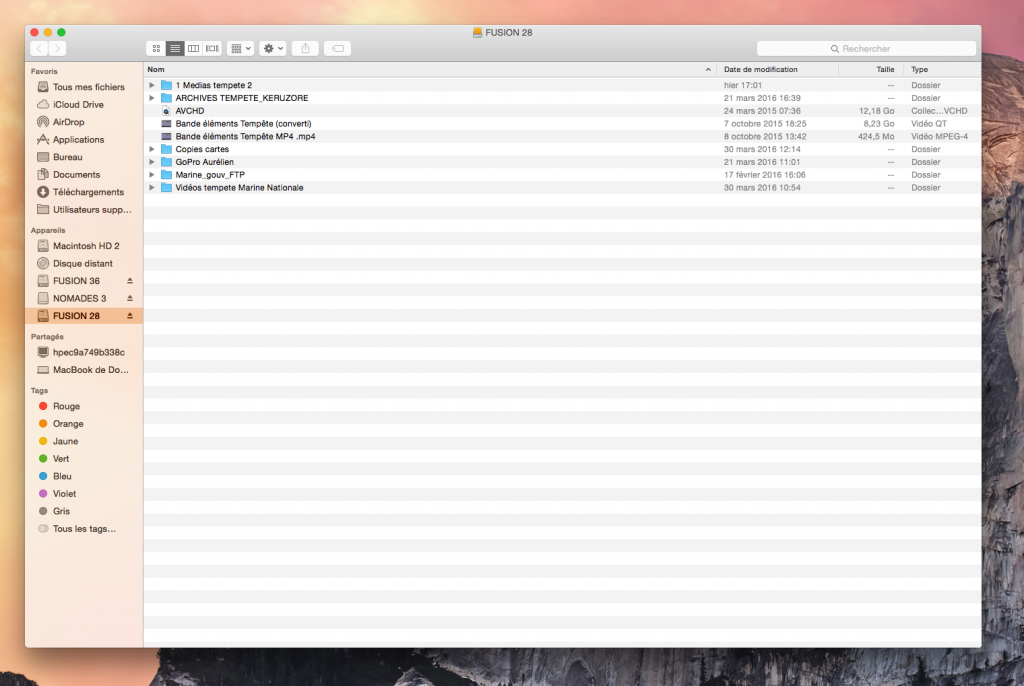
It depends what's at the root level of the drive. There is probably a folder or bundle that FCP is reading as camera content. Can you post a screenshot of the files at the root level? File or folder with a name like DCIM or Private.
Please Log in to join the conversation.
- Ponponpostprod
-
Topic Author
- Offline
- Premium Member
-
Less
More
- Posts: 134
- Thank you received: 9
16 Apr 2016 07:40 #75448
by Ponponpostprod
Replied by Ponponpostprod on topic External drive recognized as Camera
Hi Tom,
I would understand if it was the case, but there's only folders at the root level. The copies of the cards are in the folder named "Copies cartes". (The editor said me it was the case even without that AVCHD at the root level you can see on the capture screen).
I would understand if it was the case, but there's only folders at the root level. The copies of the cards are in the folder named "Copies cartes". (The editor said me it was the case even without that AVCHD at the root level you can see on the capture screen).
Please Log in to join the conversation.
- Tom Wolsky
-
- Offline
- Moderator
-
16 Apr 2016 08:06 #75449
by Tom Wolsky
Replied by Tom Wolsky on topic External drive recognized as Camera
The package called AVCHD. Put it in a folder.
Please Log in to join the conversation.
- Ponponpostprod
-
Topic Author
- Offline
- Premium Member
-
Less
More
- Posts: 134
- Thank you received: 9
16 Apr 2016 08:19 #75451
by Ponponpostprod
Replied by Ponponpostprod on topic External drive recognized as Camera
I will said him Monday and i’ll tell you if it correct the problem.
Please Log in to join the conversation.

16 Apr 2016 12:29 #75453
by BenB
Replied by BenB on topic External drive recognized as Camera
I can tell you it will, because I've done this exact same correction for an assistant editor a few times over the past two months. Open that AVCHD package (I hate that Canon uses that unnecessary garbage) and pull the video clips out, put them in a regular folder.
Please Log in to join the conversation.
- Ponponpostprod
-
Topic Author
- Offline
- Premium Member
-
Less
More
- Posts: 134
- Thank you received: 9
18 Apr 2016 21:36 #75599
by Ponponpostprod
Replied by Ponponpostprod on topic External drive recognized as Camera
As you've said there's no more problem.
Thank you expert guys.
Thank you expert guys.
Please Log in to join the conversation.
