


- Posts: 161
- Thank you received: 13
3 Post Moderation Rule for New Boarders (25 Jan 2021)
New boarders will have their posts moderated - Don't worry if you cannot see your post immediately.
Audio configuration bug messing up export
- nils.dettmann
-
 Topic Author
- Offline
- Elite Member
-

Less
More
11 Apr 2016 19:30 #75198
by nils.dettmann
Audio configuration bug messing up export was created by nils.dettmann
Hi,
the short version:
Can I get rid of the annoying auto configuration of audio channels on import? It's totally messing up my poly wavs.
And there is no way of fixing it afterwards.
The long version:
I have named and configured a lot (really a lot) of audio files in terms of audio channels and roles.
Now when I export to Pluraleyes, sync and reimport in some cases the audio metadata is kept in other cases it just vanishes.
I suspected Pluraleyes to be buggy but then I stumbled upon an old forum entry about manually tweaking fcpxmls for Sync-N-Link X to work properly. And reading this I remebered something:
Whenever you change the audio configuration of a source clip in the event browser it will still keep the "original" audio configuration it did automatically on import somewhere else.
You can see this when you open a changed clip in the timeline. It will still show the "original" configuration.
Now what happens with the Pluraleyes Roundtrip is that clips with unmodified audio configuration translate quite fine, modified clips won't. Sometimes Pluraleyes complains about mismatching channel data.
Is there any way to tell FCPX to change the information it appends to a source file on import?
Obviously there are at least three places where FCPX stores clip information:
- events
- projects (aka sequences)
- somewhere hidden
In theory I like the way FCPX handles media but this makes it hard to trust the internal file management. And I'm beginning to think that audio mixers could be far far away not just because people at apple don't see the value but also because the whole underlying audio system is bugged
I had some other issues when I opened sources from the event browser into the timeline and changed the audio configuration there eg. sound channels showing up and playing within the timeline but not when the clip is edited into a project.
I have a really hard time trusting FCPXs fi.
the short version:
Can I get rid of the annoying auto configuration of audio channels on import? It's totally messing up my poly wavs.
And there is no way of fixing it afterwards.
The long version:
I have named and configured a lot (really a lot) of audio files in terms of audio channels and roles.
Now when I export to Pluraleyes, sync and reimport in some cases the audio metadata is kept in other cases it just vanishes.
I suspected Pluraleyes to be buggy but then I stumbled upon an old forum entry about manually tweaking fcpxmls for Sync-N-Link X to work properly. And reading this I remebered something:
Whenever you change the audio configuration of a source clip in the event browser it will still keep the "original" audio configuration it did automatically on import somewhere else.
You can see this when you open a changed clip in the timeline. It will still show the "original" configuration.
Now what happens with the Pluraleyes Roundtrip is that clips with unmodified audio configuration translate quite fine, modified clips won't. Sometimes Pluraleyes complains about mismatching channel data.
Is there any way to tell FCPX to change the information it appends to a source file on import?
Obviously there are at least three places where FCPX stores clip information:
- events
- projects (aka sequences)
- somewhere hidden
In theory I like the way FCPX handles media but this makes it hard to trust the internal file management. And I'm beginning to think that audio mixers could be far far away not just because people at apple don't see the value but also because the whole underlying audio system is bugged
I had some other issues when I opened sources from the event browser into the timeline and changed the audio configuration there eg. sound channels showing up and playing within the timeline but not when the clip is edited into a project.
I have a really hard time trusting FCPXs fi.
Please Log in to join the conversation.
- nils.dettmann
-
Topic Author
- Offline
- Elite Member
-
Less
More
- Posts: 161
- Thank you received: 13
12 Apr 2016 08:42 #75205
by nils.dettmann
Replied by nils.dettmann on topic Audio configuration bug messing up export
Update 2 - Checking and unchecking the "Split audio channels and group..." button on import
I had imported with the button checked and unchecked before. Only this time I simply toggled the button and it helped.
Now most of the audio files are imported as polywavs with multiple mono channels. Unfortunately there are still "stereo" and "surround" files wrongly labeled. But that´s down to +-300 so an hour of keyboard ballet will resolve this.
Still: I want control over my media. If I know there is something wrong with way FCPX interprets the media there has to be a way to fix this!
Update 1 - Project XML
I investigated a little further.
I edited some of the audio clips into a project (seuqence).
In the event browser and in the project the channel configuration and the role assignment is working.
In the attached picture you can see that for the clip in the event browser. The clip is open in the timeline and there it shows the wrong channel configuration (Should be Dual Mono)

Now the XML shows one audio lane from the channels 1 and two named (!) Mono 1 and Mono 2
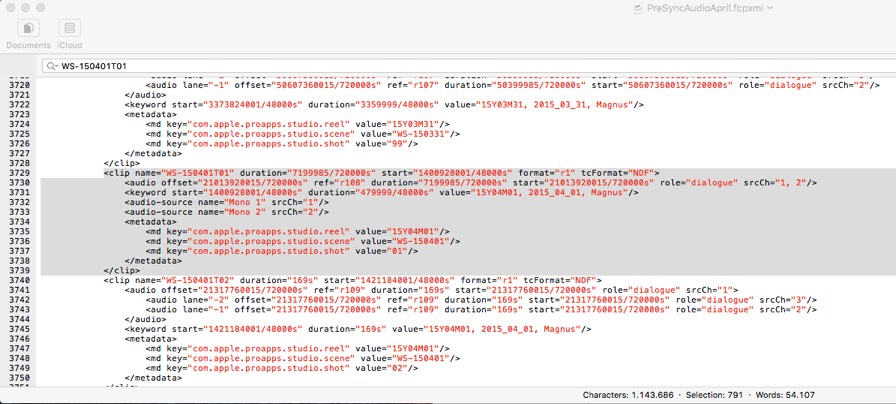
Some further testing led me to the following conclusion:
I would partly recall the bug part. The handling of source media is just not intuitive.
Some of the changes you do in the event browser will reflect on the underlying database storing the information about source media some won´t.
If you open a clip from the event browser in the timeline you will directly work on the underlying database e.g. when I split channels within the timeline, assign roles ... afterwards the Reset button in the inspector will revert the channel configuration and the names to what I did in the source medias timeline.
I had imported with the button checked and unchecked before. Only this time I simply toggled the button and it helped.
Now most of the audio files are imported as polywavs with multiple mono channels. Unfortunately there are still "stereo" and "surround" files wrongly labeled. But that´s down to +-300 so an hour of keyboard ballet will resolve this.
Still: I want control over my media. If I know there is something wrong with way FCPX interprets the media there has to be a way to fix this!
Update 1 - Project XML
I investigated a little further.
I edited some of the audio clips into a project (seuqence).
In the event browser and in the project the channel configuration and the role assignment is working.
In the attached picture you can see that for the clip in the event browser. The clip is open in the timeline and there it shows the wrong channel configuration (Should be Dual Mono)
Now the XML shows one audio lane from the channels 1 and two named (!) Mono 1 and Mono 2
Some further testing led me to the following conclusion:
I would partly recall the bug part. The handling of source media is just not intuitive.
Some of the changes you do in the event browser will reflect on the underlying database storing the information about source media some won´t.
If you open a clip from the event browser in the timeline you will directly work on the underlying database e.g. when I split channels within the timeline, assign roles ... afterwards the Reset button in the inspector will revert the channel configuration and the names to what I did in the source medias timeline.
Please Log in to join the conversation.

12 Apr 2016 10:26 #75213
by BenB
Replied by BenB on topic Audio configuration bug messing up export
Well, you've got me confused, and without seeing more of the XML, I don't know if that's showing the browser copy, or the timeline copy, of that clip.
When you import a file with audio, FCXP doesn't change that original physical file at all, only how it is represented in various parts of the GUI.
When you select a Master File in the Browser, you can go to the Inspector and change its channel configurations how ever you want. That will, obviously, carry over when you place a "copy" into a Timeline such as a Project or Compound Clip or Multicam.
Once you have a copy of that clip inside a Timeline, you an change the channel configuration, and it will not effect the Master clip. You are working on a virtual copy, with no ties to the original in the Browser.
When you import, and turn on analysis options for Audio, you're asking FCPX to set up the "default" for how audio channels are set up in the Master file in the Browser, that's all. That can be changed at any time, on any copy that's been placed in any timeline.
Again, the copy you add to a Project, is now independent of the Master file in the Browser. Change one, the other is untouched.
Now, when you say "poly wavs", what exactly are you starting off with, specifically, what's the source they're created from, how many channels, what formatting?
What is the goal in going out to Plural Eyes?
Are you checking any of the Audio analysis options in the Import window, or leaving them all unchecked?
If Plural Eyes doesn't bring FCPX metadata back from a roundtrip, that's a Plural Eyes issue, not an FCPX issue.
I'm confused as to exactly what FCPX is doing to audio channel configurations in your situation. I'd need some specifics.
When you import a file with audio, FCXP doesn't change that original physical file at all, only how it is represented in various parts of the GUI.
When you select a Master File in the Browser, you can go to the Inspector and change its channel configurations how ever you want. That will, obviously, carry over when you place a "copy" into a Timeline such as a Project or Compound Clip or Multicam.
Once you have a copy of that clip inside a Timeline, you an change the channel configuration, and it will not effect the Master clip. You are working on a virtual copy, with no ties to the original in the Browser.
When you import, and turn on analysis options for Audio, you're asking FCPX to set up the "default" for how audio channels are set up in the Master file in the Browser, that's all. That can be changed at any time, on any copy that's been placed in any timeline.
Again, the copy you add to a Project, is now independent of the Master file in the Browser. Change one, the other is untouched.
Now, when you say "poly wavs", what exactly are you starting off with, specifically, what's the source they're created from, how many channels, what formatting?
What is the goal in going out to Plural Eyes?
Are you checking any of the Audio analysis options in the Import window, or leaving them all unchecked?
If Plural Eyes doesn't bring FCPX metadata back from a roundtrip, that's a Plural Eyes issue, not an FCPX issue.
I'm confused as to exactly what FCPX is doing to audio channel configurations in your situation. I'd need some specifics.
Please Log in to join the conversation.
- nils.dettmann
-
Topic Author
- Offline
- Elite Member
-
Less
More
- Posts: 161
- Thank you received: 13
12 Apr 2016 12:05 - 12 Apr 2016 16:14 #75219
by nils.dettmann
Replied by nils.dettmann on topic Audio configuration bug messing up export
I´m mixing what I´m trying to achieve at the moment with my interpretations of some basic aspects of FCPX.
I have to agree that´s a little confusing.
Furthermore I tried to use the FCPX nomenclature where what we used to call timeline or sequence is called project.
The XML picture shows an XML-exported timeline.
Wavs are form a sounddevices recorder, different number of mono-channels.
My main concern is:
When you change the channel configuration in the inspector even chosing a Master File from the event browser, FCPX will still keep the channel configuration it assigned on import within it´s database.
That´s where FCPX looks when you choose to Reset the channel configuration.
And no matter if you export Event-XML, Timeline-XML, File-XML or whatever it will still include this information within the XML.
The only way to alter this information is to open a Master File in the Timeline and change rename,split and assign roles there.
If I have the "Split audio to mono..." button unchecked, FCPX will still interpret some of my wavs as stereo or surround files, which they aren´t
What I´m trying to achieve.
Video: Blackmagic movs
Audio: Sounddevices wavs with multiple mono tracks in different configuration nicely labeled by the sound guy
I want the wav metadata as roles and track-names in a synced sequence.
1. Import video and sound files into FCPX
2. Put all the wavs in one event without video, export Event-XML
3. Open in Sync-N-Link X and set Track Names and Subrole Names from wav iXML
4. Reimport in FCPX
5. Create Timeline with Video and Audio, export Timeline-XML
6. Sync in Plural Eyes
7. Import synced XML in FCPX
For all the sound files where the number of audio lanes in the MasterClip-opened-in-Timeline matches the number of audio lanes shown in the TimelineClip-Inspector the sync goes well and all the info is transfered.
When I have a mismatch, names and roles are reset to what is shown in the MasterClip-opened-in-Timeline.
Now, for the mismatching clips the inspector shows the right metadata until point 5 of my workflow, it´s only after going to Pluraleyes that it gets lost.
You could argue that it´s just PluralEyes fault but I think the way FCPX translates metadata into XML is not totally consistent.
I found this old thread Grabershop regarding similar problems with Sync-N-Link X some years ago and I´m just afraid that wrong clip information stored within FCPX could eventually mess up my X2Pro or similar audio export in the future...
I have to agree that´s a little confusing.
Furthermore I tried to use the FCPX nomenclature where what we used to call timeline or sequence is called project.
The XML picture shows an XML-exported timeline.
Wavs are form a sounddevices recorder, different number of mono-channels.
My main concern is:
When you change the channel configuration in the inspector even chosing a Master File from the event browser, FCPX will still keep the channel configuration it assigned on import within it´s database.
That´s where FCPX looks when you choose to Reset the channel configuration.
And no matter if you export Event-XML, Timeline-XML, File-XML or whatever it will still include this information within the XML.
The only way to alter this information is to open a Master File in the Timeline and change rename,split and assign roles there.
If I have the "Split audio to mono..." button unchecked, FCPX will still interpret some of my wavs as stereo or surround files, which they aren´t
What I´m trying to achieve.
Video: Blackmagic movs
Audio: Sounddevices wavs with multiple mono tracks in different configuration nicely labeled by the sound guy
I want the wav metadata as roles and track-names in a synced sequence.
1. Import video and sound files into FCPX
2. Put all the wavs in one event without video, export Event-XML
3. Open in Sync-N-Link X and set Track Names and Subrole Names from wav iXML
4. Reimport in FCPX
5. Create Timeline with Video and Audio, export Timeline-XML
6. Sync in Plural Eyes
7. Import synced XML in FCPX
For all the sound files where the number of audio lanes in the MasterClip-opened-in-Timeline matches the number of audio lanes shown in the TimelineClip-Inspector the sync goes well and all the info is transfered.
When I have a mismatch, names and roles are reset to what is shown in the MasterClip-opened-in-Timeline.
Now, for the mismatching clips the inspector shows the right metadata until point 5 of my workflow, it´s only after going to Pluraleyes that it gets lost.
You could argue that it´s just PluralEyes fault but I think the way FCPX translates metadata into XML is not totally consistent.
I found this old thread Grabershop regarding similar problems with Sync-N-Link X some years ago and I´m just afraid that wrong clip information stored within FCPX could eventually mess up my X2Pro or similar audio export in the future...
Last edit: 12 Apr 2016 16:14 by nils.dettmann. Reason: Clarify difference between audio channels and audio lanes
Please Log in to join the conversation.
12 Apr 2016 14:27 #75221
by BenB
Replied by BenB on topic Audio configuration bug messing up export
That thread is pretty out of date.
Not knowing what you're importing, I'm just confused. I've not seen FCPX incorrectly count the number of channels in an audio file. Maybe someone else can sort this out. Guys?
Not knowing what you're importing, I'm just confused. I've not seen FCPX incorrectly count the number of channels in an audio file. Maybe someone else can sort this out. Guys?
Please Log in to join the conversation.
- nils.dettmann
-
Topic Author
- Offline
- Elite Member
-
Less
More
- Posts: 161
- Thank you received: 13
12 Apr 2016 16:11 #75232
by nils.dettmann
Replied by nils.dettmann on topic Audio configuration bug messing up exporte
I think it's just the way FCPX works at the moment.
And it's not that it counts an incorrect numer of channels. They are just arranged on the wrong amount of "lanes".
At least that's what they are called in the xml.
I will update that in the other post if it still lets me edit it.
I just started reading through the FCPXML 1.5 definition, pehaps I can find out how it's ment to be...
And it's not that it counts an incorrect numer of channels. They are just arranged on the wrong amount of "lanes".
At least that's what they are called in the xml.
I will update that in the other post if it still lets me edit it.
I just started reading through the FCPXML 1.5 definition, pehaps I can find out how it's ment to be...
Please Log in to join the conversation.
13 Apr 2016 12:33 #75302
by BenB
Replied by BenB on topic Audio configuration bug messing up export
I'm still not clear how you source .wav files are formatted, or what the goal is. If you simply want to sync, why not do that inside of FCPX?
Please Log in to join the conversation.
- nils.dettmann
-
Topic Author
- Offline
- Elite Member
-
Less
More
- Posts: 161
- Thank you received: 13
13 Apr 2016 12:50 #75305
by nils.dettmann
Replied by nils.dettmann on topic Audio configuration bug messing up export
The source files are polyphonic WAVs with multiple mono channels (between 2 and 7 depending on the recording situation) and timecode.
Sound Devices format overview
In the end I want to achieve synced video clips with correct audio roles for each channel.
There is metadata within the wav files, labelling each of the mono channels eg. Mixdown, Stereo M, StereoS, Lav 1, Lav 2,...
This is exactly what I need the roles in FCPX to be.
As FCPX can´t read metadata from wavs, I use Sync-N-Link X
Not to sync but just to set roles and track names according to the metadata in the WAVs.
I don´t want to sync within FCPX because it doesn´t allow to batch sync.
And I don´t have one audio clip corresponding to one video clip. It´s a feature length documentary project.
Sound Devices format overview
In the end I want to achieve synced video clips with correct audio roles for each channel.
There is metadata within the wav files, labelling each of the mono channels eg. Mixdown, Stereo M, StereoS, Lav 1, Lav 2,...
This is exactly what I need the roles in FCPX to be.
As FCPX can´t read metadata from wavs, I use Sync-N-Link X
Not to sync but just to set roles and track names according to the metadata in the WAVs.
I don´t want to sync within FCPX because it doesn´t allow to batch sync.
And I don´t have one audio clip corresponding to one video clip. It´s a feature length documentary project.
Please Log in to join the conversation.
13 Apr 2016 16:25 #75314
by BenB
Replied by BenB on topic Audio configuration bug messing up export
What are the 7 channels in one file from? 7 different sources into one file, or surround sound, or what? And nothing in that article I didn't know. I know what multichannel audio files are. And FYI, AIFF is as universal as WAV, everything reads both.
Please Log in to join the conversation.
- nils.dettmann
-
Topic Author
- Offline
- Elite Member
-
Less
More
- Posts: 161
- Thank you received: 13
13 Apr 2016 17:53 #75325
by nils.dettmann
Replied by nils.dettmann on topic Audio configuration bug messing up export
The sound files are field recordings with a Sound Devices 8track recorder. As stated in the article Sound Devices doesn´t record AIFFs just WAVs.
The discreet tracks could be: 1 Mixdown, 2/3 channels form a M/S microphone and 4,5,6,7 lavallier microphones.
Depending on the actual configuration during shooting it´s between 2 (just 2 channel M/S Stereo) and 7 (Mixdown,2 M/S, Lav 1, Lav2, Lav 3, Lav 4) discreet tracks.
Many of the 2 channel WAVs and all of the 6 channel WAVs are falsely imported with the channel configurations stereo or surround.
I don´t have any stereo or surround files.
To sum up what I worked out so far.
If I don´t split the audio channels of theses Stereo/Surround Clips in the clip timeline one by one, the (false) information attached to the clips on import will export into any XML containing one of these clips.
I found a workaround for my original problem - loss of metadata in the Pluraleyes roundtrip - but it´s doesn´t feel like a stable workflow.
The discreet tracks could be: 1 Mixdown, 2/3 channels form a M/S microphone and 4,5,6,7 lavallier microphones.
Depending on the actual configuration during shooting it´s between 2 (just 2 channel M/S Stereo) and 7 (Mixdown,2 M/S, Lav 1, Lav2, Lav 3, Lav 4) discreet tracks.
Many of the 2 channel WAVs and all of the 6 channel WAVs are falsely imported with the channel configurations stereo or surround.
I don´t have any stereo or surround files.
To sum up what I worked out so far.
If I don´t split the audio channels of theses Stereo/Surround Clips in the clip timeline one by one, the (false) information attached to the clips on import will export into any XML containing one of these clips.
I found a workaround for my original problem - loss of metadata in the Pluraleyes roundtrip - but it´s doesn´t feel like a stable workflow.
Please Log in to join the conversation.
- haysoos123
-
- Offline
- Platinum Member
-

Less
More
- Posts: 402
- Thank you received: 72
13 Apr 2016 18:58 #75330
by haysoos123
Replied by haysoos123 on topic Audio configuration bug messing up export
Well, from reading what you have, it's possible that the metadata on your WAV files is somehow corrupted or set wrong... it should be saying they're all mono, but somewhere that's being screwed up. If your sound guy set them up as mono channels, there should be no reason that it wouldn't carry over when importing into FCPX (with Sync n link using the iXML).
I have done this many times with Sync N Link, with audio recorded from a Sound Devices mixer with iXML, and it always comes in as expected, with the names properly encoded to each track, and all tracks designated as mono (it will say something like "5 mono" or "7 mono" or something like that depending on how many tracks). One thing to ask... why are you even using Plural Eyes? That could be the step that's screwing things up. My guess is that you don't have jam synced timecode on all your video. I would do some tests, and see if just syncing in FCPX will preserved everything as it is (it should).
It's actually an almost automated process. You can also just use Sync N Link to get your audio in there with iXML and leave the syncing to video until later if you want. All of this is to say that Sync N Link has been working properly for us for a long time now, so any errors introduced are probably the result of Plural Eyes.
I have done this many times with Sync N Link, with audio recorded from a Sound Devices mixer with iXML, and it always comes in as expected, with the names properly encoded to each track, and all tracks designated as mono (it will say something like "5 mono" or "7 mono" or something like that depending on how many tracks). One thing to ask... why are you even using Plural Eyes? That could be the step that's screwing things up. My guess is that you don't have jam synced timecode on all your video. I would do some tests, and see if just syncing in FCPX will preserved everything as it is (it should).
It's actually an almost automated process. You can also just use Sync N Link to get your audio in there with iXML and leave the syncing to video until later if you want. All of this is to say that Sync N Link has been working properly for us for a long time now, so any errors introduced are probably the result of Plural Eyes.
Please Log in to join the conversation.
- nils.dettmann
-
Topic Author
- Offline
- Elite Member
-
Less
More
- Posts: 161
- Thank you received: 13
13 Apr 2016 19:48 #75333
by nils.dettmann
Replied by nils.dettmann on topic Audio configuration bug messing up export
Yes, I don´t have jam synced timecode. I will certainly never work like that again.
I synced 15 hours of jam synced files in 15 minutes including setting up the events in FCPX. The other 95 hours will probably take me 2 weeks..
And I actually did what you wrote, using Sync-N-Link X to get the iXML metadata into FCPX.
I looked into the sound files and the tracks are all correctly labeled as mono.
The wrong configuration on import is only happening with some 2 channel files and all 6 channel files. All other channel counts are working fine. If 6 channel files are working for you I have to investigate further.
I was thinking FCPX was just interpreting 6 channels as surround no matter what.
And you are right, the problem is induced by Pluraleyes.
Nevertheless it is only happening with files FCPX assigned a wrong channel configuration. The XML representation is totally different.
I just need Pluraleyes because I have even more audio sources.
I found a solution to my problem in opening the clips in the timeline and manually splitting the audio clip.
I´m just afraid that could lead to problems further in the process. There are still some differences in the XML.
But good to hear that you are working in a similar way and everything is stable!
In the end that´s what I want - a stable and trustworthy workflow.
Are you exporting to Pro Tools?
I synced 15 hours of jam synced files in 15 minutes including setting up the events in FCPX. The other 95 hours will probably take me 2 weeks..
And I actually did what you wrote, using Sync-N-Link X to get the iXML metadata into FCPX.
I looked into the sound files and the tracks are all correctly labeled as mono.
The wrong configuration on import is only happening with some 2 channel files and all 6 channel files. All other channel counts are working fine. If 6 channel files are working for you I have to investigate further.
I was thinking FCPX was just interpreting 6 channels as surround no matter what.
And you are right, the problem is induced by Pluraleyes.
Nevertheless it is only happening with files FCPX assigned a wrong channel configuration. The XML representation is totally different.
I just need Pluraleyes because I have even more audio sources.
I found a solution to my problem in opening the clips in the timeline and manually splitting the audio clip.
I´m just afraid that could lead to problems further in the process. There are still some differences in the XML.
But good to hear that you are working in a similar way and everything is stable!
In the end that´s what I want - a stable and trustworthy workflow.
Are you exporting to Pro Tools?
Please Log in to join the conversation.
- haysoos123
-
- Offline
- Platinum Member
-
Less
More
- Posts: 402
- Thank you received: 72
13 Apr 2016 22:52 #75338
by haysoos123
Replied by haysoos123 on topic Audio configuration bug messing up export
I just looked in a project we just finished, and we have 5, 7, and 8 track audio, but no 6 tracks coincidentally! I'm sure in the past we've had it, but I'm often not the one taking care of it, so it's hard for me to say. It's possible that they're just selecting those files that are interpreted incorrectly and just changing them in the inspector, which you can do with many files as long as the configurations are the same.
I don't use PluralEyes regularly, but it does seem like there's something missing in its programming and it's getting confused with what FCPX is doing when you change the channel configuration. In your case, with your workaround, I would do some tests to see if it comes out fine with X2Pro. Theoretically, X2Pro should just look at the role assignment and split the tracks accordingly. But in answer to your question, we don't usually have problems going to Pro Tools.
I don't use PluralEyes regularly, but it does seem like there's something missing in its programming and it's getting confused with what FCPX is doing when you change the channel configuration. In your case, with your workaround, I would do some tests to see if it comes out fine with X2Pro. Theoretically, X2Pro should just look at the role assignment and split the tracks accordingly. But in answer to your question, we don't usually have problems going to Pro Tools.
Please Log in to join the conversation.
14 Apr 2016 12:53 #75382
by BenB
Replied by BenB on topic Audio configuration bug messing up export
I know this doesn't help, but I'd never record multiple microphones to a single multichannel audio file. You only end up with headaches like this. Sorry, I know that doesn't help, but I think the original recording method was flawed. Each mic should be an independent audio file, for all sorts of reasons.
If you did all the audio work inside of FCPX, there's be no issue, though. The problems are stemming from having to leave FCPX, to to something else, then back into FCPX.
The problem with Roles is, you can't assign them to channels, only to files/clips. I'm hoping Apple will allow us to assign roles to channels soon.
If you did all the audio work inside of FCPX, there's be no issue, though. The problems are stemming from having to leave FCPX, to to something else, then back into FCPX.
The problem with Roles is, you can't assign them to channels, only to files/clips. I'm hoping Apple will allow us to assign roles to channels soon.
Please Log in to join the conversation.
- nils.dettmann
-
Topic Author
- Offline
- Elite Member
-
Less
More
- Posts: 161
- Thank you received: 13
22 Apr 2016 13:20 #75834
by nils.dettmann
Replied by nils.dettmann on topic Audio configuration bug messing up export
Coming back here after having done a lot of further testing.
I also would appreciate an overhaul of the FCPX sound system including roles. I think if they want to get a better standing in the film/tv/tv-series business that would be a must.
Actually there is a way to assign roles to individual channels.
Open the sound clip in the timeline. Now you can split stereo channels, rename the channels and attach roles individually.
The roles will directly reflect in the inspector.
The names will show up when you select "Reset" in the channel configuration.
Be aware: Splitting stereo or surround channels, the stereo/surround configuration for this clip might get lost and I haven´t found a way of recreating it.
Regarding multichannel sound files.
I have tested separating the multichannel sound files and I wouldn´t recommend it.
As of now having multiple sound files belonging to one video file makes it even more difficult to get synchronized clips.
If you go the multicam route to sync then it´s different. In this case multiple single channel files would work better.
I also would appreciate an overhaul of the FCPX sound system including roles. I think if they want to get a better standing in the film/tv/tv-series business that would be a must.
Actually there is a way to assign roles to individual channels.
Open the sound clip in the timeline. Now you can split stereo channels, rename the channels and attach roles individually.
The roles will directly reflect in the inspector.
The names will show up when you select "Reset" in the channel configuration.
Be aware: Splitting stereo or surround channels, the stereo/surround configuration for this clip might get lost and I haven´t found a way of recreating it.
Regarding multichannel sound files.
I have tested separating the multichannel sound files and I wouldn´t recommend it.
As of now having multiple sound files belonging to one video file makes it even more difficult to get synchronized clips.
If you go the multicam route to sync then it´s different. In this case multiple single channel files would work better.
Please Log in to join the conversation.
