


- Posts: 23
- Thank you received: 0
3 Post Moderation Rule for New Boarders (25 Jan 2021)
New boarders will have their posts moderated - Don't worry if you cannot see your post immediately.
folder structure and keyword export
- oliver.bloch
-
 Topic Author
- Offline
- Junior Member
-

Less
More
07 Apr 2016 10:12 #75023
by oliver.bloch
folder structure and keyword export was created by oliver.bloch
Hi, I have a project that needs me and another editor. He imported all the files gave it a general structure (chapters - yes its a dvd) - and tags of scenes etc. Now my question is... can he export that to me as an xml or whatever so I can see everything he has? I have all the original files on a hard drive... but without the structure and tags... yet 
Please Log in to join the conversation.

07 Apr 2016 11:41 #75027
by BenB
Replied by BenB on topic folder structure and keyword export
If you both have a Library, same name, and same content, yes, XML is how to do that.
If content is ALL kept external, you an send the Library itself, as it'll be small. This avoids XML limitations. This is how we do it on our show. But we delete all generated files for the Library before sending it.
But yes, XML will give you the same data management structure, if the two Libraries are the same otherwise. For example, it won't import or reconnect missing media automatically for you, it won't create a Library from scratch for you.
If content is ALL kept external, you an send the Library itself, as it'll be small. This avoids XML limitations. This is how we do it on our show. But we delete all generated files for the Library before sending it.
But yes, XML will give you the same data management structure, if the two Libraries are the same otherwise. For example, it won't import or reconnect missing media automatically for you, it won't create a Library from scratch for you.
Please Log in to join the conversation.
- oliver.bloch
-
Topic Author
- Offline
- Junior Member
-
Less
More
- Posts: 23
- Thank you received: 0
07 Apr 2016 12:21 #75030
by oliver.bloch
Replied by oliver.bloch on topic folder structure and keyword export
so he could send me the whole library which would create the same on my computer from scratch - and then it connects or I can connect the media files? would be even better - how do we do this?! thx a lot !
Please Log in to join the conversation.
08 Apr 2016 12:56 - 08 Apr 2016 12:57 #75055
by BenB
Replied by BenB on topic folder structure and keyword export
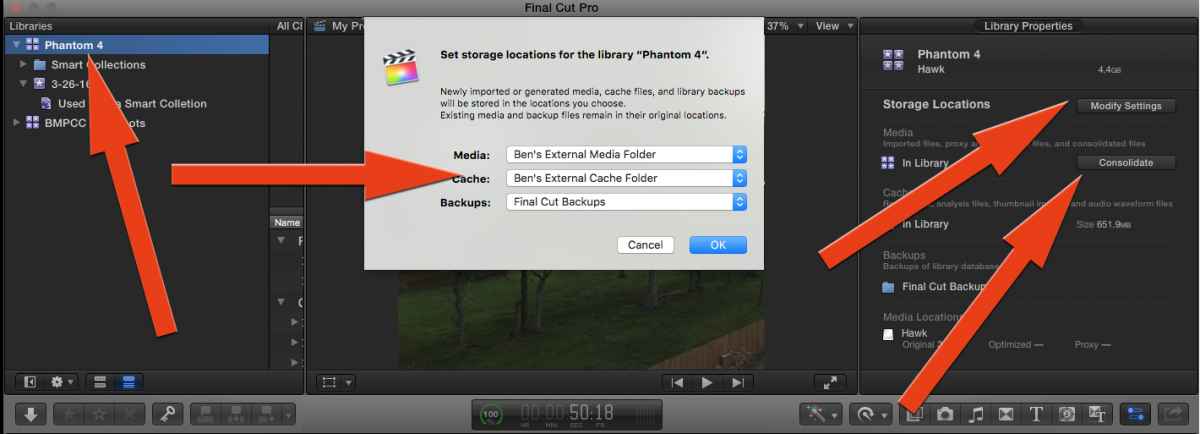
Let's say he has a Library already. Create a folder external of the Library for all the media. In the Browser, select the Library, go to the Inspector, click Modify Settings, set it to an external folder for media and cache. Then click Consolidate. That'll move it all to that external folder, just to be sure. Now you're ready to exchange the Library itself via Dropbox or something.
Again, as long as you both have a Library on your respective systems, named the same, with the same media inside it, and the same 3rd party plugins, you can exchange XML, also. If XML isn't transferring everything you need (not sure what current limitations are at the moment), try the Library method.
Again, as long as you both have a Library on your respective systems, named the same, with the same media inside it, and the same 3rd party plugins, you can exchange XML, also. If XML isn't transferring everything you need (not sure what current limitations are at the moment), try the Library method.
Last edit: 08 Apr 2016 12:57 by BenB.
Please Log in to join the conversation.
