


- Posts: 1080
- Thank you received: 106
3 Post Moderation Rule for New Boarders (25 Jan 2021)
New boarders will have their posts moderated - Don't worry if you cannot see your post immediately.
Exporting multichannel audio
05 Apr 2016 21:24 #74983
by Redifer
Exporting multichannel audio was created by Redifer
Alright I've got a project with a kick-ass multichannel 5.1 mix. Now I can export that as a Quicktime, make an AC3 file and it's good to go for DVD or Blu-ray. However I'd like to also provide a DTS option and the Surcode DTS encoder that I've had forever I believe needs 6 mono WAV files. I can't, as far as I know, export individual sound files like this from FCPX or even Compressor. Surely there must be some workaround I can do even if it is a bit convoluted. What do y'all recommend?
Please Log in to join the conversation.


05 Apr 2016 22:15 #74986
by BenB
Replied by BenB on topic Exporting multichannel audio
OK, so since you can't give each "channel" a unique roll, well, that blows that. Otherwise, you could. Compressor does WAV files. You'd have to send it to Logic Pro X, and then export it out as individual files per channel. I'll have to find a sample 5.1 files and test this. Very interesting workflow. Fill out the feedback page for sure!
Please Log in to join the conversation.
05 Apr 2016 22:47 - 05 Apr 2016 23:05 #74987
by Redifer
Replied by Redifer on topic Exporting multichannel audio
I figured out a way! Basically I just export an AIFF from FCPX (though CAF or WAV will work as well). The result is a 5.1 audio file. Take that file and put it in a new project. Highlight the audio file and Break Apart Clip Items. Then do it a second time and it will break into 6 separate sound components. Make sure only one is turned on at a time (turn the others off by highlighting them and pressing V). Create a Compressor Preset. I created on for Mono, 16-bit 48Khz WAV. Be sure to add this as a destination in FCPX so you don't have to "Send to Compressor". Export each one at a time. The most difficult part of this is that you have no idea which track is which channel. When you break them apart they are like this from top to bottom: L, R, C, LFE, LS, RS.
I did try to import a CAF into Logic Pro X and it didn't like it. It took it a while to analyze the file and when it was done it was nowhere to be found. Granted I don't know Logic that well and have never imported audio into it. I use it mainly to create audio.
ADDENDUM - Surcode likes AIF, not WAV. Export to AIF.
I did try to import a CAF into Logic Pro X and it didn't like it. It took it a while to analyze the file and when it was done it was nowhere to be found. Granted I don't know Logic that well and have never imported audio into it. I use it mainly to create audio.
ADDENDUM - Surcode likes AIF, not WAV. Export to AIF.
Last edit: 05 Apr 2016 23:05 by Redifer.
Please Log in to join the conversation.
- ronny courtens
-

- Offline
- Moderator
-

Less
More
- Posts: 4455
- Thank you received: 962
06 Apr 2016 08:46 - 06 Apr 2016 08:59 #74996
by ronny courtens
Replied by ronny courtens on topic Exporting multichannel audio
Good workflow, Joe. Thank you for posting this.
I think there is an easier way. In FCP X you can export separate mono stems from a 5.1 surround file in one export action and without creating a Compressor preset.
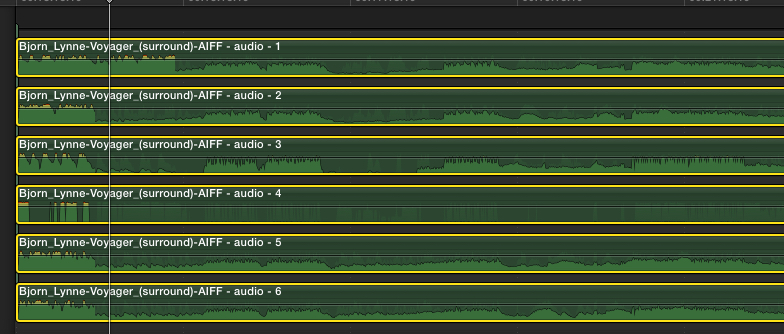
1. Put the surround clip on your timeline and do the double Break Apart trick so you get 6 discrete audio channels:
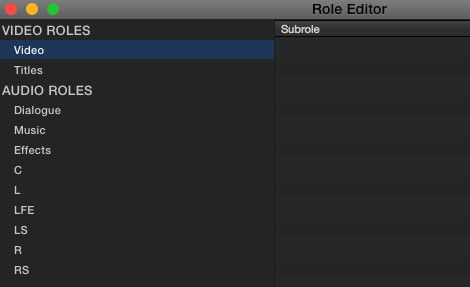
2. In the Role Editor, create 6 new Audio Roles (L, R, C, LFE, LS, RS):
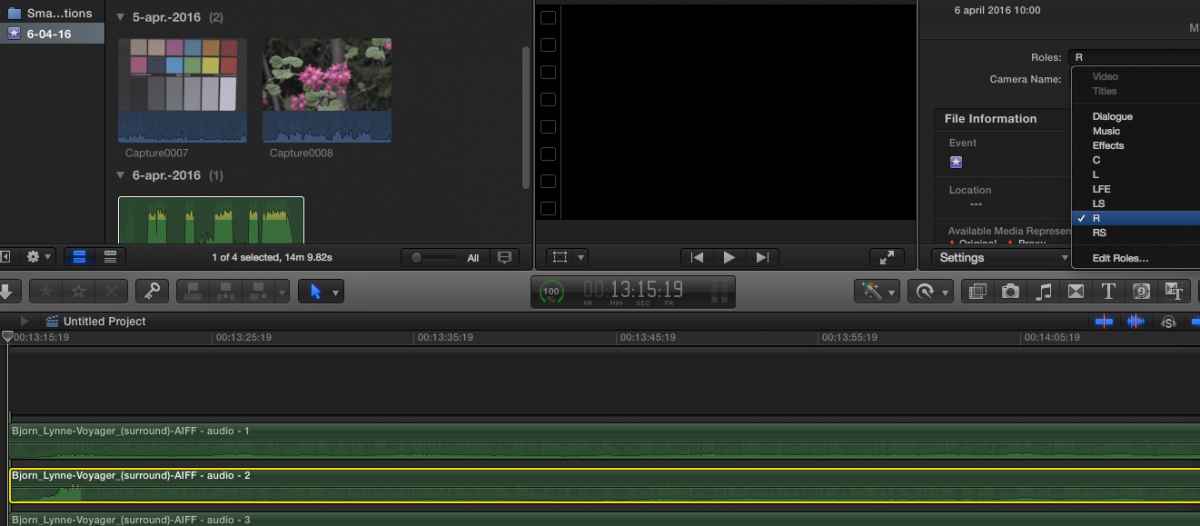
3. Assign an Audio Role to each of the discrete surround channels. Audio 1 = L, Audio 2 = R, etc...):
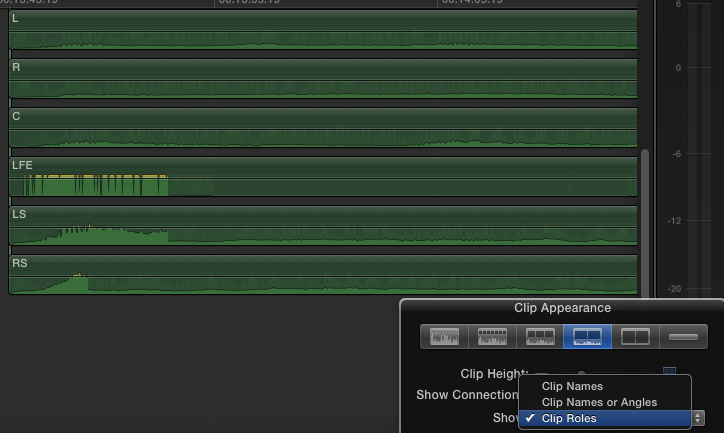
4. To make things easier to see, you can set the Clip Appearance to only show the Role names:
5. Now all you need to do is Share the project as a Master File with Audio Only as Separate files:
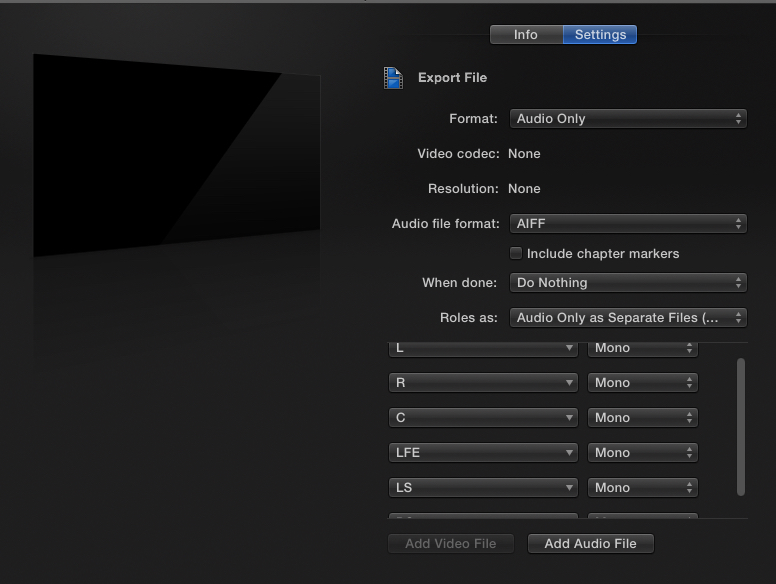
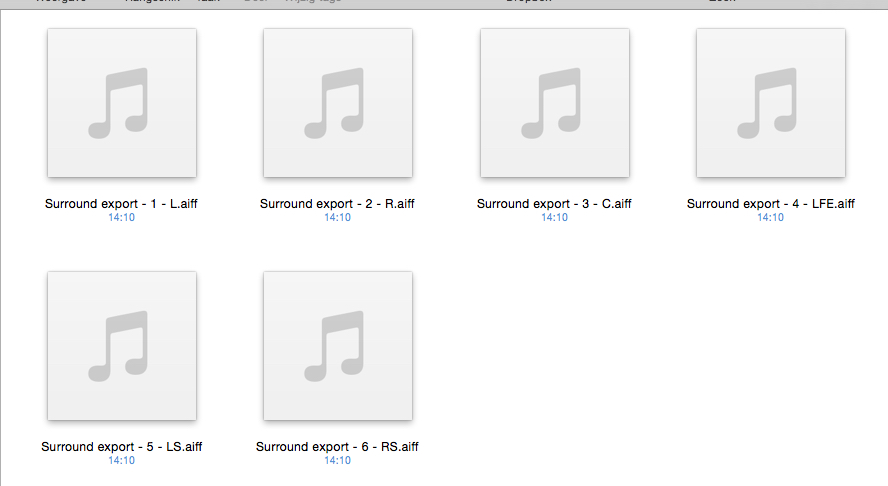
6. FCP X will export each surround channel as a discrete AIFF mono file, AND it will correctly label every file according to its surround channel configuration:
I did all this in less than 3 minutes, including the export and making the screenshots.
- Ronny
I think there is an easier way. In FCP X you can export separate mono stems from a 5.1 surround file in one export action and without creating a Compressor preset.
1. Put the surround clip on your timeline and do the double Break Apart trick so you get 6 discrete audio channels:
2. In the Role Editor, create 6 new Audio Roles (L, R, C, LFE, LS, RS):
3. Assign an Audio Role to each of the discrete surround channels. Audio 1 = L, Audio 2 = R, etc...):
4. To make things easier to see, you can set the Clip Appearance to only show the Role names:
5. Now all you need to do is Share the project as a Master File with Audio Only as Separate files:
6. FCP X will export each surround channel as a discrete AIFF mono file, AND it will correctly label every file according to its surround channel configuration:
I did all this in less than 3 minutes, including the export and making the screenshots.
- Ronny
Last edit: 06 Apr 2016 08:59 by ronny courtens.
Please Log in to join the conversation.
