


- Posts: 238
- Thank you received: 20
3 Post Moderation Rule for New Boarders (25 Jan 2021)
New boarders will have their posts moderated - Don't worry if you cannot see your post immediately.
File from BMVA won't import
- Squamish ed
-
 Topic Author
- Offline
- Elite Member
-

Less
More
04 Apr 2016 02:31 #74900
by Squamish ed
Ed
File from BMVA won't import was created by Squamish ed
Shot a few tests today with a C100II and a Black Magic Video Assist external recorder (via HDMI). Recordings were in ProRes 422.
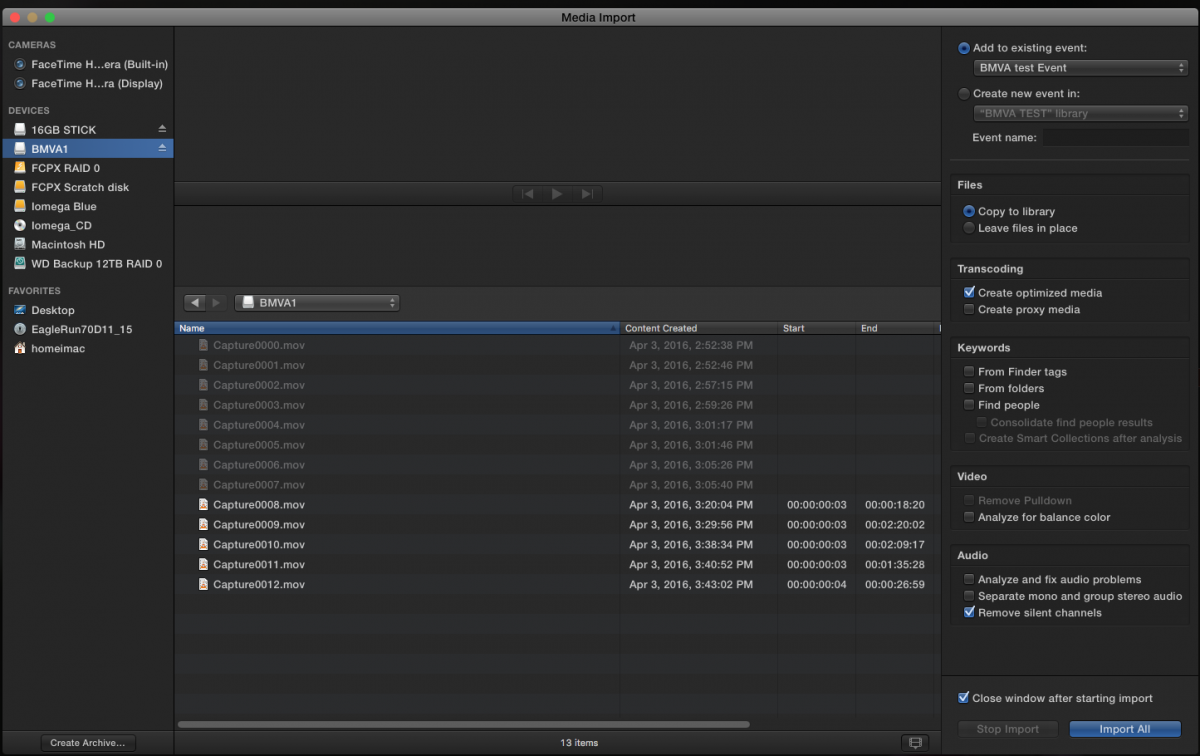
The files show as being in a QuickTime container. For some reason the files from 000 to 006 import without a problem but clips 007 - 012 won't. In the import window they're greyed out.
Before importing them I tried to play them with QT Player and they wouldn't work (any of them) so I switched to VLC and they all play fine.
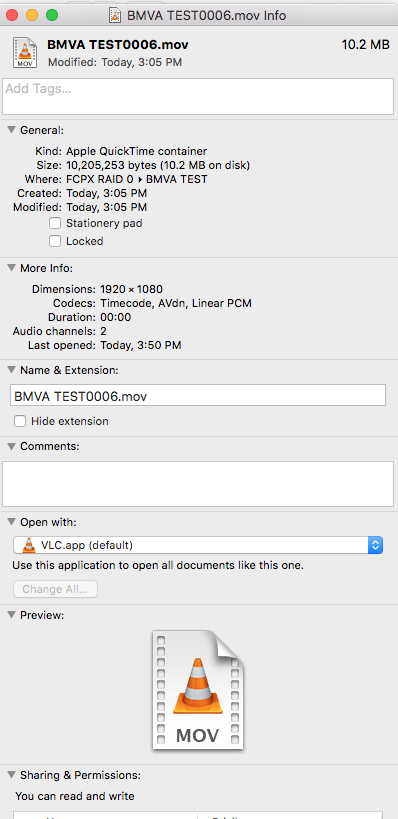
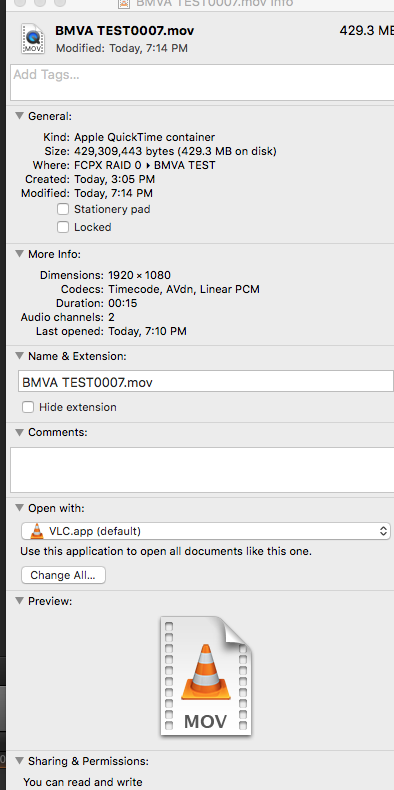
Looked up the Info on the files and have attached screen grabs of clip 6 which works and clip 7 which doesn't.
Then I wondered if ClipWrap could do the trick. Downloaded the demo and tried that but ClipWrap doesn't see them.
I'd really appreciate any ideas for how I can get these files to open?
Late 2012 iMac 27", i7, OSX 10.11.14, FCPX 10.2.3
Thanks
The files show as being in a QuickTime container. For some reason the files from 000 to 006 import without a problem but clips 007 - 012 won't. In the import window they're greyed out.
Before importing them I tried to play them with QT Player and they wouldn't work (any of them) so I switched to VLC and they all play fine.
Looked up the Info on the files and have attached screen grabs of clip 6 which works and clip 7 which doesn't.
Then I wondered if ClipWrap could do the trick. Downloaded the demo and tried that but ClipWrap doesn't see them.
I'd really appreciate any ideas for how I can get these files to open?
Late 2012 iMac 27", i7, OSX 10.11.14, FCPX 10.2.3
Thanks
Ed
Please Log in to join the conversation.

04 Apr 2016 12:30 #74910
by BenB
Replied by BenB on topic File from BMVA won't import
Reset so .mov files open with Quicktime Player. If you recorded ProRes 422, you should have a straight up QT movie file, not an image sequence.
Please Log in to join the conversation.
- Squamish ed
-
Topic Author
- Offline
- Elite Member
-
Less
More
- Posts: 238
- Thank you received: 20
04 Apr 2016 22:03 #74929
by Squamish ed
Ed
Replied by Squamish ed on topic File from BMVA won't import
Ben, Thanks. I tried that and now the clips all play through QT Player - so that's one problem solved.
My second problem remains though. I tried again to import the files into FCPX and the files mentioned before still are greyed out. The Capture_0001 etc file names are the original names generated by the BMVA.
My second problem remains though. I tried again to import the files into FCPX and the files mentioned before still are greyed out. The Capture_0001 etc file names are the original names generated by the BMVA.
Ed
Please Log in to join the conversation.
05 Apr 2016 03:34 #74935
by BenB
Replied by BenB on topic File from BMVA won't import
BMD raw files need to be converted to .MOV via Resolve (free).
Please Log in to join the conversation.
- ronny courtens
-

- Offline
- Moderator
-

Less
More
- Posts: 4455
- Thank you received: 962
05 Apr 2016 14:41 #74968
by ronny courtens
Replied by ronny courtens on topic File from BMVA won't import
Hey Ed,
No matter what camera you use, if you have recorded your footage in ProRes422 you should be able to use these files without any issues in FCP X. So the real quesion is: why do some clips import fine while others are greyed out?
Your screenshot shows that clips 0000 to 0007 are greyed out, is that correct? I also notice that none of these clips have any Start or End timecode, while the ones that work do have time code.
Could you send me one of the problematic files by WeTransfer so we can have a look at it?
ronnycourtens@mac.com
- Ronny
No matter what camera you use, if you have recorded your footage in ProRes422 you should be able to use these files without any issues in FCP X. So the real quesion is: why do some clips import fine while others are greyed out?
Your screenshot shows that clips 0000 to 0007 are greyed out, is that correct? I also notice that none of these clips have any Start or End timecode, while the ones that work do have time code.
Could you send me one of the problematic files by WeTransfer so we can have a look at it?
ronnycourtens@mac.com
- Ronny
Please Log in to join the conversation.
- Squamish ed
-
Topic Author
- Offline
- Elite Member
-
Less
More
- Posts: 238
- Thank you received: 20
05 Apr 2016 20:48 #74981
by Squamish ed
Ed
Replied by Squamish ed on topic File from BMVA won't import
Hi Ronny,
I sent 2 files as one says it's a QT container and the other an Apple container (probably the same thing). Both are direct from the card on which they were recorded.
I really appreciate your taking the time to have a look.
Thanks.
BTW - enjoyed Part II of your interview with Richard.
I sent 2 files as one says it's a QT container and the other an Apple container (probably the same thing). Both are direct from the card on which they were recorded.
I really appreciate your taking the time to have a look.
Thanks.
BTW - enjoyed Part II of your interview with Richard.
Ed
Please Log in to join the conversation.
- ronny courtens
-
- Offline
- Moderator
-
Less
More
- Posts: 4455
- Thank you received: 962
05 Apr 2016 20:52 #74982
by ronny courtens
Replied by ronny courtens on topic File from BMVA won't import
Thank you, Ed. Looking forward to receiving the files.
- Ronny
- Ronny
Please Log in to join the conversation.
- ronny courtens
-
- Offline
- Moderator
-
Less
More
- Posts: 4455
- Thank you received: 962
06 Apr 2016 06:58 #74992
by ronny courtens
Replied by ronny courtens on topic File from BMVA won't import
Hey Ed,
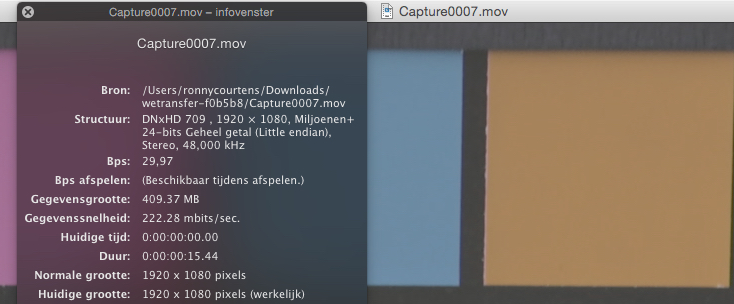
Thank you for sending the clips, mystery solved. Actually the clips have been recorded in two different codecs.
- Capture 0007 was recorded in the DNxHD codec (an Avid format)
- Capture 0008 was recorded in ProRes 422 (HQ)
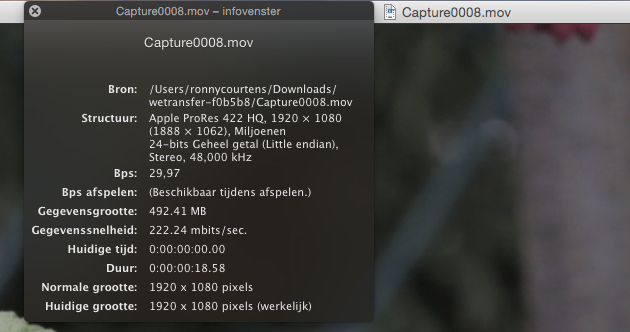
Avid DNx files won't import in FCP X as such. Now there are two ways you can go:
1. If you can play the DNx clips in QuickTime and you don't work with Avid DNx formats on a regular basis:
Just drop the DNx clips in Compressor or MPEG Streamclip and convert them to ProRes 422 (HQ). Then import the ProRes files in FCP X.
2. If you need to work with Avid formats on a regular basis, or you cannot convert the DNx clips in Compressor or MPEG Streamclip:
Download the Avid QuickTime codecs here:
avid.force.com/pkb/articles/en_US/downlo...-QuickTime-Codecs-LE
The installer will add DNx codecs to your QT components folder. Once the codecs are installed, you will be able to work natively with Avid DNx formats and you will be able to import Avid DNx clips in FCP X:
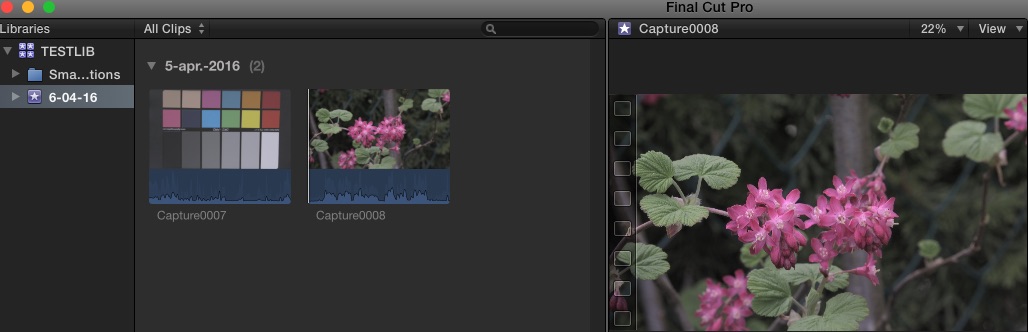
If you have any further questions, feel free to ask.
- Ronny
Thank you for sending the clips, mystery solved. Actually the clips have been recorded in two different codecs.
- Capture 0007 was recorded in the DNxHD codec (an Avid format)
- Capture 0008 was recorded in ProRes 422 (HQ)
Avid DNx files won't import in FCP X as such. Now there are two ways you can go:
1. If you can play the DNx clips in QuickTime and you don't work with Avid DNx formats on a regular basis:
Just drop the DNx clips in Compressor or MPEG Streamclip and convert them to ProRes 422 (HQ). Then import the ProRes files in FCP X.
2. If you need to work with Avid formats on a regular basis, or you cannot convert the DNx clips in Compressor or MPEG Streamclip:
Download the Avid QuickTime codecs here:
avid.force.com/pkb/articles/en_US/downlo...-QuickTime-Codecs-LE
The installer will add DNx codecs to your QT components folder. Once the codecs are installed, you will be able to work natively with Avid DNx formats and you will be able to import Avid DNx clips in FCP X:
If you have any further questions, feel free to ask.
- Ronny
Please Log in to join the conversation.
- Squamish ed
-
Topic Author
- Offline
- Elite Member
-
Less
More
- Posts: 238
- Thank you received: 20
06 Apr 2016 22:06 - 06 Apr 2016 22:09 #75008
by Squamish ed
Ed
Replied by Squamish ed on topic File from BMVA won't import
Hey Ronny,
First, a big thank you.
I tried to use Compressor but it kept failing. So then I downloaded the DNx codecs as you suggested and FCPX seems happy. If FCPX is happy - I'm happy!
Your help on this has bailed me out (not for the first time) - I don't think I'd ever have puzzled it out.
I know now how I got into this mess - a classic case of butter fingers when setting the menu options! :blush:
First, a big thank you.
I tried to use Compressor but it kept failing.
So then I downloaded the DNx codecs as you suggested and FCPX seems happy. If FCPX is happy - I'm happy!Your help on this has bailed me out (not for the first time
) - I don't think I'd ever have puzzled it out.I know now how I got into this mess - a classic case of butter fingers when setting the menu options! :blush:
Ed
Last edit: 06 Apr 2016 22:09 by Squamish ed.
Please Log in to join the conversation.
- haysoos123
-
- Offline
- Platinum Member
-

Less
More
- Posts: 402
- Thank you received: 72
06 Apr 2016 23:40 #75013
by haysoos123
Just a quick note: Compressor probably failed because you tried to do the conversion before you installed the DNx codecs. Once you install the codecs, Compressor should be able to read those files and hence you should be able to convert them. It will probably work ok when cutting, but if you have any problems down the road, I would convert them to ProRes.
Replied by haysoos123 on topic File from BMVA won't import
Squamish ed wrote: Hey Ronny,
I tried to use Compressor but it kept failing.
:
Just a quick note: Compressor probably failed because you tried to do the conversion before you installed the DNx codecs. Once you install the codecs, Compressor should be able to read those files and hence you should be able to convert them. It will probably work ok when cutting, but if you have any problems down the road, I would convert them to ProRes.
Please Log in to join the conversation.
- Squamish ed
-
Topic Author
- Offline
- Elite Member
-
Less
More
- Posts: 238
- Thank you received: 20
07 Apr 2016 00:06 #75015
by Squamish ed
Ed
Replied by Squamish ed on topic File from BMVA won't import
Thanks Haysoos.
You were right. I appreciate your help.
You were right. I appreciate your help.
Ed
Please Log in to join the conversation.
