


- Posts: 730
- Thank you received: 26
3 Post Moderation Rule for New Boarders (25 Jan 2021)
New boarders will have their posts moderated - Don't worry if you cannot see your post immediately.
Can't monitor mono audio...
- DmitriZigany
-
 Topic Author
- Offline
- Platinum Member
-

Less
More
28 Mar 2016 13:18 - 28 Mar 2016 13:35 #74710
by DmitriZigany
Can't monitor mono audio... was created by DmitriZigany
Hey!
I have a weird problem.
I can't monitor mono audio.
I'm using a MOTU 828mk3 for audio, and what I think happens is:
In the control app for the motu I can set default stereo output. I have my monitors connected to the Main Outs so that's what the default is set to. When FCPX is playing a mono signal, it seems it's sending it to output 1 of the interface, which is Analog 1, which isn't connected to anything. And FCPX has no settings to change audio output that I can find!?
Anyone know some secret audio control settings in FCPX?
EDIT: as a workaround I put a cable from output Analog 1 to Input 8 which I then can monitot through Main Outs. This can cause nasty feedback in other apps though so isn't an ideal solution. Would be great if FCPX had better audio controls like DAWs have.
I have a weird problem.
I can't monitor mono audio.
I'm using a MOTU 828mk3 for audio, and what I think happens is:
In the control app for the motu I can set default stereo output. I have my monitors connected to the Main Outs so that's what the default is set to. When FCPX is playing a mono signal, it seems it's sending it to output 1 of the interface, which is Analog 1, which isn't connected to anything. And FCPX has no settings to change audio output that I can find!?
Anyone know some secret audio control settings in FCPX?
EDIT: as a workaround I put a cable from output Analog 1 to Input 8 which I then can monitot through Main Outs. This can cause nasty feedback in other apps though so isn't an ideal solution. Would be great if FCPX had better audio controls like DAWs have.
Last edit: 28 Mar 2016 13:35 by DmitriZigany.
Please Log in to join the conversation.

28 Mar 2016 14:31 - 28 Mar 2016 14:32 #74713
by BenB
Replied by BenB on topic Can't monitor mono audio...
FCPX simply sends outputs to whatever is assigned to the operating system, very simple.
Sounds like your MOTU settings themselves are in need of clarification.
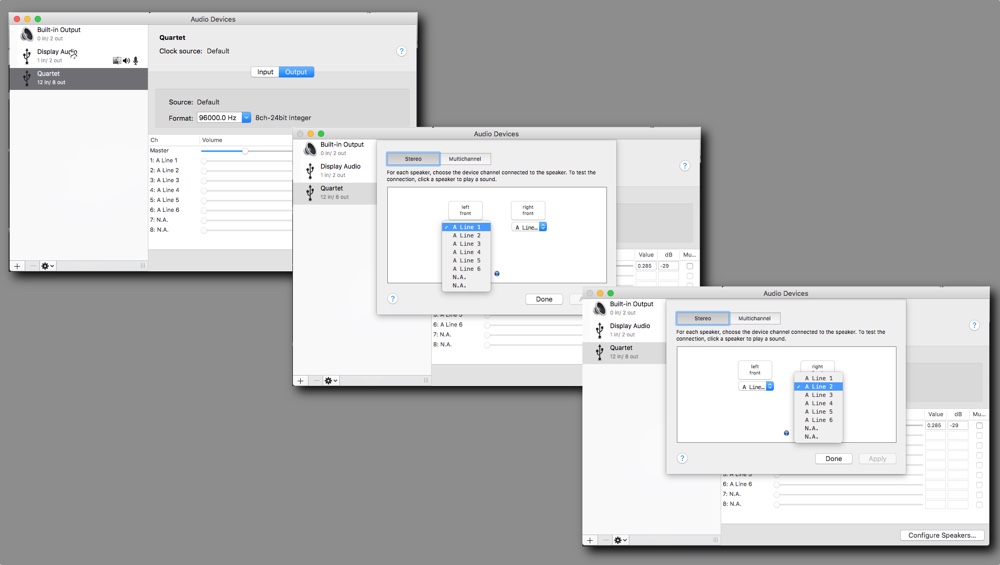
Also, open the "Audio MIDI Setup" application. This gives you detailed control over system level handling of devices with multiple inputs and outputs. You should be set up similar to this (using an Apogee Quartet as an example). In the main Audio window, Output section, bottom right, click "Configure Speakers". Be sure you're set to Stereo, and the two channels are configured properly.
Sounds like your MOTU settings themselves are in need of clarification.
Also, open the "Audio MIDI Setup" application. This gives you detailed control over system level handling of devices with multiple inputs and outputs. You should be set up similar to this (using an Apogee Quartet as an example). In the main Audio window, Output section, bottom right, click "Configure Speakers". Be sure you're set to Stereo, and the two channels are configured properly.
Last edit: 28 Mar 2016 14:32 by BenB.
Please Log in to join the conversation.
