


- Posts: 6
- Thank you received: 0
3 Post Moderation Rule for New Boarders (25 Jan 2021)
New boarders will have their posts moderated - Don't worry if you cannot see your post immediately.
Single Picture video, HUGE file size
- borriffick
-
 Topic Author
- Offline
- New Member
-

Less
More
25 Mar 2016 07:18 #74648
by borriffick
Single Picture video, HUGE file size was created by borriffick
Hi! First time poster here.
I put together a YouTube album video for a friend of mine. Her album is 10 songs and about 35 minutes. I made a custom cover for her which looks nice on its own, but once I place it in the video, it looks pretty bad, even exported at ProRes 422 HQ it's not great looking. Plus the file size is something like 14GB. Even at h.264 it's about 3GB
Again, one single image across a 35 minute album.
Is there a way to make the image appear as good as the original?
Is there a way to make the file size smaller, since there's basically next to nothing contained in the video?
Thanks so much!!
I put together a YouTube album video for a friend of mine. Her album is 10 songs and about 35 minutes. I made a custom cover for her which looks nice on its own, but once I place it in the video, it looks pretty bad, even exported at ProRes 422 HQ it's not great looking. Plus the file size is something like 14GB. Even at h.264 it's about 3GB
Again, one single image across a 35 minute album.
Is there a way to make the image appear as good as the original?
Is there a way to make the file size smaller, since there's basically next to nothing contained in the video?
Thanks so much!!
Please Log in to join the conversation.
- Tom Wolsky
-

- Offline
- Moderator
-

25 Mar 2016 12:06 #74650
by Tom Wolsky
Replied by Tom Wolsky on topic Single Picture video, HUGE file size
Make the dimensions of the image match the dimensions of the project. That it's a single image will help make it smaller, but it's not going to make the video really small. Because it's a single image you can reduce the data rate for the H.264 a lot, but you don't have that kind of control in FCP. If you have Compressor you can make a custom preset that uses a very low data rate. How low you can go depends on the complexity of the image, Amy effects, titles, or transitions you're adding and the size of the project and the frame rate.
Please Log in to join the conversation.
- borriffick
-
Topic Author
- Offline
- New Member
-
Less
More
- Posts: 6
- Thank you received: 0
26 Mar 2016 00:46 #74663
by borriffick
Replied by borriffick on topic Single Picture video, HUGE file size
The dimensions of the video were based on the picture, apparently. Although the way I understand it, it just guesses the size and puts it into the nearest size video and shrinks it anyway?
I have Compressor 4.0.7
Can I make the video super high quality and reduce the frame rate to 1 fps or something?
I can't believe there's no algorithm to instruct a video "First frame of this video is the same for EVERY frame for the next 35 minutes". Then this video would probably be about 50MB instead of 15GB
I'm just attaching the original picture, followed by what it looks like in the finished video.
I have Compressor 4.0.7
Can I make the video super high quality and reduce the frame rate to 1 fps or something?
I can't believe there's no algorithm to instruct a video "First frame of this video is the same for EVERY frame for the next 35 minutes". Then this video would probably be about 50MB instead of 15GB
I'm just attaching the original picture, followed by what it looks like in the finished video.
Please Log in to join the conversation.
- borriffick
-
Topic Author
- Offline
- New Member
-
Less
More
- Posts: 6
- Thank you received: 0
26 Mar 2016 01:07 #74664
by borriffick
Replied by borriffick on topic Single Picture video, HUGE file size
Sorry, the original image was .tiff format which isn't allowed to be posted. But believe me, it's a LOT better than the one that Final Cut ends up spitting out.
Please Log in to join the conversation.
- Tom Wolsky
-
- Offline
- Moderator
-
28 Mar 2016 21:01 #74727
by Tom Wolsky
Replied by Tom Wolsky on topic Single Picture video, HUGE file size
Video compression is extremely heavy compared to a TIFF, which frame for frame would be enormously bigger. You should upgrade Compressor. Don't know if you can get the frame rate down to one frame a second. Not sure if the audio can sync to a frame rate that low. No algorithm for that. Not much demand for 35 minute single image videos. Maybe you might be better off looking for a different delivery mechanism than video. Maybe some kind of Keynote or slide show presentation.
Please Log in to join the conversation.
- Karsten Schlüter
-

- Offline
- Moderator
-
Less
More
- Posts: 3790
- Thank you received: 718
30 Mar 2016 13:01 #74782
by Karsten Schlüter
from the start: why that?
don't import highly compressed material and expect on 2nd compression (export) a 'better' result. And on 3rd compression (YouTube) a superb quality ...
create your still as 1920x1080, export from your painting app as tiff ... file-size doesn't matter yet.
No. video codecs are optimized for <cough> moving images ... which demand a minimum of file size ...
What you can give it a try: change codec to Animation (codec for 'stills'); set a low framerate (by video standards) as 15 or 12fps; set keyframes every 50, 60, 200 frames (encoding time will be endless ) ...should result in a 10x smaller file, and, when YT is done with re-encoding, and acceptable pic-quality.
Replied by Karsten Schlüter on topic Single Picture video, HUGE file size
borriffick wrote: ... once I place it in the video, it looks pretty bad, ...
from the start: why that?
don't import highly compressed material and expect on 2nd compression (export) a 'better' result. And on 3rd compression (YouTube) a superb quality ...
create your still as 1920x1080, export from your painting app as tiff ... file-size doesn't matter yet.
borriffick wrote: ... Is there a way to make the image appear as good as the original?
Is there a way to make the file size smaller, since there's basically next to nothing contained in the video?…
No. video codecs are optimized for <cough> moving images ... which demand a minimum of file size ...
What you can give it a try: change codec to Animation (codec for 'stills'); set a low framerate (by video standards) as 15 or 12fps; set keyframes every 50, 60, 200 frames (encoding time will be endless
) ...should result in a 10x smaller file, and, when YT is done with re-encoding, and acceptable pic-quality. Please Log in to join the conversation.
- borriffick
-
Topic Author
- Offline
- New Member
-
Less
More
- Posts: 6
- Thank you received: 0
17 Apr 2016 20:16 #75514
by borriffick
Replied by borriffick on topic Single Picture video, HUGE file size
First, thank you both very much for your comments.
I can't upgrade Compressor currently, I'm running Snow Leopard on a maxed-out Macbook 8,2, and it runs fast. I "upgraded" to Lion in 2011 and it slowed my computer down to a crawl, and I went through Hell trying to get Snow Leopard back on it. At least with this machine, it will stay on Snow Leopard until the end of its days. The hardware is awesome, fast, doesn't crash, and is perfect for audio production (and gaming in Windows), which is what I use it for primarily. Within the next year or two I'll likely get a new iMac with the latest everything on it, but doing that right now is impossible.
I understand what you're saying about moving images, and there not being a codec that deals with what I'm looking for. I'm just wondering how all the thousands and thousands of albums on YouTube are made like that? I guess the single image quality suffers on all of those too...
Specifically, how do I change the codec to Animation? Are you talking about doing that in FCP or Compressor (or QuickTime)? I don't see options in either, though I'm not a pro user or anything, I'm probably missing something. Could you point me in the right direction? Thanks so much!
I can't upgrade Compressor currently, I'm running Snow Leopard on a maxed-out Macbook 8,2, and it runs fast. I "upgraded" to Lion in 2011 and it slowed my computer down to a crawl, and I went through Hell trying to get Snow Leopard back on it. At least with this machine, it will stay on Snow Leopard until the end of its days. The hardware is awesome, fast, doesn't crash, and is perfect for audio production (and gaming in Windows), which is what I use it for primarily. Within the next year or two I'll likely get a new iMac with the latest everything on it, but doing that right now is impossible.
I understand what you're saying about moving images, and there not being a codec that deals with what I'm looking for. I'm just wondering how all the thousands and thousands of albums on YouTube are made like that? I guess the single image quality suffers on all of those too...
Specifically, how do I change the codec to Animation? Are you talking about doing that in FCP or Compressor (or QuickTime)? I don't see options in either, though I'm not a pro user or anything, I'm probably missing something. Could you point me in the right direction? Thanks so much!
Please Log in to join the conversation.
- MarkNelsonMovies
-
- Offline
- Elite Member
-

Less
More
- Posts: 256
- Thank you received: 48
17 Apr 2016 20:47 #75517
by MarkNelsonMovies
Replied by MarkNelsonMovies on topic Single Picture video, HUGE file size
Official music tracks on YouTube are handled through YT's content ID system, and are an actual image being displayed by the browser instead of a video file.
Everyone else just has to do the best they can with a video file.
Everyone else just has to do the best they can with a video file.
Please Log in to join the conversation.
- Karsten Schlüter
-
- Offline
- Moderator
-
Less
More
- Posts: 3790
- Thank you received: 718
18 Apr 2016 06:02 #75523
by Karsten Schlüter
export a Master from FCPX
convert to Animation codec using the free tool MpegStreamclip ...
Replied by Karsten Schlüter on topic Single Picture video, HUGE file size
borriffick wrote: .... how do I change the codec to Animation? ..
export a Master from FCPX
convert to Animation codec using the free tool MpegStreamclip ...
Please Log in to join the conversation.

18 Apr 2016 12:39 #75532
by BenB
Replied by BenB on topic Single Picture video, HUGE file size
With ProRes, Animation codec is a waste of time.
Please Log in to join the conversation.
- Karsten Schlüter
-
- Offline
- Moderator
-
Less
More
- Posts: 3790
- Thank you received: 718
18 Apr 2016 12:43 #75533
by Karsten Schlüter
OP is about 'single frame video, small sized' - proRes just bloats such a file ....
so, why 'waste of time'?
Replied by Karsten Schlüter on topic Single Picture video, HUGE file size
BenB wrote: With ProRes, Animation codec is a waste of time.
OP is about 'single frame video, small sized' - proRes just bloats such a file ....
so, why 'waste of time'?
Please Log in to join the conversation.
18 Apr 2016 12:56 - 18 Apr 2016 12:58 #75536
by BenB
Replied by BenB on topic Single Picture video, HUGE file size
In that case, single frame image, user a PNG. But for a video file, Animation is not small, no smaller than ProRes. I'd go with ProRes LT. Equal if not better image quality, smaller file size. Animation is so outdated...
Last edit: 18 Apr 2016 12:58 by BenB.
Please Log in to join the conversation.
- Karsten Schlüter
-
- Offline
- Moderator
-
Less
More
- Posts: 3790
- Thank you received: 718
18 Apr 2016 14:20 - 18 Apr 2016 14:24 #75539
by Karsten Schlüter
Replied by Karsten Schlüter on topic Single Picture video, HUGE file size
sorry, Ben, don't share your opinion.
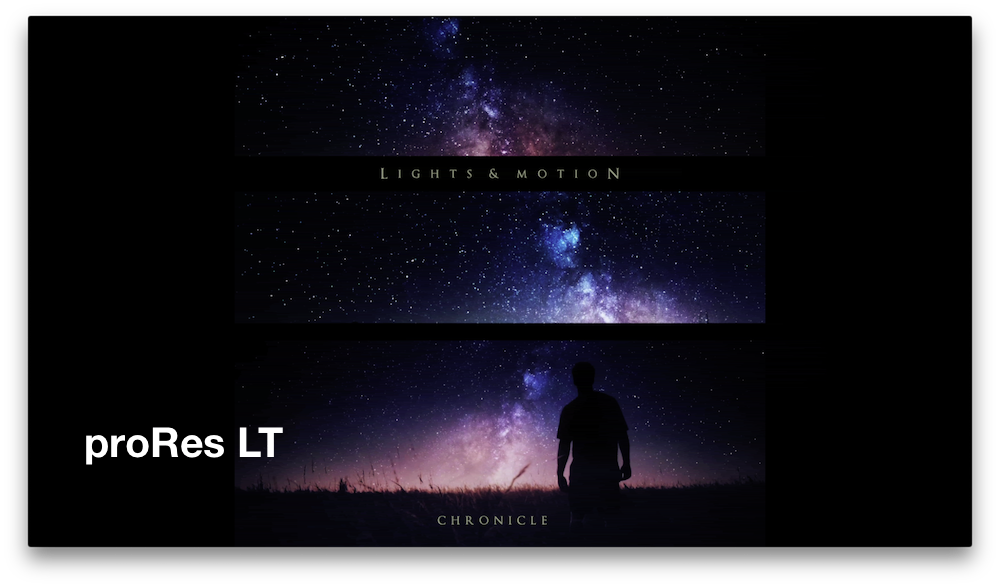
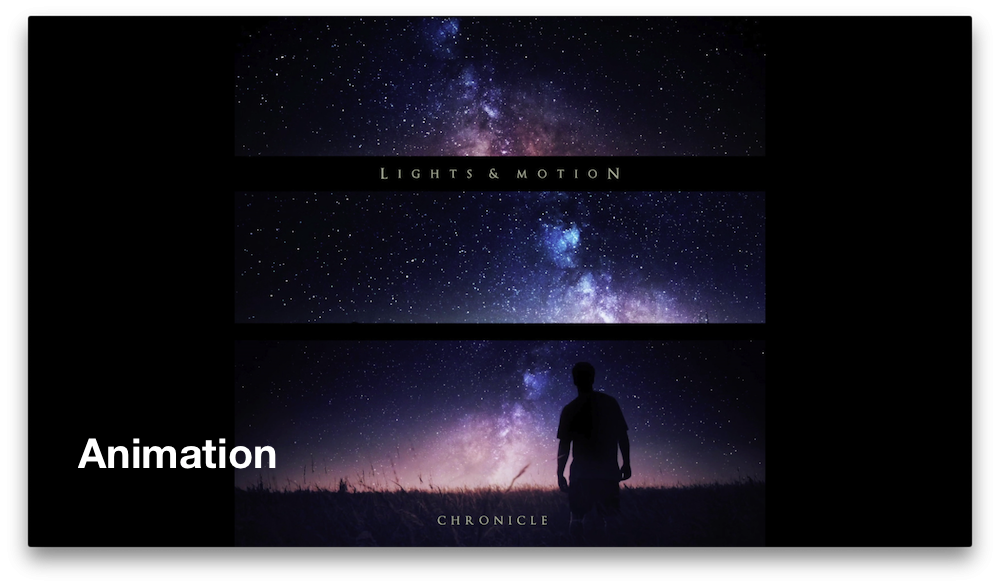
a quick test
single frame project, ~3:30min, ...

master export: 8 GB
proRes LT: 2.6 GB
Animation : 35 MB ....
ok, Anim is so antiqué, El Cap doesn't support a preview :lol:
but resulting pic quality (what OT asks for) is nice, see attached files ... aside the old gamma-shift problem (old codec, old issues)
a 1-frame 'video' doesn#t need vector prediction and yaddayadda the highly sophisticated proRes offer.
no idea, what's left when YT converts it again... a little bit left for borrificks own experiments .....
but for the very special demands of the OT, 1-frame video, small upload file, acceptable quality, I stand by my recommendation ...
enjoy Vegas, Ben!
a quick test
single frame project, ~3:30min, ...
master export: 8 GB
proRes LT: 2.6 GB
Animation : 35 MB ....
ok, Anim is so antiqué, El Cap doesn't support a preview :lol:
but resulting pic quality (what OT asks for) is nice, see attached files ... aside the old gamma-shift problem (old codec, old issues)
a 1-frame 'video' doesn#t need vector prediction and yaddayadda the highly sophisticated proRes offer.
no idea, what's left when YT converts it again... a little bit left for borrificks own experiments .....
but for the very special demands of the OT, 1-frame video, small upload file, acceptable quality, I stand by my recommendation ...
enjoy Vegas, Ben!
Last edit: 18 Apr 2016 14:24 by Karsten Schlüter.
Please Log in to join the conversation.
18 Apr 2016 14:38 #75543
by BenB
Replied by BenB on topic Single Picture video, HUGE file size
1 image in a video? Use H.264. Save even more space. Anim is overkill for this.
Please Log in to join the conversation.
- Karsten Schlüter
-
- Offline
- Moderator
-
Less
More
- Posts: 3790
- Thank you received: 718
19 Apr 2016 07:59 #75616
by Karsten Schlüter
yep, that is the topic of this thread…
not in my test:

80 when exporting from within FCPX, using the 'AppleDeivice' preset, the two others are - as mentioned in this thread before - MpegStreamclip, one without manual settings, another with 100mbps limitation.. still twice the size. 50mbps starts to kill details (OP: "quality") ...
and to mention (again) :
h264, undoubted a powerful codec, is optimized, as proRes, for moving content - no moves here...
... since borrifick obviously doesn't follow this thread anymore, give us a nice closing line, Ben:
Replied by Karsten Schlüter on topic Single Picture video, HUGE file size
BenB wrote: 1 image in a video? ….
yep, that is the topic of this thread…
BenB wrote: … Use H.264. Save even more space. Anim is overkill for this.
not in my test:
80 when exporting from within FCPX, using the 'AppleDeivice' preset, the two others are - as mentioned in this thread before - MpegStreamclip, one without manual settings, another with 100mbps limitation.. still twice the size. 50mbps starts to kill details (OP: "quality") ...
and to mention (again) :
h264, undoubted a powerful codec, is optimized, as proRes, for moving content - no moves here...
... since borrifick obviously doesn't follow this thread anymore, give us a nice closing line, Ben:
Please Log in to join the conversation.
- borriffick
-
Topic Author
- Offline
- New Member
-
Less
More
- Posts: 6
- Thank you received: 0
25 Apr 2016 06:15 - 25 Apr 2016 06:20 #75998
by borriffick
Replied by borriffick on topic Single Picture video, HUGE file size
I still follow this topic, and I will until my project is finished  And thank you kindly for your help, I think you found just what I was looking for.
I have the latest stable release of MPEG Streamclip 1.9.2 (2008). I see how I can export as an .avi while using the Apple Animation codec, but can't find anything about changing the fps. Is this only available in the beta version? Maybe I am just missing it?
Karasten, thanks for your help, this is incredibly close to what I was looking for, it will do just fine once I get it working. So close now.
And thank you kindly for your help, I think you found just what I was looking for.I have the latest stable release of MPEG Streamclip 1.9.2 (2008). I see how I can export as an .avi while using the Apple Animation codec, but can't find anything about changing the fps. Is this only available in the beta version? Maybe I am just missing it?
Karasten, thanks for your help, this is incredibly close to what I was looking for, it will do just fine once I get it working. So close now.
Last edit: 25 Apr 2016 06:20 by borriffick.
Please Log in to join the conversation.
- Karsten Schlüter
-
- Offline
- Moderator
-
Less
More
- Posts: 3790
- Thank you received: 718
25 Apr 2016 07:06 #76001
by Karsten Schlüter
sorry, I don't use avi, prefer mov
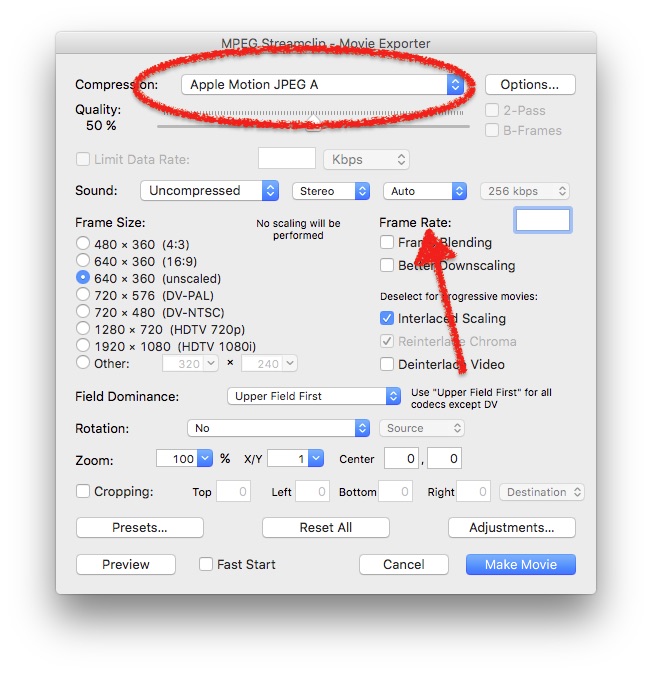
some knobs to play with....
plus the bitrate limitations ....
Just to reiterate:
I don't recommend 'animation' as general 'best'! This is all about that very specific need, a single frame 'video' AND tiny file-size... in terms of convenience a 'share to YT' is best, in terms of easy+good quality, a h264 export would give siperb results.
Plus...
check before with a much shorter version, what YT makes with your upload. YT converts any upload to up-to 16 diff. versions; so, wait an hour before judging final result.
If bandwidth doesn't matter, 'best' would be a proRes/Master file.... some gazillion bits huge :woohoo:
Replied by Karsten Schlüter on topic Single Picture video, HUGE file size
borriffick wrote: …I see how I can export as an .avi while using ….
sorry, I don't use avi, prefer mov
some knobs to play with....
plus the bitrate limitations ....
Just to reiterate:
I don't recommend 'animation' as general 'best'! This is all about that very specific need, a single frame 'video' AND tiny file-size... in terms of convenience a 'share to YT' is best, in terms of easy+good quality, a h264 export would give siperb results.
Plus...
check before with a much shorter version, what YT makes with your upload. YT converts any upload to up-to 16 diff. versions; so, wait an hour before judging final result.
If bandwidth doesn't matter, 'best' would be a proRes/Master file.... some gazillion bits huge :woohoo:
Please Log in to join the conversation.
- borriffick
-
Topic Author
- Offline
- New Member
-
Less
More
- Posts: 6
- Thank you received: 0
28 Apr 2016 04:49 #76150
by borriffick
Replied by borriffick on topic Single Picture video, HUGE file size
Your method did the trick. Exactly what I was looking for. Shrunk an 11.5GB file to 488MB and no noticeable loss of picture quality.
YouTube might be a different matter. But I'll have to fight with them if it comes to it.
Thanks so much.
YouTube might be a different matter. But I'll have to fight with them if it comes to it.
Thanks so much.
Please Log in to join the conversation.
- Karsten Schlüter
-
- Offline
- Moderator
-
Less
More
- Posts: 3790
- Thank you received: 718
28 Apr 2016 09:33 #76163
by Karsten Schlüter
Glad to be helpful!
.... a very [strike]weird[/strike] unusual method, I have to admit, but I do like cheap workarounds... :lol:
Come back, when yo've done your YT uploads, and tell us how it comes out there....
With Quicktime6/pro it would be even easier..... LOL,
.... <nostalgicmodeON> those days ....
Replied by Karsten Schlüter on topic Single Picture video, HUGE file size
borriffick wrote: Your method did the trick. ...
Glad to be helpful!
.... a very [strike]weird[/strike] unusual method, I have to admit, but I do like cheap workarounds... :lol:
Come back, when yo've done your YT uploads, and tell us how it comes out there....
With Quicktime6/pro it would be even easier..... LOL,
.... <nostalgicmodeON> those days ....
Please Log in to join the conversation.
