


- Posts: 150
- Thank you received: 2
3 Post Moderation Rule for New Boarders (25 Jan 2021)
New boarders will have their posts moderated - Don't worry if you cannot see your post immediately.
FCPX 10.2.3. The name of the folder.
24 Mar 2016 10:28 #74612
by click
FCPX 10.2.3. The name of the folder. was created by click
Hi everyone, I want to ask some information, when I import a SDHC card folder with all original content, of FCPX in the library is imported with the original folder name.
As though I have a folder that you copied from the SDHC as "holiday in Paris" it will be the same as the name on FCPX library.
Ip but if I create a folder such as "ProRes File" in my external hd and then the amount with FCPX find it on the library with the date of import, but not with the original name of the folder !!!!!!!
how can I do? I tried in every way but I can not, so I am so many folders on the library, all with import dates by creating confusion, however, if I could give him the name that I want every folder I would order more.
thank you
As though I have a folder that you copied from the SDHC as "holiday in Paris" it will be the same as the name on FCPX library.
Ip but if I create a folder such as "ProRes File" in my external hd and then the amount with FCPX find it on the library with the date of import, but not with the original name of the folder !!!!!!!
how can I do? I tried in every way but I can not, so I am so many folders on the library, all with import dates by creating confusion, however, if I could give him the name that I want every folder I would order more.
thank you
Please Log in to join the conversation.
- Tom Wolsky
-

- Offline
- Moderator
-

24 Mar 2016 12:45 #74615
by Tom Wolsky
Replied by Tom Wolsky on topic FCPX 10.2.3. The name of the folder.
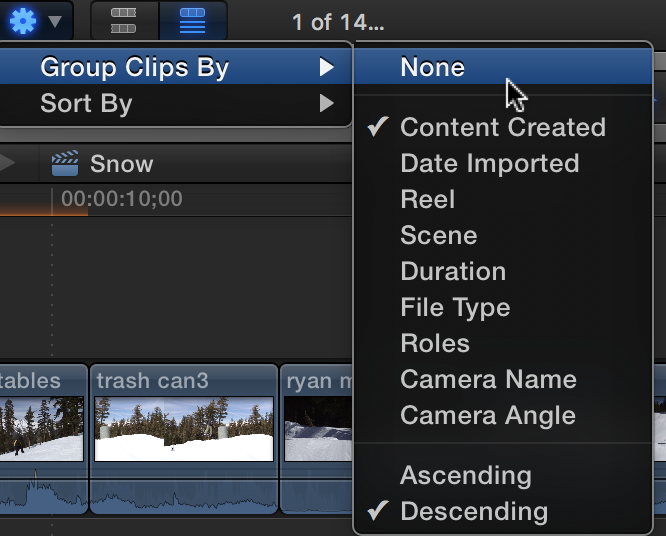
There are no folders based on creation date. In the action popup in the toolbar the gear, clips are grouped based on content created. Switch it to none.
Please Log in to join the conversation.
24 Mar 2016 13:02 - 24 Mar 2016 13:02 #74617
by click
Replied by click on topic FCPX 10.2.3. The name of the folder.
thanks for helping me, but I make an example if I have a folder containing ProRes files titled "Paris 1" when the amount of FCPX the meeting on library as "no data" because ??
and if I wanted to change the name of the folder and call it "Paris1" how should I do ??
I can only change the name of the individual clips but not the folder contents all clips.
thank you
and if I wanted to change the name of the folder and call it "Paris1" how should I do ??
I can only change the name of the individual clips but not the folder contents all clips.
thank you
Last edit: 24 Mar 2016 13:02 by click. Reason: error
Please Log in to join the conversation.
- Tom Wolsky
-
- Offline
- Moderator
-
24 Mar 2016 13:33 - 24 Mar 2016 13:33 #74618
by Tom Wolsky
Replied by Tom Wolsky on topic FCPX 10.2.3. The name of the folder.
Please post screenshots of what you're talking about.
These are not folders. They are creation dates.
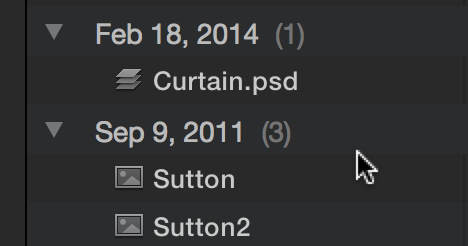
Not Date means there is no creation date of the file embedded in it.
Switch these off if you don't want them.
These are not folders. They are creation dates.
Not Date means there is no creation date of the file embedded in it.
Switch these off if you don't want them.
Last edit: 24 Mar 2016 13:33 by Tom Wolsky.
Please Log in to join the conversation.
24 Mar 2016 13:53 #74619
by click
Replied by click on topic FCPX 10.2.3. The name of the folder.
I tried it as you say it does not change anything I might regret I can not explain well I
example: in my external HD I open a folder by putting the name "Rain" and you put into 4 avchd files.
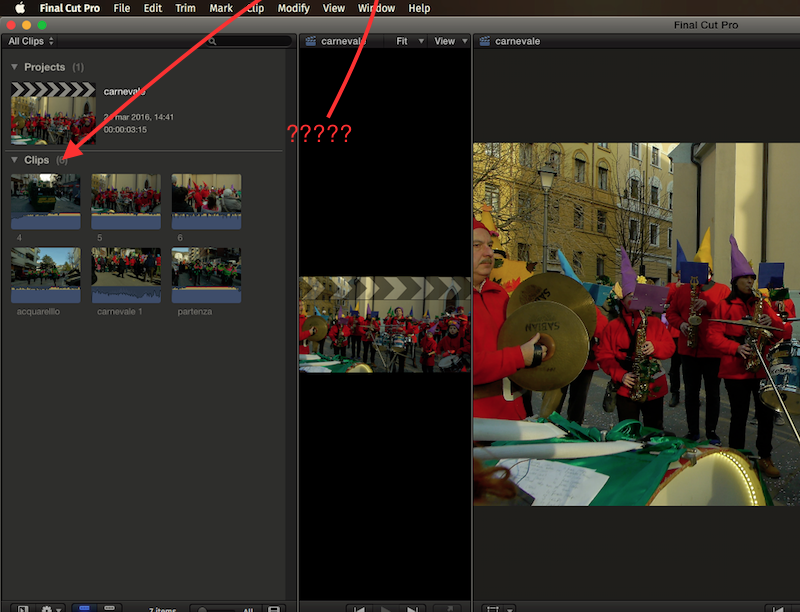
I open FCPX and amount of the folder "rain" and I find it on the library as "no data" or "clips" or "02.18.15" but NEVER with his real name "Rain"
you understand ?? how can I change the name of "no data" in "rain" on the folder in the library FCPX?
example: in my external HD I open a folder by putting the name "Rain" and you put into 4 avchd files.
I open FCPX and amount of the folder "rain" and I find it on the library as "no data" or "clips" or "02.18.15" but NEVER with his real name "Rain"
you understand ?? how can I change the name of "no data" in "rain" on the folder in the library FCPX?
Please Log in to join the conversation.
24 Mar 2016 13:55 #74620
by click
Replied by click on topic FCPX 10.2.3. The name of the folder.
example
Please Log in to join the conversation.
- Tom Wolsky
-
- Offline
- Moderator
-
24 Mar 2016 14:00 #74621
by Tom Wolsky
Replied by Tom Wolsky on topic FCPX 10.2.3. The name of the folder.
Clips is not a folder. There are no folders inside the event browser. That's says Clips to separate it from Projects above it.
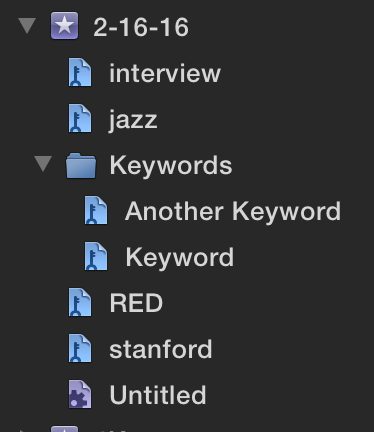
In the FCP library browser, to the left of what you show, are collections, keyword collections and smart collections. These collections can be grouped into folders. Clips cannot be grouped into folders.
I would suggest getting some basic instruction on the application, books, online, or at a training center. This is probably a very different application from one you might be sued to.
In the FCP library browser, to the left of what you show, are collections, keyword collections and smart collections. These collections can be grouped into folders. Clips cannot be grouped into folders.
I would suggest getting some basic instruction on the application, books, online, or at a training center. This is probably a very different application from one you might be sued to.
Please Log in to join the conversation.
24 Mar 2016 14:03 #74622
by click

Replied by click on topic FCPX 10.2.3. The name of the folder.
Please Log in to join the conversation.
- Tom Wolsky
-
- Offline
- Moderator
-
24 Mar 2016 14:07 #74623
by Tom Wolsky
Replied by Tom Wolsky on topic FCPX 10.2.3. The name of the folder.
That is NOT a folder. You cannot change its name.
Please Log in to join the conversation.
- Tom Wolsky
-
- Offline
- Moderator
-
24 Mar 2016 14:11 #74624
by Tom Wolsky
Replied by Tom Wolsky on topic FCPX 10.2.3. The name of the folder.
On the left are keyword collections. These act as folders. The collections can be put inside a folder.
Please Log in to join the conversation.
24 Mar 2016 14:13 #74625
by click
Replied by click on topic FCPX 10.2.3. The name of the folder.
ok thanks now I finally realized I'm sorry
:S
:S
Please Log in to join the conversation.

24 Mar 2016 18:28 #74635
by BenB
Replied by BenB on topic FCPX 10.2.3. The name of the folder.
Forget everything you learned about any other NLE, none of it translates to FCPX.
Here's the manual about organizing clips.
help.apple.com/finalcutpro/mac/10.2/#/ver26ccfda0
Here's the manual about organizing clips.
help.apple.com/finalcutpro/mac/10.2/#/ver26ccfda0
Please Log in to join the conversation.
