


- Posts: 8
- Thank you received: 0
3 Post Moderation Rule for New Boarders (25 Jan 2021)
New boarders will have their posts moderated - Don't worry if you cannot see your post immediately.
Choppy 4K exports of DJI Osmo footage
- andysummers
-
 Topic Author
- Offline
- New Member
-

Less
More
23 Mar 2016 21:59 #74603
by andysummers
Choppy 4K exports of DJI Osmo footage was created by andysummers
Hello all, I'm new to the forum and come with a request for help.
I've been happily shooting 1080 and now 4k footage (3840x2160) on my DJI Phantom 3 pro and DJI Osmo cameras. In general if I am shooting at 50/60fps I am happy with the playback on my Mac, lower frame rates tend to look a little juddery for want of a better word.
I recently bought a Sony 4K Android Tv and I installed VLC, Plex and XMBC on it only to find that the nice footage I have edited in FCPx plays really badly on the tv when streaming over my wired gigabit LAN. In fact, to rule out that I also put some videos on a USB3 stick and they also play back very juddery / choppy. So I have been doing some tests and I can't work out where I am going wrong.
The raw 4k footage I shot today on the Osmo plays back perfectly via USB or LAN on my TV in VLC and Plex. It's super smooth, I shot it at 30fps in NTSC mode on the camera. An app I have reports the following properties about the raw files:
General : MPEG-4 / QuickTime / Variable bitrate mode / Bitrate 60mbps = .mov file
Video : AVC / Profile High@L5.1 / 60mbps / Frame Rate 29.970 (30000/1001) fps
I have edited a few short 4k shots together in FCP 10.2.1 and can not seem to get it to play smoothly on my TV. I have tried sharing with the following settings:
1. Master File : Computer : H.264 Faster Encode : 3840/2160 = .mp4
2. Master File : Computer : H.264 Better Quality : 3840/2160 = .mp4
3. Master File : Video & Audio : H.264 : 3840/2160 = .mov file
I have also tried 1 and 2 above but at 1080 - this was better on my tv but still looked a long way off the quality of the raw footage that plays so well.
1 and 2 give me files with a bitrate of about 30mbps or half of the original and they look rubbish. They upload to Youtube however and stream as 4k really well on the tv.
When I shared as a Mastering Video & Audio file, number 3 above, I got output that was slightly more than the original 60mbps so I thought I had cracked it until I played the file back on the tv and it continues to judder. The effect is like the first frame of every second stutters and looks terrible. The 1080 files I am rendering are also judder on the tv but not quite as pronounced.
The files all play fine on my MBP and my iPhone if I stream them, even the 4k video. The raw footage on my TV looks awesome in 4k, why can't I output the same footage from FCP to a 4k file that also looks good on my TV ?
One thing I noticed when I examine properties of the output file on my windows machine - it says the file is 29.970fps but the original was 25.000 fps - no it wasn't?? It was shot at 30fps on the Osmo and the inspector in FCP confirms it's 29.970 4K.
Any ideas where I am going wrong? Ultimately I want to create a 4k version of my videos that I can enjoy on my 4K tv without having to upload them to Youtube, and then a lower res version that I can share with friends. Any help is greatly appreciated!
I've been happily shooting 1080 and now 4k footage (3840x2160) on my DJI Phantom 3 pro and DJI Osmo cameras. In general if I am shooting at 50/60fps I am happy with the playback on my Mac, lower frame rates tend to look a little juddery for want of a better word.
I recently bought a Sony 4K Android Tv and I installed VLC, Plex and XMBC on it only to find that the nice footage I have edited in FCPx plays really badly on the tv when streaming over my wired gigabit LAN. In fact, to rule out that I also put some videos on a USB3 stick and they also play back very juddery / choppy. So I have been doing some tests and I can't work out where I am going wrong.
The raw 4k footage I shot today on the Osmo plays back perfectly via USB or LAN on my TV in VLC and Plex. It's super smooth, I shot it at 30fps in NTSC mode on the camera. An app I have reports the following properties about the raw files:
General : MPEG-4 / QuickTime / Variable bitrate mode / Bitrate 60mbps = .mov file
Video : AVC / Profile High@L5.1 / 60mbps / Frame Rate 29.970 (30000/1001) fps
I have edited a few short 4k shots together in FCP 10.2.1 and can not seem to get it to play smoothly on my TV. I have tried sharing with the following settings:
1. Master File : Computer : H.264 Faster Encode : 3840/2160 = .mp4
2. Master File : Computer : H.264 Better Quality : 3840/2160 = .mp4
3. Master File : Video & Audio : H.264 : 3840/2160 = .mov file
I have also tried 1 and 2 above but at 1080 - this was better on my tv but still looked a long way off the quality of the raw footage that plays so well.
1 and 2 give me files with a bitrate of about 30mbps or half of the original and they look rubbish. They upload to Youtube however and stream as 4k really well on the tv.
When I shared as a Mastering Video & Audio file, number 3 above, I got output that was slightly more than the original 60mbps so I thought I had cracked it until I played the file back on the tv and it continues to judder. The effect is like the first frame of every second stutters and looks terrible. The 1080 files I am rendering are also judder on the tv but not quite as pronounced.
The files all play fine on my MBP and my iPhone if I stream them, even the 4k video. The raw footage on my TV looks awesome in 4k, why can't I output the same footage from FCP to a 4k file that also looks good on my TV ?
One thing I noticed when I examine properties of the output file on my windows machine - it says the file is 29.970fps but the original was 25.000 fps - no it wasn't?? It was shot at 30fps on the Osmo and the inspector in FCP confirms it's 29.970 4K.
Any ideas where I am going wrong? Ultimately I want to create a 4k version of my videos that I can enjoy on my 4K tv without having to upload them to Youtube, and then a lower res version that I can share with friends. Any help is greatly appreciated!
Please Log in to join the conversation.

24 Mar 2016 12:49 #74616
by BenB
Replied by BenB on topic Choppy 4K exports of DJI Osmo footage
What is the frame rate of the Project timeline you're editing in?
Please Log in to join the conversation.


24 Mar 2016 14:31 #74626
by joema
Can you please download MediaInfo (it is free), and do View>Text, then File>Export on a 4k camera native file and one from FCPX, and post the results here? mediaarea.net/en/MediaInfo Or if you already have Invisor, use that: itunes.apple.com/us/app/invisor-media-fi...or/id442947586?mt=12 I like Invisor best since you can compare multiple files side-by-side on a single screen. With either one in Finder you can right-click on the file>Services>Analyze with MediaInfo or Invisor.
You are using the TV like a giant 4k Android tablet. This is a new area. In general "smart" TVs have fairly weak CPUs relative to a laptop. Your TV uses a MediaTek MT5595 CPU, which is a custom SoC which contains two ARM Cortex A17 cores and two ARM A7 CPUs. It may have highly specific video file input criteria. Check the manual and any manufacturer info about specifications required for playback of 4k video files.
If there is insufficient info in the manual, you will have to contact the manufacturer about their detailed video file criteria for smooth 4k playback. We need highly specific information here.
In general a laptop or desktop (or even a 12" iPad Pro) have more powerful CPUs than a smart TV and can handle a wide range of encoding formats. 4k is very stressful and it's possible your TV is optimized for a narrow range of codecs or specific encoding criteria.
E.g. on my iMac, Premiere Pro has better performance at 4k playback of H.265 than H.264 -- despite the fact that H.265 is computationally much harder. The code path is just more optimized for H.265 or uses available hardware better. The fact your TV can play camera-native 4K from DJI devices might be a similar situation.
It would also be interesting if you could run GeekBench on the TV and report the numbers: www.primatelabs.com/geekbench/
I expect this situation will arise repeatedly in the future -- you are just the first I've seen. We will try to help you out.
As Ben said we also need your project timeline frame rate. In FCPX, click on the project itself, open Inspector (Window>GoTo>Inspector) and report the resolution and frame rate.
As a standard procedure check if there is any firmware/software update available for the TV. If there is and it fixes the problem, that will save a lot of troubleshooting time.
Replied by joema on topic Choppy 4K exports of DJI Osmo footage
andysummers wrote: ...recently bought a Sony 4K Android Tv and I installed VLC, Plex and XMBC on it only to find that the nice footage I have edited in FCPx plays really badly on the tv...videos on a USB3 stick and they also play back very juddery / choppy...The raw 4k footage I shot today on the Osmo plays back perfectly via USB or LAN on my TV in VLC and Plex...
Can you please download MediaInfo (it is free), and do View>Text, then File>Export on a 4k camera native file and one from FCPX, and post the results here? mediaarea.net/en/MediaInfo Or if you already have Invisor, use that: itunes.apple.com/us/app/invisor-media-fi...or/id442947586?mt=12 I like Invisor best since you can compare multiple files side-by-side on a single screen. With either one in Finder you can right-click on the file>Services>Analyze with MediaInfo or Invisor.
You are using the TV like a giant 4k Android tablet. This is a new area. In general "smart" TVs have fairly weak CPUs relative to a laptop. Your TV uses a MediaTek MT5595 CPU, which is a custom SoC which contains two ARM Cortex A17 cores and two ARM A7 CPUs. It may have highly specific video file input criteria. Check the manual and any manufacturer info about specifications required for playback of 4k video files.
If there is insufficient info in the manual, you will have to contact the manufacturer about their detailed video file criteria for smooth 4k playback. We need highly specific information here.
In general a laptop or desktop (or even a 12" iPad Pro) have more powerful CPUs than a smart TV and can handle a wide range of encoding formats. 4k is very stressful and it's possible your TV is optimized for a narrow range of codecs or specific encoding criteria.
E.g. on my iMac, Premiere Pro has better performance at 4k playback of H.265 than H.264 -- despite the fact that H.265 is computationally much harder. The code path is just more optimized for H.265 or uses available hardware better. The fact your TV can play camera-native 4K from DJI devices might be a similar situation.
It would also be interesting if you could run GeekBench on the TV and report the numbers: www.primatelabs.com/geekbench/
I expect this situation will arise repeatedly in the future -- you are just the first I've seen. We will try to help you out.
As Ben said we also need your project timeline frame rate. In FCPX, click on the project itself, open Inspector (Window>GoTo>Inspector) and report the resolution and frame rate.
As a standard procedure check if there is any firmware/software update available for the TV. If there is and it fixes the problem, that will save a lot of troubleshooting time.
Please Log in to join the conversation.
- andysummers
-
Topic Author
- Offline
- New Member
-
Less
More
- Posts: 8
- Thank you received: 0
24 Mar 2016 15:35 #74628
by andysummers
Replied by andysummers on topic Choppy 4K exports of DJI Osmo footage
Inspector says the project is 29.970 4K video 3840 x 2160
Please Log in to join the conversation.
- andysummers
-
Topic Author
- Offline
- New Member
-
Less
More
- Posts: 8
- Thank you received: 0
24 Mar 2016 15:45 - 25 Mar 2016 11:40 #74629
by andysummers
Replied by andysummers on topic Choppy 4K exports of DJI Osmo footage
Hi - thanks for the reply. Makes sense what you're saying about it basically being a big Android tablet. I'm pretty new to all the different choices you have when rendering these videos so thanks for being patient!
I already had MediaInfo on my Windows server so I've attached the output for a native 4k video from the Osmo. There is also a file for the 4K Share to Computer @4k video I made first, and also one for a Video And Audio export in the much higher frame rate I mentioned in my post. I don't have my mac with me today to check the exact terminology used in FCPX but hopefully you get what I am talking about.
I can see some differences in these files obviously but I don't know what I would do to alter the render in FCP to improve the situation so any help here would be great.
I am away from the house until Saturday so I'll run geekbench on the tv when I get back and report the results.
Thanks for your time so far
I already had MediaInfo on my Windows server so I've attached the output for a native 4k video from the Osmo. There is also a file for the 4K Share to Computer @4k video I made first, and also one for a Video And Audio export in the much higher frame rate I mentioned in my post. I don't have my mac with me today to check the exact terminology used in FCPX but hopefully you get what I am talking about.
I can see some differences in these files obviously but I don't know what I would do to alter the render in FCP to improve the situation so any help here would be great.
I am away from the house until Saturday so I'll run geekbench on the tv when I get back and report the results.
Thanks for your time so far
Last edit: 25 Mar 2016 11:40 by andysummers. Reason: Spelling mistake
Please Log in to join the conversation.
25 Mar 2016 13:57 #74653
by joema
Another user reported a similar problem in this Apple thread: discussions.apple.com/thread/6746986?start=0&tstart=0
In that thread, Tom said the TV mfg must specify what exact video file criteria they require. That is correct, and I believe the same issue here.
The camera-native DJI 4k material is encoded H264 with a Quicktime wrapper, and the GOP characteristics are M=1, N=8. M is the frame interval which is different from the GOP length. I believe having M>1 enables "frame reordering", which allows the decoder to decompress frames in a different order than their display order.
Larry Jordan discusses how some H264 decoders may not support this, and in that case you would want to disable frame reordering in Compressor. FCPX by itself does not have this feature: larryjordan.com/articles/compressor-what-is-frame-reordering/
As a next attempt you need to get Compressor, and use the following procedure:
(1) In FCPX, File>Send To Compressor
(2) In Compressor drag/drop 4k output from Video Sharing Services on top of the job
(3) Press the video button at top right to override the default parameters
(4) Select these parameters:
Data Rate: Computer Playback
Compression Type: H.264
Frame rate: current
Data rate: automatic
Keyframes: Every 8 frames
Frame reordering: no (clear checkbox)
Encoding: Best Quality
You should also use MediaInfo to check the output file to ensure this parameter is set: Format settings, GOP : M=1, N=8
Try that and let us know if it works. If it does the manufacturer should still be contacted, as this will be a major support issue since their decoder does not support this common feature.
Replied by joema on topic Choppy 4K exports of DJI Osmo footage
andysummers wrote:
I can see some differences in these files obviously but I don't know what I would do to alter the render in FCP to improve the situation so any help here would be great.
I am away from the house until Saturday so I'll run geekbench on the tv when I get back and report the results...
Another user reported a similar problem in this Apple thread: discussions.apple.com/thread/6746986?start=0&tstart=0
In that thread, Tom said the TV mfg must specify what exact video file criteria they require. That is correct, and I believe the same issue here.
The camera-native DJI 4k material is encoded H264 with a Quicktime wrapper, and the GOP characteristics are M=1, N=8. M is the frame interval which is different from the GOP length. I believe having M>1 enables "frame reordering", which allows the decoder to decompress frames in a different order than their display order.
Larry Jordan discusses how some H264 decoders may not support this, and in that case you would want to disable frame reordering in Compressor. FCPX by itself does not have this feature: larryjordan.com/articles/compressor-what-is-frame-reordering/
As a next attempt you need to get Compressor, and use the following procedure:
(1) In FCPX, File>Send To Compressor
(2) In Compressor drag/drop 4k output from Video Sharing Services on top of the job
(3) Press the video button at top right to override the default parameters
(4) Select these parameters:
Data Rate: Computer Playback
Compression Type: H.264
Frame rate: current
Data rate: automatic
Keyframes: Every 8 frames
Frame reordering: no (clear checkbox)
Encoding: Best Quality
You should also use MediaInfo to check the output file to ensure this parameter is set: Format settings, GOP : M=1, N=8
Try that and let us know if it works. If it does the manufacturer should still be contacted, as this will be a major support issue since their decoder does not support this common feature.
Please Log in to join the conversation.
- andysummers
-
Topic Author
- Offline
- New Member
-
Less
More
- Posts: 8
- Thank you received: 0
26 Mar 2016 22:36 #74681
by andysummers
Thanks for the tips. I installed Compressor and selected the options that you suggested but it's still playing back just as bad as before on the tv. When I chose data rate: computer playback and automatic I ended up with a file that was around 83mbps this time so I did a second version and capped it at 29mbps as well as slightly lower quality but this too was choppy in exactly the same way. I've attached the MediaInfo analysis of both of the renders and you'll see they do now have the GOP: M=1, N=8 settings.
Is there any other significant difference now with these files and the native 4k footage from the Osmo?
Replied by andysummers on topic Choppy 4K exports of DJI Osmo footage
joema wrote: As a next attempt you need to get Compressor, and use the following procedure:
(1) In FCPX, File>Send To Compressor
(2) In Compressor drag/drop 4k output from Video Sharing Services on top of the job
(3) Press the video button at top right to override the default parameters
(4) Select these parameters:
Data Rate: Computer Playback
Compression Type: H.264
Frame rate: current
Data rate: automatic
Keyframes: Every 8 frames
Frame reordering: no (clear checkbox)
Encoding: Best Quality
You should also use MediaInfo to check the output file to ensure this parameter is set: Format settings, GOP : M=1, N=8
Try that and let us know if it works. If it does the manufacturer should still be contacted, as this will be a major support issue since their decoder does not support this common feature.
Thanks for the tips. I installed Compressor and selected the options that you suggested but it's still playing back just as bad as before on the tv. When I chose data rate: computer playback and automatic I ended up with a file that was around 83mbps this time so I did a second version and capped it at 29mbps as well as slightly lower quality but this too was choppy in exactly the same way. I've attached the MediaInfo analysis of both of the renders and you'll see they do now have the GOP: M=1, N=8 settings.
Is there any other significant difference now with these files and the native 4k footage from the Osmo?
Please Log in to join the conversation.
- andysummers
-
Topic Author
- Offline
- New Member
-
Less
More
- Posts: 8
- Thank you received: 0
27 Mar 2016 12:38 #74692
by andysummers
Replied by andysummers on topic Choppy 4K exports of DJI Osmo footage
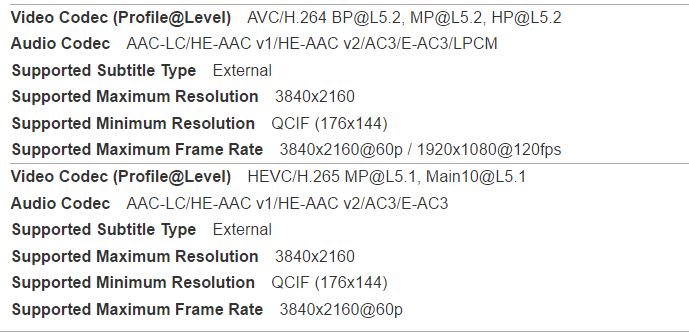
I found this page on the Sony site that appears to list all the file formats and codecs that the Video app on the TV can handle:
helpguide.sony.net/tv/caep1/v1/en/conten...arch=codec#section04
The 4k section that should cover my TV seems to suggest that max resolution and frame rate for an MOV file is 1920x1080 @ 60fps but the native file from the Osmo are MOV and they play fine. An MP4 H.265 file seems to be a good choice looking at the list as that goes up to the 3840x2160 resolution but I'm not sure if Compressor or FCP can output in that format?
helpguide.sony.net/tv/caep1/v1/en/conten...arch=codec#section04
The 4k section that should cover my TV seems to suggest that max resolution and frame rate for an MOV file is 1920x1080 @ 60fps but the native file from the Osmo are MOV and they play fine. An MP4 H.265 file seems to be a good choice looking at the list as that goes up to the 3840x2160 resolution but I'm not sure if Compressor or FCP can output in that format?
Please Log in to join the conversation.
27 Mar 2016 14:23 - 27 Mar 2016 14:23 #74697
by joema
Replied by joema on topic Choppy 4K exports of DJI Osmo footage
It appears there is a set of UHD 4k H264 parameters they support. See attached from that page. I'll try to examine this later today. I have DJI and Osmo 4k files but unfortunately I don't have a Sony 4k TV to test it on. So all I can do is jigger with the Compressor settings, try to get them closer to the Sony specs and/or the camera native files, then recommend those to you for trying.
Now that you have Compressor you could try those yourself. As is typical in these cases (with any encoding software) the relationship of UI settings to exactly what that produces in the file is often unclear and requires trial and error. That is all I am doing -- making changes, then examining the file with MediaInfo.
There are a difference I just noticed. Even though M=1 and N=8 on both DJI and Compressor-encoded files, the DJI file has ReFrames=1, whereas Compressor has ReFrames=2. If you could get Compressor to produce a file with ReFrames=1 that might work.
This overall situation is typical for smart TVs. Features like direct playback from video files are a lower priority and their component budget is less than a laptop. The CPU and decoding software don't have the horsepower to handle things outside a narrow range, and they probably don't spend a lot of time testing it. Hopefully we can figure it out.
Now that you have Compressor you could try those yourself. As is typical in these cases (with any encoding software) the relationship of UI settings to exactly what that produces in the file is often unclear and requires trial and error. That is all I am doing -- making changes, then examining the file with MediaInfo.
There are a difference I just noticed. Even though M=1 and N=8 on both DJI and Compressor-encoded files, the DJI file has ReFrames=1, whereas Compressor has ReFrames=2. If you could get Compressor to produce a file with ReFrames=1 that might work.
This overall situation is typical for smart TVs. Features like direct playback from video files are a lower priority and their component budget is less than a laptop. The CPU and decoding software don't have the horsepower to handle things outside a narrow range, and they probably don't spend a lot of time testing it. Hopefully we can figure it out.
Last edit: 27 Mar 2016 14:23 by joema.
Please Log in to join the conversation.
- andysummers
-
Topic Author
- Offline
- New Member
-
Less
More
- Posts: 8
- Thank you received: 0
30 Mar 2016 11:31 #74776
by andysummers
Replied by andysummers on topic Choppy 4K exports of DJI Osmo footage
Thanks joema for your thoughts and help so far. Being new to Compressor and all these different options I think it might take me a while to find the optimum settings. I have handbrake on the PC as well, maybe this would work?
I'd like to be able to stream the 4K content over my LAN at home but I think for now I'll settle for uploading my Osmo creations to Youtube and watching their version of the 4k file from there. Seems to work nicely. When I was in the Youtube app on my TV I noticed there was a "geek" setting to show lots of information about the stream from youtube - do you know if there is a way to encode the videos in the same format that Youtube streams in or would that be proprietary to them and their app ?
I'd like to be able to stream the 4K content over my LAN at home but I think for now I'll settle for uploading my Osmo creations to Youtube and watching their version of the 4k file from there. Seems to work nicely. When I was in the Youtube app on my TV I noticed there was a "geek" setting to show lots of information about the stream from youtube - do you know if there is a way to encode the videos in the same format that Youtube streams in or would that be proprietary to them and their app ?
Please Log in to join the conversation.
- andysummers
-
Topic Author
- Offline
- New Member
-
Less
More
- Posts: 8
- Thank you received: 0
04 Apr 2016 09:56 #74903
by andysummers
Replied by andysummers on topic Choppy 4K exports of DJI Osmo footage
So I have found through trial and error some settings that work for my TV and produce a decent quality 4k file at a lower bitrate than FCP.
I started off by sharing the FCP project as a 4k MOV file using the built in settings in FCP. That produced a file that was 64mbps and looked lovely on my mac, but played back really choppy on my TV as before. Then I sent the project to Compressor from FCP and used the settings mentioned before. That gave me a MOV file with a bit rate of about 30mbps and again, it was great on the mac but still not that great on the TV.
Then I took the output from Compressor and put that through Handbrake, as n MP4 instead of MOV, with a profile of Main@L5.2 (the default was L4 in Handbrake so I changed this). I also set the bitrate to be 30mbps. The output looks great on the Mac but crucially it plays really well on my TV - job done! I took it one step further though and cut out compressor from the process - taking the output from FCP to Handbrake direct and that also works perfectly.
Attached are the MediaInfo files for the Osmo Native footage, the FCP render, the render from Compressor and then the output from Handbrake (using the FCP render as the source). The reframes property in the Handbrake output is 4, not 8 like the original so maybe this was a red herring?
Anyway, it works so I'm happy. I can now record in 4K and render a file to keep that plays on the TV really well. Thanks for the help!
I started off by sharing the FCP project as a 4k MOV file using the built in settings in FCP. That produced a file that was 64mbps and looked lovely on my mac, but played back really choppy on my TV as before. Then I sent the project to Compressor from FCP and used the settings mentioned before. That gave me a MOV file with a bit rate of about 30mbps and again, it was great on the mac but still not that great on the TV.
Then I took the output from Compressor and put that through Handbrake, as n MP4 instead of MOV, with a profile of Main@L5.2 (the default was L4 in Handbrake so I changed this). I also set the bitrate to be 30mbps. The output looks great on the Mac but crucially it plays really well on my TV - job done! I took it one step further though and cut out compressor from the process - taking the output from FCP to Handbrake direct and that also works perfectly.
Attached are the MediaInfo files for the Osmo Native footage, the FCP render, the render from Compressor and then the output from Handbrake (using the FCP render as the source). The reframes property in the Handbrake output is 4, not 8 like the original so maybe this was a red herring?
Anyway, it works so I'm happy. I can now record in 4K and render a file to keep that plays on the TV really well. Thanks for the help!
Please Log in to join the conversation.
04 Apr 2016 12:25 #74908
by BenB
Replied by BenB on topic Choppy 4K exports of DJI Osmo footage
I believe what you did in Handbreak can be done in Compressor, which would save you time.
Please Log in to join the conversation.
- andysummers
-
Topic Author
- Offline
- New Member
-
Less
More
- Posts: 8
- Thank you received: 0
04 Apr 2016 14:53 #74914
by andysummers
Replied by andysummers on topic Choppy 4K exports of DJI Osmo footage
Problem is I couldn't find any settings in Compressor that worked for my case. I've cut Compressor out of the loop completely now by sharing in FCPx and then using a preset I saved in Handbrake to re-encode to the compatible format I needed for my TV.
Am I right in thinking that if I had the correct settings known to me in Compressor, I could skip the sharing part in FCPX and push directly to Compressor for the render there ? Or does it have to be shared /pre-rendered in FCPX before Compressor can do something with it?
Am I right in thinking that if I had the correct settings known to me in Compressor, I could skip the sharing part in FCPX and push directly to Compressor for the render there ? Or does it have to be shared /pre-rendered in FCPX before Compressor can do something with it?
Please Log in to join the conversation.
05 Apr 2016 03:38 #74937
by BenB
Replied by BenB on topic Choppy 4K exports of DJI Osmo footage
You can "Send To Compressor", or create a custom preset and make a custom Destination for it in FCPX.
What you're doing in Handbreak, Compressor will also do. PM me the specs.
What you're doing in Handbreak, Compressor will also do. PM me the specs.
Please Log in to join the conversation.
07 Apr 2016 13:20 - 07 Apr 2016 13:23 #75031
by joema
The file processed by Handbrake doesn't show any GOP parameters in MediaInfo. I don't know what that means. More detailed info can be gleaned from the file using the command line tool ExifTool, available for both Mac and PC: www.sno.phy.queensu.ca/~phil/exiftool/ , however I would need your files for that, and I don't have a Sony/Android TV to test it on.
As Ben said, in general Compressor should be able to do almost anything Handbrake can. It's just a matter of finding what settings are acceptable to this very finicky Sony/Android TV.
If you could figure it out, the workflow of exporting from FCPX to Compressor is easier than doing two separate exports from FCPX and from Handbrake.
If I had that TV I would definitely pursue it even if I had to talk directly to Sony engineering, plus I would test on Premiere CC, iMovie, direct playback of camera native iPhone 6S, GoPro Hero4, DJI Phantom Pro 3, Sony A7RII, etc. When manufacturers ship products having incompatibilities with widely-deployed existing software and procedures, it causes lots of problems.
Sony needs to state the exact, detailed video encoding parameters their TV requires for smooth playback of 4k video files. If you purchased this from Amazon, B&H, etc, I suggest leaving a review describing these problems as a courtesy to other potential purchasers.
I believe the TV in question is a Sony X830C-series.
Replied by joema on topic Choppy 4K exports of DJI Osmo footage
andysummers wrote: ...Attached are the MediaInfo files for the Osmo Native footage, the FCP render, the render from Compressor and then the output from Handbrake (using the FCP render as the source). The reframes property in the Handbrake output is 4, not 8 like the original so maybe this was a red herring?...
The file processed by Handbrake doesn't show any GOP parameters in MediaInfo. I don't know what that means. More detailed info can be gleaned from the file using the command line tool ExifTool, available for both Mac and PC: www.sno.phy.queensu.ca/~phil/exiftool/ , however I would need your files for that, and I don't have a Sony/Android TV to test it on.
As Ben said, in general Compressor should be able to do almost anything Handbrake can. It's just a matter of finding what settings are acceptable to this very finicky Sony/Android TV.
If you could figure it out, the workflow of exporting from FCPX to Compressor is easier than doing two separate exports from FCPX and from Handbrake.
If I had that TV I would definitely pursue it even if I had to talk directly to Sony engineering, plus I would test on Premiere CC, iMovie, direct playback of camera native iPhone 6S, GoPro Hero4, DJI Phantom Pro 3, Sony A7RII, etc. When manufacturers ship products having incompatibilities with widely-deployed existing software and procedures, it causes lots of problems.
Sony needs to state the exact, detailed video encoding parameters their TV requires for smooth playback of 4k video files. If you purchased this from Amazon, B&H, etc, I suggest leaving a review describing these problems as a courtesy to other potential purchasers.
I believe the TV in question is a Sony X830C-series.
Last edit: 07 Apr 2016 13:23 by joema.
Please Log in to join the conversation.
01 Dec 2016 17:40 - 01 Dec 2016 20:59 #83522
by mrthink
Replied by mrthink on topic Choppy 4K exports of DJI Osmo footage
I have the identical problem: Sony 55X930D 4K TV and DJI Inspire 1 4K Videos @ 29.97fps.
Previously taken 4K videos display fine. What has changed is 1) DJI Firmware and 2) FCP X version.
I've tried numerous Compressor options as well to no avail.
The only fix for the jitter (pause, normal, pause, normal) display is to run the FCP X 4K output through HandBrake. HandBrake does "something" to fix the pause so that the video results in a normal, smooth display.
Using a media-info program, I compared the two files. HandBrake downgrades the bit rate from 30871 kbs to 20780 kbs, cutting the resulting file size by about a third. Under compatible brands, the original is "mp41mp42isom, and HandBrake is "isomiso2avc1mp41". The handler name for the original is "Core Media Video", and HandBrake's is "VideoHandler". Otherwise, there is no difference.
Its gotta be the downgrade in the bit rate...??!!!
Previously taken 4K videos display fine. What has changed is 1) DJI Firmware and 2) FCP X version.
I've tried numerous Compressor options as well to no avail.
The only fix for the jitter (pause, normal, pause, normal) display is to run the FCP X 4K output through HandBrake. HandBrake does "something" to fix the pause so that the video results in a normal, smooth display.
Using a media-info program, I compared the two files. HandBrake downgrades the bit rate from 30871 kbs to 20780 kbs, cutting the resulting file size by about a third. Under compatible brands, the original is "mp41mp42isom, and HandBrake is "isomiso2avc1mp41". The handler name for the original is "Core Media Video", and HandBrake's is "VideoHandler". Otherwise, there is no difference.
Its gotta be the downgrade in the bit rate...??!!!
Last edit: 01 Dec 2016 20:59 by mrthink. Reason: Added details.
Please Log in to join the conversation.
