


- Posts: 10
- Thank you received: 0
3 Post Moderation Rule for New Boarders (25 Jan 2021)
New boarders will have their posts moderated - Don't worry if you cannot see your post immediately.
5 gig movie size?
- Lethbridge
-
 Topic Author
- Offline
- New Member
-

Less
More
17 Mar 2016 14:21 #74430
by Lethbridge
 I have edited an 18 minute movie. Imagine my horror when I go to upload to Master file to see that it is 5.14gig in size??!!

How can this be? Obviously way to big to upload to You tube. I do not have any compressing software - but I am more concerned as to why this particular file is so big. I have done other movies of a similar size before, but find it strange that this file is so big. It does include some heavy editing, increased speed, slow motion, split screen - but surely even that wouldn't increase the file size THAT much? Would it?
Any help in reducing the size would be appreciated or any other advice as to how to upload this monster file??
I am relatively new to FCP X & not that tech savvy, so any assistance in plain & simple terms!! Don't want much do I??!!
Thank you in anticipation!
5 gig movie size? was created by Lethbridge
I have edited an 18 minute movie. Imagine my horror when I go to upload to Master file to see that it is 5.14gig in size??!!
How can this be? Obviously way to big to upload to You tube. I do not have any compressing software - but I am more concerned as to why this particular file is so big. I have done other movies of a similar size before, but find it strange that this file is so big. It does include some heavy editing, increased speed, slow motion, split screen - but surely even that wouldn't increase the file size THAT much? Would it?
Any help in reducing the size would be appreciated or any other advice as to how to upload this monster file??
I am relatively new to FCP X & not that tech savvy, so any assistance in plain & simple terms!! Don't want much do I??!!
Thank you in anticipation!
Please Log in to join the conversation.


18 Mar 2016 13:43 - 18 Mar 2016 13:44 #74446
by dgwvideo
Creating history....one edit at a time !
Replied by dgwvideo on topic 5 gig movie size?
That appears to be a master file (audio and video) which is likely a ProRes flavor. A master file typically is to preserve a full resolution copy of your video so that you can also use that to make other types of compressed deliverables. Click the settings tab on the screen you show here and confirm what the file format is. In that same settings tab, choose computer instead of audio and video and you will be presented with compressed options for converting that video to something suitable for web use. You can also share (export from FCPX) directly to YouTube.
Creating history....one edit at a time !
Last edit: 18 Mar 2016 13:44 by dgwvideo.
Please Log in to join the conversation.

Less
More
- Posts: 971
- Thank you received: 46
18 Mar 2016 13:46 #74447
by MsJustine
Replied by MsJustine on topic 5 gig movie size?
That is the one aspect of FCPX I find confusing, the sharing and the predicted file size, it is often way out of reason, I hope that this is addressed in an upcoming update.
Please Log in to join the conversation.
- Tom Wolsky
-

- Offline
- Moderator
-

18 Mar 2016 13:50 #74448
by Tom Wolsky
Replied by Tom Wolsky on topic 5 gig movie size?
Click Settings and change to H.264. That'll be a start.
Please Log in to join the conversation.
- Lethbridge
-
Topic Author
- Offline
- New Member
-
Less
More
- Posts: 10
- Thank you received: 0
18 Mar 2016 15:24 #74450
by Lethbridge
Replied by Lethbridge on topic 5 gig movie size?
Hi,it is set to H.264... I checked that straight away!
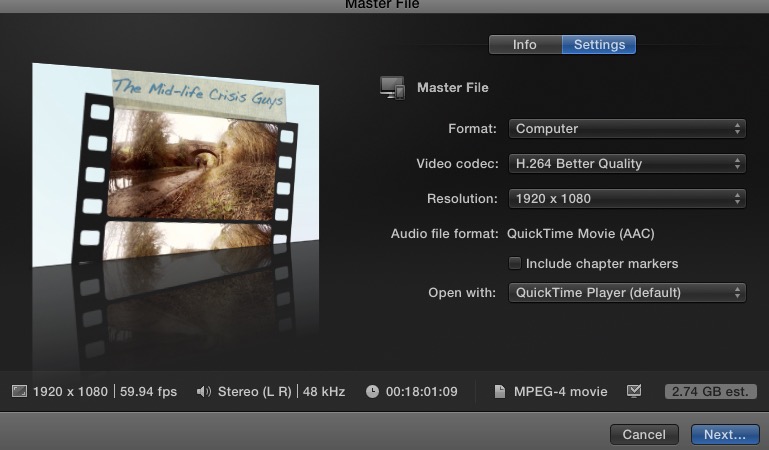
I have changed to 'Computer' instead of audio & video and that appears to have halved the size which is great.
Just still seems so big compared with other projects I have edited...?! confused!
I have changed to 'Computer' instead of audio & video and that appears to have halved the size which is great.
Just still seems so big compared with other projects I have edited...?! confused!
Please Log in to join the conversation.
- Lethbridge
-
Topic Author
- Offline
- New Member
-
Less
More
- Posts: 10
- Thank you received: 0
18 Mar 2016 15:27 #74451
by Lethbridge
Replied by Lethbridge on topic 5 gig movie size?
As you said... Halved the size which is great thank you. Just still confused as to why it is so big compared to other projects. I did use some phone footage in the project - only a small amount - could that make a difference?
Please Log in to join the conversation.

18 Mar 2016 19:20 #74454
by joema
Share>Master File>Settings, then pick:
Format: Computer
Video Codec: H.264 Better Quality
Resolution: 1920x1080 or 1280x720
In most cases you can pick H.264 "Faster Encode" and there will *not* be a visible quality difference, but it will export faster. This is due to using Intel's Quick Sync on-chip transcoder.
This is a high bit rate, good quality H264 export (regardless of whether you pick "Better Quality" or "Faster Encode"). There are other export options if you want to reduce the size further.
Using the above at 720p will reduce the file size by about 1/2 and further reduce export time. In many cases you can't tell much difference between 720p and 1080p on mobile devices or even modest-size computer screens. Everything broadcast by ABC, Fox, ESPN, ESPN2, Disney, A&E and MLB Network is exclusively in 720p/59.94.
An 18 min 1080p H264 file using the above settings will probably be about 2.7GB, and a 720p file about 1.6GB. If you used Compressor and cut the bit rate to 7 mbps you could probably get it under 1GB, but I'm not sure how good it would look. Compressor is only $49; it's handy if you need to fine-tune the output.
Replied by joema on topic 5 gig movie size?
Lethbridge wrote:
Share>Master File>Settings, then pick:
Format: Computer
Video Codec: H.264 Better Quality
Resolution: 1920x1080 or 1280x720
In most cases you can pick H.264 "Faster Encode" and there will *not* be a visible quality difference, but it will export faster. This is due to using Intel's Quick Sync on-chip transcoder.
This is a high bit rate, good quality H264 export (regardless of whether you pick "Better Quality" or "Faster Encode"). There are other export options if you want to reduce the size further.
Using the above at 720p will reduce the file size by about 1/2 and further reduce export time. In many cases you can't tell much difference between 720p and 1080p on mobile devices or even modest-size computer screens. Everything broadcast by ABC, Fox, ESPN, ESPN2, Disney, A&E and MLB Network is exclusively in 720p/59.94.
An 18 min 1080p H264 file using the above settings will probably be about 2.7GB, and a 720p file about 1.6GB. If you used Compressor and cut the bit rate to 7 mbps you could probably get it under 1GB, but I'm not sure how good it would look. Compressor is only $49; it's handy if you need to fine-tune the output.
Please Log in to join the conversation.
- Lethbridge
-
Topic Author
- Offline
- New Member
-
Less
More
- Posts: 10
- Thank you received: 0
18 Mar 2016 19:42 #74456
by Lethbridge
Replied by Lethbridge on topic 5 gig movie size?
Great thanks for explanation! Yes looking at getting some kind of compressing software.
Thanks again
Thanks again
Please Log in to join the conversation.
- Tom Wolsky
-
- Offline
- Moderator
-
20 Mar 2016 21:11 #74499
by Tom Wolsky
Replied by Tom Wolsky on topic 5 gig movie size?
No
Can you post a screenshot of your master file not computer settings? Computer is usually larger than master file H.264.
Can you post a screenshot of your master file not computer settings? Computer is usually larger than master file H.264.
Please Log in to join the conversation.
- Lethbridge
-
Topic Author
- Offline
- New Member
-
Less
More
- Posts: 10
- Thank you received: 0
21 Mar 2016 19:18 #74527
by Lethbridge
Replied by Lethbridge on topic 5 gig movie size?
Managed to upload, so now original file deleted. But thanks anyway 
Please Log in to join the conversation.

21 Mar 2016 20:28 #74530
by Norbz
Replied by Norbz on topic 5 gig movie size?
Always love reading these
Wait until you start doing stuff in 4K!
Don't be afraid of big file sizes, youtube loves them and still converts it to 6 different filetypes/sizes so the higher/bigger the better in most cases (well within reason there is no need to export 444 if you shot 422 etc).
Wait until you start doing stuff in 4K!
Don't be afraid of big file sizes, youtube loves them and still converts it to 6 different filetypes/sizes so the higher/bigger the better in most cases (well within reason there is no need to export 444 if you shot 422 etc).
Please Log in to join the conversation.
- Lethbridge
-
Topic Author
- Offline
- New Member
-
Less
More
- Posts: 10
- Thank you received: 0
22 Mar 2016 07:20 #74544
by Lethbridge
Replied by Lethbridge on topic 5 gig movie size?
Yeh, I guess people complaining of large file sizes is a common problem. As for 4k, well, I have just had to give up using it with my GoPro hero 4 - My imac just cannot handle editing it without lagging, and missing frames everywhere!
Shame as that was the main reason for purchasing the Hero 4. Might as well have just carried on with 1080 on my hero 3.
But thats a whole different thread...
4k... if only...
thanks for your reply
Shame as that was the main reason for purchasing the Hero 4. Might as well have just carried on with 1080 on my hero 3.
But thats a whole different thread...
4k... if only...
thanks for your reply
Please Log in to join the conversation.
22 Mar 2016 15:16 #74572
by Norbz
Replied by Norbz on topic 5 gig movie size?
The goPro I think does 8-bit? I have a heavy duty 12 core MAC with 48ram and other goodies, and I can barely handle true RAW 10bit 4K as well, basic stuff yes but start color correcting or adding effects and byebye FCP session, so I can relate - I think we'll probably be seeing new codecs as time goes on re 8k/16K, until then though, we'll be stuttering and going crazy re render times and filesizes .
. Please Log in to join the conversation.
23 Mar 2016 19:36 #74597
by joema
Don't give up!!! Using proxy, your iMac can easily handle H264 4k from a Hero 4. This is built in, seamless and easy. Just transcode to proxy on import or afterward by selecting the clips in the Event Browser, right-click and pick "Transcode". You can pick proxy, optimized or both. I recommend proxy only for an initial pass, since it is faster and smaller.
To use proxy files, simply set View>Proxy in the viewer (upper-right corner drop-down menu). This automatically uses the proxy files. You edit as normal. When finished and ready to output at 4k resolution, set View>Optimized/Original in the viewer, otherwise it will output proxy resolution files. There is nothing to keep track of and nothing to relink. In general this will provide sufficient performance to smoothly edit camera native H264 4k on a MacBook Pro or even lower end machine.
Fortunately you aren't using Premiere or you'd be facing a much more difficult situation. It doesn't have proxy and the rendering engine is much slower.
Replied by joema on topic 5 gig movie size?
Lethbridge wrote: ...As for 4k, well, I have just had to give up using it with my GoPro hero 4 - My imac just cannot handle editing it without lagging, and missing frames everywhere!
Shame as that was the main reason for purchasing the Hero 4....
Don't give up!!! Using proxy, your iMac can easily handle H264 4k from a Hero 4. This is built in, seamless and easy. Just transcode to proxy on import or afterward by selecting the clips in the Event Browser, right-click and pick "Transcode". You can pick proxy, optimized or both. I recommend proxy only for an initial pass, since it is faster and smaller.
To use proxy files, simply set View>Proxy in the viewer (upper-right corner drop-down menu). This automatically uses the proxy files. You edit as normal. When finished and ready to output at 4k resolution, set View>Optimized/Original in the viewer, otherwise it will output proxy resolution files. There is nothing to keep track of and nothing to relink. In general this will provide sufficient performance to smoothly edit camera native H264 4k on a MacBook Pro or even lower end machine.
Fortunately you aren't using Premiere or you'd be facing a much more difficult situation. It doesn't have proxy and the rendering engine is much slower.
Please Log in to join the conversation.
23 Mar 2016 19:58 #74599
by joema
You have a 1080p/60 project. Youtube's recommended bitrate for that is 12 megabits/sec or 1.5 MB/sc or 1.62 GB for 18 minutes: support.google.com/youtube/answer/1722171?hl=en
FCPX by default uses a higher bitrate when exporting H.264 to provide better quality, thus your file size of about 2.5 GB. You can probably squeeze that down to 1GB by exporting at 1080p/30 or 720p/30, yet still retain good quality, although this might require using Apple Compressor. It is only $49.
Anytime you make an encoding change it's good practice to view it on several different devices *before* you upload it, then view it on several different ones afterward. It is usually re-encoded by Youtube, Vimeo, etc. so how it finally looks is what counts. Checking before the upload avoids squandering bandwidth and time if something is visible immediately after exporting, plus allows a cross check of how the upload affected it. Checking different playback methods is useful because they may behave differently. E.g, VLC may look different than Quicktime or Windows Media Player.
If many of your viewers use mobile devices, it's good to check those as well. The checking also prevents having to re-send new download links every time you adjust the video. With Youtube you cannot re-upload the file without changing the URL, but with Vimeo you can which is a big advantage.
Replied by joema on topic 5 gig movie size?
Lethbridge wrote: As you said... Halved the size which is great thank you. Just still confused as to why it is so big compared to other projects. I did use some phone footage in the project - only a small amount - could that make a difference?
You have a 1080p/60 project. Youtube's recommended bitrate for that is 12 megabits/sec or 1.5 MB/sc or 1.62 GB for 18 minutes: support.google.com/youtube/answer/1722171?hl=en
FCPX by default uses a higher bitrate when exporting H.264 to provide better quality, thus your file size of about 2.5 GB. You can probably squeeze that down to 1GB by exporting at 1080p/30 or 720p/30, yet still retain good quality, although this might require using Apple Compressor. It is only $49.
Anytime you make an encoding change it's good practice to view it on several different devices *before* you upload it, then view it on several different ones afterward. It is usually re-encoded by Youtube, Vimeo, etc. so how it finally looks is what counts. Checking before the upload avoids squandering bandwidth and time if something is visible immediately after exporting, plus allows a cross check of how the upload affected it. Checking different playback methods is useful because they may behave differently. E.g, VLC may look different than Quicktime or Windows Media Player.
If many of your viewers use mobile devices, it's good to check those as well. The checking also prevents having to re-send new download links every time you adjust the video. With Youtube you cannot re-upload the file without changing the URL, but with Vimeo you can which is a big advantage.
Please Log in to join the conversation.
- Lethbridge
-
Topic Author
- Offline
- New Member
-
Less
More
- Posts: 10
- Thank you received: 0
26 Mar 2016 06:42 #74666
by Lethbridge
Replied by Lethbridge on topic 5 gig movie size?
Thank you so much for this information. Greatly appreciated. It would seem I am (like many others I am sure) very niaeve in the process of file compression in the upload process. I am currently editing a project which has just past the 20 minute mark, with more to add, with phone, dslr & Gopro footage to boot... I will take on board all this advice & hope I manage to upload adequately! Thanks again
Please Log in to join the conversation.
- Lethbridge
-
Topic Author
- Offline
- New Member
-
Less
More
- Posts: 10
- Thank you received: 0
26 Mar 2016 06:49 #74667
by Lethbridge
Replied by Lethbridge on topic 5 gig movie size?
This is truly fantastic news! I genuinely have ignored my Gopro 4k capabilities. So thanks to this advice I will go and test it out. Once again this forum has been brilliant and really come up trumps! (Sorry, English expression, perhaps not appropriate for some Americans right now!) Thank you so much for your detailed explanation, I will input the settings ASAP on my next upload. 4k here we come!
Please Log in to join the conversation.
- Lethbridge
-
Topic Author
- Offline
- New Member
-
Less
More
- Posts: 10
- Thank you received: 0
26 Mar 2016 06:54 #74668
by Lethbridge
Replied by Lethbridge on topic 5 gig movie size?
Hopefully some of joema''s advice on this thread can help you out too! Check it out! Looking forward to at least attempting 4k again!
Please Log in to join the conversation.
- Lethbridge
-
Topic Author
- Offline
- New Member
-
Less
More
- Posts: 10
- Thank you received: 0
26 Mar 2016 17:05 #74674
by Lethbridge
Replied by Lethbridge on topic 5 gig movie size?
I cannot thank you enough for this advice - Just tested it out - Great to use 4K again!
Please Log in to join the conversation.
