


- Posts: 69
- Thank you received: 0
3 Post Moderation Rule for New Boarders (25 Jan 2021)
New boarders will have their posts moderated - Don't worry if you cannot see your post immediately.
Any way to automatically hide source clips once synchronized?
14 Mar 2016 20:12 #74320
by mindbend
I guess the pretty much says it all:
Any way to automatically hide source clips once synchronized?
I've been using FCPX's synch feature for video/audio pairs. Works great, but it's a bit of a pain to have to then go and manually hide the source media to keep the Browser clean. Especially since FCPX seems to drop me off at a random browser location once the sync is complete. I was wondering if there was any way to handle that automatically, almost like a macro.
Any way to automatically hide source clips once synchronized?
I've been using FCPX's synch feature for video/audio pairs. Works great, but it's a bit of a pain to have to then go and manually hide the source media to keep the Browser clean. Especially since FCPX seems to drop me off at a random browser location once the sync is complete. I was wondering if there was any way to handle that automatically, almost like a macro.
Please Log in to join the conversation.
- MarkNelsonMovies
-

- Offline
- Elite Member
-

Less
More
- Posts: 256
- Thank you received: 48
14 Mar 2016 23:50 #74325
by MarkNelsonMovies
Replied by MarkNelsonMovies on topic Any way to automatically hide source clips once synchronized?
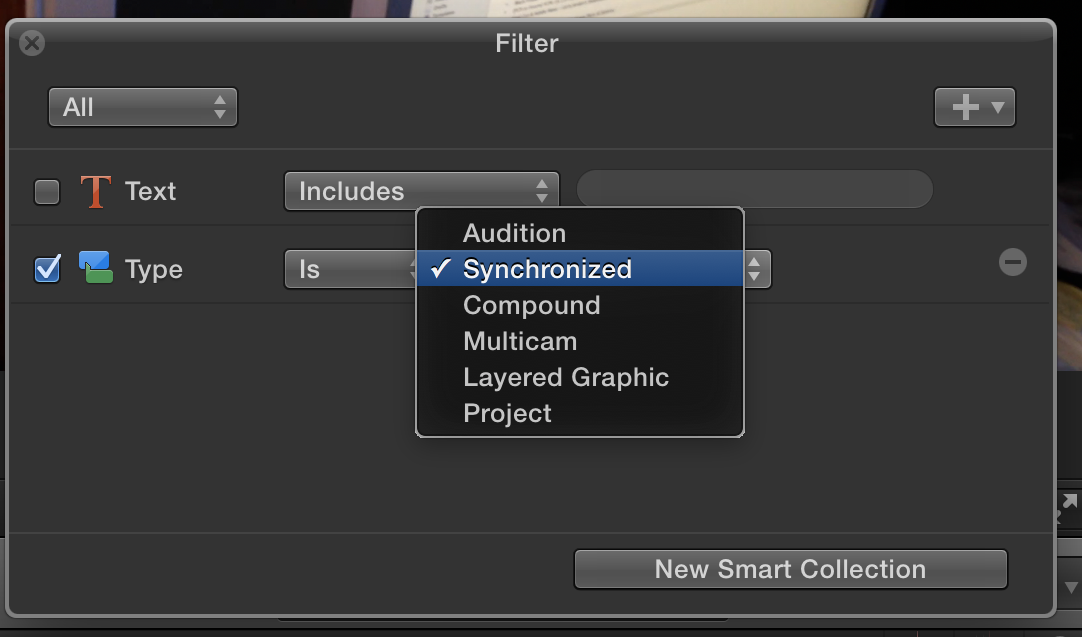
The only way I can think of is to make a smart collection that either,
1. filters out normal clips, this would only work if all your media is synchronized.
2. filters out a specific key word or role, but you wold have to assign that to the clips.
You could also put all the media that will end up inside synchronized clip in a separate event, then put the synchronized clips and all the other media in your main event.
Hope this helps,
-Mark
1. filters out normal clips, this would only work if all your media is synchronized.
2. filters out a specific key word or role, but you wold have to assign that to the clips.
You could also put all the media that will end up inside synchronized clip in a separate event, then put the synchronized clips and all the other media in your main event.
Hope this helps,
-Mark
Please Log in to join the conversation.

15 Mar 2016 03:14 #74326
by BenB
Replied by BenB on topic Any way to automatically hide source clips once synchronized?
Smart Collection, that's exactly what it is there for. Just like a macro, but better.
Please Log in to join the conversation.
