


- Posts: 263
- Thank you received: 2
3 Post Moderation Rule for New Boarders (25 Jan 2021)
New boarders will have their posts moderated - Don't worry if you cannot see your post immediately.
how to split the screen to a 7 degree angle for 2 clips
14 Mar 2016 19:47 - 14 Mar 2016 19:48 #74314
by gaddster

Guys
A client has asked for a a 'split screen clip (2 clips) where the angle of separation is 7 degrees! i have crumple pop and proslice but when i try taking these into Motion, I can rotate the white separator line but struggle rotating the mask (can't see that option anywhere
Is there an easier way to do it in FCPX?
MBP retina 15" 2014
imac 27 i7 2013
G-tech
Panasonic GH4, AC90, Gopro
how to split the screen to a 7 degree angle for 2 clips was created by gaddster
Guys
A client has asked for a a 'split screen clip (2 clips) where the angle of separation is 7 degrees! i have crumple pop and proslice but when i try taking these into Motion, I can rotate the white separator line but struggle rotating the mask (can't see that option anywhere
Is there an easier way to do it in FCPX?
MBP retina 15" 2014
imac 27 i7 2013
G-tech
Panasonic GH4, AC90, Gopro
Last edit: 14 Mar 2016 19:48 by gaddster.
Please Log in to join the conversation.

15 Mar 2016 03:21 #74329
by BenB
Replied by BenB on topic how to split the screen to a 7 degree angle for 2 clips
That's a Motion job.
Please Log in to join the conversation.
- Karsten Schlüter
-

- Offline
- Moderator
-

Less
More
- Posts: 3790
- Thank you received: 718
15 Mar 2016 05:29 #74336
by Karsten Schlüter
Replied by Karsten Schlüter on topic how to split the screen to a 7 degree angle for 2 clips
another option is a custom-made Image Mask ...
use any 'paint' app (Pixelmator, ...) to create the mask - to make it exactly 7° (?? :blink: ) depends on your paint.app.
in FPCX, ...

… stack both clips over each other, apply from Effects/Masks an 'Image Mask', and drop your b/w painting into it (pic has to be imported into FCPX); maybe you have to set mode to luma and invert mask ......
Image Mask is, imho, an underrated tool ... you can 'paint' gradient masks, for custom vignettes for example, or pre-produce even animated mask etc etc ...
use any 'paint' app (Pixelmator, ...) to create the mask - to make it exactly 7° (?? :blink: ) depends on your paint.app.
in FPCX, ...
… stack both clips over each other, apply from Effects/Masks an 'Image Mask', and drop your b/w painting into it (pic has to be imported into FCPX); maybe you have to set mode to luma and invert mask ......
Image Mask is, imho, an underrated tool ... you can 'paint' gradient masks, for custom vignettes for example, or pre-produce even animated mask etc etc ...
Please Log in to join the conversation.
15 Mar 2016 08:40 #74342
by gaddster
MBP retina 15" 2014
imac 27 i7 2013
G-tech
Panasonic GH4, AC90, Gopro
Replied by gaddster on topic how to split the screen to a 7 degree angle for 2 clips
Thanks Karsten
I have photoshop, although I am uncertain how you created a an exact layer mask and what format you saved it in..
The clients corporate branding has a split, 7 degree on all branding so they wanted film footage coinciding with their branding (pedantic i know)
I have photoshop, although I am uncertain how you created a an exact layer mask and what format you saved it in..
The clients corporate branding has a split, 7 degree on all branding so they wanted film footage coinciding with their branding (pedantic i know)
MBP retina 15" 2014
imac 27 i7 2013
G-tech
Panasonic GH4, AC90, Gopro
Please Log in to join the conversation.
- Karsten Schlüter
-
- Offline
- Moderator
-
Less
More
- Posts: 3790
- Thank you received: 718
15 Mar 2016 08:52 #74343
by Karsten Schlüter
Replied by Karsten Schlüter on topic how to split the screen to a 7 degree angle for 2 clips
Just a black/white painting, save it as png... Done in seconds.... If I remember correctly, PS allow to rotate numerically.....
Please Log in to join the conversation.
Less
More
- Posts: 971
- Thank you received: 46
15 Mar 2016 09:08 #74344
by MsJustine
Replied by MsJustine on topic how to split the screen to a 7 degree angle for 2 clips
Send a tweet to the anorak of motion Mark Spencer @markspen , I am sure he would love to help, maybe suggest it as a Motion in 5 subject.
Justine
Justine
Please Log in to join the conversation.
15 Mar 2016 09:55 - 15 Mar 2016 09:58 #74345
by gaddster
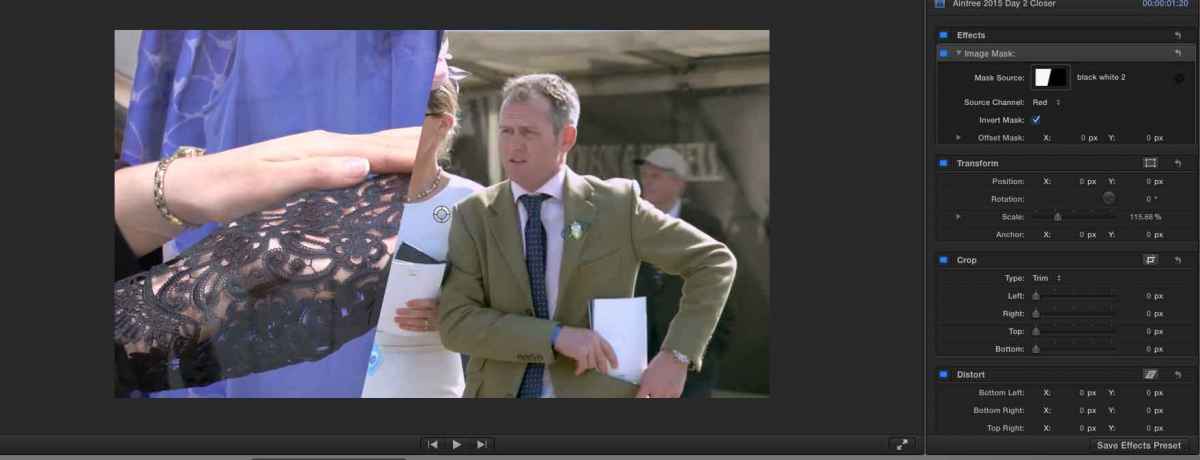
I am close Karsten, but one side of the mask is showing a slight amount of the other footage in the background
MBP retina 15" 2014
imac 27 i7 2013
G-tech
Panasonic GH4, AC90, Gopro
Replied by gaddster on topic how to split the screen to a 7 degree angle for 2 clips
I am close Karsten, but one side of the mask is showing a slight amount of the other footage in the background
MBP retina 15" 2014
imac 27 i7 2013
G-tech
Panasonic GH4, AC90, Gopro
Last edit: 15 Mar 2016 09:58 by gaddster.
Please Log in to join the conversation.

15 Mar 2016 10:15 #74346
by rjvddoes
Replied by rjvddoes on topic how to split the screen to a 7 degree angle for 2 clips
Hi Phil,
Check if your mask image is pure black (RGB=0,0,0) and pure white (RGB=255,255,255). It seems that the white part is slightly off. This results in a semi transparent mask
Check if your mask image is pure black (RGB=0,0,0) and pure white (RGB=255,255,255). It seems that the white part is slightly off. This results in a semi transparent mask
Please Log in to join the conversation.
15 Mar 2016 10:21 #74348
by gaddster
MBP retina 15" 2014
imac 27 i7 2013
G-tech
Panasonic GH4, AC90, Gopro
Replied by gaddster on topic how to split the screen to a 7 degree angle for 2 clips
rjvddoes
Omg you are spot on, check the mask and it wasn't pure black and pure white... thanks everyone, love this forum
Omg you are spot on, check the mask and it wasn't pure black and pure white... thanks everyone, love this forum
MBP retina 15" 2014
imac 27 i7 2013
G-tech
Panasonic GH4, AC90, Gopro
Please Log in to join the conversation.
- Karsten Schlüter
-
- Offline
- Moderator
-
Less
More
- Posts: 3790
- Thank you received: 718
15 Mar 2016 13:28 #74353
by Karsten Schlüter
Replied by Karsten Schlüter on topic how to split the screen to a 7 degree angle for 2 clips
@gaddster,
I made you a plug-in
www.fcp.co/forum/split-screen/25107-rotation-split#74352

and esp.for you, I published the rotation angle for numeric input (7° or 353°) .... :lol:
I made you a plug-in
www.fcp.co/forum/split-screen/25107-rotation-split#74352
and esp.for you, I published the rotation angle for numeric input (7° or 353°) .... :lol:
Please Log in to join the conversation.
15 Mar 2016 17:05 #74365
by gaddster
MBP retina 15" 2014
imac 27 i7 2013
G-tech
Panasonic GH4, AC90, Gopro
Replied by gaddster on topic how to split the screen to a 7 degree angle for 2 clips
Thank you sooooooooooo much for this
MBP retina 15" 2014
imac 27 i7 2013
G-tech
Panasonic GH4, AC90, Gopro
Please Log in to join the conversation.
