


- Posts: 60
- Thank you received: 1
3 Post Moderation Rule for New Boarders (25 Jan 2021)
New boarders will have their posts moderated - Don't worry if you cannot see your post immediately.
My 1st attempt editing multicam w/ FCPX HELP PLEASE.
13 Mar 2016 04:41 - 13 Mar 2016 04:41 #74252
by RickLFoy
My 1st attempt editing multicam w/ FCPX HELP PLEASE. was created by RickLFoy
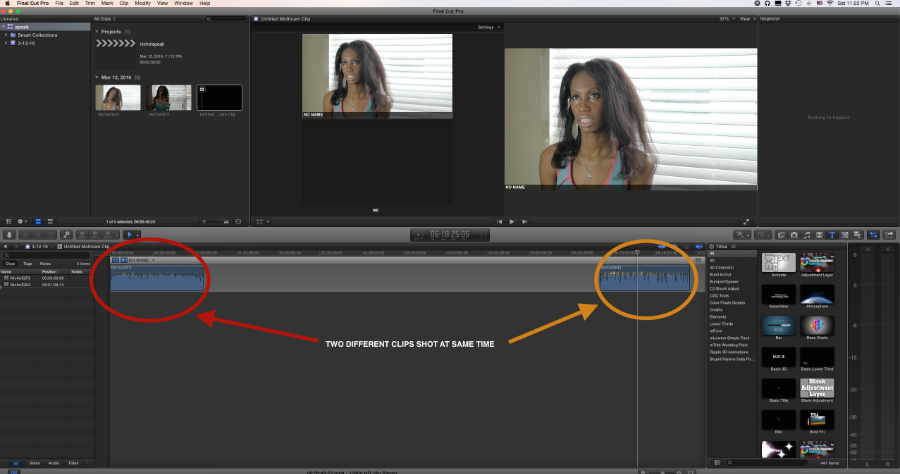
Hello, I am following Ashley Kennedy tutorial on Lynda.com on how to multicam edit with FCPX. I am not getting the syncing correct after selecting "new multicam edit". Here is a picture of what it looks like after syncing. I have both separate clips but not one on top of the other like I see in her tutorial. Can anyone tell me what is happening here? I appreciate any suggestion. I am trying to edit more with FCPX instead of my Avid but I really want to learn this NLE. Anyway. thanks in advance.
Last edit: 13 Mar 2016 04:41 by RickLFoy.
Please Log in to join the conversation.
- Karsten Schlüter
-

- Offline
- Moderator
-

Less
More
- Posts: 3790
- Thank you received: 718
13 Mar 2016 06:08 #74253
by Karsten Schlüter
Replied by Karsten Schlüter on topic My 1st attempt editing multicam w/ FCPX HELP PLEASE.
you have to assign both clips diff. angles in the Inspector/Info tab ....
Please Log in to join the conversation.

13 Mar 2016 14:44 #74257
by BenB
Replied by BenB on topic My 1st attempt editing multicam w/ FCPX HELP PLEASE.
Camera Angle is your missed setting. You need to assign cameras an Angle Angle value for each clip in the Inspector, as Karsten stated. Clips that share the same camera name with no angle metadata, could be grouped into the same angle, as you ended up with.
Why are they pushed so far apart? I bet the "time of day" metadata is not exactly the same on both cameras, and is off by that much. But they shouldn't be on the same angle anyway.
Why are they pushed so far apart? I bet the "time of day" metadata is not exactly the same on both cameras, and is off by that much. But they shouldn't be on the same angle anyway.
Please Log in to join the conversation.


13 Mar 2016 15:09 #74258
by joema
Replied by joema on topic My 1st attempt editing multicam w/ FCPX HELP PLEASE.
Besides camera angle, if you supply a camera name in the metadata this also works. Procedure:
1. Import all clips
2. In Event Browser at top left select List View (it's the button above the red X at left)
3. In Event Browser, click on clip name to sort by name. All the clips from each camera should be grouped together.
4. Select a group of clips from one camera (Click on 1st, go to last and Shift-click).
5. In Inspector at upper right, click on Info button. If Inspector pane is not on, turn it on with Window>Show Inspector
6. At bottom of Inspector Pane, click the drop-down box and select "General". This shows more details.
7. In the Inspector Pane, enter a camera name. When you press Enter it will add that camera name to all the clips you have selected in a single step.
8. Repeat step 4 and 7 for each camera.
9. In Event Browser, select all clips from all the cameras you added camera name info to.
10. Right-click on the selected group and select "New Multicam Clip", then set checkbox "use audio for synchronization"
Given camera angle or camera name, FCPX does a halfway decent job of syncing by audio. I have sync'd about 40 clips successfully, provided the audio is really good. OTOH I've had cases where the sync fails with 5 clips. It is not remotely as capable as PluralEyes, so if FCPX won't do the trick that is another option. The latest version of PluralEyes 4.0 can automatically detect different cameras and assign them to unique bins: www.redgiant.com/products/pluraleyes/ Its audio analysis algorithm is apparently much more sophisticated than FCPX.
We once shot a large multi-week project with all the field audio recorders each set to the wrong date/time. This meant it was almost impossible to match those to the corresponding video. Fortunately Pluraleyes could search across many hundreds of clips in various subfolders and matched them all in a single pass.
1. Import all clips
2. In Event Browser at top left select List View (it's the button above the red X at left)
3. In Event Browser, click on clip name to sort by name. All the clips from each camera should be grouped together.
4. Select a group of clips from one camera (Click on 1st, go to last and Shift-click).
5. In Inspector at upper right, click on Info button. If Inspector pane is not on, turn it on with Window>Show Inspector
6. At bottom of Inspector Pane, click the drop-down box and select "General". This shows more details.
7. In the Inspector Pane, enter a camera name. When you press Enter it will add that camera name to all the clips you have selected in a single step.
8. Repeat step 4 and 7 for each camera.
9. In Event Browser, select all clips from all the cameras you added camera name info to.
10. Right-click on the selected group and select "New Multicam Clip", then set checkbox "use audio for synchronization"
Given camera angle or camera name, FCPX does a halfway decent job of syncing by audio. I have sync'd about 40 clips successfully, provided the audio is really good. OTOH I've had cases where the sync fails with 5 clips. It is not remotely as capable as PluralEyes, so if FCPX won't do the trick that is another option. The latest version of PluralEyes 4.0 can automatically detect different cameras and assign them to unique bins: www.redgiant.com/products/pluraleyes/ Its audio analysis algorithm is apparently much more sophisticated than FCPX.
We once shot a large multi-week project with all the field audio recorders each set to the wrong date/time. This meant it was almost impossible to match those to the corresponding video. Fortunately Pluraleyes could search across many hundreds of clips in various subfolders and matched them all in a single pass.
Please Log in to join the conversation.
13 Mar 2016 18:13 #74261
by RickLFoy
Replied by RickLFoy on topic My 1st attempt editing multicam w/ FCPX HELP PLEASE.
Thanks guys for the info. I am just checking back to view your answers. I ended up figuring it out late last night. I changed the angle ass. angle clip order and angle sync to content created. That seem to work. Then I had to figure out how to actually do a multi edit which did not take too long for me to figure out. I believe Ashley was working on the multiciip but in my fcpx. I had to go to my actually project and drop the multi clip in the timeline then proceed to do my multi edit. I went to Richard Harrington and found that missing info left out from Ashley. Thank you all.
Please Log in to join the conversation.
13 Mar 2016 21:47 #74263
by BenB
Replied by BenB on topic My 1st attempt editing multicam w/ FCPX HELP PLEASE.
There's always the user manual.
help.apple.com/finalcutpro/mac/10.2/#/ver23c76439
help.apple.com/finalcutpro/mac/10.2/#/ver23c76439
Please Log in to join the conversation.
