


- Posts: 19
- Thank you received: 0
3 Post Moderation Rule for New Boarders (25 Jan 2021)
New boarders will have their posts moderated - Don't worry if you cannot see your post immediately.
Can you help me recover my work?
- howard.ritchie
-
 Topic Author
- Offline
- New Member
-

Less
More
11 Mar 2016 11:44 #74226
by howard.ritchie
Can you help me recover my work? was created by howard.ritchie
Last night I was editing a project... or an event. I am confused as to which.
Anyway the screen shots show the following..
That my project... editing window has gone.
My Files are in Red and there is a yello triangle, on the event folder.. or is it project folder anyway... I have tried opening the "backup" from 1am last night.
I will show you all the screen shots. Can you help... recover...
Do I just click relink files ... and it will all magically come back???
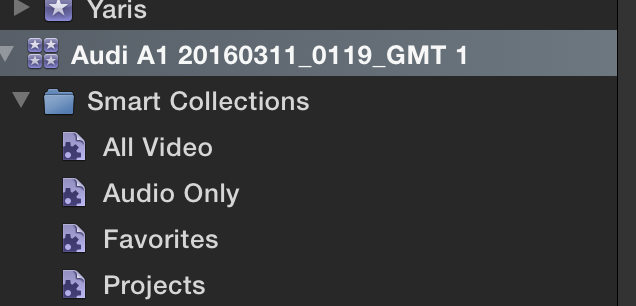
Anyway the screen shots show the following..
That my project... editing window has gone.
My Files are in Red and there is a yello triangle, on the event folder.. or is it project folder anyway... I have tried opening the "backup" from 1am last night.
I will show you all the screen shots. Can you help... recover...
Do I just click relink files ... and it will all magically come back???
Please Log in to join the conversation.


14 Mar 2016 06:18 - 14 Mar 2016 06:19 #74271
by dgwvideo
Creating history....one edit at a time !
Replied by dgwvideo on topic Can you help me recover my work?
Your screenshot only shows a library with the FCPX generated collections. I assume your events are below that in the image. The yellow triangle is an alert that something changed within the FCPX database for an event or a project. The red files indicate missing media, or possibly a missing effect that was applied to a clip in the event. See page 1265 in the FCPX manual (help menu) to learn more about the various alert icons.
Relinking may be possible assuming you did not alter the media such as renaming a file, moving a file or changing a date of the file outside of FCPX. Any modifications to your originally imported media that might have been done thru the finder can cause this. See page 1217 in the FCPX manual (help menu) for more info about relinking files.
Relinking may be possible assuming you did not alter the media such as renaming a file, moving a file or changing a date of the file outside of FCPX. Any modifications to your originally imported media that might have been done thru the finder can cause this. See page 1217 in the FCPX manual (help menu) for more info about relinking files.
Creating history....one edit at a time !
Last edit: 14 Mar 2016 06:19 by dgwvideo.
Please Log in to join the conversation.
