


- Posts: 3790
- Thank you received: 718
3 Post Moderation Rule for New Boarders (25 Jan 2021)
New boarders will have their posts moderated - Don't worry if you cannot see your post immediately.
Is there a smarter way? 'synching' 3x same theatre performance…
- Karsten Schlüter
-
 Topic Author
- Offline
- Moderator
-

Less
More
08 Mar 2016 16:29 #74161
by Karsten Schlüter
In an hour, there's final rehearsal, I could check my set-up (2 cams, Friday 3, ext. audio-recorder) - and the next three days, the kids from our school perform a theatre play (B.Brecht.. oh-my-god!!)...
I'd like to summarize all 3 shows into one video.
each days recording = 1 Multicam, synching cams and audio source
... but how to 'synch' the resulting 3 MCs?
It's theatre, so no synch in audio nor video... (????)
my actual idea is to set markers+notes in each MC, tagging the 5 parts of the play and 'significant', natural edit points
so, when I'm in act #3, the big solo, I search for Marker 'act3' and note 'solo'...
should result in 3 parts of 3 MCclips, containing the same scene...
am I right?
better suggestions?
I'd like to summarize all 3 shows into one video.
each days recording = 1 Multicam, synching cams and audio source
... but how to 'synch' the resulting 3 MCs?
It's theatre, so no synch in audio nor video... (????)
my actual idea is to set markers+notes in each MC, tagging the 5 parts of the play and 'significant', natural edit points
so, when I'm in act #3, the big solo, I search for Marker 'act3' and note 'solo'...
should result in 3 parts of 3 MCclips, containing the same scene...
am I right?
better suggestions?
Please Log in to join the conversation.
- MarkNelsonMovies
-

- Offline
- Elite Member
-

Less
More
- Posts: 256
- Thank you received: 48
08 Mar 2016 17:56 #74163
by MarkNelsonMovies
Replied by MarkNelsonMovies on topic Is there a smarter way? 'synching' 3x same theatre performance…
I'm facing the same thing as well, and would be interested in hearing any ideas.
Please Log in to join the conversation.
- Daniel Rutledge
-
- Offline
- Premium Member
-

- Those that know don't tell, and those that tell don't know.
08 Mar 2016 18:57 #74164
by Daniel Rutledge
Replied by Daniel Rutledge on topic Is there a smarter way? 'synching' 3x same theatre performance…
I hope this helps.
I often shoot performances, and have the artists do two takes. I will sync 3 cameras and audio. If the artist does 3 songs twice, then after syncing that leaves me with 4 angle and six segments. All the cameras and audio will be in sync with what actually happened.
What I want from there is to make it so I have 7 angles (six camera and one audio) divided into three segments.
My next step is to place a blank angle under each existing angle. So there is angle A and angle A2, angle B and angle B2, etc. Then I go to the beginning of each take and find the first beat and place a marker. Now the first beat of every angle and every take is denoted by a marker.
Let's assume I am using the second audio take for each song. I then drag the first take of song one angle A onto angle A2 and line up the markers. I drag take one angle B onto angle B2 and line up the markers, etc.
Now all of the angles begin on the first beat.
Rarely, this will keep me in sync through an entire song.
If you find that your A2, B2, and C2 angles are slipping out of time, then do the following.
Command select A2,B2, and C2. Play until the sync problem just gets to be noticeable. Hit Command+B. This will cut the three selected angles. Select the clips after the cut on A2, B2, and C2 and use the period and comma keys to nudge the clips back or forward until they are in sync. I recommend going a few frames further than you need to, so that it will end up taking a few seconds longer until you are out of sync again. You may need to perform this operation several times per song.
Be sure that you have the Position tool selected or some of these actions may not work.
I have never done this with more than 4 songs. It usually isn't too much hassle, but if I was doing it for a 2 hour performance I would probably rethink my plan. Maybe shoot one performance with an additional camera over what you are planning, and then shoot the additional performances with one camera (to get cut aways and extreme closeups). Then after you do the multicam cut of the first performance, put the additional angles under the timeline and just go to it when you need to.
Just my 2¢.
Good Luck.
I often shoot performances, and have the artists do two takes. I will sync 3 cameras and audio. If the artist does 3 songs twice, then after syncing that leaves me with 4 angle and six segments. All the cameras and audio will be in sync with what actually happened.
What I want from there is to make it so I have 7 angles (six camera and one audio) divided into three segments.
My next step is to place a blank angle under each existing angle. So there is angle A and angle A2, angle B and angle B2, etc. Then I go to the beginning of each take and find the first beat and place a marker. Now the first beat of every angle and every take is denoted by a marker.
Let's assume I am using the second audio take for each song. I then drag the first take of song one angle A onto angle A2 and line up the markers. I drag take one angle B onto angle B2 and line up the markers, etc.
Now all of the angles begin on the first beat.
Rarely, this will keep me in sync through an entire song.
If you find that your A2, B2, and C2 angles are slipping out of time, then do the following.
Command select A2,B2, and C2. Play until the sync problem just gets to be noticeable. Hit Command+B. This will cut the three selected angles. Select the clips after the cut on A2, B2, and C2 and use the period and comma keys to nudge the clips back or forward until they are in sync. I recommend going a few frames further than you need to, so that it will end up taking a few seconds longer until you are out of sync again. You may need to perform this operation several times per song.
Be sure that you have the Position tool selected or some of these actions may not work.
I have never done this with more than 4 songs. It usually isn't too much hassle, but if I was doing it for a 2 hour performance I would probably rethink my plan. Maybe shoot one performance with an additional camera over what you are planning, and then shoot the additional performances with one camera (to get cut aways and extreme closeups). Then after you do the multicam cut of the first performance, put the additional angles under the timeline and just go to it when you need to.
Just my 2¢.
Good Luck.
Please Log in to join the conversation.
- Karsten Schlüter
-
Topic Author
- Offline
- Moderator
-
Less
More
- Posts: 3790
- Thank you received: 718
09 Mar 2016 07:12 #74175
by Karsten Schlüter
Replied by Karsten Schlüter on topic Is there a smarter way? 'synching' 3x same theatre performance…
@Daniel
excellent discription of your workflow, thanks for sharing, could be titled "Auditions in Multicams" ..
... and unfortunately misses my point
forget for a second Multicam... I have three recordings of the same play, but from three diff. days =>
no 'matches', no synch audio, no audio/music track to synch to!
so, only solution which I came up with: using markers and notes... so, I have a common 'starting point' .. but no synch.
to illustrate my dilemma:
a dialogue; person#1 performed awesome on Wednesday, person#2 on Friday; would like to edit, classic, shot-reverse shot... no way to multicam that. ... (tracks wouldn't solve that either…)
I guess, an excessive usage of notes, like documentarists do, is my only solution...
pheww ... and that play is really 'art house' << not my thing!
(last year, I edited another play with speakers off ... yep, me :evil: )
but, thanks, Daniel anyhow ...
@Mark
we'll edit next week, will post here how we finally did it...
excellent discription of your workflow, thanks for sharing, could be titled "Auditions in Multicams" ..
... and unfortunately misses my point
forget for a second Multicam... I have three recordings of the same play, but from three diff. days =>
no 'matches', no synch audio, no audio/music track to synch to!
so, only solution which I came up with: using markers and notes... so, I have a common 'starting point' .. but no synch.
to illustrate my dilemma:
a dialogue; person#1 performed awesome on Wednesday, person#2 on Friday; would like to edit, classic, shot-reverse shot... no way to multicam that. ... (tracks wouldn't solve that either…)
I guess, an excessive usage of notes, like documentarists do, is my only solution...
pheww ... and that play is really 'art house' << not my thing!
(last year, I edited another play with speakers off ... yep, me :evil: )
but, thanks, Daniel anyhow ...
@Mark
we'll edit next week, will post here how we finally did it...
Please Log in to join the conversation.

09 Mar 2016 09:25 #74178
by FvH
Replied by FvH on topic Is there a smarter way? 'synching' 3x same theatre performance…
Karsten, I see two solutions for problem, both of which I sometimes employ to solve my tasks here. For both methods it comes in very handy to have a script of the play at hand, with numbered scenes or even numbered lines. Then for the first method, you go through the footage in the browser and favor and keyword scenes or line ranges (sc01 resp. lines 48-72) together with the shooting date or take. You end up with a nice list where you can look up scene 4, e.g., choose the best take, and append it to your timeline. The second approach would be to add the respective clips from the different shooting dates as a stack to the timeline first, then go over them and add markers. Remember that you can name the markers so that you can find them in the timeline index. I should prefer method 1 for your type of project, but it's personal preference, I think. Good luck for the production!
Please Log in to join the conversation.

Less
More
- Posts: 971
- Thank you received: 46
09 Mar 2016 09:35 #74179
by MsJustine
Replied by MsJustine on topic Is there a smarter way? 'synching' 3x same theatre performance…
With FCPX multicam, you do not need to sync, you can create angles and drop the clips from each performance as a new angle, slide the clips in the angles to where you think they need to be, the point is, sync is not important to creating multicams anymore.
As I see it, you have 2+2+3 cameras, if you do not stop start, then 7 clips, as well as external audio, 8 angles, this is more than enough to handle in a multicam
I am sure it is not impossible to create 1 8 "track" multicam instead of 3 separate ones, or just create ranges, of the best and edit into the time line.
Multicam is a very very very powerful tool, and I think sometimes we forget how good it is, syncing 3 multicams is a wasted effort, when 1 multicam will do.
As I see it, you have 2+2+3 cameras, if you do not stop start, then 7 clips, as well as external audio, 8 angles, this is more than enough to handle in a multicam
I am sure it is not impossible to create 1 8 "track" multicam instead of 3 separate ones, or just create ranges, of the best and edit into the time line.
Multicam is a very very very powerful tool, and I think sometimes we forget how good it is, syncing 3 multicams is a wasted effort, when 1 multicam will do.
Please Log in to join the conversation.
- Karsten Schlüter
-
Topic Author
- Offline
- Moderator
-
Less
More
- Posts: 3790
- Thank you received: 718
09 Mar 2016 10:14 - 09 Mar 2016 10:17 #74180
by Karsten Schlüter
naming it "art house" inlcudes "script? wot script?"
Just asked the teachers in charge, both ladies starred at me like being a hairy spider.... "The flow is part of the piece" .. heaven........
yep, that's why I called the documentarists approach. Good thing 'bout this method: although performed three times different, it is three times the same content! It's up to me, how narrow I 'quantize' the whole play, from far too rough "5 scenes" to far too detailed "every scentence"...
Finally: this is a school play, and I'm an amateur! No need to be the perfect workflow, and I am the one deciding "like that!"
Only hurdle is: this time, 5 kids watching me editing … so, to keep my 'image' as Mr.AllKnow, I need a waterproof workflow.. :woohoo:
yep, me too … I'm aware of 'naming' markers, but I guess, excessive usage of Notes, and/or keywords is the better approach.
We will edit anyhow chronological, it's a theatre play, so structure is given.... it is mainly "oops, cam right doesn't cover this player, how's shot left OR cam right the other day?"....
@Justine
What I've written before: 'tracks' don't help here, stacking 8 streams don't help me to find "Help me!" in version Wednesday vs vers. Friday...
But you triggered an interesting thought. MCs don't have to be synched… hmm? That's what they are intended for. But there are probably cases, where theres is 'visual synch' needed.. I'l keep this idea in my 'Box Of Dirty Tricks' for future reference ...
tech. note: I'm excited 'bout pic quality, we tested it yesterday! For <cough> artistical purpose, the stage is lit by just two Tungsten (not all the time). ... brave Lumix FZ1000 delivers that:
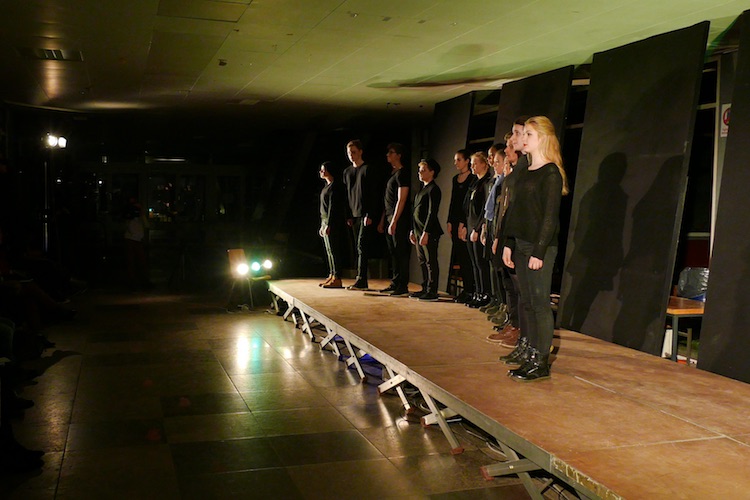
(reduced in size, original format 4k, this is a videograb, no photo)
It's really dark in there!
Replied by Karsten Schlüter on topic Is there a smarter way? 'synching' 3x same theatre performance…
FvH wrote: … For both methods it comes in very handy to have a script of the play at hand, with numbered scenes or even numbered lines. …
naming it "art house" inlcudes "script? wot script?"
Just asked the teachers in charge, both ladies starred at me like being a hairy spider.... "The flow is part of the piece" .. heaven........
FvH wrote: … favor and keyword scenes or line ranges (sc01 resp. lines 48-72) together with the shooting date or take. You end up with a nice list where you can look up scene 4, e.g., choose the best take, and append it to your timeline. …
yep, that's why I called the documentarists approach. Good thing 'bout this method: although performed three times different, it is three times the same content! It's up to me, how narrow I 'quantize' the whole play, from far too rough "5 scenes" to far too detailed "every scentence"...
Finally: this is a school play, and I'm an amateur! No need to be the perfect workflow, and I am the one deciding "like that!"
Only hurdle is: this time, 5 kids watching me editing … so, to keep my 'image' as Mr.AllKnow, I need a waterproof workflow.. :woohoo:
FvH wrote: … second approach would be … I should prefer method 1…
yep, me too … I'm aware of 'naming' markers, but I guess, excessive usage of Notes, and/or keywords is the better approach.
We will edit anyhow chronological, it's a theatre play, so structure is given.... it is mainly "oops, cam right doesn't cover this player, how's shot left OR cam right the other day?"....
@Justine
What I've written before: 'tracks' don't help here, stacking 8 streams don't help me to find "Help me!" in version Wednesday vs vers. Friday...
But you triggered an interesting thought. MCs don't have to be synched… hmm? That's what they are intended for. But there are probably cases, where theres is 'visual synch' needed.. I'l keep this idea in my 'Box Of Dirty Tricks' for future reference ...
tech. note: I'm excited 'bout pic quality, we tested it yesterday! For <cough> artistical purpose, the stage is lit by just two Tungsten (not all the time). ... brave Lumix FZ1000 delivers that:
(reduced in size, original format 4k, this is a videograb, no photo)
It's really dark in there!
Last edit: 09 Mar 2016 10:17 by Karsten Schlüter.
Please Log in to join the conversation.

09 Mar 2016 11:34 #74183
by rjvddoes
Replied by rjvddoes on topic Is there a smarter way? 'synching' 3x same theatre performance…
Hey Karsten,
You could also take the first performance, sync all the angles and audio, make it a multiclip. Next, do the same with the second and the third shows.
Open the angle editor of the first MC and place markers in your main angle where new (improvised) scenes begin.
Add as many angles as needed for clips from your second and third MC.
Open the second MC in the angle editor and mark the same scenes as in the first MC. Blade through all your angles at the markers (turn snapping on).
Select all the angle clips on a per-scene basis in the second MC. Copy them and paste them in the angle editor of the first MC at the corresponding "scene" markers.
If the performance of a scene from the second MC has a longer duration than the same scene in the first MC, you can add a new set of angles for the next scene in order to allow for the end of the longer scene to extend the beginning of the next scene in the first MC. Place the next scene angle clips from the second MC at the second marker in the first MC.
Repeat this for all the angles in the third MC.
Now you end up with one giant MC with probably a lot of angles, but at least with all the "scene" beginnings synced up.
You can force some cleaning up by adding empty angles and rearrange the the angles in such a way that you end up with a new "page" of angles per performance. For instance if you have 2 video angles and one audio angle per MC, you can add one empty angle. This gives you one performance or scene in a 4-up view.
When you start editing you can concentrate on a scene from one day until you need a better performance. Then you switch to there next page of 4 angles in the angle viewer and continue from there etc. etc.
Good luck with your edit!
Robbert-Jan
You could also take the first performance, sync all the angles and audio, make it a multiclip. Next, do the same with the second and the third shows.
Open the angle editor of the first MC and place markers in your main angle where new (improvised) scenes begin.
Add as many angles as needed for clips from your second and third MC.
Open the second MC in the angle editor and mark the same scenes as in the first MC. Blade through all your angles at the markers (turn snapping on).
Select all the angle clips on a per-scene basis in the second MC. Copy them and paste them in the angle editor of the first MC at the corresponding "scene" markers.
If the performance of a scene from the second MC has a longer duration than the same scene in the first MC, you can add a new set of angles for the next scene in order to allow for the end of the longer scene to extend the beginning of the next scene in the first MC. Place the next scene angle clips from the second MC at the second marker in the first MC.
Repeat this for all the angles in the third MC.
Now you end up with one giant MC with probably a lot of angles, but at least with all the "scene" beginnings synced up.
You can force some cleaning up by adding empty angles and rearrange the the angles in such a way that you end up with a new "page" of angles per performance. For instance if you have 2 video angles and one audio angle per MC, you can add one empty angle. This gives you one performance or scene in a 4-up view.
When you start editing you can concentrate on a scene from one day until you need a better performance. Then you switch to there next page of 4 angles in the angle viewer and continue from there etc. etc.
Good luck with your edit!
Robbert-Jan
Please Log in to join the conversation.
Less
More
- Posts: 971
- Thank you received: 46
09 Mar 2016 13:10 #74184
by MsJustine
Replied by MsJustine on topic Is there a smarter way? 'synching' 3x same theatre performance…
Hi Karsten
The point to multi-cam in FCPX is not to sync in every case, this is a great feature of multi-cam, in that it has various ways to sync, you do not have to sync.
Think of multi-cam as a giant compound clip, syncing does not have to be used at any stage.
If it was me, I would either do 1 of 2 things, have someone watch and make notes during the event recording via pencil and paper when things happened, good speech, bad speech, using the time you set on the camera's, or 2, once ingested into FCPX, do a rough skim through, making notes of good takes, bad takes, this should not take too long.
Maybe a 3rd option, take each clip into a multi-cam, skim through, then blade out the bad bits,delete out the gaps between the clips, watch through, then again, that might be a bit long.
The best solution is to do a pre-edit, skim through, range-delete the rubbish bits=rejected clips, hide rejected as the filter, repeat, this way you have only clips worthwhile in the visible browser, select all, append to timeline, repeat range delete, delete gaps, and so on.
It all depends on how much time you want to dedicate to this work, multicam would be a fast easy method if you know what you are doing, pre-editing and rejecting, is very fast and dirty way to get rid of annoying seconds, top and tail reject clips in other words.
Maybe just a new thought, put each day as a compound clip, then edit the compound clip, overall this is a great question to ask, thanks for asking!!
The point to multi-cam in FCPX is not to sync in every case, this is a great feature of multi-cam, in that it has various ways to sync, you do not have to sync.
Think of multi-cam as a giant compound clip, syncing does not have to be used at any stage.
If it was me, I would either do 1 of 2 things, have someone watch and make notes during the event recording via pencil and paper when things happened, good speech, bad speech, using the time you set on the camera's, or 2, once ingested into FCPX, do a rough skim through, making notes of good takes, bad takes, this should not take too long.
Maybe a 3rd option, take each clip into a multi-cam, skim through, then blade out the bad bits,delete out the gaps between the clips, watch through, then again, that might be a bit long.
The best solution is to do a pre-edit, skim through, range-delete the rubbish bits=rejected clips, hide rejected as the filter, repeat, this way you have only clips worthwhile in the visible browser, select all, append to timeline, repeat range delete, delete gaps, and so on.
It all depends on how much time you want to dedicate to this work, multicam would be a fast easy method if you know what you are doing, pre-editing and rejecting, is very fast and dirty way to get rid of annoying seconds, top and tail reject clips in other words.
Maybe just a new thought, put each day as a compound clip, then edit the compound clip, overall this is a great question to ask, thanks for asking!!
Please Log in to join the conversation.
- Karsten Schlüter
-
Topic Author
- Offline
- Moderator
-
Less
More
- Posts: 3790
- Thank you received: 718
09 Mar 2016 14:41 #74187
by Karsten Schlüter
excellent idea ....
But (I'm soooo German, but, but, but.....)…
two 'tracks' in a MC, A and B
I pick scene 1,2,3 from each track
sequence is A1 B1 A2 B2 A3 B3...
then: shift/trim B3 in the Project ==>> B2 and B1 too get shifted!!
… have experienced that in other MC projects before... scene 1,2,3 are parts from the same clip - so, when I shift/trim one of them, all get trimmed.....
But basically, your method is a nice mix of MC and manual synched clips. The technical variation of sorting by notes/keywords.- I'll try next week....
... I assume, the real-life issues are much simpler to solve - guess, a smart collection spits out the right part on MC_wed and MC_tue (and maybe MC_fri), and then simple skim/in/out/E.
What I tell others, I have to tell me: first of all, a MC is a clip as any other ....
It's just a matter of getting organzied BEFORE launching FCPX ...
grey-matter v1.0 ... oh, oohhh ..
THANKS to everybody participated so far... lots of good input and new perspectives... this board rocks!
Replied by Karsten Schlüter on topic Is there a smarter way? 'synching' 3x same theatre performance…
rjvddoes wrote: … sync all the angles and audio, make it a multiclip. … mark the same scenes as in the first MC. Blade through all your angles at the markers (turn snapping on).
Select all the angle clips on a per-scene basis in the second MC. Copy them and paste them in the angle editor of the first MC at the corresponding "scene" markers.…
excellent idea ....
But (I'm soooo German, but, but, but.....)…
two 'tracks' in a MC, A and B
I pick scene 1,2,3 from each track
sequence is A1 B1 A2 B2 A3 B3...
then: shift/trim B3 in the Project ==>> B2 and B1 too get shifted!!
… have experienced that in other MC projects before... scene 1,2,3 are parts from the same clip - so, when I shift/trim one of them, all get trimmed.....
But basically, your method is a nice mix of MC and manual synched clips. The technical variation of sorting by notes/keywords.- I'll try next week....
... I assume, the real-life issues are much simpler to solve - guess, a smart collection spits out the right part on MC_wed and MC_tue (and maybe MC_fri), and then simple skim/in/out/E.
What I tell others, I have to tell me: first of all, a MC is a clip as any other ....
It's just a matter of getting organzied BEFORE launching FCPX ...
grey-matter v1.0 ... oh, oohhh ..
THANKS to everybody participated so far... lots of good input and new perspectives... this board rocks!
Please Log in to join the conversation.
09 Mar 2016 14:46 #74189
by rjvddoes
Replied by rjvddoes on topic Is there a smarter way? 'synching' 3x same theatre performance…
Did you trim with the Select Tool (shortcut A), then you shift all clips while trimming.
When you use the Position Tool (shortcut P), all clips will stay in place.
When you use the Position Tool (shortcut P), all clips will stay in place.
Please Log in to join the conversation.
Less
More
- Posts: 971
- Thank you received: 46
09 Mar 2016 14:52 #74190
by MsJustine
Replied by MsJustine on topic Is there a smarter way? 'synching' 3x same theatre performance…
The first thing you should do is pre-edit, and delete/reject range the parts of the video you do not want/need, as there will be loads of rubbish.
Once you have done that, you will be left with clean usable clips in the browser if you set the view browser filter to hide rejected, the red lines with not be seen, those regions/ranges are now hidden.
Roughly skim through the remainder of the clips, set the view to a minute, then skim, set in and out points, mark them favorites, then change the filter view to favorites.
Now you will have only a handful of clips to use, multicam is using a shovel to squash an ant, overkill.
Keep skimming and selecting and adding to the timeline the clips that are the very best of each, of course label each clip correctly with each day, and what camera, Tue_Cam1_Stage, Tue_Cam2_Wide, and so on.
As you are making 1 video out of many, it does not matter in what order you edit the best parts in, FCPX is basically all about pre-editing, doing the editing, separating the rubbish from the good using the rejected clips=delete key and the favorite F key, and choosing the right filter to view the browser in.
Really skim, skim, append to timeline will work out very fast, as you will have only very few clips in the browser if you pre-edit well!
Once you have done that, you will be left with clean usable clips in the browser if you set the view browser filter to hide rejected, the red lines with not be seen, those regions/ranges are now hidden.
Roughly skim through the remainder of the clips, set the view to a minute, then skim, set in and out points, mark them favorites, then change the filter view to favorites.
Now you will have only a handful of clips to use, multicam is using a shovel to squash an ant, overkill.
Keep skimming and selecting and adding to the timeline the clips that are the very best of each, of course label each clip correctly with each day, and what camera, Tue_Cam1_Stage, Tue_Cam2_Wide, and so on.
As you are making 1 video out of many, it does not matter in what order you edit the best parts in, FCPX is basically all about pre-editing, doing the editing, separating the rubbish from the good using the rejected clips=delete key and the favorite F key, and choosing the right filter to view the browser in.
Really skim, skim, append to timeline will work out very fast, as you will have only very few clips in the browser if you pre-edit well!
Please Log in to join the conversation.
- Karsten Schlüter
-
Topic Author
- Offline
- Moderator
-
Less
More
- Posts: 3790
- Thank you received: 718
09 Mar 2016 15:44 #74192
by Karsten Schlüter
no, I use the Trim Tool, shortcut T, click'n drag inside the clip....
Replied by Karsten Schlüter on topic Is there a smarter way? 'synching' 3x same theatre performance…
rjvddoes wrote: Did you trim with the Select Tool (shortcut A), then you shift all clips while trimming.
When you use the Position Tool (shortcut P), all clips will stay in place.
no, I use the Trim Tool, shortcut T, click'n drag inside the clip....
Please Log in to join the conversation.
- Karsten Schlüter
-
Topic Author
- Offline
- Moderator
-
Less
More
- Posts: 3790
- Thank you received: 718
09 Mar 2016 16:09 - 09 Mar 2016 16:10 #74193
by Karsten Schlüter
This is a recording of a theatre play - there's no single frame of 'rubbish' (??) . Each cam runs permanently. One is wide, one is close, both on opposite sides of stage, switching positions next day.
For sure I use Multicam, a) to snych ext audio recording with video, b) allows MC to simple select the actual viewing angle of scene....
pre-edit? .... I favorize and/or keyword parts ...
'third dimension' is: I not only select angle, but 'version' (read Daniels reply); prob here is: no fix timebase, as with a music track.
But that is manageable with 'quantizing' the single streams by Markers and/or notes - as FvH suggested.
MC=synching each day, Markers+Notes=cue points across diff days of recording
Replied by Karsten Schlüter on topic Is there a smarter way? 'synching' 3x same theatre performance…
MsJustine wrote: The first thing you should do is pre-edit, and delete/reject range the parts of the video you do not want/need, as there will be loads of rubbish.…
This is a recording of a theatre play - there's no single frame of 'rubbish' (??) . Each cam runs permanently. One is wide, one is close, both on opposite sides of stage, switching positions next day.
For sure I use Multicam, a) to snych ext audio recording with video, b) allows MC to simple select the actual viewing angle of scene....
pre-edit? .... I favorize and/or keyword parts ...
'third dimension' is: I not only select angle, but 'version' (read Daniels reply); prob here is: no fix timebase, as with a music track.
But that is manageable with 'quantizing' the single streams by Markers and/or notes - as FvH suggested.
MC=synching each day, Markers+Notes=cue points across diff days of recording
Last edit: 09 Mar 2016 16:10 by Karsten Schlüter.
Please Log in to join the conversation.
