


3 Post Moderation Rule for New Boarders (25 Jan 2021)
New boarders will have their posts moderated - Don't worry if you cannot see your post immediately.
quitting on text manipulation

03 Mar 2016 20:06 #74020
by Gretta
quitting on text manipulation was created by Gretta
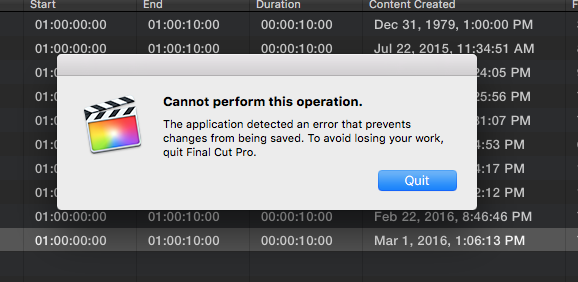
I've been getting this attached error/quit msg when trying to a lot of text work, e.g., changing fonts, all caps, tracking, line spacing in a lower 3rd.
Just now, I got it just by dragging the 'Custom' title to TL. (would be V3 over video and a graphic)
I'm all caught up with updates and just yesterday trashed prefs.
any ideas?
TIA
Just now, I got it just by dragging the 'Custom' title to TL. (would be V3 over video and a graphic)
I'm all caught up with updates and just yesterday trashed prefs.
any ideas?
TIA
Please Log in to join the conversation.
03 Mar 2016 20:11 - 03 Mar 2016 20:14 #74021
by Gretta
Replied by Gretta on topic quitting on text manipulation
OK, reworded my search, and found this from Ronny:
"You get this message when your Project database is getting corrupted. It's a safety system built inside FCP X to prevent you from continuing to work on a corrupt Project and risking to lose all your work.
When you get this message you will see that you cannot use CMD+Z (Undo) anymore. That's why FCP X won't allow you to continue. Usually the problem has nothing to do with the exact clip or the title you are working on, it's a database issue.
The best thing you can do when you get this message is to paste the Project content into a new Project, as you have done. This will create an entirely fresh database for your edit and, unless there is effectively a corrupt clip in the Project, this will solve the problem."
Is this still the case two years later? And by 'project' do you now mean 'Library'? I was actually working in a CC, but one which happens to be part of a 'project'. I think I will delete that project completely.
"You get this message when your Project database is getting corrupted. It's a safety system built inside FCP X to prevent you from continuing to work on a corrupt Project and risking to lose all your work.
When you get this message you will see that you cannot use CMD+Z (Undo) anymore. That's why FCP X won't allow you to continue. Usually the problem has nothing to do with the exact clip or the title you are working on, it's a database issue.
The best thing you can do when you get this message is to paste the Project content into a new Project, as you have done. This will create an entirely fresh database for your edit and, unless there is effectively a corrupt clip in the Project, this will solve the problem."
Is this still the case two years later? And by 'project' do you now mean 'Library'? I was actually working in a CC, but one which happens to be part of a 'project'. I think I will delete that project completely.
Last edit: 03 Mar 2016 20:14 by Gretta.
Please Log in to join the conversation.

04 Mar 2016 08:09 - 04 Mar 2016 08:53 #74035
by Navigator
Replied by Navigator on topic quitting on text manipulation
I had the same message a couple of times last week working on a new project. FC restarts automatically and than the problem is 'solved'...... for a while. Sometimes I restart the iMac. During editing for 3 or 4 hours the problem occurred 2 or 3 times. I will make a new project and copy the project.
Peter
Specs:
2015 iMac 27", 5K Retina 8GB, 2TB Fusion, 2GB graph.card, external 250SSD (FCPX project drive)
Peter
Specs:
2015 iMac 27", 5K Retina 8GB, 2TB Fusion, 2GB graph.card, external 250SSD (FCPX project drive)
Last edit: 04 Mar 2016 08:53 by Navigator.
Please Log in to join the conversation.
