


- Posts: 8
- Thank you received: 0
3 Post Moderation Rule for New Boarders (25 Jan 2021)
New boarders will have their posts moderated - Don't worry if you cannot see your post immediately.
Working from External Drive Across multipul computers.
02 Mar 2016 07:10 #73938
by nvrenuf
Working from External Drive Across multipul computers. was created by nvrenuf
Hi guys,
Probably an easy fix for the experts. But driving me crazy can't seem to find the answer.
All my searches keep giving me results about moving files and not my exact problem.
Currently I work on FCPX with my imac and the library is located on an external Thunderbolt SSD,
When i import media. I copy all files to the ssd, everything as far as i'm aware is located on the external drive.
How ever when i plug the drive into my macbook, and open the library and project
i get the red error screen on the project footage.
All the media is showing in the top and plays and shows fine.
The project timeline shows the thumbnails and plays the music ,
how ever the screen showing the footage from the project just shows the red missing footage
screen.
What am i doing wrong ?
I thought that having everything located on the external means i can just move it around with out having to do anything else.
does any body know what i need to do to have it all located correctly on the external and swap between machines and carry on editing. ?
Sorry if this has been answered. Please link me if it has.
Just all my searches have turned up nothing. Phone support not helpful.
thanks .
Tim
Probably an easy fix for the experts. But driving me crazy can't seem to find the answer.
All my searches keep giving me results about moving files and not my exact problem.
Currently I work on FCPX with my imac and the library is located on an external Thunderbolt SSD,
When i import media. I copy all files to the ssd, everything as far as i'm aware is located on the external drive.
How ever when i plug the drive into my macbook, and open the library and project
i get the red error screen on the project footage.
All the media is showing in the top and plays and shows fine.
The project timeline shows the thumbnails and plays the music ,
how ever the screen showing the footage from the project just shows the red missing footage
screen.
What am i doing wrong ?
I thought that having everything located on the external means i can just move it around with out having to do anything else.
does any body know what i need to do to have it all located correctly on the external and swap between machines and carry on editing. ?
Sorry if this has been answered. Please link me if it has.
Just all my searches have turned up nothing. Phone support not helpful.
thanks .
Tim
Please Log in to join the conversation.


03 Mar 2016 00:59 - 03 Mar 2016 00:59 #73969
by dgwvideo
Creating history....one edit at a time !
Replied by dgwvideo on topic Working from External Drive Across multipul computers.
First, click on the Library that contains your project in FCPX and look at the info tab in the inspector. This will tell you the location that FCPX identifies for the media, the caches and your backups. It sounds like you may have modified the files on your external drive by either renaming, moving or replacing them thru the finder. If this is the case, FCPX cannot successfully relink the files to your project. Any media used in FCPX should only be modified thru FCPX.
It could also be possible that you didn't leave your drive connected long enough for FCPX to fully import the files and create waveforms before you ejected it.
If this is not the issue, post back with what the inspector tells you for the problem library.
It could also be possible that you didn't leave your drive connected long enough for FCPX to fully import the files and create waveforms before you ejected it.
If this is not the issue, post back with what the inspector tells you for the problem library.
Creating history....one edit at a time !
Last edit: 03 Mar 2016 00:59 by dgwvideo. Reason: typo
Please Log in to join the conversation.
03 Mar 2016 01:17 #73972
by nvrenuf
Replied by nvrenuf on topic Working from External Drive Across multipul computers.
Hi Thanks for the reply.
I will give that a go and have a look.
To give a bit more info. The External sits connected permanently to the imac.
All the footage is copied to the external VIA FCP when importing. And nothing is touched
after that. everything when on the Imac works great. Unplug external
plug it into the Macbook and all the thumbnails load, even the thumbnails on the project
all load and it plays, music plays. It's just the preview screen on playback of the project
that shows the missing footage icon.
Ill have a look at the location you mentioned and see what result i obtain.
Cheers
Tim
I will give that a go and have a look.
To give a bit more info. The External sits connected permanently to the imac.
All the footage is copied to the external VIA FCP when importing. And nothing is touched
after that. everything when on the Imac works great. Unplug external
plug it into the Macbook and all the thumbnails load, even the thumbnails on the project
all load and it plays, music plays. It's just the preview screen on playback of the project
that shows the missing footage icon.
Ill have a look at the location you mentioned and see what result i obtain.
Cheers
Tim
Please Log in to join the conversation.
03 Mar 2016 01:46 - 04 Mar 2016 03:41 #73974
by nvrenuf
Replied by nvrenuf on topic Working from External Drive Across multipul computers.
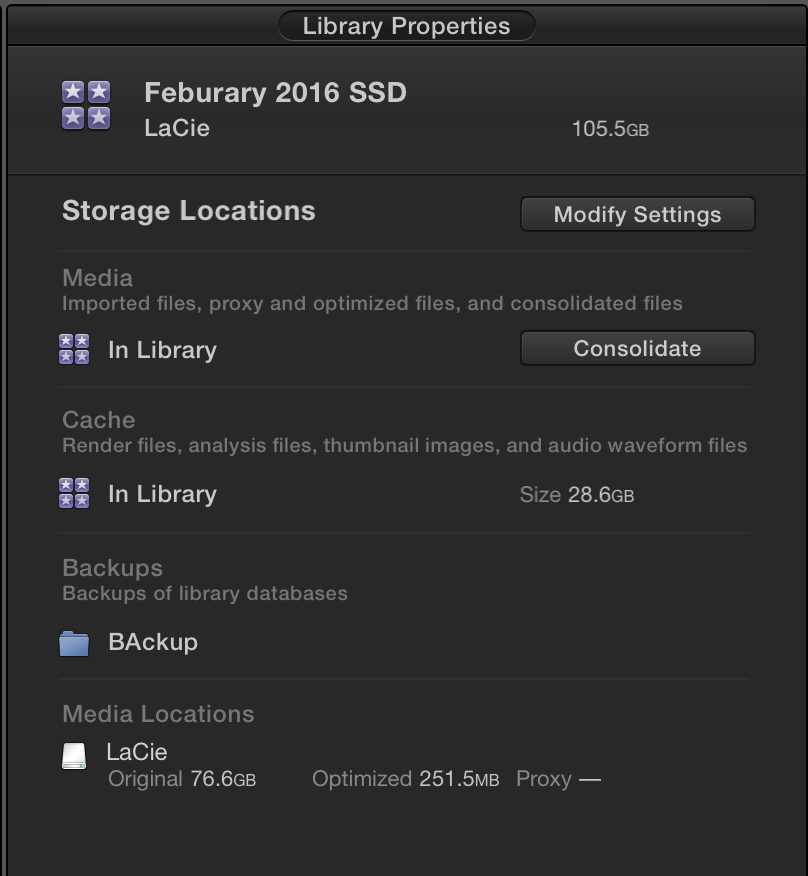
Is this the info you asked about ?
It's all pointing to the library it's self or the ssd,
the folder Backup and Lacie are all on the external.
https://www.dropbox.com/s/9qyrjozti4htkpb/unnamed.png?dl=0
It's all pointing to the library it's self or the ssd,
the folder Backup and Lacie are all on the external.
https://www.dropbox.com/s/9qyrjozti4htkpb/unnamed.png?dl=0
Last edit: 04 Mar 2016 03:41 by nvrenuf.
Please Log in to join the conversation.

04 Mar 2016 14:02 #74047
by joema
It sounds like on your external hard drive you have a managed library with all content inside that. You should be able to move that hard drive to another computer and all footage should be present. Are you reporting the footage is in the Event Browser at upper left, and in the timeline but the viewer display is red (missing media)?
Normally a missing clip is red everywhere -- timeline, event browser and viewer. You normally cannot play it. Can you clarify what window is showing what?
Are you using proxy media and is your viewer set to View>Proxy or View>Optimized Original?
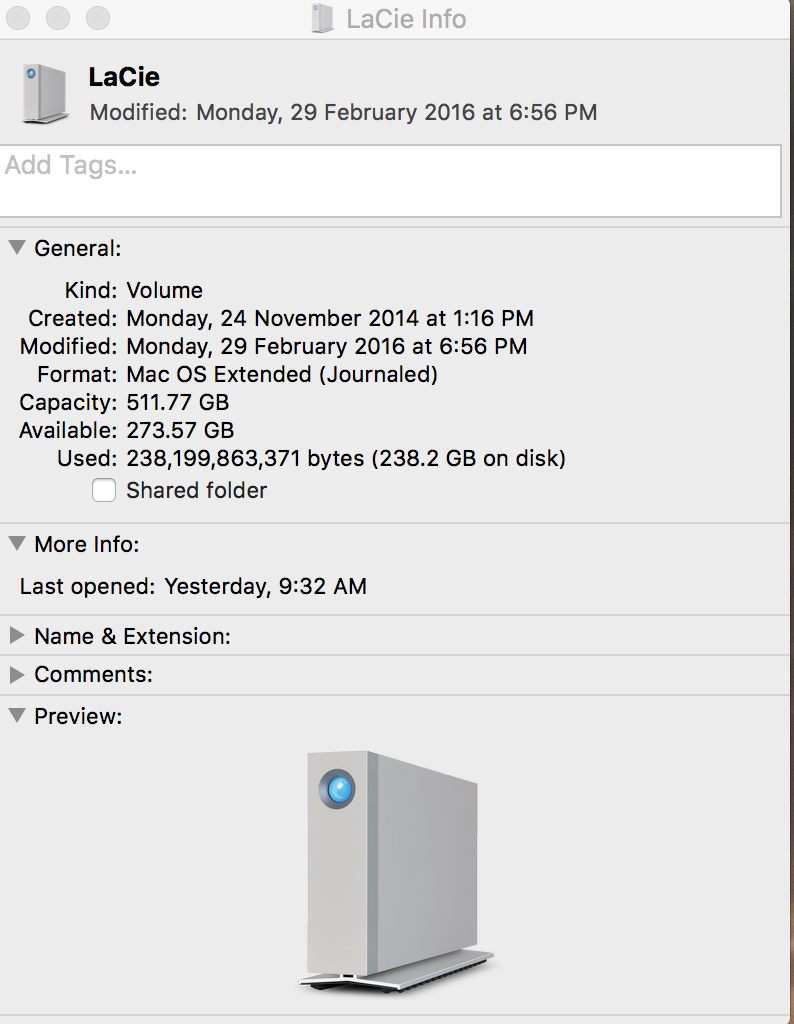
Is this Lacie drive formatted HFS+ or by some chance is it exFAT, NTFS or something else? You can do a "Get Info" from Finder (CMD+I) on that drive to check.
Does all your footage behave this way or just some clips?
I have seen cases where a missing clip which is restored or when switching from proxy to original stays red until FCPX is restarted. Have you tried that, and is it persistent after restarting FCPX?
Have you tried deleting and rebuilding all generated library files? This can be done safely by selecting the library, then Files>Delete Generated Library Files, and selecting all the checkboxes. It will only delete temporary media which can easily be recreated.
FCPX normally shows red "missing media" if that content is not in the expected location. The question is where is it unsuccessfully looking for the content. To my knowledge the only way to see this is using the Terminal command "readlink" within the library against the symlink of the missing clip. It will show the original path where FCPX expects the media to be. Obviously any use of Terminal is at your own discretion.
Replied by joema on topic Working from External Drive Across multipul computers.
nvrenuf wrote: ...FCPX with my imac and the library is located on an external Thunderbolt SSD...When i import media. I copy all files to the ssd, everything as far as i'm aware is located on the external drive...How ever when i plug the drive into my macbook, and open the library and project i get the red error screen on the project footage...All the media is showing in the top and plays and shows fine...The project timeline shows the thumbnails and plays the music...how ever the screen showing the footage from the project just shows the red missing footage...does any body know what i need to do to have it all located correctly on the external and swap between machines and carry on editing. ?...
It sounds like on your external hard drive you have a managed library with all content inside that. You should be able to move that hard drive to another computer and all footage should be present. Are you reporting the footage is in the Event Browser at upper left, and in the timeline but the viewer display is red (missing media)?
Normally a missing clip is red everywhere -- timeline, event browser and viewer. You normally cannot play it. Can you clarify what window is showing what?
Are you using proxy media and is your viewer set to View>Proxy or View>Optimized Original?
Is this Lacie drive formatted HFS+ or by some chance is it exFAT, NTFS or something else? You can do a "Get Info" from Finder (CMD+I) on that drive to check.
Does all your footage behave this way or just some clips?
I have seen cases where a missing clip which is restored or when switching from proxy to original stays red until FCPX is restarted. Have you tried that, and is it persistent after restarting FCPX?
Have you tried deleting and rebuilding all generated library files? This can be done safely by selecting the library, then Files>Delete Generated Library Files, and selecting all the checkboxes. It will only delete temporary media which can easily be recreated.
FCPX normally shows red "missing media" if that content is not in the expected location. The question is where is it unsuccessfully looking for the content. To my knowledge the only way to see this is using the Terminal command "readlink" within the library against the symlink of the missing clip. It will show the original path where FCPX expects the media to be. Obviously any use of Terminal is at your own discretion.
Please Log in to join the conversation.
04 Mar 2016 14:08 #74049
by nvrenuf
Replied by nvrenuf on topic Working from External Drive Across multipul computers.
Thanks for the reply,
I will post up some attachments of screen shots that hopefully answer those questions
you're asking me .
I will post up some attachments of screen shots that hopefully answer those questions
you're asking me .
Please Log in to join the conversation.
04 Mar 2016 14:22 #74051
by nvrenuf
Replied by nvrenuf on topic Working from External Drive Across multipul computers.
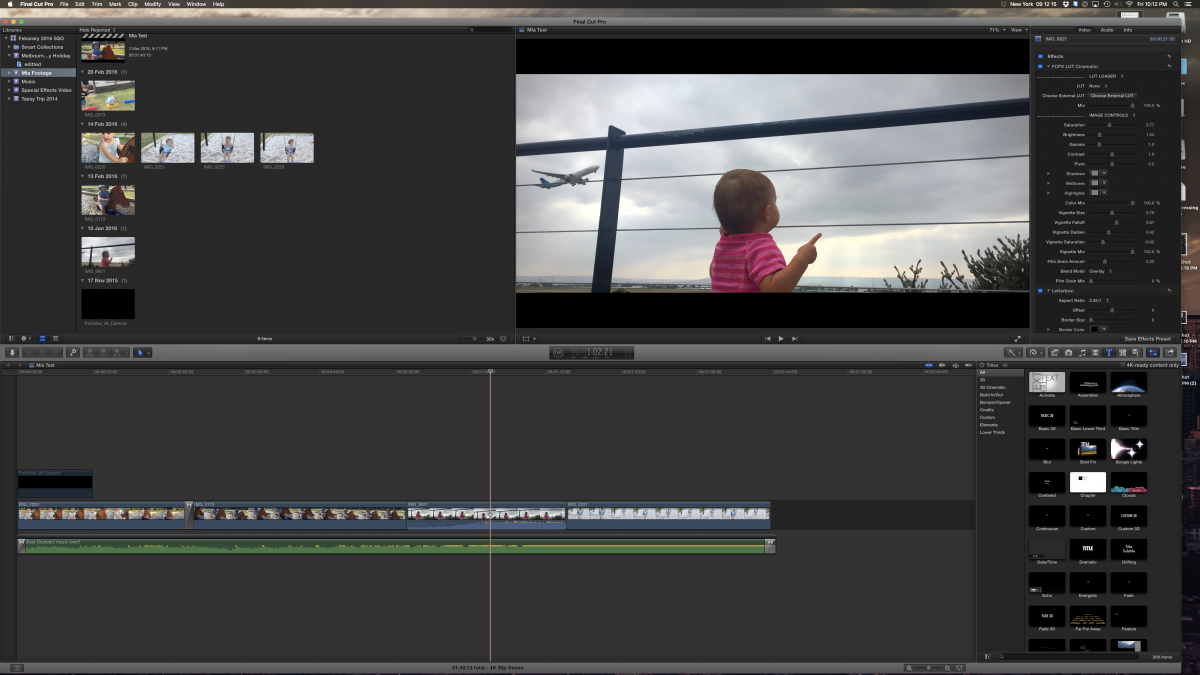
This is from the Imac where it was created.
see both places where the mouse is, it shows the footage.
Ill post up the macbook photos next
see both places where the mouse is, it shows the footage.
Ill post up the macbook photos next
Please Log in to join the conversation.
04 Mar 2016 14:30 #74052
by nvrenuf
Replied by nvrenuf on topic Working from External Drive Across multipul computers.
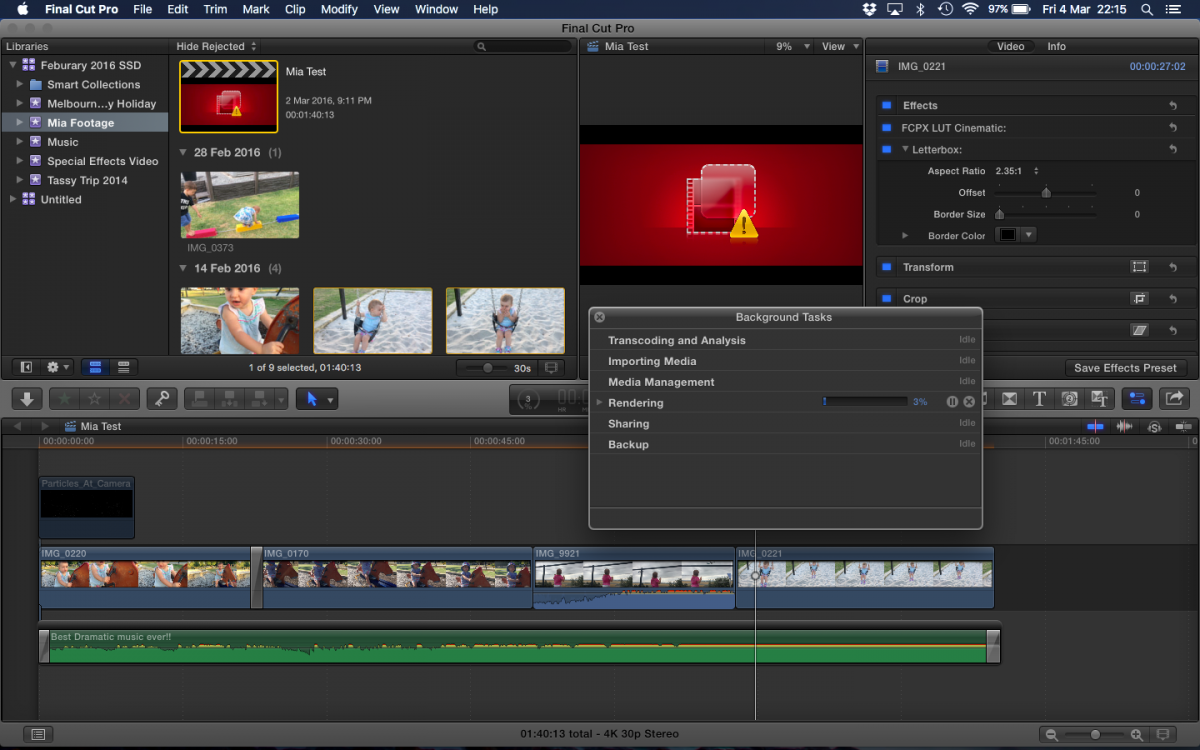
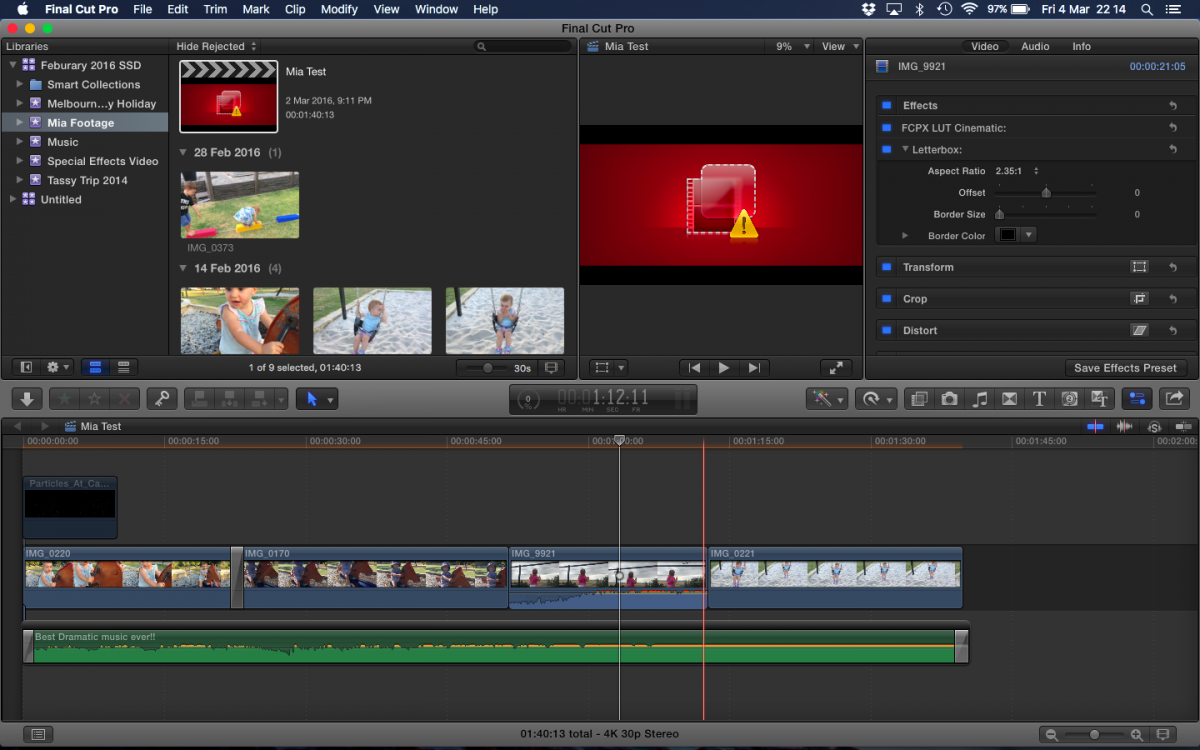
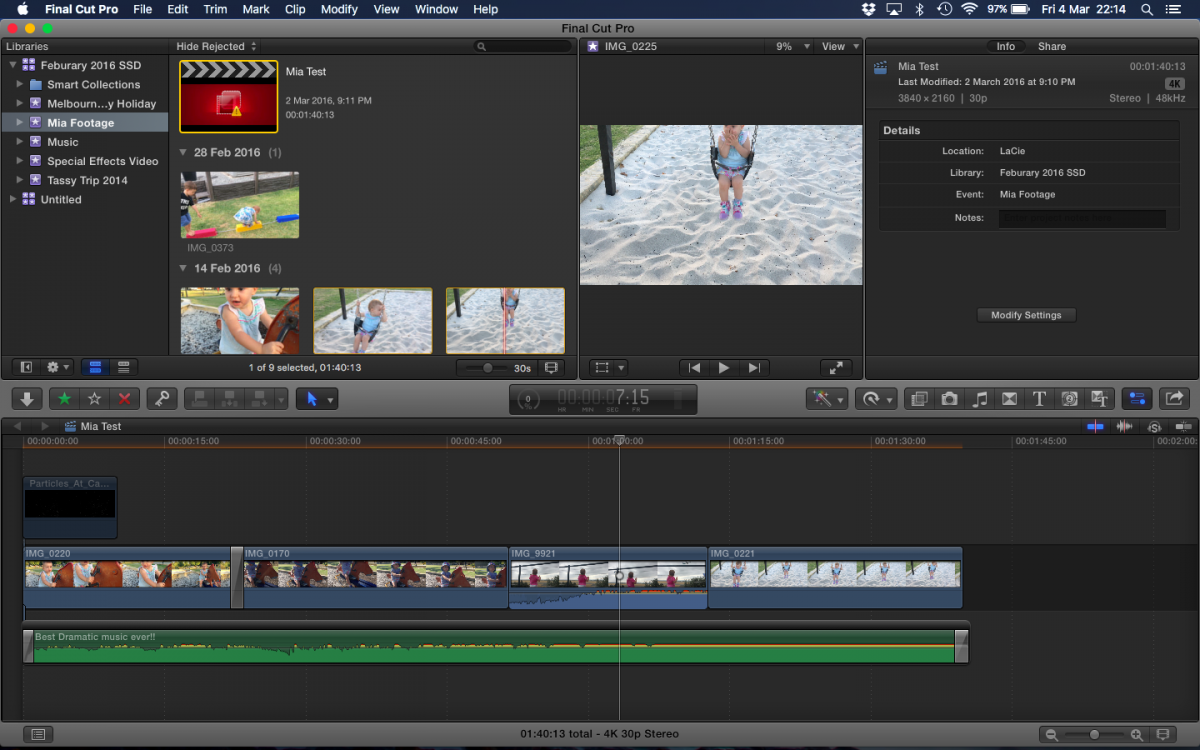
Here is the snap shots of it being open on my macbook.
see where the mouse is, showing clips working ok at the top,
but when mouse is over and playing in project, .
see where the mouse is, showing clips working ok at the top,
but when mouse is over and playing in project, .
Please Log in to join the conversation.
04 Mar 2016 14:34 #74053
by joema
Replied by joema on topic Working from External Drive Across multipul computers.
The red thumnail is the project file. Try clicking once on the "Untitled" library, then click back to your SSD library and see if it resolves. I have seen cases where the project file temporarily shows red after switching between proxy/original, and usually clicking out and in of the library makes it go away.
Please Log in to join the conversation.
04 Mar 2016 14:36 #74054
by nvrenuf
Replied by nvrenuf on topic Working from External Drive Across multipul computers.
Thanks for the fast reply. This didn't work. As i actually have 2 or 3 project files in there. I have opened them all and they all have the same problem. But move it back to the iMac and they all appear fine.
Strange thing is they all play the music and the it moves along. Just no image
Strange thing is they all play the music and the it moves along. Just no image
Please Log in to join the conversation.
04 Mar 2016 17:16 #74068
by dgwvideo
Creating history....one edit at a time !
Replied by dgwvideo on topic Working from External Drive Across multipul computers.
If these projects work properly on one computer but not on another then maybe you are missing an effect in the computer that experiences the problem. I see by your image you have applied a cinematic LUT to one of the clips. Is this LUT installed on both computers? If you select the clip and choose from the menu, RELINK files, it may tell you if an applied effect is not present. Do this and try choosing ALL and MISSING when you attempt a relink.
Creating history....one edit at a time !
Please Log in to join the conversation.
04 Mar 2016 22:37 #74091
by nvrenuf
Replied by nvrenuf on topic Working from External Drive Across multipul computers.
Hi thanks,
When I was relinking the files individual it wasn't seem to be helping.
But selected all of them and relinked.
And reinstalled the plugin files incase there was an issue with the plugin .
And it finally worked. And it seems to have fixed all the projects at the same time.
Assuming it was a mix of maybe the plugin , and relinking them again.
I just have to remember to install plugins on both computers everytime i download one.
Thank you every one for your help.
When I was relinking the files individual it wasn't seem to be helping.
But selected all of them and relinked.
And reinstalled the plugin files incase there was an issue with the plugin .
And it finally worked. And it seems to have fixed all the projects at the same time.
Assuming it was a mix of maybe the plugin , and relinking them again.
I just have to remember to install plugins on both computers everytime i download one.
Thank you every one for your help.
Please Log in to join the conversation.
