


3 Post Moderation Rule for New Boarders (25 Jan 2021)
New boarders will have their posts moderated - Don't worry if you cannot see your post immediately.
3 Monitor Setup - Display Order Priority?
- thefcpxeditor
-
 Topic Author
- Offline
- Premium Member
-

- Control+Command+Awesome
Right now when sending the browser to the second display it chooses the wrong one, for what I'd prefer.
Please Log in to join the conversation.
- thefcpxeditor
-
Topic Author
- Offline
- Premium Member
-
- Control+Command+Awesome
This is my setup:
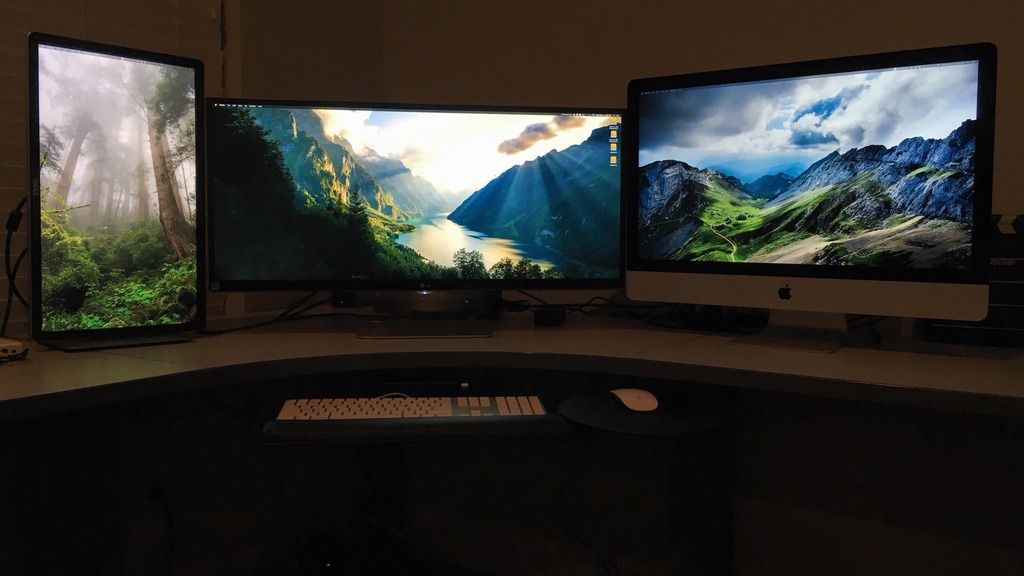
This is what happens when I try and move the browser from one secondary screen to the other, where I want it:
Please Log in to join the conversation.


Creating history....one edit at a time !
Please Log in to join the conversation.
- thefcpxeditor
-
Topic Author
- Offline
- Premium Member
-
- Control+Command+Awesome
Please Log in to join the conversation.
- thefcpxeditor
-
Topic Author
- Offline
- Premium Member
-
- Control+Command+Awesome
Please Log in to join the conversation.

Creating history....one edit at a time !
Please Log in to join the conversation.
- thefcpxeditor
-
Topic Author
- Offline
- Premium Member
-
- Control+Command+Awesome
I'm not referring to A/V out, that's a different situation. I'm just trying to get the Library Browser to the vertical screen.
FCP X has two options for a secondary display it could use, but defaults to the iMac screen. I'm trying to figure why and how to get it to default to the vertical one.
Turning off separate spaces didn't help. The browser disappeared when put on the vertical screen just like before when separate spaces was on. .
Please Log in to join the conversation.
Creating history....one edit at a time !
Please Log in to join the conversation.
- thefcpxeditor
-
Topic Author
- Offline
- Premium Member
-
- Control+Command+Awesome
Please Log in to join the conversation.
- thefcpxeditor
-
Topic Author
- Offline
- Premium Member
-
- Control+Command+Awesome
Please Log in to join the conversation.
Creating history....one edit at a time !
Please Log in to join the conversation.
Creating history....one edit at a time !
Please Log in to join the conversation.
- thefcpxeditor
-
Topic Author
- Offline
- Premium Member
-
- Control+Command+Awesome
I already tried switching the inputs on the iMac, no luck.
Also, when I tried putting the menu bar on the iMac it did put the 2nd panel on the vertical display, but then my main screen was not correct of course. While I was there though I tried dragging the 2nd panel to the ultra wide. It did the same thing with that one. Bounced back. The behavior is odd seems random what monitor it chooses to use.
Please Log in to join the conversation.
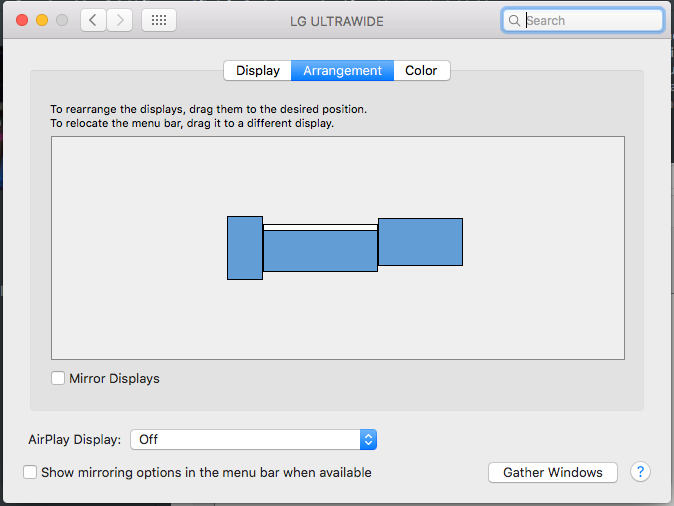
In System Pref, if you open your Monitors Preference utility, you'll notice a small white rectangle which you can slide on either one of your 3 monitors. Doing so determines, amongst other things, the secondary monitor FCPX will be using. I work with 4 monitors hooked up to a MacPro and this behaviour always work.
Regards.
Please Log in to join the conversation.


I've also had a similar situation.
I found that switching the order of the physical connections on the iMac solved the problem.
However, in my case the iMac was still primary for me, and the vertical screen was secondary, the third screen was a colour monitor via a mini ultra studio monitor.
Hope that helps.
Please Log in to join the conversation.
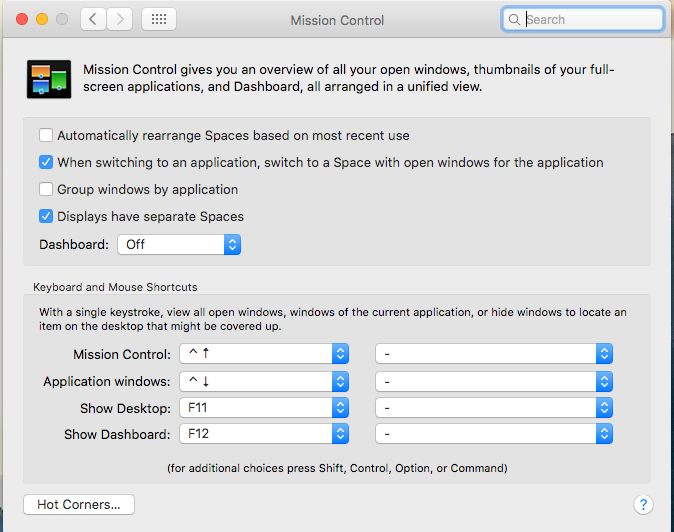
Unfortunately, FCP X does not let you explicitly choose what the second monitor will be. It is, however, easy to choose what the *first* or main monitor is: as was already explained here, it is the one that has the menu bar on it in System Preferences->Displays->Arrangement.
(Note: this is *also* true if you have "Displays have separate Spaces" checked - even though in reality *all* displays have menu bars on them, in System Preferences there is still just one, and that marks the "main" display)
So the trick to make FCP X use "display A" as the main display and "display B" as the second display: mark "display B" as the *main* display (in System Preferences, as above). Drag the FCP X window from display B (where it moves automatically) to display A. Then do Window->Show Viewers on Second Display (or Events, if that is what you want). They will go the display B.
Please Log in to join the conversation.
I my case there are 4 monitors. Forget number 4 since it is solely used for assorted Mac commodities (Mail, clock, news, weather, etc.).
That leaves us 3 displays: from left to right # 1, 2 and 3 (see attached screen dump).
in System Preferences->Displays->Arrangement, I’ve appointed # 1 as my main monitor. Also, in FCP, I chose to have my main viewer on the Second Display.
As a result, when I boot FCP, my #1 display always sports the viewer, and my #2 display has the software main working space. As for #3 display (mainly used for my clips and photos bank), it becomes my main viewer display when I need to show my work to a colleague (there’s always an empty seat to my right...). All I need to do, then, is to grab FCP’s window on #2 display and slide it on top of the viewer on #1 display. Automatically, the later slides on #3 display. I can’t explain why, but it’s what it does. And it fits my needs.
Sometime I miss Adobe ...
Regards.

Please Log in to join the conversation.
- GlenMoore1
-
- Offline
- New Member
-

- Posts: 2
- Thank you received: 0
Please Log in to join the conversation.


Please Log in to join the conversation.

You have three monitors.
One is for a/v output.
Open FCPX with a one window-layout.
Leave the main FCPX window where it is, or drag it to the monitor of your choice (but not to the dedicated a/v output monitor).
Now tell FCPX to show a/v output on your a/v output monitor.
Then choose - workspace - two monitors
The second monitor will now show the second window (overview, viewer, timeline) on the last of your three monitors.
Should work also with a vertikal oriented monitor.
This is a long time bug in FCPX and should have been solved years ago.(Do you read this, apple?) I can hear the deep sighs of thousand of new FPCX editors, when they run in the "how to setup three monitors" struggle.
Please Log in to join the conversation.
