


- Posts: 4
- Thank you received: 0
3 Post Moderation Rule for New Boarders (25 Jan 2021)
New boarders will have their posts moderated - Don't worry if you cannot see your post immediately.
How to move score theme from the top of the video to the bottom

03 Mar 2016 01:11 #73971
by dgwvideo
Creating history....one edit at a time !
Replied by dgwvideo on topic How to move score theme from the top of the video to the bottom
Usually you can just click in the viewer on the title, or click the title in the timeline to select it and drag it down where you want it. Sometimes you need to click once, and then click again to be able to move it. You might also be able to click the title in the timeline and then use the x, y position parameters in the inspector to move it.
Creating history....one edit at a time !
Please Log in to join the conversation.
- simonpwood
-

- Offline
- Platinum Member
-

Less
More
- Posts: 654
- Thank you received: 42
03 Mar 2016 11:21 #73991
by simonpwood
Replied by simonpwood on topic How to move score theme from the top of the video to the bottom
I tried this just now; it can't be moved, the parameters are not there unfortunately.
I wonder could this be opened in Motion and made into a theme that allows movement?
I wonder could this be opened in Motion and made into a theme that allows movement?
Please Log in to join the conversation.
- Karsten Schlüter
-

- Offline
- Moderator
-

Less
More
- Posts: 3790
- Thank you received: 718
03 Mar 2016 11:43 #73993
by Karsten Schlüter
That is a bug (!) with some 'older' titles:
You've probably have heard of Adjustment Layers?
Those are blank titles which affect the underlying clips - intentionally.
Same here - but unwanted. :blink:
Cure:
Open the title in Motion and …
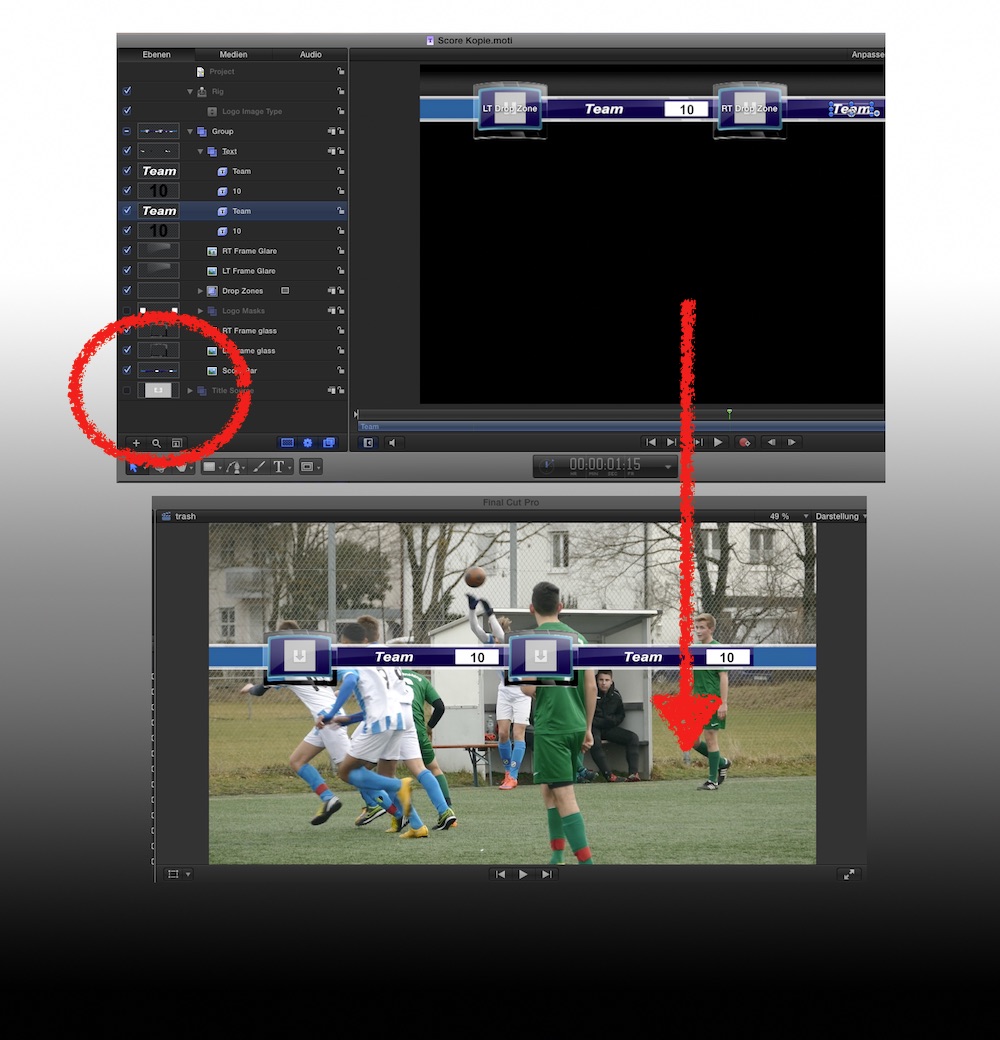
… and uncheck the background layer...
Moving the title via Transformation has then no effect on underlying clips.
Replied by Karsten Schlüter on topic How to move score theme from the top of the video to the bottom
yangy wrote: Hey there! I have put the score title under the Sport Theme in my video, however I cannot move the title bar to the bottom of the screen without moving the whole video. Can anyone please help
?
That is a bug (!) with some 'older' titles:
You've probably have heard of Adjustment Layers?
Those are blank titles which affect the underlying clips - intentionally.
Same here - but unwanted. :blink:
Cure:
Open the title in Motion and …
… and uncheck the background layer...
Moving the title via Transformation has then no effect on underlying clips.
Please Log in to join the conversation.
03 Mar 2016 18:08 #74013
by yangy
Replied by yangy on topic How to move score theme from the top of the video to the bottom
Thank you all so much for your input, and thank you Karsten for your detailed explanation, greatly appreciate it !
! Please Log in to join the conversation.
