


- Posts: 3
- Thank you received: 0
3 Post Moderation Rule for New Boarders (25 Jan 2021)
New boarders will have their posts moderated - Don't worry if you cannot see your post immediately.
FCP Plug in for Sports Footage
27 Feb 2016 17:44 #73818
by fcpdad
FCP Plug in for Sports Footage was created by fcpdad
I shoot youth soccer and want to incorporate the time elapsed, score and team logos in the upper left corner as is done with professional teams on TV (see attached image). I have been unable to find a plug-in for FCP that would enable me to do this, and I would appreciate any recommendations. I own FCP X and Motion 5.2.2. Thank you.

Please Log in to join the conversation.
- peteramwiggins
-

- Offline
- Administrator
-

- The Administrator :)
Less
More
- Posts: 1049
- Thank you received: 404
27 Feb 2016 19:39 #73821
by peteramwiggins
Administrator
Replied by peteramwiggins on topic FCP Plug in for Sports Footage
Administrator
Please Log in to join the conversation.
- Karsten Schlüter
-

- Offline
- Moderator
-

Less
More
- Posts: 3790
- Thank you received: 718
28 Feb 2016 09:51 #73831
by Karsten Schlüter
Me too! Every godd*** saturday ... :lol:
For each season, I make my own 'screen design', so I have a Theme in FCPX, containing all sorts of generators and titles and effects, to be used in my weekly reports...
To create such a score bar is no rocket science:
I'v applied a 'generic' title plug-in, to demo a few simle features.
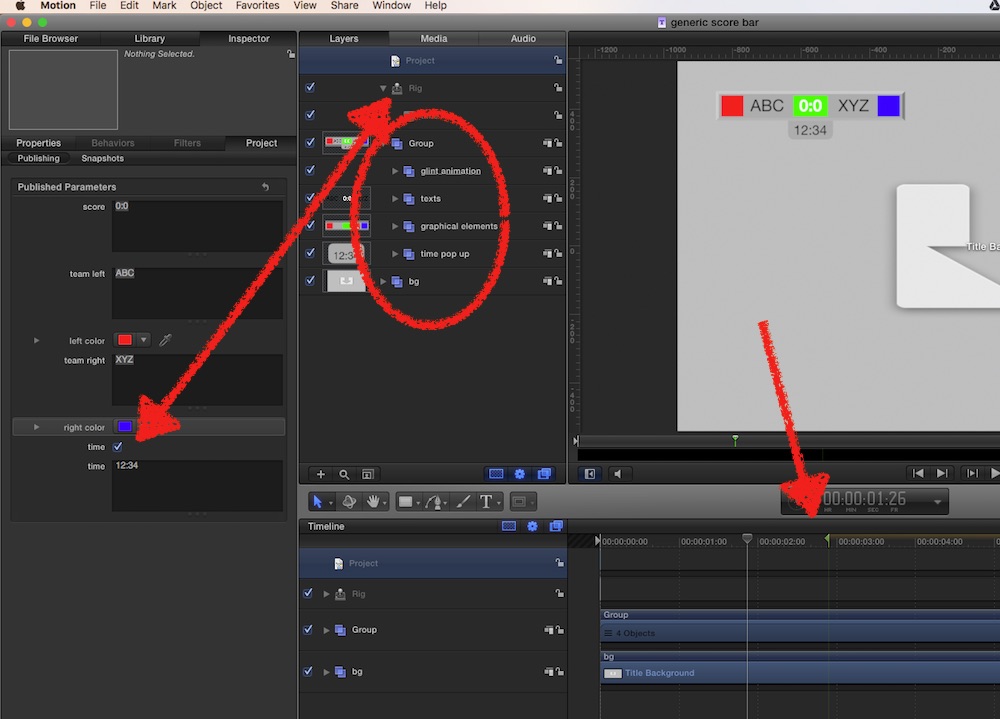
when you open it, you see several groups:
bg is the background...
group is the 'bar' with all elements, ready to be scaled, to put in position (upper left, lower mid), and being a group, you can apply some 'flying in', or fade-in, or ...
There's a 'bar', a green bg for the score, two rectangles for the team colors (=could be replaced by drop-zones, to insert team logos) ...
Just to demo options:
a glint effect, to create some 'action'
and corncerning 'time': it is very tricky to squeeze the source time out of the clips and into some custom title, I found for my needs a tricky workaround, … the easy way: type it in
and I applied a 'mandatory built-in marker' => when you stretch the title, the animations keep their timing
the time pop-ups - a rig switches on/off
In FCPX, you see the published parameters:
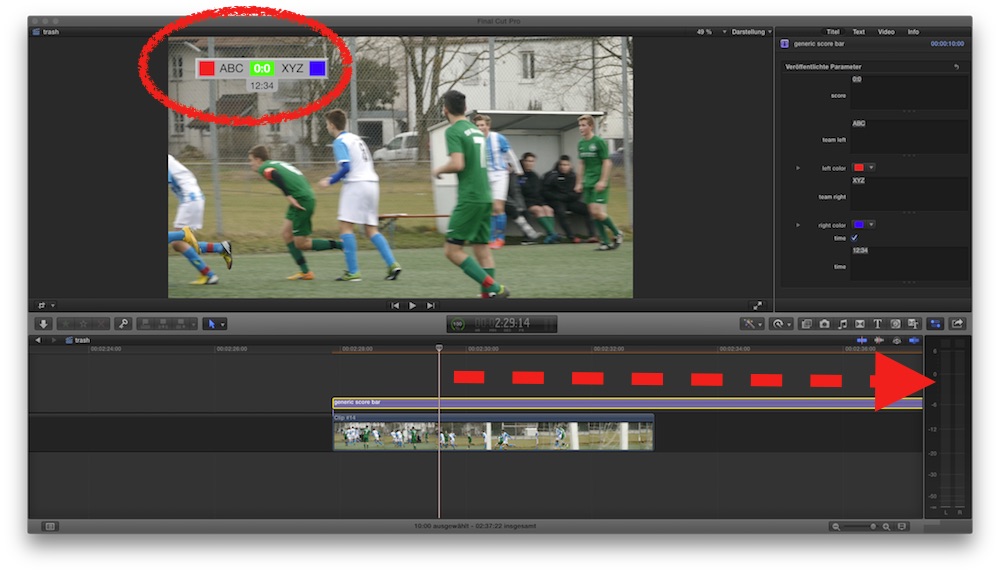
hint: when a goal happens, click opt/alt and drag the title => all settings, such as team colors, are same, just change the score...
this generic plugin has little design, meant as a starting point for your own creations ...
Replied by Karsten Schlüter on topic FCP Plug in for Sports Footage
fcpdad wrote: I shoot youth soccer ….
Me too! Every godd*** saturday ... :lol:
For each season, I make my own 'screen design', so I have a Theme in FCPX, containing all sorts of generators and titles and effects, to be used in my weekly reports...
To create such a score bar is no rocket science:
I'v applied a 'generic' title plug-in, to demo a few simle features.
when you open it, you see several groups:
bg is the background...
group is the 'bar' with all elements, ready to be scaled, to put in position (upper left, lower mid), and being a group, you can apply some 'flying in', or fade-in, or ...
There's a 'bar', a green bg for the score, two rectangles for the team colors (=could be replaced by drop-zones, to insert team logos) ...
Just to demo options:
a glint effect, to create some 'action'
and corncerning 'time': it is very tricky to squeeze the source time out of the clips and into some custom title, I found for my needs a tricky workaround, … the easy way: type it in
and I applied a 'mandatory built-in marker' => when you stretch the title, the animations keep their timing
the time pop-ups - a rig switches on/off
In FCPX, you see the published parameters:
hint: when a goal happens, click opt/alt and drag the title => all settings, such as team colors, are same, just change the score...
this generic plugin has little design, meant as a starting point for your own creations ...
Please Log in to join the conversation.
28 Feb 2016 16:57 #73835
by fcpdad
Replied by fcpdad on topic FCP Plug in for Sports Footage
Thanks a lot! Looks like I didn't search very hard for my plug-in.
Please Log in to join the conversation.
28 Feb 2016 17:00 #73836
by fcpdad
Replied by fcpdad on topic FCP Plug in for Sports Footage
I sure appreciate your detailed response. I viewed a couple of your games on YouTube. Very nice indeed. I will give it a shot.
Thanks again.
Thanks again.
Please Log in to join the conversation.
- Karsten Schlüter
-
- Offline
- Moderator
-
Less
More
- Posts: 3790
- Thank you received: 718
29 Feb 2016 11:08 - 29 Feb 2016 11:09 #73873
by Karsten Schlüter
Replied by Karsten Schlüter on topic FCP Plug in for Sports Footage
Glad you liked it, you're Welcome!
Such a 'score bar‘ is an excellent exercise to get comfortable with the features of M5 (if you are'n already); for earlier projects, I used Pixelmator to 'paint' that bar, and saved it in .psd format. In M5, I'm then allowed to import all layers as singled group.. so, the 'animated' parts (here: digits) are created with M5 tools, the design parts are plain jpg/png.
e.g. those 'aqua bubble reflections' as in your example are much easier to accomplish in a designated paint.app than in M5 ... 'staple' groups: background.jpg, 0:0 Motion text/title, aqua-bubble as .png and 'screen' as compo mode =>
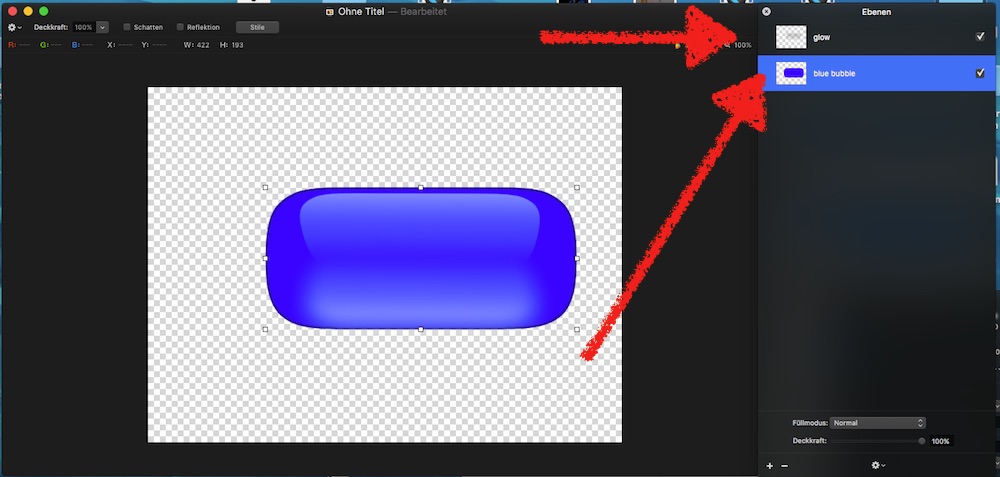
In Pixelmator, two layers, the blue bubble and on top the 'refractions'
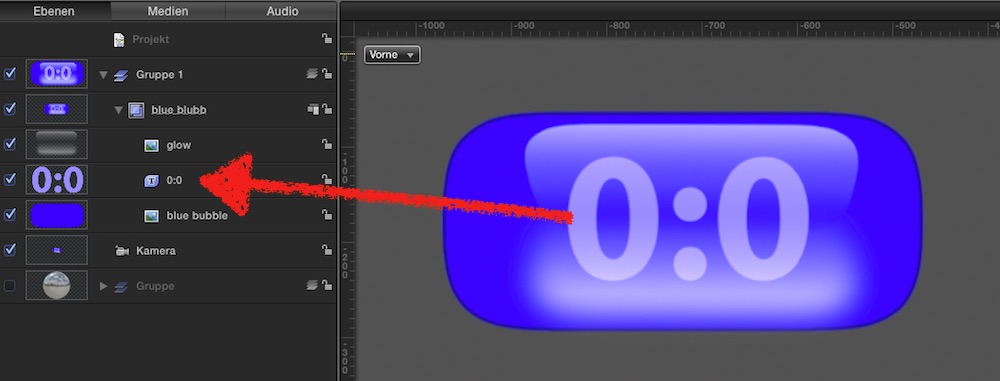
importing both layers in M5, I put the digit layer inbetween... publishing it = nice title plug-in...
Such a 'score bar‘ is an excellent exercise to get comfortable with the features of M5 (if you are'n already); for earlier projects, I used Pixelmator to 'paint' that bar, and saved it in .psd format. In M5, I'm then allowed to import all layers as singled group.. so, the 'animated' parts (here: digits) are created with M5 tools, the design parts are plain jpg/png.
e.g. those 'aqua bubble reflections' as in your example are much easier to accomplish in a designated paint.app than in M5 ... 'staple' groups: background.jpg, 0:0 Motion text/title, aqua-bubble as .png and 'screen' as compo mode =>
In Pixelmator, two layers, the blue bubble and on top the 'refractions'
importing both layers in M5, I put the digit layer inbetween... publishing it = nice title plug-in...
Last edit: 29 Feb 2016 11:09 by Karsten Schlüter.
Please Log in to join the conversation.
