


- Posts: 3
- Thank you received: 0
3 Post Moderation Rule for New Boarders (25 Jan 2021)
New boarders will have their posts moderated - Don't worry if you cannot see your post immediately.
Black box showing up after rendering
- shaggeboxer
-
 Topic Author
- Offline
- New Member
-

Less
More
24 Feb 2016 03:11 - 24 Feb 2016 15:57 #73707
by shaggeboxer
Black box showing up after rendering was created by shaggeboxer
Big thanks in advance to anyone who tries to help me out.
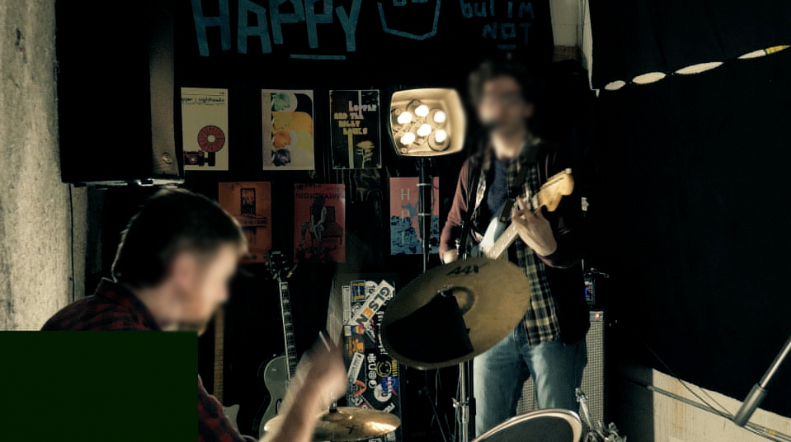
So when I exported using the built in youtube setting, I got a ton of random green frames appearing throughout the 2 min clip (appears to be a pretty common issue). To fix this, first I deleted all rendered files, and rendered again. When I exported again, I avoided the youtube setting, and went for what FCPX had as the default when I selected "Master File" which turns out to be Apple ProRes 422 Proxy (I'm sure plenty people here will want to get into the problems with this codec). Anyways, the green frames were gone, but what occurs now are small black rectangles appearing in the bottom left of screen during cut between clips. It does not happen for all cuts, just some.
Every clip was recorded using the same camera/settings.
The project being rendered is a 2 minute music video clip with only Magic Bullet's mojo effect being used.
Seeing as this is a 2 minute diy music video, importing the file back into FCP, then deleting the frames causes all kinds of sync issues.
If you look at my signature, you can see that I'm not exactly working on an ideal computer, but I've never had this problem before.
Any ideas what's going on?
Thanks again.
Final Cut Pro 10.2.2
MacBook Pro Late 2011
2.5 GHz Intel Core i5
8 GB Memory
Intel HG Graphics 3000 512 MB
So when I exported using the built in youtube setting, I got a ton of random green frames appearing throughout the 2 min clip (appears to be a pretty common issue). To fix this, first I deleted all rendered files, and rendered again. When I exported again, I avoided the youtube setting, and went for what FCPX had as the default when I selected "Master File" which turns out to be Apple ProRes 422 Proxy (I'm sure plenty people here will want to get into the problems with this codec). Anyways, the green frames were gone, but what occurs now are small black rectangles appearing in the bottom left of screen during cut between clips. It does not happen for all cuts, just some.
Every clip was recorded using the same camera/settings.
The project being rendered is a 2 minute music video clip with only Magic Bullet's mojo effect being used.
Seeing as this is a 2 minute diy music video, importing the file back into FCP, then deleting the frames causes all kinds of sync issues.
If you look at my signature, you can see that I'm not exactly working on an ideal computer, but I've never had this problem before.
Any ideas what's going on?
Thanks again.
Final Cut Pro 10.2.2
MacBook Pro Late 2011
2.5 GHz Intel Core i5
8 GB Memory
Intel HG Graphics 3000 512 MB
Last edit: 24 Feb 2016 15:57 by shaggeboxer. Reason: Wanted to include computer/software specs.
Please Log in to join the conversation.
- Tom Wolsky
-

- Offline
- Moderator
-

24 Feb 2016 11:02 #73711
by Tom Wolsky
Replied by Tom Wolsky on topic Black box showing up after rendering
Are you editing in proxy mode or original?
Please Log in to join the conversation.
- shaggeboxer
-
Topic Author
- Offline
- New Member
-
Less
More
- Posts: 3
- Thank you received: 0
24 Feb 2016 15:54 #73721
by shaggeboxer
Replied by shaggeboxer on topic Black box showing up after rendering
I've been editing in proxy mode.
I've attached the readouts from iMediaHud below. The first, titled "Footage1," is one of the clips straight from the camera (recorded to a 4k ready SD card, dragged and dropped to my internal HD). The second is the rendered file.
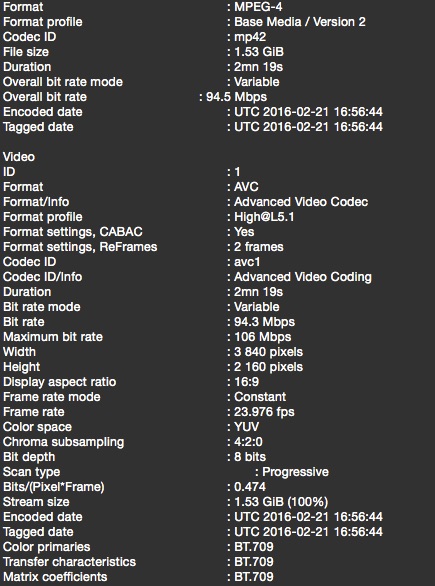
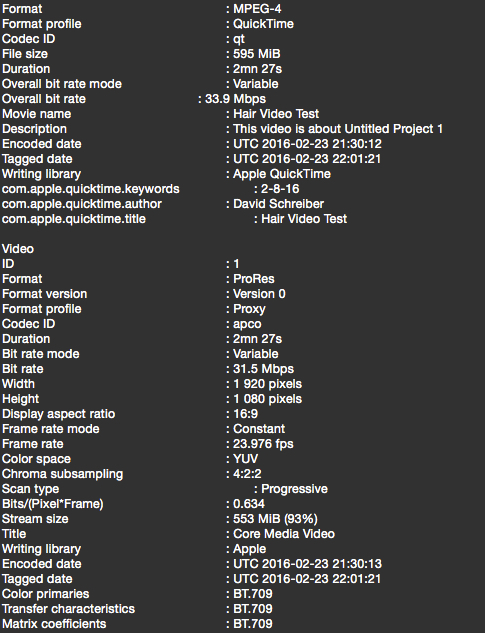
I've attached the readouts from iMediaHud below. The first, titled "Footage1," is one of the clips straight from the camera (recorded to a 4k ready SD card, dragged and dropped to my internal HD). The second is the rendered file.
Please Log in to join the conversation.
- shaggeboxer
-
Topic Author
- Offline
- New Member
-
Less
More
- Posts: 3
- Thank you received: 0
24 Feb 2016 18:44 - 25 Feb 2016 17:04 #73737
by shaggeboxer
Replied by shaggeboxer on topic Black box showing up after rendering
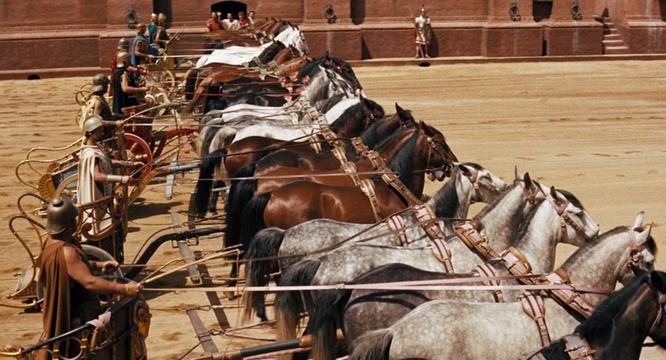
Update: I measured the pixels of the rectangle showing up in the bottom left, and they are a scaled down version (25% of the original size) of the entire frame. I also noticed after looking closer at other frames that what is showing up is not always black, it is whatever was in the same area of the box from the previous frame. See pictures for further explanation.
So if picture 1 is the "1st frame"
Picture 2 is the "next frame"
So if picture 1 is the "1st frame"
Picture 2 is the "next frame"
Last edit: 25 Feb 2016 17:04 by shaggeboxer.
Please Log in to join the conversation.
