


- Posts: 3
- Thank you received: 0
3 Post Moderation Rule for New Boarders (25 Jan 2021)
New boarders will have their posts moderated - Don't worry if you cannot see your post immediately.
Library organization for ever-expanding ongoing project
21 Feb 2016 19:49 #73596
by knup36
Library organization for ever-expanding ongoing project was created by knup36
Hi Everyone,
Long-time lurker here and I thought it was finally time to join the boards officially. I run an editorial department for a mid-size Los Angeles-based previsualization company.
We've been primarily using FCP legacy and Avid most of our projects that come through the editorial department. I've been using FCPX personally since its release and my fondness for the program has gotten to the point where I'm comfortable trying to introduce it to my professional workflow. I want to start with a project that is 'isolated' from any of our work in which we deal directly with the client because, as I'm sure most of you are aware, speed and comfort are of paramount importance when someone is working over your shoulder, and I'm just not comfortable ENOUGH on FCPX to do client work...yet. Which brings me to my test project...
My company works on hundreds of projects a year and a large portion of them generate many edits for all the various sequences and spots we work on. Throughout the year, when we wrap a show, we like to take these edits and catalog them for use in any of our marketing needs that might arise in the future (awards submissions, company reels, pitch packages, etc) With FCPX and its database structure, I think we could get TONS of value by organizing these edits in to one master project in which I can recall ANY edit based on a variety of keywords and smart collections and cut a reel in a very short amount of time.
Let me give a quick hypothetical example... Lets say we worked on the film Kill Bill. At this point the show would be wrapped and lets say we had 15 or so sequences that we wanted to be available to cut future marketing reels from this movie. Let's also say that we had also worked on Tarantino's many other films. Let's also presume that in addition to Tarantino, we had also worked with Spielberg, Lucas, Abrams, Fincher etc on many other films and those particular projects also generated 10-15 edits. Now, from ALL this material, I may be tasked with any of the following:
-Cutting a Tarantino (or any other director) specific reel of any or all of his movies
-Cutting a 'mood' or genre reel which could contain content from ANY of those directors
-Cutting a 'supervisor' reel which would contain content from any show that a particular supervisor oversaw (for example maybe he/she supervised a tarantino, Fincher and Abrams show and we want to sell that particular supervisor to a new client)
-Cutting a 'medium' reel (TV, commercial, feature...)
-Cutting a Company Reel which would contain content from ALL of these directors
Now...I know what information would be important to know in the future. All of these need tags for the type of work (previs, postvis, behind the scenes), the supervisor on the show (in case we need to sell the supervisor with a reel in the future), the studio of the film (in case we need a studio reel), the 'medium' (is it a film, commercial, tv show, etc..), the director, etc... In addition to these obvious things, there are other non-obvious tags that I'd like to create. Things like genre, principle visual effect used, mood - I have cut a reel before that was all of our 'space or sci-fi' material to try and land a sci fi project before.
From my understanding, the way that FCPX 10.2 approaches the library concept has sort of obviated the need to organize all video media in to ONE event for efficient keyword searching...so my question is this: Based on my workflow as listed above, what is the most efficient way of organizing my material?
I had assumed that I would dump EVERYTHING in to a 'Video' event and create Keywords for EVERYTHING, but filtering by keywords and using the 'uncheck all' and scrolling to find the keywords is fairly cumbersome. However now with Library-spanning smart collections, I'm wondering if this organizational tactic is now not necessary. Should I maybe have an EVENT per client? Or just an event for all video content? Or an event per type of work (previs, postvis, awards reels)?
This library will be constantly growing as we go forward with new edits and new clients. I want to create a library foundation that has the room to grow in the future. Any help would be enormously appreciated.
On a related note, this forum has been in invaluable resource for me and I hope that I can give back to the community as much as I've taken from it.
Additionally, if anyone is interested here is a link to my company's website: www.thethirdfloorinc.com . I'm including not as a plug for more work, but merely as a way of adding a bit of context to my question above.
Thank you all in advance for any advice
JOHN
Long-time lurker here and I thought it was finally time to join the boards officially. I run an editorial department for a mid-size Los Angeles-based previsualization company.
We've been primarily using FCP legacy and Avid most of our projects that come through the editorial department. I've been using FCPX personally since its release and my fondness for the program has gotten to the point where I'm comfortable trying to introduce it to my professional workflow. I want to start with a project that is 'isolated' from any of our work in which we deal directly with the client because, as I'm sure most of you are aware, speed and comfort are of paramount importance when someone is working over your shoulder, and I'm just not comfortable ENOUGH on FCPX to do client work...yet. Which brings me to my test project...
My company works on hundreds of projects a year and a large portion of them generate many edits for all the various sequences and spots we work on. Throughout the year, when we wrap a show, we like to take these edits and catalog them for use in any of our marketing needs that might arise in the future (awards submissions, company reels, pitch packages, etc) With FCPX and its database structure, I think we could get TONS of value by organizing these edits in to one master project in which I can recall ANY edit based on a variety of keywords and smart collections and cut a reel in a very short amount of time.
Let me give a quick hypothetical example... Lets say we worked on the film Kill Bill. At this point the show would be wrapped and lets say we had 15 or so sequences that we wanted to be available to cut future marketing reels from this movie. Let's also say that we had also worked on Tarantino's many other films. Let's also presume that in addition to Tarantino, we had also worked with Spielberg, Lucas, Abrams, Fincher etc on many other films and those particular projects also generated 10-15 edits. Now, from ALL this material, I may be tasked with any of the following:
-Cutting a Tarantino (or any other director) specific reel of any or all of his movies
-Cutting a 'mood' or genre reel which could contain content from ANY of those directors
-Cutting a 'supervisor' reel which would contain content from any show that a particular supervisor oversaw (for example maybe he/she supervised a tarantino, Fincher and Abrams show and we want to sell that particular supervisor to a new client)
-Cutting a 'medium' reel (TV, commercial, feature...)
-Cutting a Company Reel which would contain content from ALL of these directors
Now...I know what information would be important to know in the future. All of these need tags for the type of work (previs, postvis, behind the scenes), the supervisor on the show (in case we need to sell the supervisor with a reel in the future), the studio of the film (in case we need a studio reel), the 'medium' (is it a film, commercial, tv show, etc..), the director, etc... In addition to these obvious things, there are other non-obvious tags that I'd like to create. Things like genre, principle visual effect used, mood - I have cut a reel before that was all of our 'space or sci-fi' material to try and land a sci fi project before.
From my understanding, the way that FCPX 10.2 approaches the library concept has sort of obviated the need to organize all video media in to ONE event for efficient keyword searching...so my question is this: Based on my workflow as listed above, what is the most efficient way of organizing my material?
I had assumed that I would dump EVERYTHING in to a 'Video' event and create Keywords for EVERYTHING, but filtering by keywords and using the 'uncheck all' and scrolling to find the keywords is fairly cumbersome. However now with Library-spanning smart collections, I'm wondering if this organizational tactic is now not necessary. Should I maybe have an EVENT per client? Or just an event for all video content? Or an event per type of work (previs, postvis, awards reels)?
This library will be constantly growing as we go forward with new edits and new clients. I want to create a library foundation that has the room to grow in the future. Any help would be enormously appreciated.
On a related note, this forum has been in invaluable resource for me and I hope that I can give back to the community as much as I've taken from it.
Additionally, if anyone is interested here is a link to my company's website: www.thethirdfloorinc.com . I'm including not as a plug for more work, but merely as a way of adding a bit of context to my question above.
Thank you all in advance for any advice
JOHN
Please Log in to join the conversation.
- Karsten Schlüter
-

- Offline
- Moderator
-

Less
More
- Posts: 3790
- Thank you received: 718
22 Feb 2016 07:22 #73606
by Karsten Schlüter
Replied by Karsten Schlüter on topic Library organization for ever-expanding ongoing project
.. that's all way above my usage of FCPX  , but I dare to say, in this case, abusing FCPX as a 'dynamic database' is no good plan. Although it IS a data-base…
For your needs, Content Management Tools come to mind, and I've read here at FCP.co about it:
www.fcp.co/final-cut-pro/articles/1702-k...ut-pro-x-integration
.. maybe that is, what you're looking for:
highly integrated with the FCPX ecosphere, but no 'bending' of tools.....
, but I dare to say, in this case, abusing FCPX as a 'dynamic database' is no good plan. Although it IS a data-base…For your needs, Content Management Tools come to mind, and I've read here at FCP.co about it:
www.fcp.co/final-cut-pro/articles/1702-k...ut-pro-x-integration
.. maybe that is, what you're looking for:
highly integrated with the FCPX ecosphere, but no 'bending' of tools.....
Please Log in to join the conversation.

22 Feb 2016 12:25 - 22 Feb 2016 12:26 #73619
by BenB
Replied by BenB on topic Library organization for ever-expanding ongoing project
Yes, Karsten is correct. You're talking about a digital asset management system, like what Final Cut Server used to be. There are several FCPX friendly products on the market. And an organization your size, doing your volume, I'm surprised you don't already use one. Would make life so much nicer for you. For the scenario you mention, you need one for sure.
How are you managing and searching all of that content now?
How are you managing and searching all of that content now?
Last edit: 22 Feb 2016 12:26 by BenB.
Please Log in to join the conversation.


22 Feb 2016 12:44 - 22 Feb 2016 12:46 #73620
by joema
These are all excellent questions. Despite all the books and training videos on FCPX, there is somewhat limited information on this. They mostly focus on getting familiar with features, not extensive practical issues like you raise.
To a degree this is understandable -- the FCPX organizational tools are general-purpose in nature, so you can construct your own system. What system works for one project is not optimal for another.
I am working on a doc project and have 2.2 terabytes of camera-native material in a single FCPX event, comprised of 5,667 clips -- 117 hours of mixed 1080p and 4k material. This was with "leave files in place" and no transcoding. I am still developing what keywording and organizational system to use.
On a top-spec 2015 iMac 27 and Thunderbolt RAID, it works pretty well, but Karsten raises a good point. Would I want to keep adding everything my team shoots in this one library forever, for ease of archival lookup? There is no good answer for that, as the limits are based partially on hardware and software which are changing over time. My gut feel is I'd be hesitant to do that and maybe an external content manager might be best, but that entails a separate time-consuming investigation path.
Any such evaluation of a content manager should include extensive performance and stress testing -- not just just feature evaluation. Several years ago I evaluated CatDV for my team (on Windows) and it was great feature-wise, but at that time stress testing showed it was not stable under high loads and large file sizes. You don't want to go down a path, commit a lot of work, then find it won't hold up.
This is a general area I wish somebody would further explore and document. We have had lots of articles on high-end FCPX usage -- use in feature films, and projects like: 64-layer timelines: www.fcp.co/final-cut-pro/articles/1472-b...t-in-final-cut-pro-x
Editing large seven-camera professional event, shooting one terabyte per day, editing a four-hour, seven-camera timeline, of which they had three different versions open: www.fcp.co/final-cut-pro/articles/1572-u...niversary-conference
1000-layer, 279-day timeline: www.fcp.co/final-cut-pro/news/1372-pushi...ro-x-to-their-limits
However I don't recollect any well-detailed articles which evaluated practical FCPX database limits or higher-end, more complex media organization strategies from an archival perspective.
Replied by joema on topic Library organization for ever-expanding ongoing project
knup36 wrote: ...With FCPX and its database structure, I think we could get TONS of value by organizing these edits in to one master project in which I can recall ANY edit based on a variety of keywords and smart collections...the library concept has sort of obviated the need to organize all video media in to ONE event for efficient keyword searching...Based on my workflow as listed above, what is the most efficient way of organizing my material?...now with Library-spanning smart collections, I'm wondering if this organizational tactic is now not necessary. Should I maybe have an EVENT per client? Or just an event for all video content? Or an event per type of work (previs, postvis, awards reels)?
This library will be constantly growing as we go forward with new edits and new clients. I want to create a library foundation that has the room to grow in the future...
These are all excellent questions. Despite all the books and training videos on FCPX, there is somewhat limited information on this. They mostly focus on getting familiar with features, not extensive practical issues like you raise.
To a degree this is understandable -- the FCPX organizational tools are general-purpose in nature, so you can construct your own system. What system works for one project is not optimal for another.
I am working on a doc project and have 2.2 terabytes of camera-native material in a single FCPX event, comprised of 5,667 clips -- 117 hours of mixed 1080p and 4k material. This was with "leave files in place" and no transcoding. I am still developing what keywording and organizational system to use.
On a top-spec 2015 iMac 27 and Thunderbolt RAID, it works pretty well, but Karsten raises a good point. Would I want to keep adding everything my team shoots in this one library forever, for ease of archival lookup? There is no good answer for that, as the limits are based partially on hardware and software which are changing over time. My gut feel is I'd be hesitant to do that and maybe an external content manager might be best, but that entails a separate time-consuming investigation path.
Any such evaluation of a content manager should include extensive performance and stress testing -- not just just feature evaluation. Several years ago I evaluated CatDV for my team (on Windows) and it was great feature-wise, but at that time stress testing showed it was not stable under high loads and large file sizes. You don't want to go down a path, commit a lot of work, then find it won't hold up.
This is a general area I wish somebody would further explore and document. We have had lots of articles on high-end FCPX usage -- use in feature films, and projects like: 64-layer timelines: www.fcp.co/final-cut-pro/articles/1472-b...t-in-final-cut-pro-x
Editing large seven-camera professional event, shooting one terabyte per day, editing a four-hour, seven-camera timeline, of which they had three different versions open: www.fcp.co/final-cut-pro/articles/1572-u...niversary-conference
1000-layer, 279-day timeline: www.fcp.co/final-cut-pro/news/1372-pushi...ro-x-to-their-limits
However I don't recollect any well-detailed articles which evaluated practical FCPX database limits or higher-end, more complex media organization strategies from an archival perspective.
Last edit: 22 Feb 2016 12:46 by joema.
Please Log in to join the conversation.

22 Feb 2016 16:36 #73630
by bogiesan
Replied by bogiesan on topic Library organization for ever-expanding ongoing project
I never got to use Final Cut Server so I cannot compare it to anything else I know. You are describing a digital asset management tool, as others have also noted. FCPX operates superficially in this way but are describing a dedicated system. I'm a card-carrying DAM wonk. I live and breathe metadata. We use Canto Cumulus (but only for still images and because it's a legacy product for us). There are dozens of video-capable and video-specific DAMs on the market today.
"Throughout the year, when we wrap a show, we like to take these edits and catalog them for use in any of our marketing needs that might arise in the future (awards submissions, company reels, pitch packages, etc)"
Here are describing the beginnings of a dedicated DAM function.
"Throughout the year, when we wrap a show, we like to take these edits and catalog them for use in any of our marketing needs that might arise in the future (awards submissions, company reels, pitch packages, etc)"
Here are describing the beginnings of a dedicated DAM function.
Please Log in to join the conversation.
22 Feb 2016 18:21 #73638
by VidGreg
Replied by VidGreg on topic Library organization for ever-expanding ongoing project
Knup36
The other thing to consider is that as you add more and more data to a Library and especially to events or projects inside a single Library, it takes longer and longer to load. So organizing everything into just one library will give you time to go fetch a coffee and read the paper.
Also do you really want to have other clients projects exposed while you edit and show to a different client? It is listed right there, although you can now hide libraries, it is one by one inside FCPX.
You might want to check out Arctic Whiteness' Final Cut Library Manager. They have been adding to the app to allow database management on keywords, etc… so this might work, or you may need something more robust. What is nice about FCPLM is you can hide/open/just the projects you want. The app also keeps records for drives that are not connected, so you can search for something, then if needed, mount the disk to access the media. Very reasonably priced.
Link… www.arcticwhiteness.com/finalcutlibrarymanager/
Hope this helps, Greg
The other thing to consider is that as you add more and more data to a Library and especially to events or projects inside a single Library, it takes longer and longer to load. So organizing everything into just one library will give you time to go fetch a coffee and read the paper.
Also do you really want to have other clients projects exposed while you edit and show to a different client? It is listed right there, although you can now hide libraries, it is one by one inside FCPX.
You might want to check out Arctic Whiteness' Final Cut Library Manager. They have been adding to the app to allow database management on keywords, etc… so this might work, or you may need something more robust. What is nice about FCPLM is you can hide/open/just the projects you want. The app also keeps records for drives that are not connected, so you can search for something, then if needed, mount the disk to access the media. Very reasonably priced.
Link… www.arcticwhiteness.com/finalcutlibrarymanager/
Hope this helps, Greg
Please Log in to join the conversation.
22 Feb 2016 18:47 #73641
by bogiesan
Replied by bogiesan on topic Library organization for ever-expanding ongoing project
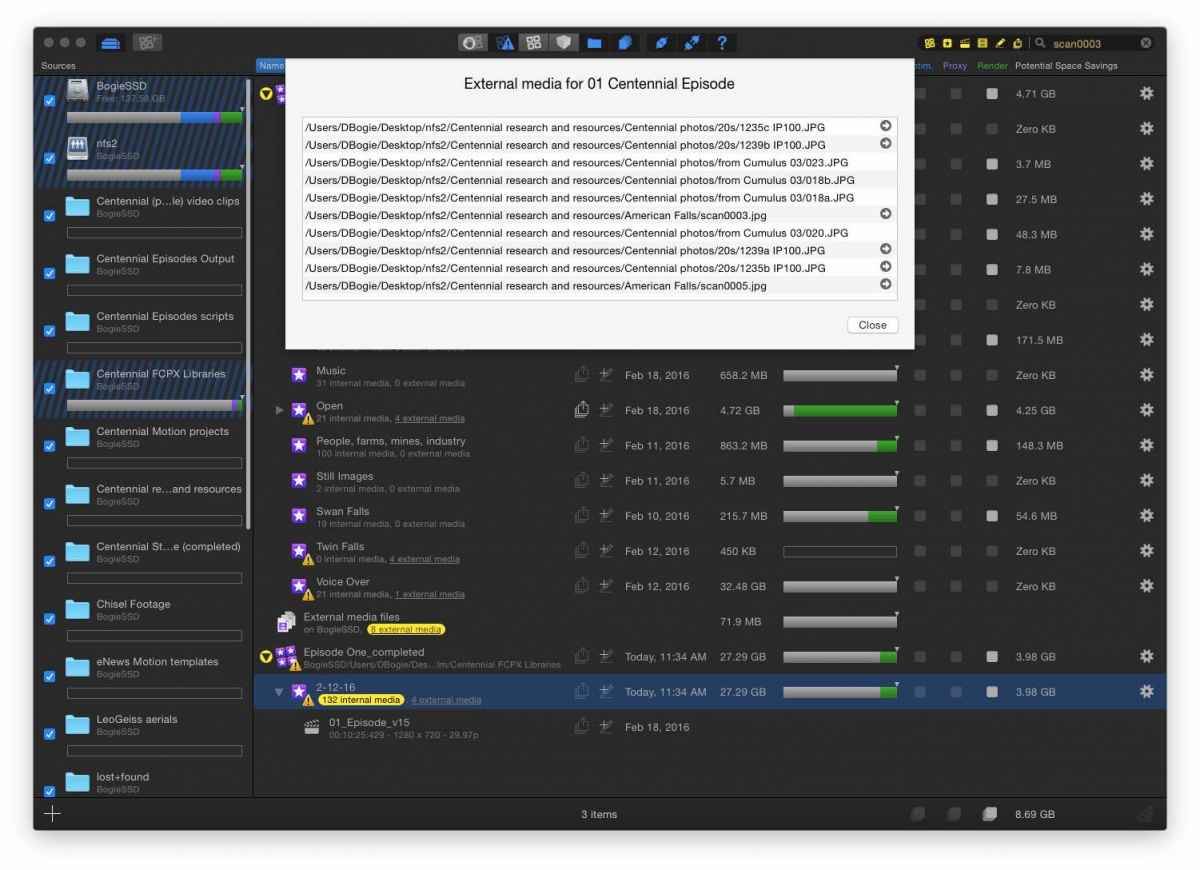
I'm enjoying FCPLM but it's not really able to give you full DAM or MAM functions. For instance, I know there's a thingy called Scan0003 on my drive and it was used in several FCP Libraries. I can use FCPLM's search function and enter "Scan0003". What I end up with a list of Libraries that include references to or copies of Scan0003. Some events have a little yellow pill next to them, indicating Scan0003 is in a list of external media. If I click on the yellow pill, I get a list of external media. But Scan0003 is not highlighted for me and I must find it myself in the list of media. That's not a valid search function and it's useless in a DAM situation. If I find the media by reading through the list, there is an arrow that will, indeed, reveal the clip in the Finder. These are many steps that a real DAM or MAM does not force a user to perform.
BTW: A yellow pill that indicates the search term may appear as internal media cannot be opened to view as a list. Clicking on it forces FCPX to launch and you could, presumably, search for and then Reveal in Finder. Again, more random steps to do than a legitimate DAM function.
FCPLM is cool and I'm enjoying playing around with it. But it is not a DAM.
BTW: A yellow pill that indicates the search term may appear as internal media cannot be opened to view as a list. Clicking on it forces FCPX to launch and you could, presumably, search for and then Reveal in Finder. Again, more random steps to do than a legitimate DAM function.
FCPLM is cool and I'm enjoying playing around with it. But it is not a DAM.
Please Log in to join the conversation.
22 Feb 2016 22:43 #73651
by knup36
Replied by knup36 on topic Library organization for ever-expanding ongoing project
These are all excellent points!
I fear I may have overstated the amount of content I'll be adding to this system and under-represented the degree to which I'll be removing older projects from the database. It seems to be doable in FCPX, but I wonder if you all may be right in that this might be just simply too much for a single NLE to handle. Perhaps I got drunk on the thought of how quickly I'd be able to cut something together if it was organized like this
If it helps, I would imagine that at any one point, the number of sequences in the database at any one point would be about 2,000 or so...
A function of a fast-growing company, unfortunately. It's why I'm trying to come up with a solution that can drastically speed up the process as opposed to hunting through a server
Arrrggg! You got me I always rail against editors who don't use the right tool for the job. I should heed my own advice!
Wow! This is what I love about this community. I had not heard of this and I'm downloading the 30-day trial as I type this. Thank you for the recommendation.
This is why all the best advice comes from these forums...I just can't find many personal use cases either...it's all theory.
Can I get your card?!
Hopefully the databases natural limit won't be as high as I implied. I'll be taking older stuff out as often as adding newer stuff in. In regards to having the other projects exposed, not an issue as this will never used for client purposes. This is all in-house needs.
Thank you all for your amazing responses. The DAM software seems to be the best way to go now. Especially since it's not specifically tied to an editing platform, our avid editor could get some use out of it as well!
JOHN
I fear I may have overstated the amount of content I'll be adding to this system and under-represented the degree to which I'll be removing older projects from the database. It seems to be doable in FCPX, but I wonder if you all may be right in that this might be just simply too much for a single NLE to handle. Perhaps I got drunk on the thought of how quickly I'd be able to cut something together if it was organized like this
If it helps, I would imagine that at any one point, the number of sequences in the database at any one point would be about 2,000 or so...
And an organization your size, doing your volume, I'm surprised you don't already use one
A function of a fast-growing company, unfortunately. It's why I'm trying to come up with a solution that can drastically speed up the process as opposed to hunting through a server
but I dare to say, in this case, abusing FCPX as a 'dynamic database' is no good plan
Arrrggg! You got me
I always rail against editors who don't use the right tool for the job. I should heed my own advice!For your needs, Content Management Tools come to mind, and I've read here at FCP.co about it:
www.fcp.co/final-cut-pro/articles/1702-k...ut-pro-x-integration
Wow! This is what I love about this community. I had not heard of this and I'm downloading the 30-day trial as I type this. Thank you for the recommendation.
These are all excellent questions. Despite all the books and training videos on FCPX, there is somewhat limited information on this. They mostly focus on getting familiar with features, not extensive practical issues like you raise.
This is why all the best advice comes from these forums...I just can't find many personal use cases either...it's all theory.
I'm a card-carrying DAM wonk. I live and breathe metadata. We use Canto Cumulus (but only for still images and because it's a legacy product for us). There are dozens of video-capable and video-specific DAMs on the market today.
Can I get your card?!
The other thing to consider is that as you add more and more data to a Library and especially to events or projects inside a single Library, it takes longer and longer to load. So organizing everything into just one library will give you time to go fetch a coffee and read the paper.
Also do you really want to have other clients projects exposed while you edit and show to a different client? It is listed right there, although you can now hide libraries, it is one by one inside FCPX.
Hopefully the databases natural limit won't be as high as I implied. I'll be taking older stuff out as often as adding newer stuff in. In regards to having the other projects exposed, not an issue as this will never used for client purposes. This is all in-house needs.
Thank you all for your amazing responses. The DAM software seems to be the best way to go now. Especially since it's not specifically tied to an editing platform, our avid editor could get some use out of it as well!
JOHN
Please Log in to join the conversation.
23 Feb 2016 14:28 #73674
by BenB
Replied by BenB on topic Library organization for ever-expanding ongoing project
You may also want to give a call to FCPWorks, and get some professional consulting, if it is for business, and getting to that point of necessity.
Please Log in to join the conversation.
