


- Posts: 9
- Thank you received: 0
3 Post Moderation Rule for New Boarders (25 Jan 2021)
New boarders will have their posts moderated - Don't worry if you cannot see your post immediately.
Questions about typical work flow for story line music videos
- fayez.musallam
-
 Topic Author
- Offline
- New Member
-

Less
More
19 Feb 2016 08:53 #73528
by fayez.musallam
for example i am working on a story line style music video that has 2 seperate action scenes for the 2 verses (1 for the first verse, 1 for the second verse) and for the hooks i have the artist on camera. what i have done and please correct me if im wrong is
created an event for each part
1 for first story (verse 1 )
1 for second story (verse 2)
1 for the hooks
then one final event to mash everything together
(4 total events) 1 project in each
each project has a timeline. Do i put the music audio layover underneath all the clips (magnatized) or do i create another timeline underneath all the clips?
what are your guys suggestions?
created an event for each part
1 for first story (verse 1 )
1 for second story (verse 2)
1 for the hooks
then one final event to mash everything together
(4 total events) 1 project in each
each project has a timeline. Do i put the music audio layover underneath all the clips (magnatized) or do i create another timeline underneath all the clips?
what are your guys suggestions?
Please Log in to join the conversation.

19 Feb 2016 09:14 - 19 Feb 2016 09:15 #73529
by Gabba84
Replied by Gabba84 on topic Questions about typical work flow for story line music videos
The number of event is a personal choice. I prefer to work with just two events: one for all the media (with internal keywords and smart collections) and one for all the sequences (also keyworded with terms like "preview", "master", "vfx", "resolve"...).
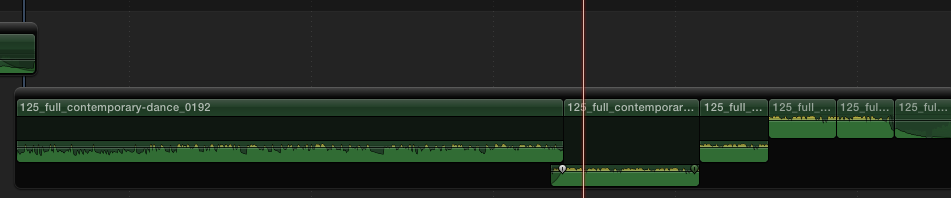
In terms of editing I usually make a multicam for the live playback and put it on the main storyline with master audio (the song) attached below (manually synched). All the extra parts connected to the multicam. I found this method better than placing the song in that main storyline as some people do. If the music video is just few minute long I would not split it in multiple sequences/projects.
In terms of editing I usually make a multicam for the live playback and put it on the main storyline with master audio (the song) attached below (manually synched). All the extra parts connected to the multicam. I found this method better than placing the song in that main storyline as some people do. If the music video is just few minute long I would not split it in multiple sequences/projects.
Last edit: 19 Feb 2016 09:15 by Gabba84. Reason: typos
Please Log in to join the conversation.
- fayez.musallam
-
Topic Author
- Offline
- New Member
-
Less
More
- Posts: 9
- Thank you received: 0
19 Feb 2016 09:20 #73530
by fayez.musallam
Replied by fayez.musallam on topic Questions about typical work flow for story line music videos
Hey thanks for the response and your input my next project i will make sure i use a better and more efficient work flow I have also made multicams as well to change clips and then for b roll i just attach it to the timeline. also for the audio i just created an additional timeline so nothing can be magnatized to it. Is that a good idea?
Please Log in to join the conversation.
19 Feb 2016 09:33 #73531
by Gabba84
Replied by Gabba84 on topic Questions about typical work flow for story line music videos
If you mean a "secondary storyline" that's a good idea if you have one or more cuts in your music track. That's because you can join multiple chunks but leaving just one connection point. Usually a music video has one master audio track with no cuts, so you don't need to do a secondary storyline. Anyway, the point is that if your secondary storyline is connected to a multicam clip you don't have to move nothing... just cut the multicam.
Please Log in to join the conversation.
- fayez.musallam
-
Topic Author
- Offline
- New Member
-
Less
More
- Posts: 9
- Thank you received: 0
19 Feb 2016 09:35 #73532
by fayez.musallam
Replied by fayez.musallam on topic Questions about typical work flow for story line music videos
thats true i like how i can link to use only that one audio track and when you do all the cuts it stays in sync! thanks a ton brotha
Please Log in to join the conversation.
19 Feb 2016 09:42 #73533
by Gabba84
Replied by Gabba84 on topic Questions about typical work flow for story line music videos
Sure. When i'm working with licensed music track in fact I always put the cutted audio in a secondary storyline with just one connection point.
Please Log in to join the conversation.
