


- Posts: 54
- Thank you received: 0
3 Post Moderation Rule for New Boarders (25 Jan 2021)
New boarders will have their posts moderated - Don't worry if you cannot see your post immediately.
Sound Effects Editing Approach and Ideas
- flaminghick
-
 Topic Author
- Offline
- Senior Member
-

Less
More
17 Feb 2016 17:29 #73476
by flaminghick
Sound Effects Editing Approach and Ideas was created by flaminghick
I didn't find anything with the search tool about this topic, but if this has been delved into in any depth before, please feel free to link me to other posts.
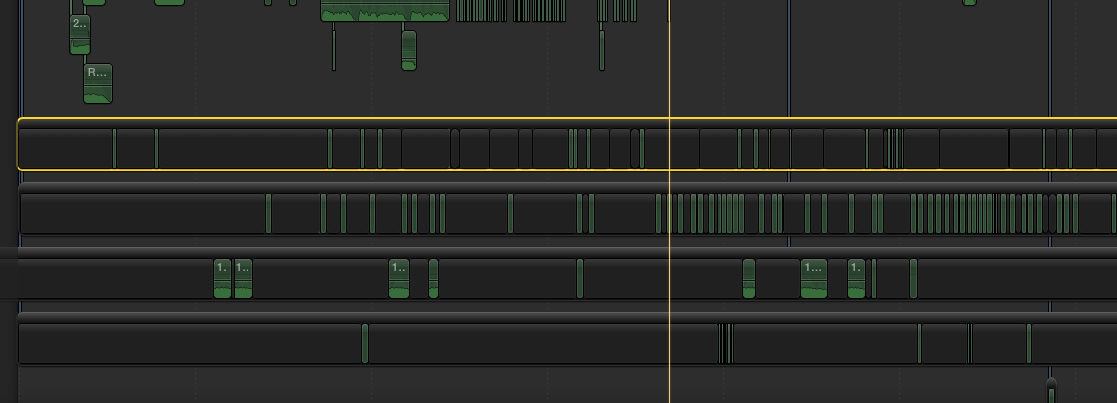
I'm deep into a sound effects edit, and it's a situation where tracks would be helpful, so I am using secondary storylines. It involves the repeated use of several different sounds, so I am trying to organize them by storyline (track). The reason I've done this is so I can easily change the audio levels on all similar effects, and so I can easily find the effect and shift the timing, because I know exactly where I'm looking for each sound.
What I've been doing is an insert or overwrite edit into the secondary storyline. The issue I'm having is when I scroll over the secondary storyline to set the in and out points, I can't see what's happening in the timeline, only what's in my storyline (which is one long track-length gap). So I have to keep pulling the arrow tool out of the story line to see how the timing will work, then scroll back into that point in the storyline to set the in or out point. There has got to be a less mouse-heavy way to go about this.
Perhaps if I had started with the SFX, I could simply edit them all into the main timeline, then easily select them as they would all be on the same level, and then create the secondary storyline after the fact: easy. But there is enough going on that too many things will end up on too many difference levels that selecting everything will require scouring the timeline and selecting each effect one at a time.
Maybe I could compound-clip all of the audio in the timeline, then go about laying sound effects down, make those into a storyline, and then de-compound the compound clip afterward?
Any ideas would be greatly appreciated!
I'm deep into a sound effects edit, and it's a situation where tracks would be helpful, so I am using secondary storylines. It involves the repeated use of several different sounds, so I am trying to organize them by storyline (track). The reason I've done this is so I can easily change the audio levels on all similar effects, and so I can easily find the effect and shift the timing, because I know exactly where I'm looking for each sound.
What I've been doing is an insert or overwrite edit into the secondary storyline. The issue I'm having is when I scroll over the secondary storyline to set the in and out points, I can't see what's happening in the timeline, only what's in my storyline (which is one long track-length gap). So I have to keep pulling the arrow tool out of the story line to see how the timing will work, then scroll back into that point in the storyline to set the in or out point. There has got to be a less mouse-heavy way to go about this.
Perhaps if I had started with the SFX, I could simply edit them all into the main timeline, then easily select them as they would all be on the same level, and then create the secondary storyline after the fact: easy. But there is enough going on that too many things will end up on too many difference levels that selecting everything will require scouring the timeline and selecting each effect one at a time.
Maybe I could compound-clip all of the audio in the timeline, then go about laying sound effects down, make those into a storyline, and then de-compound the compound clip afterward?
Any ideas would be greatly appreciated!
Please Log in to join the conversation.
- MarkNelsonMovies
-
- Offline
- Elite Member
-

Less
More
- Posts: 256
- Thank you received: 48
17 Feb 2016 18:30 #73478
by MarkNelsonMovies
Replied by MarkNelsonMovies on topic Sound Effects Editing Approach and Ideas
You can Press; Option - Command - S to disable clip skimming,
or use the 'View' menu and uncheck the clip skimming option.
Hope this helps,
-Mark
or use the 'View' menu and uncheck the clip skimming option.
Hope this helps,
-Mark
Please Log in to join the conversation.
- flaminghick
-
Topic Author
- Offline
- Senior Member
-
Less
More
- Posts: 54
- Thank you received: 0
17 Feb 2016 19:01 #73480
by flaminghick
Replied by flaminghick on topic Sound Effects Editing Approach and Ideas
Hey Mark, thanks for that.
That will come in handy for some other things. I guess what would be ideal would be if when I skimmed a clip, I was seeing what was happening in the primary storyline. Something tells me that's not going to be possible though.
That will come in handy for some other things. I guess what would be ideal would be if when I skimmed a clip, I was seeing what was happening in the primary storyline. Something tells me that's not going to be possible though.
Please Log in to join the conversation.
17 Feb 2016 21:02 #73484
by canelson
--
Matias Canelson
www.canelson.us
Replied by canelson on topic Sound Effects Editing Approach and Ideas
I'm not sure if I understood it right, but if one of your problems is that the secondary storylines with the SFXs are far away from the primary storyline (I see from the screenshot that you have more audio in the middle) you could select all the audio that you don't need right now and move it on top the primary storyline, so the SFX secondary story lines will be just below the primary storyline. If you want to be super tidy, select all the audio you are going to move on top, create a compound for it, move it on top the primary storyline and work with your SFX. Later you can move your audio and break apart the compound clip if you want.
Hope it helps.
Hope it helps.
--
Matias Canelson
www.canelson.us
Please Log in to join the conversation.
- flaminghick
-
Topic Author
- Offline
- Senior Member
-
Less
More
- Posts: 54
- Thank you received: 0
18 Feb 2016 04:19 #73490
by flaminghick
Replied by flaminghick on topic Sound Effects Editing Approach and Ideas
Thanks for the suggestions. I had NO IDEA you could move audio on top of the primary storyline. HA! Gonna have to think you show to incorporate that to work better.
Please Log in to join the conversation.

Less
More
- Posts: 971
- Thank you received: 46
18 Feb 2016 04:37 #73491
by MsJustine
Replied by MsJustine on topic Sound Effects Editing Approach and Ideas
Why all the compound clips attached at the start? I am not sure that is the most efficient way to achieve what you need to do. At worst create a single gap clip in the Primary storyline and attach the audio, just the audio in compound clips, drop all the gap clips, the audio without gap clips in compound clips, to the primary storyline.
The problem is, at this point, it is not possible to attach a clip [video or audio] to an attached clip, it all has to attach to the primary storyline. I really hope this is fixed soon, makes no sense to not have attached to attached!!!
Create roles for the clips, so you can find them in the timeline, then when you start exporting, or "sharing" you have control over what is exported in channels,
Example, dialogue, use the roles feature: dialogue-role: dialogue, sound effects-roles: SFX, and so one, you can share as a mix or separate files. Roles is very useful...just need a roles based audio mixer...[hint to Apple pro dev...]
The problem is, at this point, it is not possible to attach a clip [video or audio] to an attached clip, it all has to attach to the primary storyline. I really hope this is fixed soon, makes no sense to not have attached to attached!!!
Create roles for the clips, so you can find them in the timeline, then when you start exporting, or "sharing" you have control over what is exported in channels,
Example, dialogue, use the roles feature: dialogue-role: dialogue, sound effects-roles: SFX, and so one, you can share as a mix or separate files. Roles is very useful...just need a roles based audio mixer...[hint to Apple pro dev...]
Please Log in to join the conversation.
- Karsten Schlüter
-

- Offline
- Moderator
-

Less
More
- Posts: 3790
- Thank you received: 718
18 Feb 2016 07:49 #73493
by Karsten Schlüter
hmmm, ... 'organizing' in the storyline .... :whistle:
have you tried the tools FCPX offering for media-management, keywords for indexing, roles for grouping, the Timeline Index for selecting 'similiar ones' .... ?
and you know cmd-opt-click ... ? to shift the 'connection finger' to some other point or clip?
Replied by Karsten Schlüter on topic Sound Effects Editing Approach and Ideas
flaminghick wrote: … I am trying to organize them by storyline (track). …
hmmm, ... 'organizing' in the storyline .... :whistle:
have you tried the tools FCPX offering for media-management, keywords for indexing, roles for grouping, the Timeline Index for selecting 'similiar ones' .... ?
and you know cmd-opt-click ... ? to shift the 'connection finger' to some other point or clip?
Please Log in to join the conversation.
- ronny courtens
-

- Offline
- Moderator
-
Less
More
- Posts: 4455
- Thank you received: 962
18 Feb 2016 09:46 - 18 Feb 2016 10:00 #73495
by ronny courtens
Replied by ronny courtens on topic Sound Effects Editing Approach and Ideas
Some great advice has been given here. When you disable clip skimming you will see your video while you skim any of the audio clips in any of your secondary storylines. I think that solves your problem. And yes, you can also put audio above the primary storyline, that's another way to do what you want to do.
- Ronny
- Ronny
Last edit: 18 Feb 2016 10:00 by ronny courtens.
Please Log in to join the conversation.

18 Feb 2016 17:43 #73508
by VidGreg
Replied by VidGreg on topic Sound Effects Editing Approach and Ideas
Hi Flaming
Here is one other approach.
Starting at the beginning of the Timeline, go through and add "To Do Markers" (Option m) will create a marker and allow you to name it (SFX maybe, make it unique) and select the type of Marker. Middle top button is the "To Do" designator. Once you press done, you can right (control) click on the Marker icon in the Timeline and select "Copy Marker".
Now skim through rest of Timeline and Paste your copied Marker (Cmmd v) till you reach the end.
Go to your first marker. Add all the SFX you need at that first Marker. Select them all, (you could compound if you want). Once selected, Copy them to Clipboard.
Now navigate to each marker. You can jump to the next marker by using keyboard short cut (Control-Apostrophe (') then Paste (Cmmd v) all the SFX clips at once. Note, if you have other markers, it goes to next marker, not necessarily the "To Do" marker you want.
You can also navigate via Timeline index. This indicates "To Do" Markers by red icon and shows the Name. You could also make a Smart collection with a unique name, I suppose.
Now you can go through the Timeline and make any adjustments you need to each effect.
If you need more than just 1 set of SFX, rinse and repeat with a different unique name SFX2, or add all effects and then disable or delete the ones you don't need.
Anyway, just another possible workflow.
Hope this helps, Greg
Here is one other approach.
Starting at the beginning of the Timeline, go through and add "To Do Markers" (Option m) will create a marker and allow you to name it (SFX maybe, make it unique) and select the type of Marker. Middle top button is the "To Do" designator. Once you press done, you can right (control) click on the Marker icon in the Timeline and select "Copy Marker".
Now skim through rest of Timeline and Paste your copied Marker (Cmmd v) till you reach the end.
Go to your first marker. Add all the SFX you need at that first Marker. Select them all, (you could compound if you want). Once selected, Copy them to Clipboard.
Now navigate to each marker. You can jump to the next marker by using keyboard short cut (Control-Apostrophe (') then Paste (Cmmd v) all the SFX clips at once. Note, if you have other markers, it goes to next marker, not necessarily the "To Do" marker you want.
You can also navigate via Timeline index. This indicates "To Do" Markers by red icon and shows the Name. You could also make a Smart collection with a unique name, I suppose.
Now you can go through the Timeline and make any adjustments you need to each effect.
If you need more than just 1 set of SFX, rinse and repeat with a different unique name SFX2, or add all effects and then disable or delete the ones you don't need.
Anyway, just another possible workflow.
Hope this helps, Greg
Please Log in to join the conversation.
