




- Posts: 24
- Thank you received: 0
3 Post Moderation Rule for New Boarders (25 Jan 2021)
New boarders will have their posts moderated - Don't worry if you cannot see your post immediately.
Motion VFX templtes drop zone
14 Feb 2016 17:55 #73325
by webwiz
Motion VFX templtes drop zone was created by webwiz
Can I add videos into the drop zones motion VFX templates, or I need to do it in Motion?
Thanks.
Thanks.
Please Log in to join the conversation.


15 Feb 2016 02:58 #73333
by BenB
Replied by BenB on topic Motion VFX templtes drop zone
If the drop zone is published, you select that clip in the Timeline. Go to the Inspector, the first tab on the left will give you the ability to drop any media item into the drop zone.
Please Log in to join the conversation.
15 Feb 2016 03:17 #73334
by webwiz
Replied by webwiz on topic Motion VFX templtes drop zone
Its not published, because I do not have Motion 5. I guess I will have to get it, in order to make motion templates work in FCPX
Thanks.
Thanks.
Please Log in to join the conversation.
- Karsten Schlüter
-

- Offline
- Moderator
-

Less
More
- Posts: 3790
- Thank you received: 718
15 Feb 2016 08:01 #73338
by Karsten Schlüter
Replied by Karsten Schlüter on topic Motion VFX templtes drop zone
the dropzone(s) have to be 'published' in Motion, then you get an 'image well' in FCPX, look:
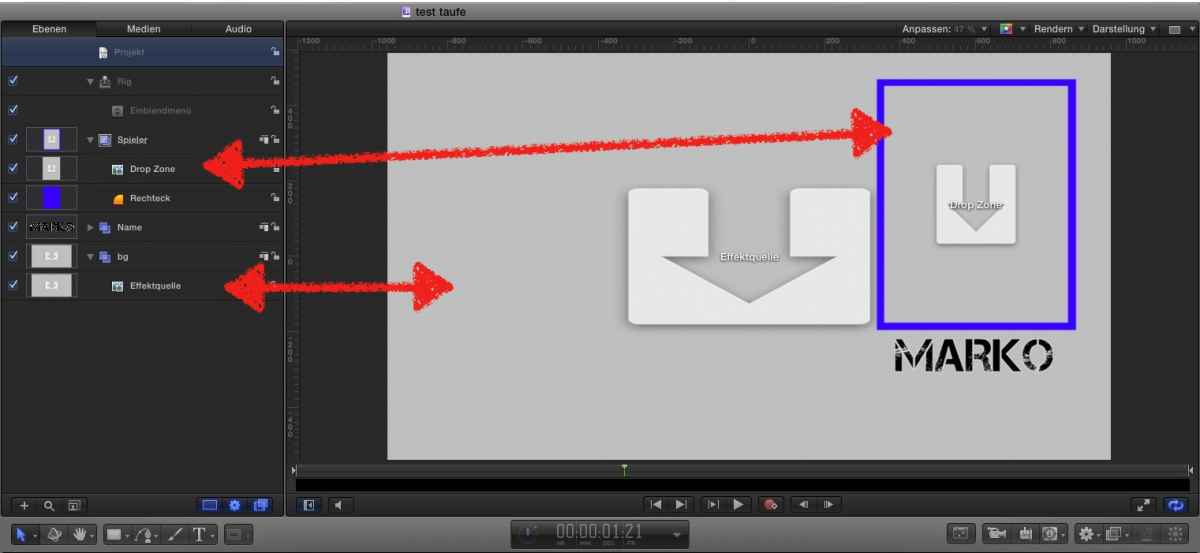
That is a very simple template to - as we call it in German - 'baptise' a player (who shot a goal or whatever...)
For demonstrational purposes, it's not a generator, but an 'effect' , so we have TWO dropzones: the big one for the source, and a cropped one for the insert...
In FCPX…
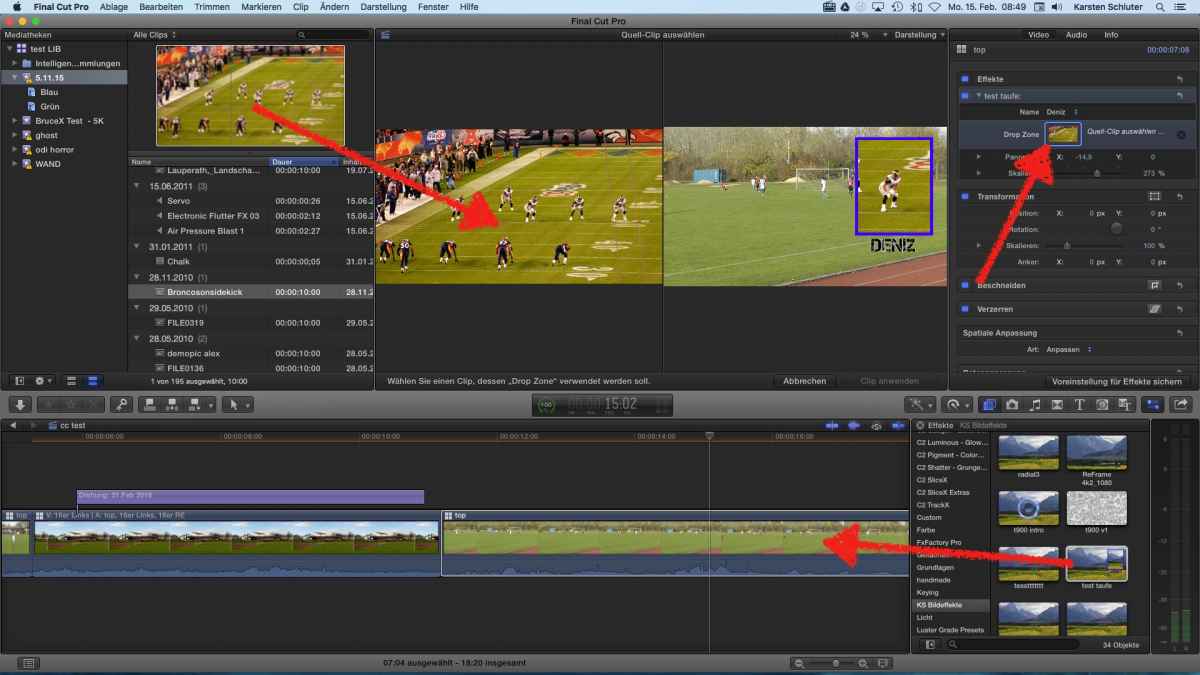
… in the Inspector of that effect, you notice a lil' square, or 'well'; double clicking that promps you to select the content - which could be from the actual projects timeline (what Ben mentioned), or from any other clip in the Event browser.
That is a very simple template to - as we call it in German - 'baptise' a player (who shot a goal or whatever...)
For demonstrational purposes, it's not a generator, but an 'effect' , so we have TWO dropzones: the big one for the source, and a cropped one for the insert...
In FCPX…
… in the Inspector of that effect, you notice a lil' square, or 'well'; double clicking that promps you to select the content - which could be from the actual projects timeline (what Ben mentioned), or from any other clip in the Event browser.
Please Log in to join the conversation.
- Karsten Schlüter
-
- Offline
- Moderator
-
Less
More
- Posts: 3790
- Thank you received: 718
15 Feb 2016 09:58 #73341
by Karsten Schlüter
No, it's not published because you don't have Motion.
It's not published because its maker hasn't published it.
Purchasing M5 will not solve your problem. (alone you could change parameters - if you know to handle M5)
Where did you get that template from?
Replied by Karsten Schlüter on topic Motion VFX templtes drop zone
webwiz wrote: Its not published, because I do not have Motion 5. I guess I will have to get it, in order to make motion templates work in FCPX….
No, it's not published because you don't have Motion.
It's not published because its maker hasn't published it.
Purchasing M5 will not solve your problem. (alone you could change parameters - if you know to handle M5)
Where did you get that template from?
Please Log in to join the conversation.
15 Feb 2016 14:54 #73362
by webwiz
Replied by webwiz on topic Motion VFX templtes drop zone
After a long research and contacting the company Motion VFX, I found the solution. There are a few reasons why it did not work for me.
1. In the motion folder there are 2 files. one without an extension and one with .motn I grabbed a wrong one from the the generator where I could not apply footage into placeholder
2. I tried to drop clips onto the browser, instead of the inspector.
3. Another mistake was when I selected the clip drop zones were gone as the browser was showing the selected clip.
The way to make it work was to select the drop zone box in the inspector, select the clip and push the button apply. This morning I received the manual from the company which explains how to do it direct in FCPX without using Motion. www.motionvfx.com/tutorials/MotionVFX_Mo...mplates_Tutorial.pdf
I am new in FCPX (FCP7 user) and maybe for some people it would be obvious how to work with templates, but I decided to post the solution, for people like me.
1. In the motion folder there are 2 files. one without an extension and one with .motn I grabbed a wrong one from the the generator where I could not apply footage into placeholder
2. I tried to drop clips onto the browser, instead of the inspector.
3. Another mistake was when I selected the clip drop zones were gone as the browser was showing the selected clip.
The way to make it work was to select the drop zone box in the inspector, select the clip and push the button apply. This morning I received the manual from the company which explains how to do it direct in FCPX without using Motion. www.motionvfx.com/tutorials/MotionVFX_Mo...mplates_Tutorial.pdf
I am new in FCPX (FCP7 user) and maybe for some people it would be obvious how to work with templates, but I decided to post the solution, for people like me.
Please Log in to join the conversation.
