


- Posts: 19
- Thank you received: 0
3 Post Moderation Rule for New Boarders (25 Jan 2021)
New boarders will have their posts moderated - Don't worry if you cannot see your post immediately.
Video & Audio synching question
- martinresi
-
 Topic Author
- Offline
- New Member
-

Less
More
11 Feb 2016 20:52 #73231
by martinresi
Video & Audio synching question was created by martinresi
Hi,
I'm a stickler about audio synching to video to the millisecond and I'm irritated by all the differences depending on medium and computer platform. Currently, what I do is output my synched video for vimeo & youtube. Then for blu-ray and dvd I create another file with the audio slightly earlier. I used to pull it back 0.80, but for my latest video after trial & error and a bunch of blu-rays in the garbage I'm pushing audio back 1.60 to get it synched up right. The difference this time is that I'm editing on a 2015 iMac instead of a 2011 macbook pro, and I used GoPro video 1080p 30 & 60fps instead of Samsung galaxy s6 & Canon 7d.
Just wanted to put this out there to see if there are easier solutions than mine, it seems like such a waste of time to have to deal with this for each video. A few other things I noticed is that the Galaxy s6 audio is out of synch right off the phone when inputing to FCPX by about 1.68. Vimeo videos played on the mac are in synch, but samsung phone plays them a little bit off. I also noticed that for a 720 x 480 video created on the iMac then exported to dvd had even different out of synch characteristics. Everything else seems exactly in synch or extremely close e.g. youtube vs. vimeo & mac vs. pc.
Haven't talked about this with anyone yet so any input is appreciated
Thanks,
Todd
I'm a stickler about audio synching to video to the millisecond and I'm irritated by all the differences depending on medium and computer platform. Currently, what I do is output my synched video for vimeo & youtube. Then for blu-ray and dvd I create another file with the audio slightly earlier. I used to pull it back 0.80, but for my latest video after trial & error and a bunch of blu-rays in the garbage I'm pushing audio back 1.60 to get it synched up right. The difference this time is that I'm editing on a 2015 iMac instead of a 2011 macbook pro, and I used GoPro video 1080p 30 & 60fps instead of Samsung galaxy s6 & Canon 7d.
Just wanted to put this out there to see if there are easier solutions than mine, it seems like such a waste of time to have to deal with this for each video. A few other things I noticed is that the Galaxy s6 audio is out of synch right off the phone when inputing to FCPX by about 1.68. Vimeo videos played on the mac are in synch, but samsung phone plays them a little bit off. I also noticed that for a 720 x 480 video created on the iMac then exported to dvd had even different out of synch characteristics. Everything else seems exactly in synch or extremely close e.g. youtube vs. vimeo & mac vs. pc.
Haven't talked about this with anyone yet so any input is appreciated
Thanks,
Todd
Please Log in to join the conversation.

11 Feb 2016 21:05 #73232
by BenB
Replied by BenB on topic Video & Audio synching question
HHHmmm... I've never had these issues at all. This is totally new to me.
Please Log in to join the conversation.
- martinresi
-
Topic Author
- Offline
- New Member
-
Less
More
- Posts: 19
- Thank you received: 0
11 Feb 2016 22:21 #73235
by martinresi
Replied by martinresi on topic Video & Audio synching question
Hmm if nobody can relate to this I suppose it would have to be my burn drive which is a Pioneer BDR XD05B. I would gladly purchase a new Blu-ray burner if that would resolve this issue. Is there a "go to" Blu ray burner that a lot of people are using?
Please Log in to join the conversation.

11 Feb 2016 23:03 #73236
by Francois
Replied by Francois on topic Video & Audio synching question
I did not experience anything similar either but i am not using these kind of video sources.
This seems more like encoding problems, so I would first output a master file from FCPX and do a QC,
then encode to Bluray via "disk image" file and check again in a software bluray player then burn this image.
Pioneer BDR are usually pretty good ...
Check all your encoding worflows you might find the culprit.
This seems more like encoding problems, so I would first output a master file from FCPX and do a QC,
then encode to Bluray via "disk image" file and check again in a software bluray player then burn this image.
Pioneer BDR are usually pretty good ...
Check all your encoding worflows you might find the culprit.
Please Log in to join the conversation.
- MarkNelsonMovies
-
- Offline
- Elite Member
-

Less
More
- Posts: 256
- Thank you received: 48
12 Feb 2016 00:30 #73238
by MarkNelsonMovies
Replied by MarkNelsonMovies on topic Video & Audio synching question
Your sure the problem isn't in what your using to play back the blu-rays and/or DVDs?
Please Log in to join the conversation.
- martinresi
-
Topic Author
- Offline
- New Member
-
Less
More
- Posts: 19
- Thank you received: 0
12 Feb 2016 02:30 #73239
by martinresi
Replied by martinresi on topic Video & Audio synching question
Many thanks for the advice! I will try that test.
Also, I'm using a PS4 to play the blu-rays.
It's weird too I crete blu-rays and dvds differently. For blu-rays I just output directly (file > share > blu ray) and for dvds I send to compressor, then burn through compressor, both with same results.
Still very puzzled, but gives me something to think about. It'll be good to try them at other people's houses to ensure I don't have something funky going on with my audio/video receiver. I'm starting to think that may be the problem. I have the ps4 going through an Onkyo A/V receiver before the TV.
Also, I'm using a PS4 to play the blu-rays.
It's weird too I crete blu-rays and dvds differently. For blu-rays I just output directly (file > share > blu ray) and for dvds I send to compressor, then burn through compressor, both with same results.
Still very puzzled, but gives me something to think about. It'll be good to try them at other people's houses to ensure I don't have something funky going on with my audio/video receiver. I'm starting to think that may be the problem. I have the ps4 going through an Onkyo A/V receiver before the TV.
Please Log in to join the conversation.
12 Feb 2016 03:22 #73240
by PaulG
Replied by PaulG on topic Video & Audio synching question
This definitely sounds hardware platform dependent. I agree that first just checking the master files in QT on the desktop using the computer's line-out. Something like an output card like a BM or AJA can have slip synch issues depending on a variety of factors. Streaming is also problematic. The same goes for AV receivers, which often have audio delay settings that can be adjusted depending on the source (BlueRay, cable box, cameras, computers).
As for devices such as Galaxy phones, I would not trust them as far as you can throw them. They're working like crazy to show video at speed and may have hardware problems/shortcuts of their own regarding audio sync. I would not try to adjust perfectly good sync master files to try and "fix" audio problems on a phone. You may be at the limit of what you can expect out of a consumer audio device.
As for devices such as Galaxy phones, I would not trust them as far as you can throw them. They're working like crazy to show video at speed and may have hardware problems/shortcuts of their own regarding audio sync. I would not try to adjust perfectly good sync master files to try and "fix" audio problems on a phone. You may be at the limit of what you can expect out of a consumer audio device.
Please Log in to join the conversation.
- Karsten Schlüter
-

- Offline
- Moderator
-

Less
More
- Posts: 3790
- Thank you received: 718
12 Feb 2016 04:19 #73242
by Karsten Schlüter
Just to feed my curiosity:
What ar these numbers??
The smallest 'tic' in video is a frame = 1/25th / 1/30th of a second ...
you can align two audio-tracks by fractions of a 1/1000th, but a+v is on frame#1 or on frame#2
… but "1.68" :blink:
Replied by Karsten Schlüter on topic Video & Audio synching question
martinresi wrote: … pull it back 0.80 … about 1.68. …
Just to feed my curiosity:
What ar these numbers??
The smallest 'tic' in video is a frame = 1/25th / 1/30th of a second ...
you can align two audio-tracks by fractions of a 1/1000th, but a+v is on frame#1 or on frame#2
… but "1.68" :blink:
Please Log in to join the conversation.
- martinresi
-
Topic Author
- Offline
- New Member
-
Less
More
- Posts: 19
- Thank you received: 0
12 Feb 2016 04:45 #73245
by martinresi
Replied by martinresi on topic Video & Audio synching question
I would like to know too lol! It's the final cut default for sound unless I changed it and didn't know it. Once I detach the audio and zoom in, .01 is the smallest amount I can move sound but I don't what unit it stands for. It's weird too because after it passes 0.79 it goes right to 1.00. Anyone know what this stands for?
Please Log in to join the conversation.
- Karsten Schlüter
-
- Offline
- Moderator
-
Less
More
- Posts: 3790
- Thank you received: 718
12 Feb 2016 05:03 #73246
by Karsten Schlüter
can you apply a screenshot… still no idea, what you are talking about ...
Replied by Karsten Schlüter on topic Video & Audio synching question
martinresi wrote: I would like to know too lol! It's the final cut default for sound unless I changed it and didn't know it. Once I detach the audio and zoom in, .01 is the smallest amount I can move sound but I don't what unit it stands for. It's weird too because after it passes 0.79 it goes right to 1.00. Anyone know what this stands for?
can you apply a screenshot… still no idea, what you are talking about ...
Please Log in to join the conversation.
- martinresi
-
Topic Author
- Offline
- New Member
-
Less
More
- Posts: 19
- Thank you received: 0
12 Feb 2016 06:37 #73249
by martinresi
Replied by martinresi on topic Video & Audio synching question
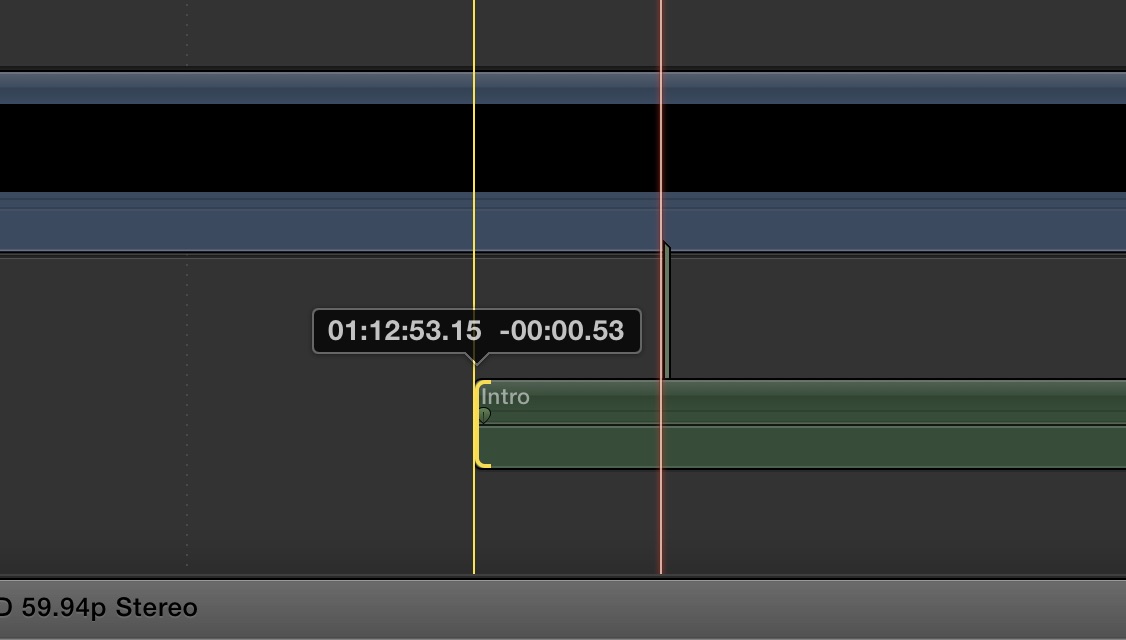
Here is -0.53
Please Log in to join the conversation.
- martinresi
-
Topic Author
- Offline
- New Member
-
Less
More
- Posts: 19
- Thank you received: 0
12 Feb 2016 06:40 #73250
by martinresi
Replied by martinresi on topic Video & Audio synching question
I haven't attached files here before, did it attach the pic? It said it did
Please Log in to join the conversation.
- Karsten Schlüter
-
- Offline
- Moderator
-
Less
More
- Posts: 3790
- Thank you received: 718
12 Feb 2016 07:03 #73252
by Karsten Schlüter
nope.
out-of-the-box screenshots are png, which don't work (at last for me) here ....
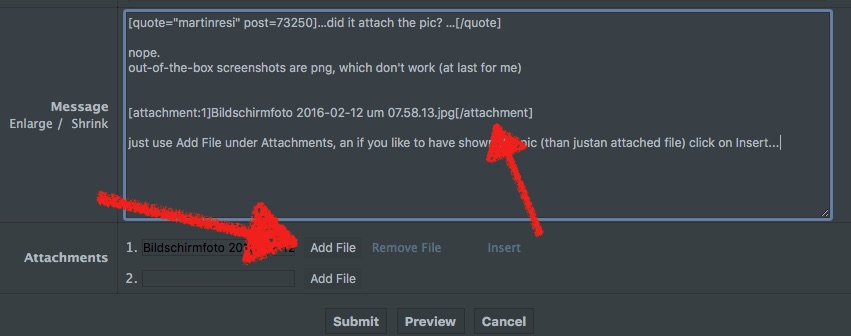
just use Add File under Attachments, an if you like to have shown the pic (than justan attached file) click on Insert...
Replied by Karsten Schlüter on topic Video & Audio synching question
martinresi wrote: …did it attach the pic? …
nope.
out-of-the-box screenshots are png, which don't work (at last for me) here ....
just use Add File under Attachments, an if you like to have shown the pic (than justan attached file) click on Insert...
Please Log in to join the conversation.


12 Feb 2016 10:16 #73258
by joema
Since digital video processing on various playback devices takes slightly longer than audio, there is an HDMI lip sync protocol which tries to correct this. Supposedly when HDMI hand-shakes, the devices exchange delay info and the playback device is supposed to delay audio by the number of milliseconds the viewing device requires for video processing, which makes audio & video sync up during playback on the viewing device.
It does not always work right and depends on the exact devices, version of HDMI and how they are configured.
Also some TVs and amplifiers have manual lip sync delay controls, usually nested down in the menu somewhere. It's possible those are turned to some manual setting.
With any optical media you master, I suggest you verify it on multiple playback devices with optical drives:, e.g, PC/Mac using various player software (Quicktime, VLC, WMP), plus at least two or three different hardware players, etc. Back when we mastered optical disks, we'd check it on about eight different devices before sending it for mass replication.
You generally don't want to inject artificial A/V delays into the mastered disk to fix a specific problem on a specific playback device. This could adversely affect playback on other devices.
Replied by joema on topic Video & Audio synching question
martinresi wrote: ....try them at other people's houses to ensure I don't have something funky going on with my audio/video receiver. I'm starting to think that may be the problem. I have the ps4 going through an Onkyo A/V receiver before the TV.
Since digital video processing on various playback devices takes slightly longer than audio, there is an HDMI lip sync protocol which tries to correct this. Supposedly when HDMI hand-shakes, the devices exchange delay info and the playback device is supposed to delay audio by the number of milliseconds the viewing device requires for video processing, which makes audio & video sync up during playback on the viewing device.
It does not always work right and depends on the exact devices, version of HDMI and how they are configured.
Also some TVs and amplifiers have manual lip sync delay controls, usually nested down in the menu somewhere. It's possible those are turned to some manual setting.
With any optical media you master, I suggest you verify it on multiple playback devices with optical drives:, e.g, PC/Mac using various player software (Quicktime, VLC, WMP), plus at least two or three different hardware players, etc. Back when we mastered optical disks, we'd check it on about eight different devices before sending it for mass replication.
You generally don't want to inject artificial A/V delays into the mastered disk to fix a specific problem on a specific playback device. This could adversely affect playback on other devices.
Please Log in to join the conversation.
12 Feb 2016 13:31 #73263
by BenB
Replied by BenB on topic Video & Audio synching question
"It's weird too because after it passes 0.79 it goes right to 1.00. Anyone know what this stands for?"
Seconds:Frames.Ticks
A "Tick" is a measurement used in audio/music. It is a sub-division of a second, basically in FCPX it is 1/80 of a second. You will only see the Ticks when moving an audio clip, as it only applies to audio, not video. Since video's smallest possible physical measurement is a frame. Audio's smallest possible measurement is a sample (normally 48/1000 of a second). But that's impossibly small to work with on a Timeline, so we use ticks.
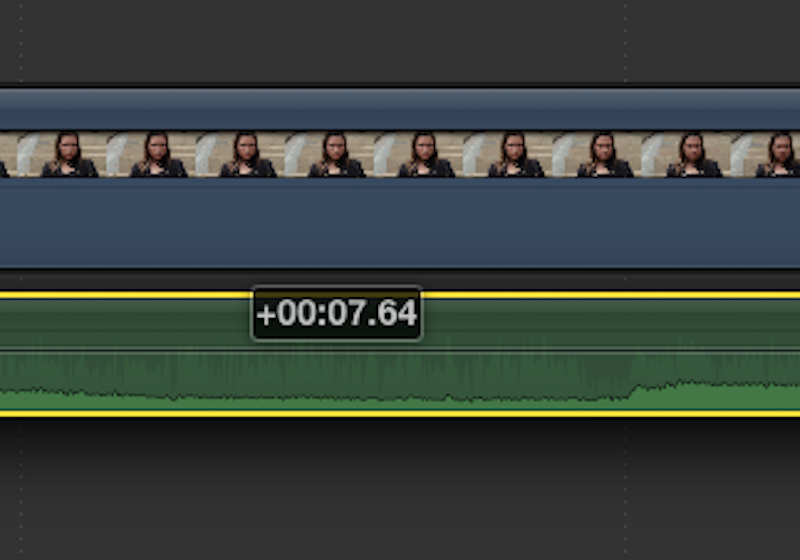
Here is an audio clip I've moved to the right (plus sign, minus shows moving to left), 7 seconds and 64 ticks (or 64/80 of a second).
Seconds:Frames.Ticks
A "Tick" is a measurement used in audio/music. It is a sub-division of a second, basically in FCPX it is 1/80 of a second. You will only see the Ticks when moving an audio clip, as it only applies to audio, not video. Since video's smallest possible physical measurement is a frame. Audio's smallest possible measurement is a sample (normally 48/1000 of a second). But that's impossibly small to work with on a Timeline, so we use ticks.
Here is an audio clip I've moved to the right (plus sign, minus shows moving to left), 7 seconds and 64 ticks (or 64/80 of a second).
Please Log in to join the conversation.
- martinresi
-
Topic Author
- Offline
- New Member
-
Less
More
- Posts: 19
- Thank you received: 0
12 Feb 2016 18:25 #73272
by martinresi
Replied by martinresi on topic Video & Audio synching question
just use Add File under Attachments, an if you like to have shown the pic (than justan attached file) click on Insert...[/quote]
Cool thanks for explaining that
Cool thanks for explaining that
Please Log in to join the conversation.
- martinresi
-
Topic Author
- Offline
- New Member
-
Less
More
- Posts: 19
- Thank you received: 0
12 Feb 2016 18:36 #73273
by martinresi
Replied by martinresi on topic Video & Audio synching question
"A "Tick" is a measurement used in audio/music. It is a sub-division of a second, basically in FCPX it is 1/80 of a second. "
Yes! Thank you, "ticks" are what that is. Though whatever they're called I do know that 1.00 is much shorter than a second so I looked it up. A "tick" is 1/80th of a frame, not second. It's good to get all this clear though, so I suppose +7.64 means you moved the audio 7 frames and 64 ticks. As small as a "tick" is, I get "ticked off" watching my videos if they're about 3 or more "ticks" off har har
www.premiumbeat.com/blog/subframe-editing-fcpx/
Yes! Thank you, "ticks" are what that is. Though whatever they're called I do know that 1.00 is much shorter than a second so I looked it up. A "tick" is 1/80th of a frame, not second. It's good to get all this clear though, so I suppose +7.64 means you moved the audio 7 frames and 64 ticks. As small as a "tick" is, I get "ticked off" watching my videos if they're about 3 or more "ticks" off har har
www.premiumbeat.com/blog/subframe-editing-fcpx/
Please Log in to join the conversation.
- martinresi
-
Topic Author
- Offline
- New Member
-
Less
More
- Posts: 19
- Thank you received: 0
12 Feb 2016 18:45 #73274
by martinresi
Replied by martinresi on topic Video & Audio synching question
"Also some TVs and amplifiers have manual lip sync delay controls, usually nested down in the menu somewhere. It's possible those are turned to some manual setting."
You hit it right on the head joema! I do remember trying to adjust a setting like that in my video sound system way back during setup. Because I'm so meticulous wiith my own editing I probably don't notice it being off as much with other people's work. I think our brains can be quite forgiving when it comes to audio/video synching being off a little bit. I'll try to find that setting in the menu and correct it.
The bad news is I've made a bunch of blu-rays and dvds that are perfect on my system and a frame and a few ticks off on other systems. But the good news is I can get to the bottom of this once and for all and be good going forward.
Thanks for the help all!
Todd
You hit it right on the head joema! I do remember trying to adjust a setting like that in my video sound system way back during setup. Because I'm so meticulous wiith my own editing I probably don't notice it being off as much with other people's work. I think our brains can be quite forgiving when it comes to audio/video synching being off a little bit. I'll try to find that setting in the menu and correct it.
The bad news is I've made a bunch of blu-rays and dvds that are perfect on my system and a frame and a few ticks off on other systems. But the good news is I can get to the bottom of this once and for all and be good going forward.
Thanks for the help all!
Todd
Please Log in to join the conversation.
- martinresi
-
Topic Author
- Offline
- New Member
-
Less
More
- Posts: 19
- Thank you received: 0
12 Feb 2016 19:27 - 12 Feb 2016 19:28 #73278
by martinresi
Replied by martinresi on topic Video & Audio synching question
Oh my god it's all coming together and making sense now. What prompted me to write this post in the first place was the frustration in that my latest video needed more "ticks" of adjustment to get the audio/video synched. And because a tick is 1/80th of a frame and my latest vid was 60fps instead of 30fps, I needed to adjust sound twice as many ticks! When working in 60fps, the "tick" becomes twice as short in time... I think
Last edit: 12 Feb 2016 19:28 by martinresi.
Please Log in to join the conversation.
12 Feb 2016 19:53 - 12 Feb 2016 19:54 #73279
by BenB
Replied by BenB on topic Video & Audio synching question
Yes, 1/80 of a frame, not a second. That's that I meant. In an NLE, it subdivides a frame. In a DAW it is slightly different.
Last edit: 12 Feb 2016 19:54 by BenB.
Please Log in to join the conversation.
