


- Posts: 20
- Thank you received: 0
3 Post Moderation Rule for New Boarders (25 Jan 2021)
New boarders will have their posts moderated - Don't worry if you cannot see your post immediately.
Anchor Points don't anchor in video keyframing
04 Feb 2016 06:56 #72902
by Riqiv
Anchor Points don't anchor in video keyframing was created by Riqiv
Hello there, first time posting here!
While keyframing an arrow in FCPX as I move the arrow down using either my cursor or the X/Y Postion Arrows in the Inspector as can be seen in this movie:
www.dropbox.com/s/erxyeiswq5zccz3/Can%27...or%20points.mov?dl=0
(Pls turn down your volume as the music is louder than the speaking voice.)
Is a preference corrupted or am I missing a setting.
This has been happening about a year now. Larry Jordon suggested I delete preferences by holding Option + Cmd while launching FCP X from the Dock. I did this long time ago and I believe it temporarily fixed things.
Looking forward to an answer . . . you all seem much better the the Apple FCPX forum.
Im on a new iMac, El Capitan, Intel Iris Pro Graphics, latest versions of FCPX.
Thx!
While keyframing an arrow in FCPX as I move the arrow down using either my cursor or the X/Y Postion Arrows in the Inspector as can be seen in this movie:
www.dropbox.com/s/erxyeiswq5zccz3/Can%27...or%20points.mov?dl=0
(Pls turn down your volume as the music is louder than the speaking voice.)
Is a preference corrupted or am I missing a setting.
This has been happening about a year now. Larry Jordon suggested I delete preferences by holding Option + Cmd while launching FCP X from the Dock. I did this long time ago and I believe it temporarily fixed things.
Looking forward to an answer . . . you all seem much better the the Apple FCPX forum.
Im on a new iMac, El Capitan, Intel Iris Pro Graphics, latest versions of FCPX.
Thx!
Please Log in to join the conversation.
- Tom Wolsky
-

- Offline
- Moderator
-

05 Feb 2016 15:53 - 05 Feb 2016 15:54 #72998
by Tom Wolsky
Replied by Tom Wolsky on topic Anchor Points don't anchor in video keyframing
I don't hear any speech. The video doesn't show anything that's being done in the inspector. The anchor point is a rotational point inn the frame and has nothing to do with keyframing. It's not an anchor keyframe.
Last edit: 05 Feb 2016 15:54 by Tom Wolsky.
Please Log in to join the conversation.
05 Feb 2016 22:07 #73032
by Riqiv
Replied by Riqiv on topic Anchor Points don't anchor in video keyframing
Thx Tom,
I'm not explaining this very clearly . . . .
There is speech 11 seconds in, I just checked. The Inspector is not in the frame, but I merely am telling all that the point to the right moves whether I use cursor or drag the point on the left.
Re: the anchor point . . . wherever I said anchor point, pls place the word "point" in the previous post.
15 sec in I move a point on the left and the one on the right moves with it, causing the arrow instead of going horizontally to the right. Upon play back 25 sec in the arrow moves to the right but also downwards.
I would like to eliminate the downward motion of the arrow.
When I first creating these arrow movements in FCPX, and I choose a point, the point created before that remained where it was, independent of the creation or another point.
Somewhere along the way, I changed a setting or a preference was corrupted.
Can anyone offer a solution, meaning when I create a new point for the motion of the arrow, the point created just before that will remain stationary? Thank you,
I'm not explaining this very clearly . . . .
There is speech 11 seconds in, I just checked. The Inspector is not in the frame, but I merely am telling all that the point to the right moves whether I use cursor or drag the point on the left.
Re: the anchor point . . . wherever I said anchor point, pls place the word "point" in the previous post.
15 sec in I move a point on the left and the one on the right moves with it, causing the arrow instead of going horizontally to the right. Upon play back 25 sec in the arrow moves to the right but also downwards.
I would like to eliminate the downward motion of the arrow.
When I first creating these arrow movements in FCPX, and I choose a point, the point created before that remained where it was, independent of the creation or another point.
Somewhere along the way, I changed a setting or a preference was corrupted.
Can anyone offer a solution, meaning when I create a new point for the motion of the arrow, the point created just before that will remain stationary? Thank you,
Please Log in to join the conversation.
- Tom Wolsky
-
- Offline
- Moderator
-
08 Feb 2016 12:28 #73099
by Tom Wolsky
Replied by Tom Wolsky on topic Anchor Points don't anchor in video keyframing
Im not clear what you're dragging down in the frame. You set a start keyframe. You go forward and drag the rectangle to the right in a straight line. Don't drag the center point. Drag the rectangle. About a second later drag the rectangle down and to the left to make the arrow move down and to the left. Play forward. Stop snd drag the rectangle straight across to the right.
Please Log in to join the conversation.


08 Feb 2016 13:48 #73101
by anickt
Replied by anickt on topic Anchor Points don't anchor in video keyframing
Your explanation of what is happening is not clear but it sounds like you are both moving the anchor point and the video frame position which would work in different ways and could be causing the problem. If we could see the inspector as Tom mentioned, it would be helpful.
Please Log in to join the conversation.
08 Feb 2016 19:10 #73105
by Riqiv
Replied by Riqiv on topic Anchor Points don't anchor in video keyframing
Thank you gentlemen,
I'm recording again soon and will make a new video with the cursor shown as a red circle and also showing the inspector. It'll be much more clear, thank you!
I'm recording again soon and will make a new video with the cursor shown as a red circle and also showing the inspector. It'll be much more clear, thank you!
Please Log in to join the conversation.

09 Feb 2016 00:11 #73120
by BenB
Replied by BenB on topic Anchor Points don't anchor in video keyframing
You are missing keyframes, that's all. I happen to do this with sheet music, being a composer and all. See if this helps. And yes, I skip lines of music, just trying to exaggerate to get the point across, that you are missing keyframe positions.
www.bbalser.com/video/musicfollow.mp4
Unless I'm missing what the problem is.
www.bbalser.com/video/musicfollow.mp4
Unless I'm missing what the problem is.
Please Log in to join the conversation.
09 Feb 2016 01:21 #73125
by Riqiv
Replied by Riqiv on topic Anchor Points don't anchor in video keyframing
Excellent video!
Yes, exactly, except 22 seconds in, when I drag the cursor down southwest, the point at the right margin (made just previous to the movement 22 sec in) also moves.
I set my initial keyframe as you do 10 seconds in, and all other keyframe points (I think that's what they're called), are supposed to automatically set.
I don't move the cursor ahead in the timeline as you do, but instead push the Space Bar to "play" to the next position, then move my arrow.
Each time I do this the Inspector shows a keyframe as being set. This used to work with no issues.
I'm recording sound now so I haven't gotten to my next filming, but when I do I'll post the issue much clearer.
Thx!
Yes, exactly, except 22 seconds in, when I drag the cursor down southwest, the point at the right margin (made just previous to the movement 22 sec in) also moves.
I set my initial keyframe as you do 10 seconds in, and all other keyframe points (I think that's what they're called), are supposed to automatically set.
I don't move the cursor ahead in the timeline as you do, but instead push the Space Bar to "play" to the next position, then move my arrow.
Each time I do this the Inspector shows a keyframe as being set. This used to work with no issues.
I'm recording sound now so I haven't gotten to my next filming, but when I do I'll post the issue much clearer.
Thx!
Please Log in to join the conversation.
09 Feb 2016 13:32 #73142
by BenB
Replied by BenB on topic Anchor Points don't anchor in video keyframing
I can't tell exactly what you're doing in your video. But here's me adjusting just fine. I click on the keyframe point once, to select that point. The playhead should jump to that point. Then, I click and drag the point, or the object itself (arrow) to move it.
bbalser.com/video/musicadjust.mov
bbalser.com/video/musicadjust.mov
Please Log in to join the conversation.
- MarkNelsonMovies
-

- Offline
- Elite Member
-

Less
More
- Posts: 256
- Thank you received: 48
09 Feb 2016 17:37 #73158
by MarkNelsonMovies
Replied by MarkNelsonMovies on topic Anchor Points don't anchor in video keyframing
To expand on what Ben posted, The X and Y axis are key-framed separately, therefore, when you move the X axis, final cut only sets a keyframe on the x axis. if you want the y axis to stay in the same place, you have to manually add a keyframe on the y axis every time you move the x axis. The same is true if you are moving the y axis and want the x axis to say the same, you will have to manually set keyframes on the x axis.
Please Log in to join the conversation.
09 Feb 2016 17:42 #73160
by Riqiv
Replied by Riqiv on topic Anchor Points don't anchor in video keyframing
OK, will do in my next video and I'll also take Mark Nelson's advice. Thx!
Please Log in to join the conversation.
09 Feb 2016 23:58 - 10 Feb 2016 00:03 #73170
by Riqiv
Replied by Riqiv on topic Anchor Points don't anchor in video keyframing
Finding an intermittent problem is like trying to get your baby child to speak on the telephone when you want. Everything has cleared up, perhaps due to a restart of my computer or something else?
If I just push the Y Axis in the Inspector everything works perfectly, but keeping in mind what Mark said, if I have this issue again, I will click on the Keyframe adder to the top left as in Ben's video (see "Keyframe Setter" bottom attachment) so X/Y Pos and Rotation and Scale and Anchor are all chosen at once in Transform>Inspector.
In the meantime, is there anyway to make all the movements Linear as opposed to Smooth en masse . . . as I'm having to use right-click (see "Right-click" top attachment) on each point separately.
I believe not, but just checking.
Thx guys, great help, great forum.
(I'm not closing this post as solved til I make my next movie and test things there, which will be soon.)
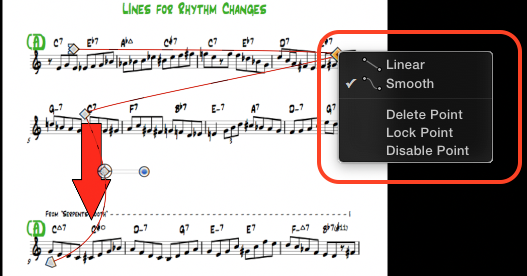
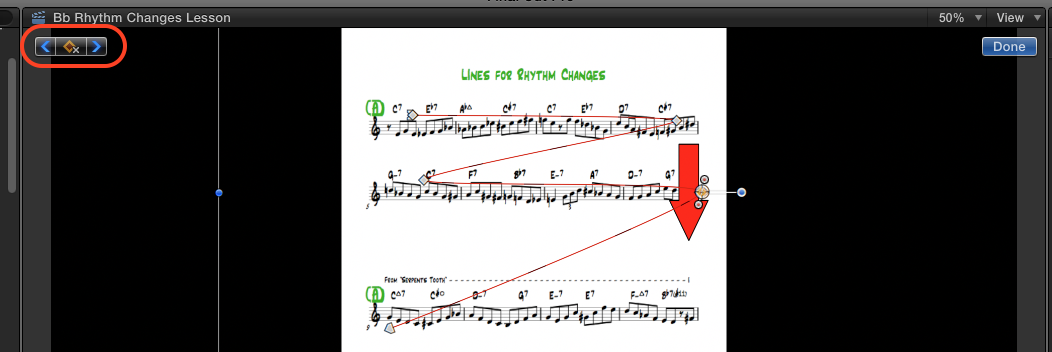
If I just push the Y Axis in the Inspector everything works perfectly, but keeping in mind what Mark said, if I have this issue again, I will click on the Keyframe adder to the top left as in Ben's video (see "Keyframe Setter" bottom attachment) so X/Y Pos and Rotation and Scale and Anchor are all chosen at once in Transform>Inspector.
In the meantime, is there anyway to make all the movements Linear as opposed to Smooth en masse . . . as I'm having to use right-click (see "Right-click" top attachment) on each point separately.
I believe not, but just checking.
Thx guys, great help, great forum.
(I'm not closing this post as solved til I make my next movie and test things there, which will be soon.)
Last edit: 10 Feb 2016 00:03 by Riqiv.
Please Log in to join the conversation.
- MarkNelsonMovies
-
- Offline
- Elite Member
-
Less
More
- Posts: 256
- Thank you received: 48
10 Feb 2016 16:29 #73191
by MarkNelsonMovies
Replied by MarkNelsonMovies on topic Anchor Points don't anchor in video keyframing
you can shift click to select multiple keyframes, and then change them all at onece
Please Log in to join the conversation.
27 Feb 2016 04:18 #73808
by Riqiv
Replied by Riqiv on topic Anchor Points don't anchor in video keyframing
I'll try the shift click thing, thx!
Here's a video of me trying to make the keyframes stay.
Oddly, sometimes it seems when I move the points with my cursor (as opposed to using the inspector which I like for accuracy) the point seem to stay where I place them.
Am I doing someone incorrectly? Let me know . . . here's a link to the video and thx ahead of time!
www.dropbox.com/s/c1cms3bbypx273a/KF%20Issue.mov?dl=0
Here's a video of me trying to make the keyframes stay.
Oddly, sometimes it seems when I move the points with my cursor (as opposed to using the inspector which I like for accuracy) the point seem to stay where I place them.
Am I doing someone incorrectly? Let me know . . . here's a link to the video and thx ahead of time!
www.dropbox.com/s/c1cms3bbypx273a/KF%20Issue.mov?dl=0
Please Log in to join the conversation.
- Tom Wolsky
-
- Offline
- Moderator
-
27 Feb 2016 13:20 #73816
by Tom Wolsky
Replied by Tom Wolsky on topic Anchor Points don't anchor in video keyframing
It's happening because the adjusts are being made in the numeric values, and there are separate values for X,Y. Don't know why's it's treating them as separate events.
Two ways around this: either do it entirely in viewer using Shift-drag and keyframing in the viewer; or, after you add the keyframe that moves the arrow to the right, step forward one frame and add another keyframe to lock it into place. Then when you go down and back to the left the right side keyframe will remain in place.
Two ways around this: either do it entirely in viewer using Shift-drag and keyframing in the viewer; or, after you add the keyframe that moves the arrow to the right, step forward one frame and add another keyframe to lock it into place. Then when you go down and back to the left the right side keyframe will remain in place.
Please Log in to join the conversation.
27 Feb 2016 20:14 - 27 Feb 2016 20:14 #73822
by Riqiv
Replied by Riqiv on topic Anchor Points don't anchor in video keyframing
Thx Tom!
The Shift-drag and keyframing in the viewer is working for me.
But adding a keyframe that moves the arrow to the right, stepping forward one frame (using my right arrow key) and adding another keyframe to lock it into place has no effect.
Tom (or anyone else): when you add the points in the inspector as in my movie, do you get the same thing?
Or are my preferences messed up?
Thanks again Tom!
The Shift-drag and keyframing in the viewer is working for me.
But adding a keyframe that moves the arrow to the right, stepping forward one frame (using my right arrow key) and adding another keyframe to lock it into place has no effect.
Tom (or anyone else): when you add the points in the inspector as in my movie, do you get the same thing?
Or are my preferences messed up?
Thanks again Tom!
Last edit: 27 Feb 2016 20:14 by Riqiv.
Please Log in to join the conversation.
- Tom Wolsky
-
- Offline
- Moderator
-
27 Feb 2016 20:51 #73824
by Tom Wolsky
Replied by Tom Wolsky on topic Anchor Points don't anchor in video keyframing
"But adding a keyframe that moves the arrow to the right, stepping forward one frame (using my right arrow key) and adding another keyframe to lock it into place has no effect."
Doesn't work for you why? What's happening? When I add the keyframe on the next line, the previous keyframes aren't moving. Make sure you're stepping forward in the timeline, and that is the active panel when you press the right arrow.
"when you add the points in the inspector as in my movie, do you get the same thing?"
Yes.
"Or are my preferences messed up?"
No.
Doesn't work for you why? What's happening? When I add the keyframe on the next line, the previous keyframes aren't moving. Make sure you're stepping forward in the timeline, and that is the active panel when you press the right arrow.
"when you add the points in the inspector as in my movie, do you get the same thing?"
Yes.
"Or are my preferences messed up?"
No.
Please Log in to join the conversation.
27 Feb 2016 21:17 #73825
by Riqiv
Replied by Riqiv on topic Anchor Points don't anchor in video keyframing
Then a shall send to Apple a Feature Request for a toggle with to freeze the points we make in the inspector to save time. (Good luck with that 
Now I'm getting over the flu, so if I'm a little muddled pls forgive me, nonetheless this video should be clear enuff that you can see what I am doing incorrectly.
www.dropbox.com/s/xan6h0eoq5c5i97/Moving%201%20Frame.mov?dl=0
Thx!
Now I'm getting over the flu, so if I'm a little muddled pls forgive me, nonetheless this video should be clear enuff that you can see what I am doing incorrectly.
www.dropbox.com/s/xan6h0eoq5c5i97/Moving%201%20Frame.mov?dl=0
Thx!
Please Log in to join the conversation.
28 Feb 2016 13:54 #73833
by anickt
Replied by anickt on topic Anchor Points don't anchor in video keyframing
When you move the arrow to the position you want for the second keyframe and change the X value in the inspector, you are not creating a keyframe for the y value because you have not changed it. So when you move forward one frame and then move the arrow, the y value is interpolating from the position set in the first keyframe. Set the first keyframe as you did. Move the arrow to the second position and set keyframes the same way you did with the first one by clicking the Add Keyframes button in the viewer. Then move forward one frame and move the arrow down to the next position.
Please Log in to join the conversation.
28 Feb 2016 18:15 #73838
by Riqiv
Replied by Riqiv on topic Anchor Points don't anchor in video keyframing
Thx, but that doesn't work either as seen in this video:
www.dropbox.com/s/l9vf2s46c9c1etr/Move%20Forward.mov?dl=0
I've also tried moving the arrow to the 2nd position and then moving forward one frame and THEN setting keyframes as I set the first keyframe, still NG.
Are you gentlemen actually using the directions you're giving me, and it works for you. As you can see it doesn't work for me.
I'm asking because in that case I will try trashing my preferences.
BenB - can you describe the actual steps you are using. I.e., are you dragging the arrow/object or using the inspector to set values.
Thx, all the help is appreciated
www.dropbox.com/s/l9vf2s46c9c1etr/Move%20Forward.mov?dl=0
I've also tried moving the arrow to the 2nd position and then moving forward one frame and THEN setting keyframes as I set the first keyframe, still NG.
Are you gentlemen actually using the directions you're giving me, and it works for you. As you can see it doesn't work for me.
I'm asking because in that case I will try trashing my preferences.
BenB - can you describe the actual steps you are using. I.e., are you dragging the arrow/object or using the inspector to set values.
Thx, all the help is appreciated
Please Log in to join the conversation.
