


- Posts: 3
- Thank you received: 0
3 Post Moderation Rule for New Boarders (25 Jan 2021)
New boarders will have their posts moderated - Don't worry if you cannot see your post immediately.
Video Quality
01 Feb 2016 18:02 #72823
by RobBrown
Video Quality was created by RobBrown
Hi,
I'm fairly new to the video side of things, and am hoping to improve the quality / resolution of my videos, but don't know how to. The following video is one I made a while ago. It starts playing at 360 (is this something I can change, or is that specific to each viewer?) and once I change it to 720HD it looks better, but it's still far from great. I'm shooting with a Canon 60D, on the largest size I can.
www.canadianwoodworking.com/video/canadi...p-made-scratch-stock
Are there import specs I need to concern myself with? Output specs? I just finished a 11 minute video and it was about 2GB, and took about 5 hours to upload to YouTube. It's not public right now, as I'm amassing a series of videos before releasing them down the road. I shoot in 1080HD, and output the video with these settings...
Resolution HD 1080p
Compression: Better Quality
I'm sure there are many other specs / numbers but I'm not sure where they are located, and what they are set to.
Thanks very much for the help everyone.
I'm fairly new to the video side of things, and am hoping to improve the quality / resolution of my videos, but don't know how to. The following video is one I made a while ago. It starts playing at 360 (is this something I can change, or is that specific to each viewer?) and once I change it to 720HD it looks better, but it's still far from great. I'm shooting with a Canon 60D, on the largest size I can.
www.canadianwoodworking.com/video/canadi...p-made-scratch-stock
Are there import specs I need to concern myself with? Output specs? I just finished a 11 minute video and it was about 2GB, and took about 5 hours to upload to YouTube. It's not public right now, as I'm amassing a series of videos before releasing them down the road. I shoot in 1080HD, and output the video with these settings...
Resolution HD 1080p
Compression: Better Quality
I'm sure there are many other specs / numbers but I'm not sure where they are located, and what they are set to.
Thanks very much for the help everyone.
Please Log in to join the conversation.

02 Feb 2016 11:52 #72834
by joema
Replied by joema on topic Video Quality
There are three items immediately obvious that could be improved. Most is on the shooting side, but some items might be improved in post.
(1) Subject is backlit. This lowers contrast and generally degrades image quality. Ideally it should be re-shot with better lighting.
You can improve it in post a little with the FCPX color board and maybe a mask. However it really needs to be re-shot.
(2) Audio is apparently on camera. Audio quality is very important for video production. Ideally use a wireless mic. Here is a Sony wireless mic for $159: amzn.com/B00JWU6WWO A more traditional wireless lav is the Rodelink: amzn.com/B00TV90DX0
Sennheiser makes a wired lav mic for the iPhone ($199): amzn.com/B00XIQCFWY
Depending on what audio tools you have, the current version can be improved in post. There are some audio tools built into FCPX, then lower-priced external tools like SoundSoap and AudioDenoise, then high-priced tools like Izotope RX5.
(3) Something is wrong with the focus or image sharpness. This might be caused by the backlighting, or maybe the focus is off or the lens is not right. It appears the in-focus plane is in front of the subject, so maybe the focus is simply off, plus it's backlit.
The live view focus tools on 60D and similar cameras are not great. You can take a single-shot AF on the subject but if he moves afterward it won't be in focus.
Magic Lantern firmware is available for the 60D and gives a lot more options, but it assumes a high level of user proficiency: www.magiclantern.fm/
Your footage might be helped by adding some sharpness with FCPX. There are also various finishing tools like from FCPEffects: www.fcpeffects.com/collections/entire-ca...cts/finishing-plugin
However ideally it should be re-shot. But it might be improvable in post to a satisfactory point, considering the type of material.
Before you shoot a significant piece, if possible shoot some test footage and review it on a larger monitor.
Re "starts playing at 360", on my PC it starts at 0. Youtube has added a feature to copy video URL at current time (ie playhead position), seen by right-clicking on the video. Unfortunately I have seen cases where the Youtube player starts caching a non-zero playhead position. You are probably seeing that. You can try copy/pasting the video URL into a different browser like FireFox or Chrome and testing that.
Re output size, a 2GB file for 11 min equates to 30 megabits/sec. That is needlessly large for a web upload. Within FCPX you have a few options for export, for more fine tuning you'll need Compressor.
An 11 min 1080p 5D Mk III video exported at 720p produces an approx 1GB file at 12 megabit/sec. Output options: Share>Master File>Settings, Format: Computer, Video codec: H.264, Resolution: 1280x720.
You can get this to about 1/2 that size or the 500-600MB range but you'll probably have to use Compressor.
(1) Subject is backlit. This lowers contrast and generally degrades image quality. Ideally it should be re-shot with better lighting.
You can improve it in post a little with the FCPX color board and maybe a mask. However it really needs to be re-shot.
(2) Audio is apparently on camera. Audio quality is very important for video production. Ideally use a wireless mic. Here is a Sony wireless mic for $159: amzn.com/B00JWU6WWO A more traditional wireless lav is the Rodelink: amzn.com/B00TV90DX0
Sennheiser makes a wired lav mic for the iPhone ($199): amzn.com/B00XIQCFWY
Depending on what audio tools you have, the current version can be improved in post. There are some audio tools built into FCPX, then lower-priced external tools like SoundSoap and AudioDenoise, then high-priced tools like Izotope RX5.
(3) Something is wrong with the focus or image sharpness. This might be caused by the backlighting, or maybe the focus is off or the lens is not right. It appears the in-focus plane is in front of the subject, so maybe the focus is simply off, plus it's backlit.
The live view focus tools on 60D and similar cameras are not great. You can take a single-shot AF on the subject but if he moves afterward it won't be in focus.
Magic Lantern firmware is available for the 60D and gives a lot more options, but it assumes a high level of user proficiency: www.magiclantern.fm/
Your footage might be helped by adding some sharpness with FCPX. There are also various finishing tools like from FCPEffects: www.fcpeffects.com/collections/entire-ca...cts/finishing-plugin
However ideally it should be re-shot. But it might be improvable in post to a satisfactory point, considering the type of material.
Before you shoot a significant piece, if possible shoot some test footage and review it on a larger monitor.
Re "starts playing at 360", on my PC it starts at 0. Youtube has added a feature to copy video URL at current time (ie playhead position), seen by right-clicking on the video. Unfortunately I have seen cases where the Youtube player starts caching a non-zero playhead position. You are probably seeing that. You can try copy/pasting the video URL into a different browser like FireFox or Chrome and testing that.
Re output size, a 2GB file for 11 min equates to 30 megabits/sec. That is needlessly large for a web upload. Within FCPX you have a few options for export, for more fine tuning you'll need Compressor.
An 11 min 1080p 5D Mk III video exported at 720p produces an approx 1GB file at 12 megabit/sec. Output options: Share>Master File>Settings, Format: Computer, Video codec: H.264, Resolution: 1280x720.
You can get this to about 1/2 that size or the 500-600MB range but you'll probably have to use Compressor.
Please Log in to join the conversation.
02 Feb 2016 18:37 #72850
by bogiesan
Replied by bogiesan on topic Video Quality
Get a good mic.
Pull the shade on that window.
Get another camera and operator to handle closeups and cutaways during the shoot.
Use cue cards.
As a former woodworker (I sold all my power tools while I could still count to ten without removing a shoe) I want and expect to see all of the work being performed. The still images (and those affected bumps to black) just frustrated me.
Can't help you on the upload stuff. Like most of us these days I shoot at 1080, edit in 720 sop I have a bit of cropping if necessary, and share directly to the YT or vimeo settings in FCPX.
Pull the shade on that window.
Get another camera and operator to handle closeups and cutaways during the shoot.
Use cue cards.
As a former woodworker (I sold all my power tools while I could still count to ten without removing a shoe) I want and expect to see all of the work being performed. The still images (and those affected bumps to black) just frustrated me.
Can't help you on the upload stuff. Like most of us these days I shoot at 1080, edit in 720 sop I have a bit of cropping if necessary, and share directly to the YT or vimeo settings in FCPX.
Please Log in to join the conversation.
- Squamish ed
-

- Offline
- Elite Member
-

Less
More
- Posts: 238
- Thank you received: 20
02 Feb 2016 20:23 #72855
by Squamish ed
Ed
Replied by Squamish ed on topic Video Quality
Backlighting is probably your easiest problem to fix. If you don't have a shade on the window try something translucent taped over the outside of the window to reduce the amount of light. That will help reduce your lens flare that's making your shot look washed out.
Low cost 'kit' lenses are often prone to internal flare where bright light sources reflect off the internal lens elements. A bright area like your window or bright interior light shining on your front lens element even from the side will contribute to your problem. A lens hood may help.
Not knowing what lens you're using I'd suggest you're most likely to get the maximum sharpness by having it stopped down one or two stops: if it's an f4 try shooting at f5.6 and at f8. Both will give you more depth of field which will bring your background into sharper focus but may make your main subject sharper. Lighting can help minimize background distractions.
Here's a short and simple interior lighting setup tutorial that's based on using what you already have vs specialized equipment. /www.youtube.com/watch?v=NVIbirzZn0M
Good luck.
Low cost 'kit' lenses are often prone to internal flare where bright light sources reflect off the internal lens elements. A bright area like your window or bright interior light shining on your front lens element even from the side will contribute to your problem. A lens hood may help.
Not knowing what lens you're using I'd suggest you're most likely to get the maximum sharpness by having it stopped down one or two stops: if it's an f4 try shooting at f5.6 and at f8. Both will give you more depth of field which will bring your background into sharper focus but may make your main subject sharper. Lighting can help minimize background distractions.
Here's a short and simple interior lighting setup tutorial that's based on using what you already have vs specialized equipment.
/www.youtube.com/watch?v=NVIbirzZn0MGood luck.
Ed
Please Log in to join the conversation.
- Karsten Schlüter
-

- Offline
- Moderator
-

Less
More
- Posts: 3790
- Thank you received: 718
03 Feb 2016 07:32 #72868
by Karsten Schlüter
Replied by Karsten Schlüter on topic Video Quality
I think you got all hints you need:
improve audio (wireless is nice, but for your sort of video, a cabled one does the trick), improve light situation (give it a direction make it look more pro by 500%), use cam set to Manual for exposure and focus.
What I'm missing: editing! What happened to 'show what you tell, tell what you show' .... ???
This is a single-shot, 10min 'radio' monologue… <chchchrrrr> :pinch:
a) no need for single-shot; make yourself a 'checklist' what to say in which order…
b) you have sooo many details to tell, you explain with thousand words - where is the close-up? In use? 'like that'? 'this or that way'? A beauty shot?
c) 'Kill your darlings' .. shoooorter! Do you sell tools or dogs? That mailman intermezzo is nice JUST because it interrupts your monologue.
To explain things, there's two structures: from general to specific. And vice versa. Along that line structure your presentation. And focus on your hero - which is, sorry, not you. And not your garden. nor your dog (nice dog, btw!).
I know, 80% of YT videos are those 'hit rec, hit stop, 20min done' videos; and for me, it is great fun to watch the background in those [strike]radioshows[/strike] videos (lately saw some Skype inteviews at Larry Jordan - 'industry professionals' in front of garage shelfs and ironing boards.... LOL :silly: !!)
More product, more demo, more 'edit' please!
PS: what a 'hobby'shop, I'm envy!
PPS: 360p is a 'starting value' of YT, the better the connection, the better the res.- There was once a 'secret string of letters' you had to add to the url to force a designated res, but afaik that doesn't work anymore.......
improve audio (wireless is nice, but for your sort of video, a cabled one does the trick), improve light situation (give it a direction make it look more pro by 500%), use cam set to Manual for exposure and focus.
What I'm missing: editing! What happened to 'show what you tell, tell what you show' .... ???
This is a single-shot, 10min 'radio' monologue… <chchchrrrr> :pinch:
a) no need for single-shot; make yourself a 'checklist' what to say in which order…
b) you have sooo many details to tell, you explain with thousand words - where is the close-up? In use? 'like that'? 'this or that way'? A beauty shot?
c) 'Kill your darlings' .. shoooorter! Do you sell tools or dogs? That mailman intermezzo is nice JUST because it interrupts your monologue.
To explain things, there's two structures: from general to specific. And vice versa. Along that line structure your presentation. And focus on your hero - which is, sorry, not you. And not your garden. nor your dog (nice dog, btw!).
I know, 80% of YT videos are those 'hit rec, hit stop, 20min done' videos; and for me, it is great fun to watch the background in those [strike]radioshows[/strike] videos (lately saw some Skype inteviews at Larry Jordan - 'industry professionals' in front of garage shelfs and ironing boards.... LOL :silly: !!)
More product, more demo, more 'edit' please!
PS: what a 'hobby'shop, I'm envy!
PPS: 360p is a 'starting value' of YT, the better the connection, the better the res.- There was once a 'secret string of letters' you had to add to the url to force a designated res, but afaik that doesn't work anymore.......
Please Log in to join the conversation.
- haysoos123
-
- Offline
- Platinum Member
-

Less
More
- Posts: 402
- Thank you received: 72
06 Feb 2016 06:11 #73041
by haysoos123
Replied by haysoos123 on topic Video Quality
Backlight in and of itself is not bad at all. In fact, a well-placed backlight or 3/4 light can create a nice rim light and give you some highlights and separation from the background as long as you have an adequate fill light. The only thing I would do is cut the window down a little, but it's far from a mistake as the commenters above have said. Backlight is a creative choice and tool just like anything else. As for sharpness, those dslrs are a bit softer to begin with (but by no means bad), and you may need a better lens like an L series. Shooting wide open aperture tends to also introduce more softness, and your depth of field will be shallower. Again, though, it depends on what you're going for.
Please Log in to join the conversation.
06 Feb 2016 12:12 #73049
by joema
Nobody has said that properly implemented three-point lighting is a mistake. The OP was not using creative backlighting, and as used it was a mistake:
www.videomaker.com/article/c10/14218-vid...three-point-lighting
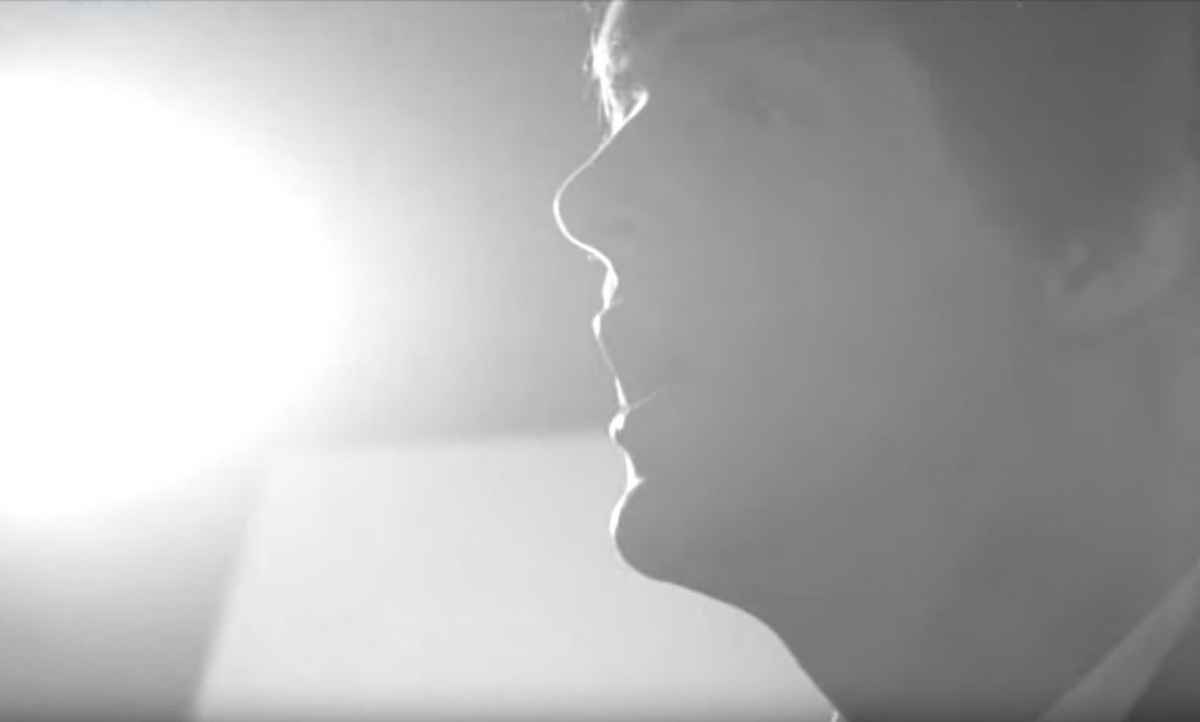
It is easy to get these confused. When DP Gilbert Taylor used severe backlighting on Hard Day's Night, the film developers thought it was a mistake and tried to correct it in post. It was obviously an intentional creative choice. He used it sparingly as an artistic effect -- he didn't shoot the entire movie looking into a bright light. See attached.
By contrast the woodworking video is shot entirely looking into a bright light. This was a mistake. Correcting this in future versions will improve things.
If he wants to use a properly-implemented rim light, that is typically above the subject, out of frame and 45 deg off axis. It is not pointed directly into the camera.
If you look at the frame, the objects on the table in the foreground are more in focus than the subject. This indicates it was front focused. He could have used a Canon L lens and it would have still been out of focus. He was using a 60D which does not have continuous video AF. It is very easy with that type of camera to take a single-shot AF reading, then have the subject move and it goes out of focus. This often happens on a one-person shoot with an unattended camera.
The lesson here is not get an expensive lens but ensure the shot is in focus. This can be done by focusing manually on a stand-in, and putting a tape mark on the floor, or having the camera operator monitor focus during the shot. An LCD viewfinder loupe can help.
Replied by joema on topic Video Quality
haysoos123 wrote: Backlight in and of itself is not bad at all. In fact, a well-placed backlight or 3/4 light can create a nice rim light and give you some highlights and separation from the background....it's far from a mistake as the commenters above have said. Backlight is a creative choice and tool just like anything else.
Nobody has said that properly implemented three-point lighting is a mistake. The OP was not using creative backlighting, and as used it was a mistake:
www.videomaker.com/article/c10/14218-vid...three-point-lighting
It is easy to get these confused. When DP Gilbert Taylor used severe backlighting on Hard Day's Night, the film developers thought it was a mistake and tried to correct it in post. It was obviously an intentional creative choice. He used it sparingly as an artistic effect -- he didn't shoot the entire movie looking into a bright light. See attached.
By contrast the woodworking video is shot entirely looking into a bright light. This was a mistake. Correcting this in future versions will improve things.
If he wants to use a properly-implemented rim light, that is typically above the subject, out of frame and 45 deg off axis. It is not pointed directly into the camera.
haysoos123 wrote: ...As for sharpness, those dslrs are a bit softer to begin with (but by no means bad), and you may need a better lens like an L series....
If you look at the frame, the objects on the table in the foreground are more in focus than the subject. This indicates it was front focused. He could have used a Canon L lens and it would have still been out of focus. He was using a 60D which does not have continuous video AF. It is very easy with that type of camera to take a single-shot AF reading, then have the subject move and it goes out of focus. This often happens on a one-person shoot with an unattended camera.
The lesson here is not get an expensive lens but ensure the shot is in focus. This can be done by focusing manually on a stand-in, and putting a tape mark on the floor, or having the camera operator monitor focus during the shot. An LCD viewfinder loupe can help.
Please Log in to join the conversation.
- Karsten Schlüter
-
- Offline
- Moderator
-
Less
More
- Posts: 3790
- Thank you received: 718
06 Feb 2016 12:59 #73051
by Karsten Schlüter
You should mention, that the OP's Canon 60D offers 'zebra' focussing/focus peaking… as someone with glases and old eyes, I find it very handy, esp on those tiny TFTs ...
Replied by Karsten Schlüter on topic Video Quality
joema wrote: …The lesson here is not get an expensive lens but ensure the shot is in focus. This can be done by focusing manually on a stand-in, and putting a tape mark on the floor, or having the camera operator monitor focus during the shot. An LCD viewfinder loupe can help.…
You should mention, that the OP's Canon 60D offers 'zebra' focussing/focus peaking… as someone with glases and old eyes, I find it very handy, esp on those tiny TFTs ...
Please Log in to join the conversation.
06 Feb 2016 14:05 - 06 Feb 2016 14:07 #73053
by joema
I also wear glasses and totally agree a DSLR focusing aid is highly useful.
Unfortunately the stock 60D has neither exposure zebras nor focus peaking. This is only available using 3rd party Magic Lantern firmware, which can be complicated to install and use. If he wants to investigate, study, install and test Magic Lantern, that is a free way to improve video functionality. It is a great thing to have available -- for some users willing to tackle the complexity and test it. However it's not like a simple OEM firmware upgrade.
Replied by joema on topic Video Quality
Karsten Schlüter wrote: ...
You should mention, that the OP's Canon 60D offers 'zebra' focussing/focus peaking… as someone with glases and old eyes, I find it very handy, esp on those tiny TFTs ...
I also wear glasses and totally agree a DSLR focusing aid is highly useful.
Unfortunately the stock 60D has neither exposure zebras nor focus peaking. This is only available using 3rd party Magic Lantern firmware, which can be complicated to install and use. If he wants to investigate, study, install and test Magic Lantern, that is a free way to improve video functionality. It is a great thing to have available -- for some users willing to tackle the complexity and test it. However it's not like a simple OEM firmware upgrade.
Last edit: 06 Feb 2016 14:07 by joema.
Please Log in to join the conversation.
- Karsten Schlüter
-
- Offline
- Moderator
-
Less
More
- Posts: 3790
- Thank you received: 718
07 Feb 2016 06:46 #73076
by Karsten Schlüter
I googled for it before posting and I could swear, some site listed it! .... hmmm, wrong pills that morning .... :silly:
Replied by Karsten Schlüter on topic Video Quality
joema wrote: …Unfortunately the stock 60D has neither exposure zebras nor focus peaking. ….
I googled for it before posting and I could swear, some site listed it! .... hmmm, wrong pills that morning .... :silly:
Please Log in to join the conversation.
- haysoos123
-
- Offline
- Platinum Member
-
Less
More
- Posts: 402
- Thank you received: 72
08 Feb 2016 19:45 #73107
by haysoos123
Replied by haysoos123 on topic Video Quality
Hello Joema,
Sorry, we're just going to have to agree to disagree on this one. I don't think it's a mistake to shoot at that window, only maybe the degree of brightness. Like I said, I would have cut the window down because it's a little distracting. If you want to, you can say that it was a mistake. My only point was to let the OP know that backlighting like that could be a creative choice, since he admitted that he was new at this. I think a lot of beginners hear "it's a mistake" and immediately shut it down. I think everyone pretty much agreed with cutting down the window.
Sorry, we're just going to have to agree to disagree on this one. I don't think it's a mistake to shoot at that window, only maybe the degree of brightness. Like I said, I would have cut the window down because it's a little distracting. If you want to, you can say that it was a mistake. My only point was to let the OP know that backlighting like that could be a creative choice, since he admitted that he was new at this. I think a lot of beginners hear "it's a mistake" and immediately shut it down. I think everyone pretty much agreed with cutting down the window.
Please Log in to join the conversation.
08 Feb 2016 20:08 #73111
by RobBrown
Replied by RobBrown on topic Video Quality
Wow, thanks so much everyone. There is a lot to think about here. I always knew the sound could be improved and I will do that. In terms of backlighting, focus, etc. I will play around with some things to improve the look.
I have also been adding more cuts / photos / closeups / etc. into my videos after making this one, so I'm sure that will make some of you happy
I have also been adding more cuts / photos / closeups / etc. into my videos after making this one, so I'm sure that will make some of you happy
Please Log in to join the conversation.
