


- Posts: 18
- Thank you received: 0
3 Post Moderation Rule for New Boarders (25 Jan 2021)
New boarders will have their posts moderated - Don't worry if you cannot see your post immediately.
Multicam Clip for RED Raw footage - Proxy only?
31 Jan 2016 21:10 #72801
by steve.d
Multicam Clip for RED Raw footage - Proxy only? was created by steve.d
tl;dr: Is there a way to have multicam clip that just renders a proxy version, while keeping the original in red raw instead of ProRes?
--
Hi Everyone,
I recently shot an interview portion of a documentary with 2 Red cameras and a third Sony A7 for backup.
I have transcoded all the footage to proxy files, and I purposely avoided creating the optimized (PreRes) clips to avoid the extra HD space needed. My plan has been to edit in proxy, then switch back to the original red raw files for export for colour and balance audio.
Then I created the multicam clips for each segment, but FCPX automatically rendered a ProRess 422 version as well. I didn't realize this till the next morning after I set it to render, I thought it was just making new proxy versions.
Is there any way to just have the proxy versions of the multicam clips? While using the red raw instead of the optimized for original media playback mode? Is there any solution around this? Right now I am using my larger RAID drive on my desktop, but I am going to need to have to continue the edit on a smaller remote drive soon. It won't fit be able to fit both Red Raw and ProRes versions...
Would love to figure out a way to work around this. I would hate to have to edit this in Premier
This was my first time shooting anything on red, but was ready to take the plunge with some help from some friends. They have lots of experience with red, however they only use Premier Pro for editing and have strongly recommended me to use adobe for this project as well. They said its easier also for round tripping for colouring and sound. But I think they may be wrong in that regard.
Thanks for your help in advance! Been a long time reader on the site and this is my first post
--
Hi Everyone,
I recently shot an interview portion of a documentary with 2 Red cameras and a third Sony A7 for backup.
I have transcoded all the footage to proxy files, and I purposely avoided creating the optimized (PreRes) clips to avoid the extra HD space needed. My plan has been to edit in proxy, then switch back to the original red raw files for export for colour and balance audio.
Then I created the multicam clips for each segment, but FCPX automatically rendered a ProRess 422 version as well. I didn't realize this till the next morning after I set it to render, I thought it was just making new proxy versions.
Is there any way to just have the proxy versions of the multicam clips? While using the red raw instead of the optimized for original media playback mode? Is there any solution around this? Right now I am using my larger RAID drive on my desktop, but I am going to need to have to continue the edit on a smaller remote drive soon. It won't fit be able to fit both Red Raw and ProRes versions...
Would love to figure out a way to work around this. I would hate to have to edit this in Premier
This was my first time shooting anything on red, but was ready to take the plunge with some help from some friends. They have lots of experience with red, however they only use Premier Pro for editing and have strongly recommended me to use adobe for this project as well. They said its easier also for round tripping for colouring and sound. But I think they may be wrong in that regard.
Thanks for your help in advance! Been a long time reader on the site and this is my first post
Please Log in to join the conversation.
- Tom Wolsky
-

- Offline
- Moderator
-

02 Feb 2016 09:57 #72831
by Tom Wolsky
Replied by Tom Wolsky on topic Multicam Clip for RED Raw footage - Proxy only?
My recollection is that proxies for RED are full size ProRes and not the quarter resolution used in other formats.
Please Log in to join the conversation.

02 Feb 2016 10:46 #72832
by Gabba84
Replied by Gabba84 on topic Multicam Clip for RED Raw footage - Proxy only?
Proxies are exactly half the original frame size.
Remember that -by default- when you make a multicam clip FCPX will transcode an optimised version of the original clips included...you can disable this in the playback preferences.
Anyway, at any moment you can delete optimized clip from the "file" dropdown menu when selecting the library icon.
If you need to work easily on the go (as i often do) you can leave the files in place when importing RED footage and make proxies. This way, even if you don't carry the original media, you can work anywhere without moving the RED footage (but obviously, if you switch to original media, prepare to see everything offline).
Remember that -by default- when you make a multicam clip FCPX will transcode an optimised version of the original clips included...you can disable this in the playback preferences.
Anyway, at any moment you can delete optimized clip from the "file" dropdown menu when selecting the library icon.
If you need to work easily on the go (as i often do) you can leave the files in place when importing RED footage and make proxies. This way, even if you don't carry the original media, you can work anywhere without moving the RED footage (but obviously, if you switch to original media, prepare to see everything offline).
Please Log in to join the conversation.

02 Feb 2016 12:24 - 02 Feb 2016 12:24 #72836
by BenB
Replied by BenB on topic Multicam Clip for RED Raw footage - Proxy only?
Proxies being at 1/2 the image quality is where lower resolution comes in, reducing the data rate to 45Mbps max, and lower bit depth. Proxies are not 1/2 frame size. Proxies are always original frame size. This information is in the user manual, and in the ProRes white paper. Yet, in the Managing Media white paper, it is stated the Proxies are a smaller frame size. So, contradictory information. No where can I find anything that says Proxies are 1/2 frame size.
Last edit: 02 Feb 2016 12:24 by BenB.
Please Log in to join the conversation.
02 Feb 2016 12:45 #72837
by steve.d
Replied by steve.d on topic Multicam Clip for RED Raw footage - Proxy only?
When I open my library in finder, the proxy files come out to about 200gb, and the optimized media comes out to almost 4tb! The original red raw footage was about 1.7tb. (Which I left in place when I imported to FCPX, so the library just links to their files)
When I imported the media I purposely selected just to create proxy footage versions and for the first few days when I looked through the footage there was no Optimized ProRess 422 files. But once I created multicam clips FCPX started creating optimized 422 files. Does it need those versions to work because its a new clip or something?
If I just delete the Optimized Media will I run into trouble?
When I imported the media I purposely selected just to create proxy footage versions and for the first few days when I looked through the footage there was no Optimized ProRess 422 files. But once I created multicam clips FCPX started creating optimized 422 files. Does it need those versions to work because its a new clip or something?
If I just delete the Optimized Media will I run into trouble?
Please Log in to join the conversation.
02 Feb 2016 12:57 #72838
by benco
Replied by benco on topic Multicam Clip for RED Raw footage - Proxy only?
hi
go to Preferences/playback and disable "create optimized media for multicam clips"
hope it helps
go to Preferences/playback and disable "create optimized media for multicam clips"
hope it helps
Please Log in to join the conversation.
02 Feb 2016 13:25 #72839
by steve.d
Thank you!
Ugh it was so simple too haha
Replied by steve.d on topic Multicam Clip for RED Raw footage - Proxy only?
benco wrote: hi
go to Preferences/playback and disable "create optimized media for multicam clips"
hope it helps
Thank you!
Ugh it was so simple too haha
Please Log in to join the conversation.
02 Feb 2016 13:50 - 02 Feb 2016 14:10 #72840
by Gabba84
Replied by Gabba84 on topic Multicam Clip for RED Raw footage - Proxy only?
Hi BenB,
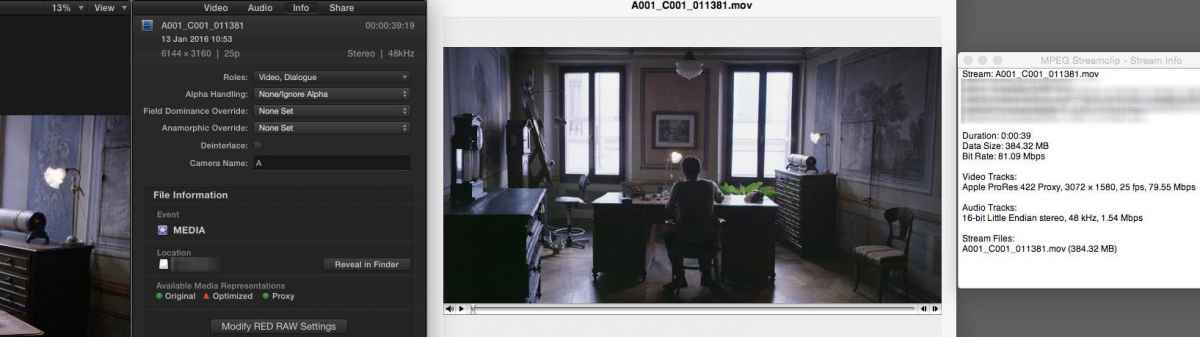
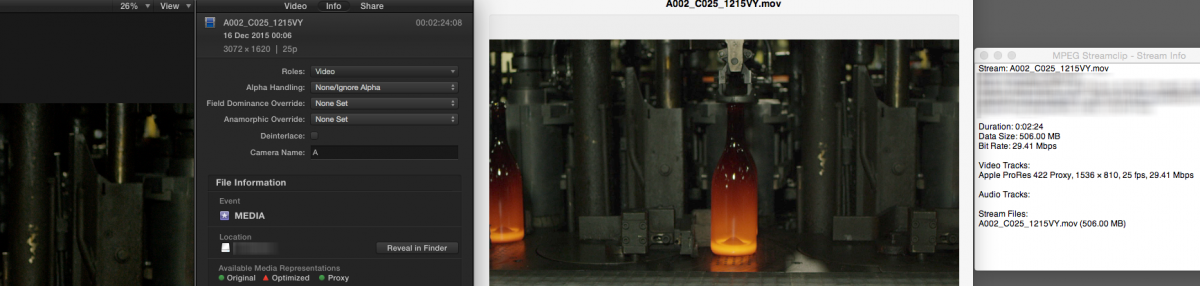
i'm not talking about Prores Proxy as a codec, but FCPX internal generated proxies. They are always half the original frame size. Here two examples. On the left the original RED clip and its frame size, on the right the FCPX generated proxy opened in mpeg streamclip. Anyway, fcpx never show in the inspector the proxy frame size, but always the original clip values, so this can be a little confusing.
i'm not talking about Prores Proxy as a codec, but FCPX internal generated proxies. They are always half the original frame size. Here two examples. On the left the original RED clip and its frame size, on the right the FCPX generated proxy opened in mpeg streamclip. Anyway, fcpx never show in the inspector the proxy frame size, but always the original clip values, so this can be a little confusing.
Last edit: 02 Feb 2016 14:10 by Gabba84.
Please Log in to join the conversation.
