


- Posts: 238
- Thank you received: 20
3 Post Moderation Rule for New Boarders (25 Jan 2021)
New boarders will have their posts moderated - Don't worry if you cannot see your post immediately.
Strange problem shut down playback
- Squamish ed
-
 Topic Author
- Offline
- Elite Member
-

Less
More
27 Jan 2016 02:59 #72589
by Squamish ed
Ed
Strange problem shut down playback was created by Squamish ed
This is a new one for me. After importing a new clip from the browser I had it in the timeline and was trying a colour match. A red line appeared at the top of the timeline over the new clip and a few that were previously there and working fine. (See attached screen grab.) Tried to play back but nothing worked - the playhead was skimming fine and the space bar started playback but no images were visible in the viewer and no audio either. Tried in an earlier part of the project where there was no red line and still nothing.
To see if I could determine the issue I quit FCPX and restarted it. The problem clip(s) were all there so I tried the colour match again. This time it all worked, both audio and video. I haven't been able to recreate the problem.
Have any of you seen this happen before? What causes this?
Late 2012 iMac, i7, GTX680MX card, 32 Gb RAM, OS X 10.10.5 (Yosemite), FCPX 10.2.2
To see if I could determine the issue I quit FCPX and restarted it. The problem clip(s) were all there so I tried the colour match again. This time it all worked, both audio and video. I haven't been able to recreate the problem.
Have any of you seen this happen before? What causes this?
Late 2012 iMac, i7, GTX680MX card, 32 Gb RAM, OS X 10.10.5 (Yosemite), FCPX 10.2.2
Ed
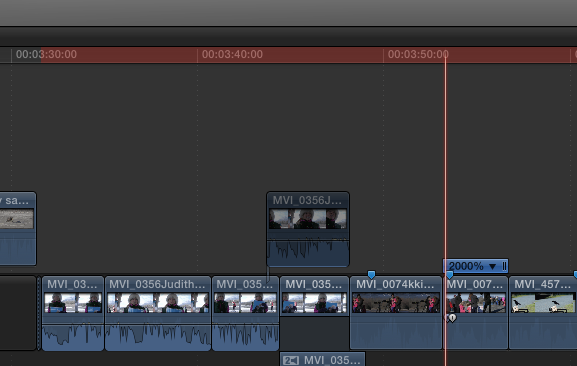
Please Log in to join the conversation.

27 Jan 2016 03:49 #72591
by BenB
Replied by BenB on topic Strange problem shut down playback
Codecs?
Please Log in to join the conversation.
- Squamish ed
-
Topic Author
- Offline
- Elite Member
-
Less
More
- Posts: 238
- Thank you received: 20
27 Jan 2016 03:53 #72592
by Squamish ed
Ed
Replied by Squamish ed on topic Strange problem shut down playback
There's a mixture of MP4 clips from a Canon 70D and a C100 II
Ed
Please Log in to join the conversation.
27 Jan 2016 12:07 #72601
by BenB
Replied by BenB on topic Strange problem shut down playback
If it happens again, open the background task window, see if anything is going on. If re-launching the app fixed it, that's pretty simple. I'd not worry about it too much. What is the source of the MP4 clips? I'd have probably Optimized those, just cause I absolutely hate MP4 video encoding as much as I hate broken glass in my eyes.
Please Log in to join the conversation.
- Squamish ed
-
Topic Author
- Offline
- Elite Member
-
Less
More
- Posts: 238
- Thank you received: 20
27 Jan 2016 19:55 #72643
by Squamish ed
Ed
Replied by Squamish ed on topic Strange problem shut down playback
Thanks Ben,
I was expecting to have to reboot or something when that happened but was pleased that a simple restart did the trick. The red bar at the top of the timeline threw me - I've never seen that before.
AFAIK there were no background tasks running. Background rendering is turned off in preferences and the percentage countdown in the timer window (or whatever it's called) wasn't showing anything. I didn't open the task manager.
The MP4 clips were from the 2 cameras mentioned before and haven't been optimized. Why might optimizing make a difference? FCPX seems to work fine with MP4 clips... so far...
I was expecting to have to reboot or something when that happened but was pleased that a simple restart did the trick. The red bar at the top of the timeline threw me - I've never seen that before.
AFAIK there were no background tasks running. Background rendering is turned off in preferences and the percentage countdown in the timer window (or whatever it's called) wasn't showing anything. I didn't open the task manager.
The MP4 clips were from the 2 cameras mentioned before and haven't been optimized. Why might optimizing make a difference? FCPX seems to work fine with MP4 clips... so far...
Ed
Please Log in to join the conversation.
