


- Posts: 150
- Thank you received: 2
3 Post Moderation Rule for New Boarders (25 Jan 2021)
New boarders will have their posts moderated - Don't worry if you cannot see your post immediately.
FCPX Securities crash
20 Jan 2016 12:59 - 20 Jan 2016 13:00 #72406
by click
FCPX Securities crash was created by click
Hello, I tried with FCPX 10.2.2. to enter the securities of a movie in HDV timeline and capsicum because when I finished I set it up I get the message attached !!!!
It closes FCPX suddenly, I do not understand what the problem is, I updated today to version OSX 10.11.3. but he did it before and with many titles of series of FCPX.
Thanks to those who helped me.
:S
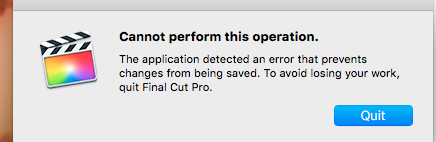
It closes FCPX suddenly, I do not understand what the problem is, I updated today to version OSX 10.11.3. but he did it before and with many titles of series of FCPX.
Thanks to those who helped me.
:S
Last edit: 20 Jan 2016 13:00 by click.
Please Log in to join the conversation.
- Jonathan Levin
-

- Offline
- Platinum Member
-

Less
More
- Posts: 786
- Thank you received: 21
20 Jan 2016 15:25 #72409
by Jonathan Levin
Replied by Jonathan Levin on topic FCPX Securities crash
Hi Click,
Could you explain what you mean by "Securities"? This is a new one for me.
Jonathan
Could you explain what you mean by "Securities"? This is a new one for me.
Jonathan
Please Log in to join the conversation.

20 Jan 2016 15:42 #72410
by BenB
Replied by BenB on topic FCPX Securities crash
Capsicum?
Please Log in to join the conversation.

20 Jan 2016 16:22 #72412
by BenB
Replied by BenB on topic FCPX Securities crash
First step, be sure all third party plugins are up to date with EC compatible versions.
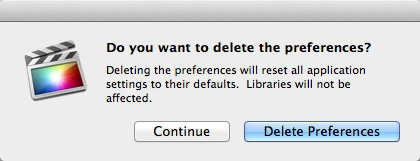
Next, launch FCPX while holding both command and option keys held down. In the resulting window, choose to delete preference files.
Next, launch FCPX while holding both command and option keys held down. In the resulting window, choose to delete preference files.
Please Log in to join the conversation.
20 Jan 2016 17:13 #72413
by click
Replied by click on topic FCPX Securities crash
ok so now I try, thanks.
Please Log in to join the conversation.
- ronny courtens
-

- Offline
- Moderator
-

Less
More
- Posts: 4455
- Thank you received: 962
20 Jan 2016 18:09 #72415
by ronny courtens
Replied by ronny courtens on topic FCPX Securities crash
That's okay. Just press the Delete Preferences button and let FCP X launch. Then open your FCP X project and see if you still have the issue.
- Ronny
- Ronny
Please Log in to join the conversation.
