


- Posts: 1
- Thank you received: 0
3 Post Moderation Rule for New Boarders (25 Jan 2021)
New boarders will have their posts moderated - Don't worry if you cannot see your post immediately.
Media Management
17 Jan 2016 10:28 #72283
by rwhites
Media Management was created by rwhites
Hi Everyone,
I'm a new user to this forum...please be gentle with me.
I've self taught myself FCPX over the last few years and I'm experiencing a few challenges with media management.
Namely this...
I finish a project and want to archive the FCPX Library on to my external hard drives.
During the transfer I'm finding that the 'Original Media' folder within the library almost always seems to FAIL.
Gives me some error code about file doesn't exist or can't read or written or some other rubbish.
It's usually just one or two files but on larger libraries it can be as many as say 10-12.
It's a proper pain in the arse because it means I have to be present and always watching the transfer.
All is not lost because i do have ALL media backed up way from FCPX in seperate folders (non FCPX folders)
When a FCPX library wont transfer I have to go find the orginal backed-up file and then copy it into the FCPX library.
So...in brief...workflow
FCPX Library > transferred from iMac to Ext Hard drive (Seagate 3TB USB 3.0 expansion drives)
Transfer fails > usually because of a file in the 'Original Media' folder in the FCPX Library.
I go recover the file from my 'other' back-up > add it to the library and away we go.
QUESTION...whay are files that are in my FCPX Original Media folder failing to transfer to ext hard drives?
Thanks - I hope this makes sense...it's always hard explaining stuff like this.
Mark.
I'm a new user to this forum...please be gentle with me.
I've self taught myself FCPX over the last few years and I'm experiencing a few challenges with media management.
Namely this...
I finish a project and want to archive the FCPX Library on to my external hard drives.
During the transfer I'm finding that the 'Original Media' folder within the library almost always seems to FAIL.
Gives me some error code about file doesn't exist or can't read or written or some other rubbish.
It's usually just one or two files but on larger libraries it can be as many as say 10-12.
It's a proper pain in the arse because it means I have to be present and always watching the transfer.
All is not lost because i do have ALL media backed up way from FCPX in seperate folders (non FCPX folders)
When a FCPX library wont transfer I have to go find the orginal backed-up file and then copy it into the FCPX library.
So...in brief...workflow
FCPX Library > transferred from iMac to Ext Hard drive (Seagate 3TB USB 3.0 expansion drives)
Transfer fails > usually because of a file in the 'Original Media' folder in the FCPX Library.
I go recover the file from my 'other' back-up > add it to the library and away we go.
QUESTION...whay are files that are in my FCPX Original Media folder failing to transfer to ext hard drives?
Thanks - I hope this makes sense...it's always hard explaining stuff like this.
Mark.
Please Log in to join the conversation.
- ronny courtens
-

- Offline
- Moderator
-

Less
More
- Posts: 4455
- Thank you received: 962
17 Jan 2016 19:16 #72302
by ronny courtens
Replied by ronny courtens on topic Media Management
Hi Mark, welcome to the forum.
If all your media is imported into the Library you should not have any issues when copying the Library over to another drive. Before you archive a self-contained Library to an external drive, first select the Library in the Clip Browser and in the Inspector click the Consolidate button to make sure every asset you have used in your projects is actually copied inside the Library. Doing this, you should not get any issues.
- Ronny
If all your media is imported into the Library you should not have any issues when copying the Library over to another drive. Before you archive a self-contained Library to an external drive, first select the Library in the Clip Browser and in the Inspector click the Consolidate button to make sure every asset you have used in your projects is actually copied inside the Library. Doing this, you should not get any issues.
- Ronny
Please Log in to join the conversation.
19 Jan 2016 22:18 #72391
by heyjosh
Replied by heyjosh on topic Media Management
Mark:
Did you make sure the drive is formatted for mac and isn't also being used as a time machine volume?
NTFS/FAT/FAT 32 (Windows) Formatted Volumes can all have various issues writing files on OS X and aren't supported volume types for Final Cut Pro X libraries.
Time Machine volumes have a special permission structure that can cause unusual behaviors within Final Cut Pro X when used as a library or media location.
Have you ignored ownership on the external volume?
If ownership is enabled, Permissions on an external drive can become an issue.
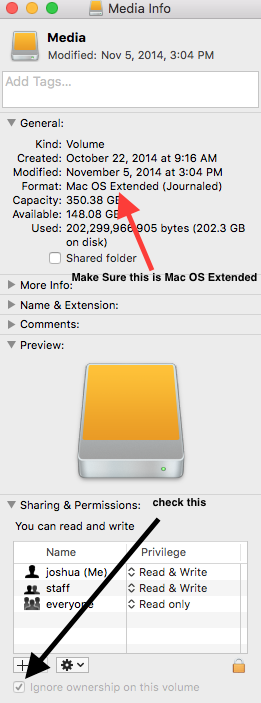
If there is no ability to ignore ownership but the drive is formatted Mac Os Extended, it has probably been used as a time machine drive (possibly by accident) Look for a folder named "Backups.BackupDB" it is indicative of having been used as a time machine backup as well.
Best
-Josh
Did you make sure the drive is formatted for mac and isn't also being used as a time machine volume?
NTFS/FAT/FAT 32 (Windows) Formatted Volumes can all have various issues writing files on OS X and aren't supported volume types for Final Cut Pro X libraries.
Time Machine volumes have a special permission structure that can cause unusual behaviors within Final Cut Pro X when used as a library or media location.
Have you ignored ownership on the external volume?
If ownership is enabled, Permissions on an external drive can become an issue.
If there is no ability to ignore ownership but the drive is formatted Mac Os Extended, it has probably been used as a time machine drive (possibly by accident) Look for a folder named "Backups.BackupDB" it is indicative of having been used as a time machine backup as well.
Best
-Josh
Please Log in to join the conversation.
