




- Posts: 215
- Thank you received: 2
3 Post Moderation Rule for New Boarders (25 Jan 2021)
New boarders will have their posts moderated - Don't worry if you cannot see your post immediately.
Odd Behavior With AV Output?
05 Jan 2016 07:51 #71945
by Shane M
Odd Behavior With AV Output? was created by Shane M
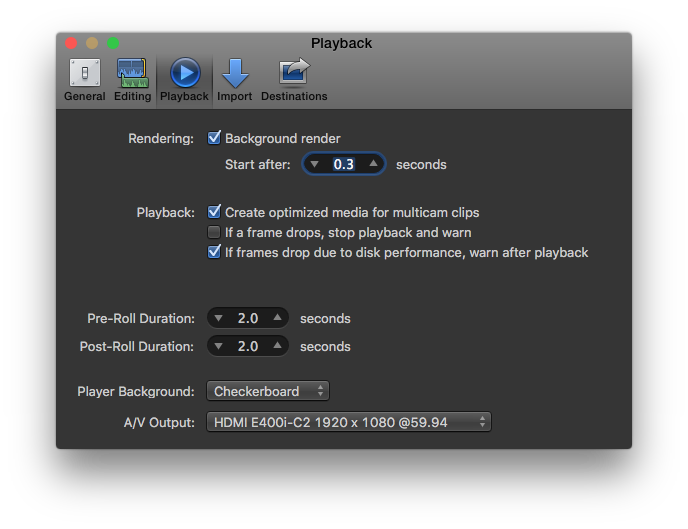
I have a new TV hooked up to my 2013 Mac Pro (trashcan) and its showing it as an AV Output in the Preferences and when I go to select WINDOW>AV OUTPUT it just slides around to a screen of black on my main display (Thunderbolt Display) and nothing happens on the TV (above).
Quick cell phone clip:
I have the new TV plugged in to the built in HDMI on my Mac Pro and it works great as a second display and even works as a second display in FCPX...but not with AV Output. I've seen people use this same config to get full playback on the TV monitor before like its show here...
This guy specifically says he's NOT using something like Blackmagic Mini Monitor, and is only using the built in HDMI port plugged in to the playback display...
What am I doing wrong here?
Quick cell phone clip:
I have the new TV plugged in to the built in HDMI on my Mac Pro and it works great as a second display and even works as a second display in FCPX...but not with AV Output. I've seen people use this same config to get full playback on the TV monitor before like its show here...
This guy specifically says he's NOT using something like Blackmagic Mini Monitor, and is only using the built in HDMI port plugged in to the playback display...
What am I doing wrong here?
Please Log in to join the conversation.
- Karsten Schlüter
-

- Offline
- Moderator
-

Less
More
- Posts: 3790
- Thank you received: 718
05 Jan 2016 10:00 #71946
by Karsten Schlüter
Replied by Karsten Schlüter on topic Odd Behavior With AV Output?
maybe too-much-around-the-corner thinking, but ...
1080/60p is no 'TV' standard; maybe your telly is, in AV-mode (!), a bit iffy with standards?
can you set your output to 1080/30p or 1080/60i ...?
Or does you telly has, aside AV, some 'PC input'-setting?
1080/60p is no 'TV' standard; maybe your telly is, in AV-mode (!), a bit iffy with standards?
can you set your output to 1080/30p or 1080/60i ...?
Or does you telly has, aside AV, some 'PC input'-setting?
Please Log in to join the conversation.

05 Jan 2016 13:58 #71955
by BenB
Replied by BenB on topic Odd Behavior With AV Output?
When you enable broadcast output, manually make the Timeline pane active and play it. Anything?
Please Log in to join the conversation.
05 Jan 2016 21:53 #71976
by Shane M
Doesn't seem to have any different behavior when doing that...I filmed another little clip so you guys can see what I mean...
Replied by Shane M on topic Odd Behavior With AV Output?
BenB wrote: When you enable broadcast output, manually make the Timeline pane active and play it. Anything?
Doesn't seem to have any different behavior when doing that...I filmed another little clip so you guys can see what I mean...
Please Log in to join the conversation.
05 Jan 2016 22:27 #71979
by Shane M
I kinda thought there might be something related to that, but it does actually play back fine (just not in the right window) and there doesn't seem to be any way to change it in FCPX or System Settings?
Replied by Shane M on topic Odd Behavior With AV Output?
Karsten Schlüter wrote: maybe too-much-around-the-corner thinking, but ...
1080/60p is no 'TV' standard; maybe your telly is, in AV-mode (!), a bit iffy with standards?
can you set your output to 1080/30p or 1080/60i ...?
Or does you telly has, aside AV, some 'PC input'-setting?
I kinda thought there might be something related to that, but it does actually play back fine (just not in the right window) and there doesn't seem to be any way to change it in FCPX or System Settings?
Please Log in to join the conversation.
- haysoos123
-

- Offline
- Platinum Member
-

Less
More
- Posts: 402
- Thank you received: 72
05 Jan 2016 23:53 #71980
by haysoos123
Replied by haysoos123 on topic Odd Behavior With AV Output?
Yes, pretty odd behavior. I've got the same setup, and it works fine. In fact, it's actually in sync with the audio, unlike the blackmagic output (however, that's to a grading monitor and I don't care too much about sync there).
Have you tried a different HDMI port on the TV? Some TVs actually have slightly different capabilities for different HDMI ports. I know on one of my Samsungs, HDMI4 recognizes if a PC is attached and makes it into a DVI/RGB signal by default. The advantage is that there's no processing and way less lag. On another Sony HDTV, when one of its HDMI ports thinks it's connected to a PC, it can't display a 24p signal at all (the ports can read a 24p signal). What brand is your TV? It's possible that it's no to spec.
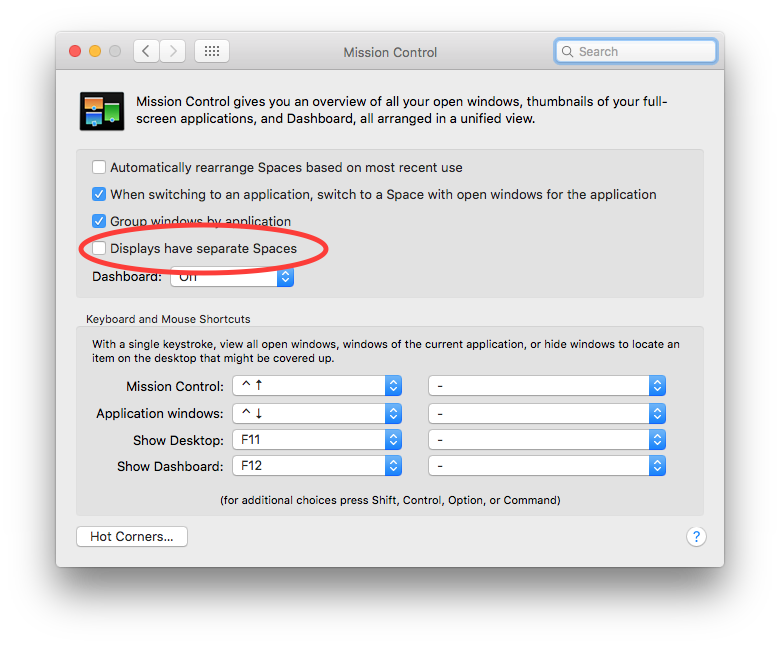
The final thing I would check is your Mission Control settings. I would play with them a bit, because it does kind of look like your machine is getting confused and doing some weird full-screen thing. Maybe it has something to do with your spaces. However, going full-screen does still work on my setup, so that might not be the problem (I'm talking about maximizing by pressing the green button).
Have you tried a different HDMI port on the TV? Some TVs actually have slightly different capabilities for different HDMI ports. I know on one of my Samsungs, HDMI4 recognizes if a PC is attached and makes it into a DVI/RGB signal by default. The advantage is that there's no processing and way less lag. On another Sony HDTV, when one of its HDMI ports thinks it's connected to a PC, it can't display a 24p signal at all (the ports can read a 24p signal). What brand is your TV? It's possible that it's no to spec.
The final thing I would check is your Mission Control settings. I would play with them a bit, because it does kind of look like your machine is getting confused and doing some weird full-screen thing. Maybe it has something to do with your spaces. However, going full-screen does still work on my setup, so that might not be the problem (I'm talking about maximizing by pressing the green button).
Please Log in to join the conversation.
06 Jan 2016 00:28 #71982
by Shane M
I just tried your suggestion of a different HDMI port and it seems to be doing the same thing unfortunately...
The TV is a Vizio E40-C2.
This one: www.bhphotovideo.com/c/product/1121965-R..._full_array_led.html
Trying to turn on and off some of the Spaces settings now.
Replied by Shane M on topic Odd Behavior With AV Output?
haysoos123 wrote: Yes, pretty odd behavior. I've got the same setup, and it works fine. In fact, it's actually in sync with the audio, unlike the blackmagic output (however, that's to a grading monitor and I don't care too much about sync there).
Have you tried a different HDMI port on the TV? Some TVs actually have slightly different capabilities for different HDMI ports. I know on one of my Samsungs, HDMI4 recognizes if a PC is attached and makes it into a DVI/RGB signal by default. The advantage is that there's no processing and way less lag. On another Sony HDTV, when one of its HDMI ports thinks it's connected to a PC, it can't display a 24p signal at all (the ports can read a 24p signal). What brand is your TV? It's possible that it's no to spec.
The final thing I would check is your Mission Control settings. I would play with them a bit, because it does kind of look like your machine is getting confused and doing some weird full-screen thing. Maybe it has something to do with your spaces. However, going full-screen does still work on my setup, so that might not be the problem (I'm talking about maximizing by pressing the green button).
I just tried your suggestion of a different HDMI port and it seems to be doing the same thing unfortunately...
The TV is a Vizio E40-C2.
This one: www.bhphotovideo.com/c/product/1121965-R..._full_array_led.html
Trying to turn on and off some of the Spaces settings now.
Please Log in to join the conversation.
06 Jan 2016 00:39 #71984
by Shane M
Looks like it was a Mission Control setting! It appears to be working correctly now. I unchecked this box and then restarted the computer and it now plays the AV Output on the TV.
Thanks!
Replied by Shane M on topic Odd Behavior With AV Output?
haysoos123 wrote: Yes, pretty odd behavior. I've got the same setup, and it works fine. In fact, it's actually in sync with the audio, unlike the blackmagic output (however, that's to a grading monitor and I don't care too much about sync there).
Have you tried a different HDMI port on the TV? Some TVs actually have slightly different capabilities for different HDMI ports. I know on one of my Samsungs, HDMI4 recognizes if a PC is attached and makes it into a DVI/RGB signal by default. The advantage is that there's no processing and way less lag. On another Sony HDTV, when one of its HDMI ports thinks it's connected to a PC, it can't display a 24p signal at all (the ports can read a 24p signal). What brand is your TV? It's possible that it's no to spec.
The final thing I would check is your Mission Control settings. I would play with them a bit, because it does kind of look like your machine is getting confused and doing some weird full-screen thing. Maybe it has something to do with your spaces. However, going full-screen does still work on my setup, so that might not be the problem (I'm talking about maximizing by pressing the green button).
Looks like it was a Mission Control setting! It appears to be working correctly now. I unchecked this box and then restarted the computer and it now plays the AV Output on the TV.
Thanks!
Please Log in to join the conversation.
- haysoos123
-
- Offline
- Platinum Member
-
Less
More
- Posts: 402
- Thank you received: 72
06 Jan 2016 00:42 - 06 Jan 2016 00:43 #71985
by haysoos123
Replied by haysoos123 on topic Odd Behavior With AV Output?
Other things to try: a different thunderbolt port for your display on the Mac Pro. I think one of the buses gets shared with the HDMI port, so it's possible there's a weird conflict. Also, try to hook up a different HDTV and see if it does the same thing. It's unlikely that a different TV will do the exact same thing unless there's actually something wrong with the Mac Pro or its configuration (this is so you can isolate where the problem might be). And lastly I would trash preferences, reboot, etc.
EDIT: great, looks like you figured it out!
EDIT: great, looks like you figured it out!
Last edit: 06 Jan 2016 00:43 by haysoos123. Reason: solved
Please Log in to join the conversation.
06 Jan 2016 00:43 #71986
by Shane M
Yeah I forgot to mention I did doubles check that...I think its the bottom two and the HDMI on the 0-BUS together.
Anyway, that setting did the trick though. Awesome.
Replied by Shane M on topic Odd Behavior With AV Output?
haysoos123 wrote: Other things to try: a different thunderbolt port for your display on the Mac Pro. I think one of the buses gets shared with the HDMI port, so it's possible there's a weird conflict. Also, try to hook up a different HDTV and see if it does the same thing. It's unlikely that a different TV will do the exact same thing unless there's actually something wrong with the Mac Pro or its configuration (this is so you can isolate where the problem might be). And lastly I would trash preferences, reboot, etc.
Yeah I forgot to mention I did doubles check that...I think its the bottom two and the HDMI on the 0-BUS together.
Anyway, that setting did the trick though. Awesome.
Please Log in to join the conversation.
- haysoos123
-
- Offline
- Platinum Member
-
Less
More
- Posts: 402
- Thank you received: 72
06 Jan 2016 00:47 #71987
by haysoos123
Replied by haysoos123 on topic Odd Behavior With AV Output?
Well, one thing strange is that I DO have that setting checked in Mission Control, and it still works for me. That setting may still work for you if you check it again, because it's possible that these preference settings get corrupted and unchecking it and rebooting reset something. I'm still running latest Yosemite, if that somehow matters.
Please Log in to join the conversation.
06 Jan 2016 00:48 #71988
by Shane M
I'm in El Capitan finally now...but I had never really tried this set up before when I was in Yosemite so I can be sure if that has something to do with it. Hm...
Replied by Shane M on topic Odd Behavior With AV Output?
haysoos123 wrote: Well, one thing strange is that I DO have that setting checked in Mission Control, and it still works for me. That setting may still work for you if you check it again, because it's possible that these preference settings get corrupted and unchecking it and rebooting reset something. I'm still running latest Yosemite, if that somehow matters.
I'm in El Capitan finally now...but I had never really tried this set up before when I was in Yosemite so I can be sure if that has something to do with it. Hm...
Please Log in to join the conversation.
