


- Posts: 85
- Thank you received: 2
3 Post Moderation Rule for New Boarders (25 Jan 2021)
New boarders will have their posts moderated - Don't worry if you cannot see your post immediately.
How to apply Alex 4D transitions to titles without affecting the layers below?
01 Jan 2016 14:58 #71872
by BJansch
How to apply Alex 4D transitions to titles without affecting the layers below? was created by BJansch
Incidentally, I have tried turning the titles into compound clips, then adding the blur transition, and also adding the transition within the compound clip itself but I can't find a way to add them without affecting the video on the primary storyline. So for example, I create the title, turn it into a storyline, add the Alex 4D transition and it effectively acts like an adjustment layer by effecting the video below. This happens if it's a compound clip too, whether I apply the transition in the compound clip or to the compound clip by putting it in a secondary storyline.
Make sense?
Appreciate any ideas.
Make sense?
Appreciate any ideas.
Please Log in to join the conversation.
- Tom Wolsky
-

- Offline
- Moderator
-

01 Jan 2016 16:17 #71873
by Tom Wolsky
Replied by Tom Wolsky on topic How to apply Alex 4D transitions to titles without affecting the layers below?
It depends how the transition was created. You'd probably have to open it in Motion to change it. It probably includes a drop zone for the the underlying layer.
Please Log in to join the conversation.
01 Jan 2016 17:14 #71874
by BJansch
Replied by BJansch on topic How to apply Alex 4D transitions to titles without affecting the layers below?
No it doesn't have a drop zone and the same thing happens with the built in FCPX blur transitions, as in they blur the underlying video when they are applied to titles.
Any ideas? As I said, I've tried putting the titles in a compound clip, applying to the clip within the compound, applying it to the compound clip itself. Nothing seems to work.
Any ideas? As I said, I've tried putting the titles in a compound clip, applying to the clip within the compound, applying it to the compound clip itself. Nothing seems to work.
Please Log in to join the conversation.
01 Jan 2016 17:17 #71875
by BJansch
Replied by BJansch on topic How to apply Alex 4D transitions to titles without affecting the layers below?
Obviously I can build the blur transition using the filter and applying movement and keyframes but I'd like to use the presets. Alex4D has some very nice customisable animations but this kind of ruins it.
Please Log in to join the conversation.
- MarkNelsonMovies
-

- Offline
- Elite Member
-

Less
More
- Posts: 256
- Thank you received: 48
01 Jan 2016 17:31 - 01 Jan 2016 17:37 #71876
by MarkNelsonMovies
Replied by MarkNelsonMovies on topic How to apply Alex 4D transitions to titles without affecting the layers below?
Try adding a solid generator to the secondary storyline so the transition is between the title and the generator, then in the video tab of the inspector, set the opacity of the generator to 0%
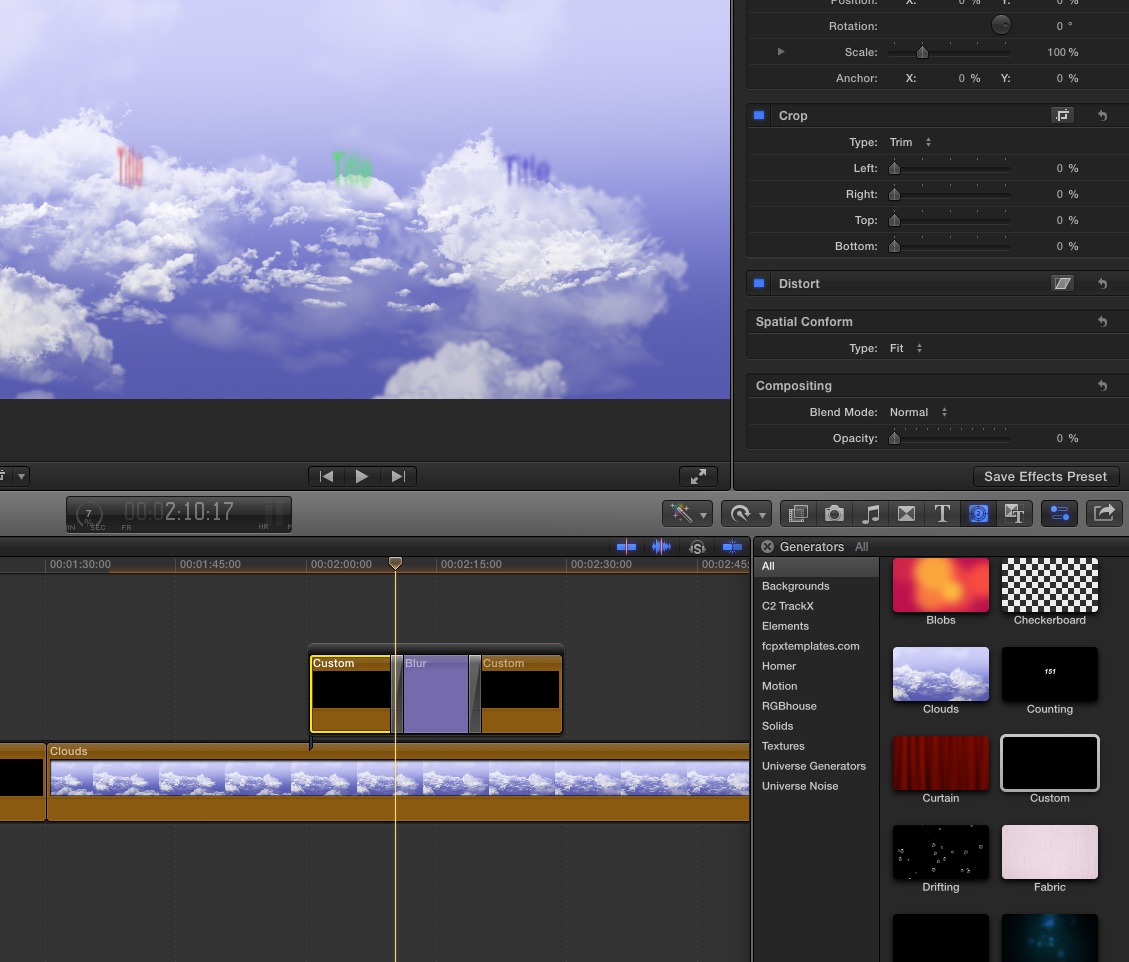
Last edit: 01 Jan 2016 17:37 by MarkNelsonMovies. Reason: add screen shot
Please Log in to join the conversation.
01 Jan 2016 17:38 #71877
by BJansch
Replied by BJansch on topic How to apply Alex 4D transitions to titles without affecting the layers below?
Genius! Thanks v much.
Please Log in to join the conversation.
- MarkNelsonMovies
-
- Offline
- Elite Member
-
Less
More
- Posts: 256
- Thank you received: 48
03 Feb 2016 17:07 #72888
by MarkNelsonMovies
Replied by MarkNelsonMovies on topic How to apply Alex 4D transitions to titles without affecting the layers below?
Just incase anyone else has this problem, Here's another way of doing it
Please Log in to join the conversation.


03 Feb 2016 17:47 - 03 Feb 2016 17:48 #72891
by anickt
Replied by anickt on topic How to apply Alex 4D transitions to titles without affecting the layers below?
Even with this method some of the transitions don't work on a layer with transparency. It would be a good idea to test first to avoid disappointment. :sick:
Last edit: 03 Feb 2016 17:48 by anickt.
Please Log in to join the conversation.
