


- Posts: 1
- Thank you received: 0
3 Post Moderation Rule for New Boarders (25 Jan 2021)
New boarders will have their posts moderated - Don't worry if you cannot see your post immediately.
[help] switching image file to video file on dropzone
31 Dec 2015 19:47 #71864
by brian.kim
[help] switching image file to video file on dropzone was created by brian.kim
HI
I just bought a template for final cut pro x
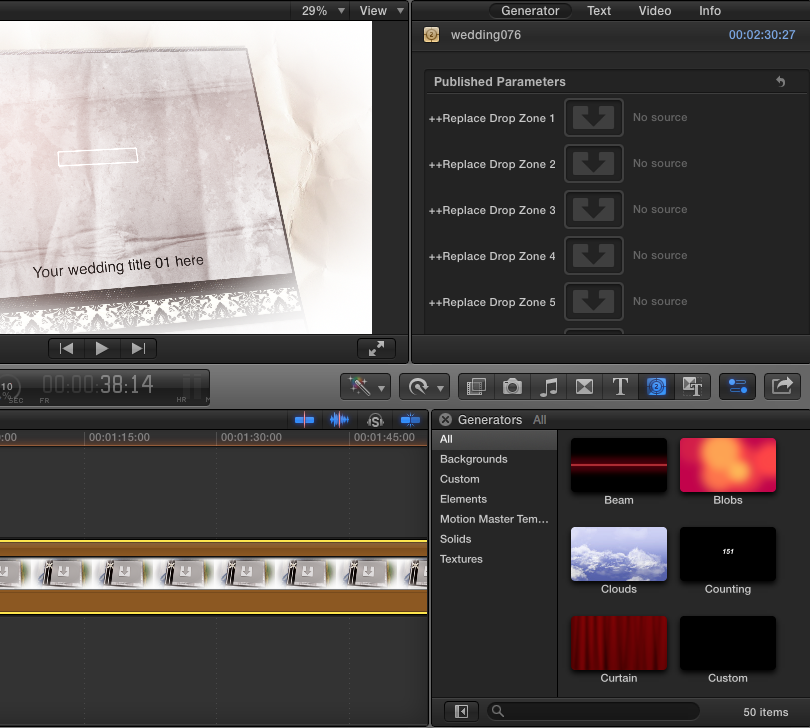
and realized that template that i bought only generates images file on the drop zone not video
i tried to change it using motion5 but i am stuck. is there way to fix this problem?
I just bought a template for final cut pro x
and realized that template that i bought only generates images file on the drop zone not video
i tried to change it using motion5 but i am stuck. is there way to fix this problem?
Please Log in to join the conversation.


04 Jan 2016 23:02 #71934
by dgwvideo
Creating history....one edit at a time !
Replied by dgwvideo on topic [help] switching image file to video file on dropzone
Make sure the clip you select for the drop zone is of a long enough duration to exceed the template duration. Then your template should play video in the drop zones. If you use all drop zones, each clip needs to be longer than the total duration of the template.
Creating history....one edit at a time !
Please Log in to join the conversation.
13 Jan 2016 20:53 #72169
by bracket26
Replied by bracket26 on topic [help] switching image file to video file on dropzone
I created some custom titles with drop zones, and for whatever reason, videos won't play in them. They end up looking like a still image, but what it's really a clip that's not playing. After some trial and error, I figured out that the video will play in the drop zones as long as I first make them into composite clips.
As stated by dgwvideo, first make sure the clips you are using are longer in duration than the drop zones into which you will be placing them. But that alone doesn't fix it for me.
For example, my drop zones last 4 seconds in my titles. So I place the clip I want to use on the timeline, trim it to 5 or 6 seconds, then make that single clip a composite clip. Then specify that composite clip (I usually name it Dropzone1 or Dropzone2) in my title.
It's convoluted and probably something I'm doing wrong when I'm creating the titles. But try it, see if it works for you, too.
As stated by dgwvideo, first make sure the clips you are using are longer in duration than the drop zones into which you will be placing them. But that alone doesn't fix it for me.
For example, my drop zones last 4 seconds in my titles. So I place the clip I want to use on the timeline, trim it to 5 or 6 seconds, then make that single clip a composite clip. Then specify that composite clip (I usually name it Dropzone1 or Dropzone2) in my title.
It's convoluted and probably something I'm doing wrong when I'm creating the titles. But try it, see if it works for you, too.
Please Log in to join the conversation.
